
Rate plans
What a rate plan is, the five ways to price one, and how to find, archive and restore plans.
A rate plan is a way of selling a room type, for example "Room Only", "Half Board" or "Dive Package". A plan says how the price is worked out, which room types it sells and what the price includes. The prices for each date are saved on the plan and shown on the rate calendar.
Use Rate plans after go-live to add plans, change them or retire them. The first plan is made in Onboarding. See Basic rate.
Before you start
- Permission: Manage property settings. Owners and managers have it by default.
- Set up your room types first. A plan sells nothing until it has room types.
- Set up your age groups if you price children. See Age groups.
The Rate plans screen
Open Settings, then Rate plans.
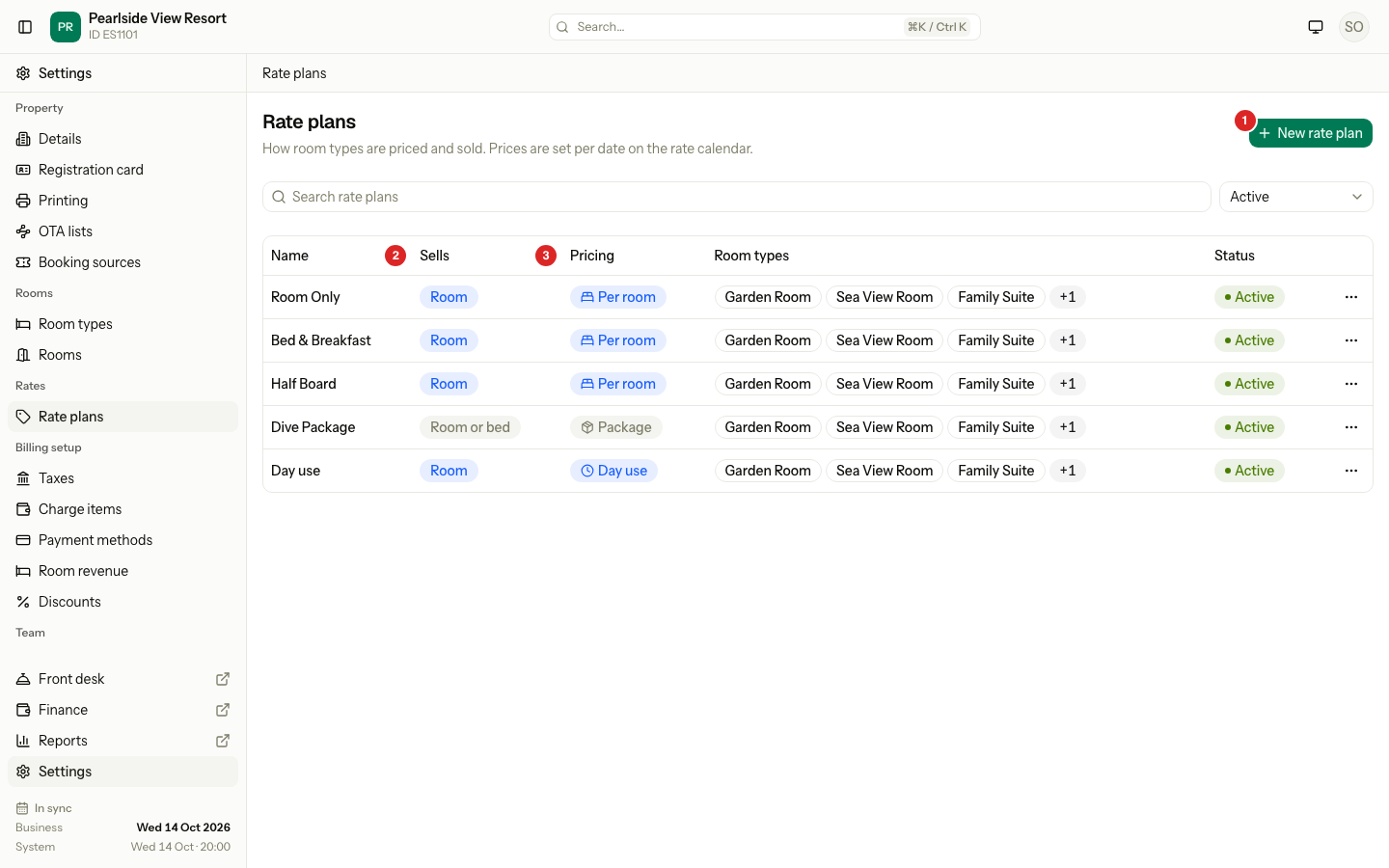
| # | What | What it does |
|---|---|---|
| 1 | New rate plan | Opens the form to add a plan. See Create a rate plan. |
| 2 | Sells | Room, Bed, or Room or bed. |
| 3 | Pricing | How the plan is priced. A plan that follows another plan shows a branch icon and "Follows" with the plan's name. |
Other columns show the room types (up to three, then a "+" pill), the status and a menu. The Status filter shows Active plans by default. Use All or Archived to see the rest. The search box filters by name.
The five pricing bases
You choose the basis when you create the plan. You cannot change it later.
| Basis | What it sells | The price you save | Tabs it shows |
|---|---|---|---|
| Per room | Rooms | One price for the room, for the guests the room type includes. Extra adults and children add to it. | Details, Room types, Pricing rules, Saved prices, Inclusions, Discounts, Companies |
| Per guest | Rooms | A price for one adult. You can set a total for two, three or more adults. Children are priced by age group. | The same as Per room, and Children |
| Per bed | Dorm beds | One price for each bed. | The same as Per room |
| Package | Rooms or beds | One price for the whole stay, by arrival date. The number of nights is fixed. | Details, Room types, Pricing rules, Saved prices, Inclusions, Companies. Children shows only when the package is charged per guest. No Discounts. |
| Day use | Rooms, by the hour, on one day | One price for each number of hours. | Details, Room types, Pricing rules, Saved prices, Inclusions. No Discounts, Companies or Children. |
A Per room, Per guest or Day use plan sells only room types sold by Room. A Per bed plan sells only room types sold by Bed. A Package plan can sell both. See Room types.
Day use plans are sold at the front desk only. They never go to a channel.
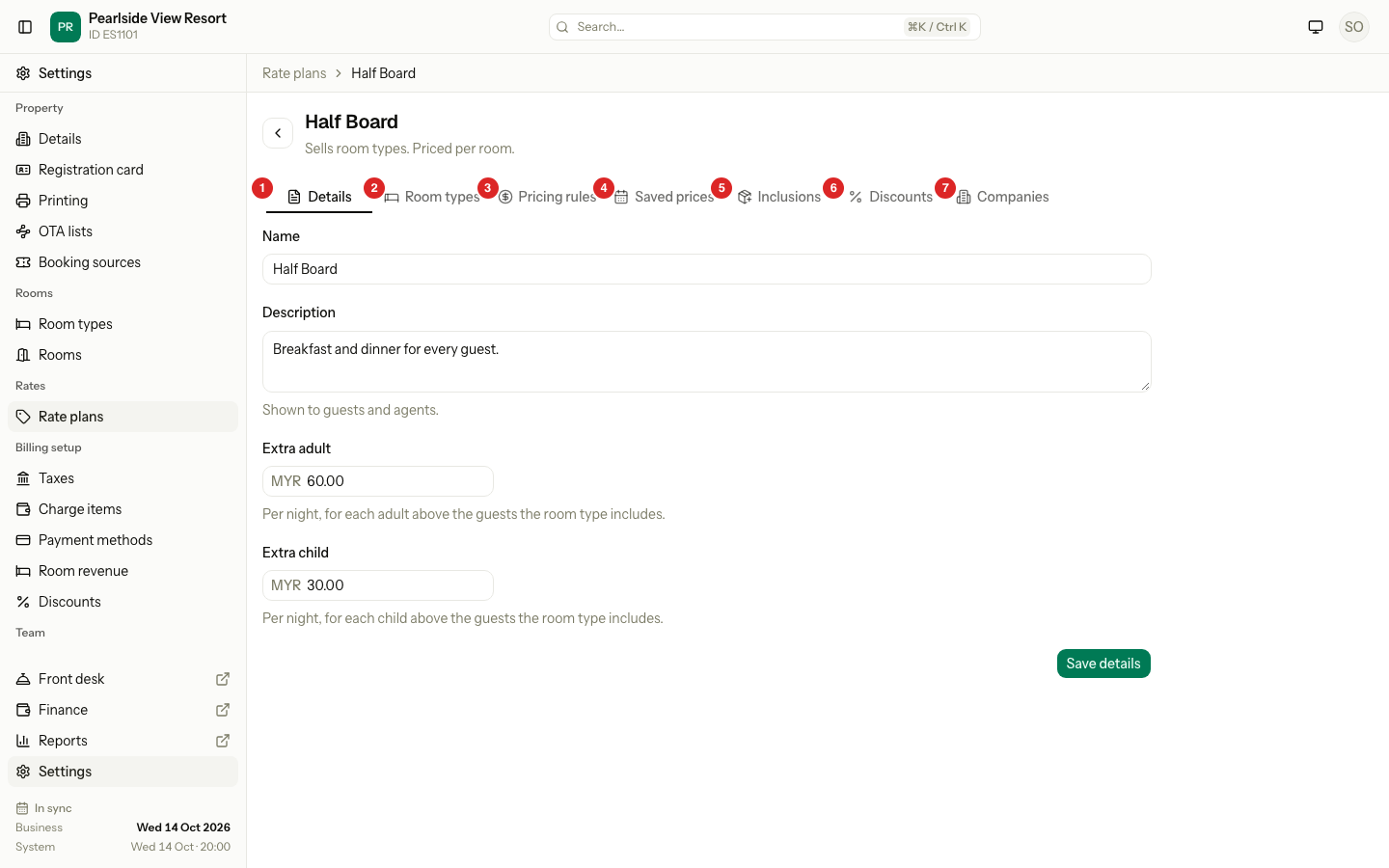
| Tab | What it does | Page |
|---|---|---|
| Details | Name, description, extra guest charges. | Create a rate plan |
| Room types | Which room types the plan sells. | Create a rate plan |
| Pricing rules | Set prices, or follow another plan. | Pricing rules |
| Saved prices | See the prices that are saved. | Saved prices |
| Children | The price for each age group. | Child prices |
| Inclusions | Meals and extras inside the price. | Inclusions |
| Discounts | Discounts for longer stays. | Long-stay discounts |
| Companies | Who can use the rate. | Companies chapter |
Change the order
Select the ⋯ button on a row, then Move up or Move down. The first plan in the list is the one the booking form picks first. You can reorder only on the Active filter with an empty search.
Archive and restore
Archive a plan you no longer sell. It leaves the active list and cannot be used for new bookings. Old bookings keep it.
- Select the ⋯ button on the row.
- Select Archive.
- Select Archive in the question.
To bring a plan back, set the Status filter to Archived or All. Then use the ⋯ menu and select Restore.
Special cases
| Situation | What happens | What to do |
|---|---|---|
| You archive a plan that another plan follows | Estatell says, for example, "Breakfast and Corporate follow this plan." | Archive or change the plans that follow it first. |
| You archive the last plan a room type sells | Estatell says, for example, "6-Bed Dorm would have no rate plan. Link another plan first." | Link the room type to another plan, then archive. |
| The plan is on a channel | Estatell asks the channel manager to remove it first, or tells you to ask the Estatell team. | Ask the Estatell team. |
| You restore a plan and its name is now used | ":name cannot be restored. Another rate plan uses the same name." | Rename the other plan, then restore. |
| You open an archived plan | Estatell says "is archived. Restore it before editing." | Select Restore first. |
| A plan has no room types | The Pricing rules and Saved prices tabs show Choose room types. | Choose room types on the Room types tab. |
| Someone else changed the order | "The rate plans changed. Reload the page and try again." | Reload the page. |