
Rate calendar
See the price and selling rules of every room type and rate plan, day by day, and change a single date.
The rate calendar shows what you sell on each date. For every room type and rate plan, you see the price, the rooms still open, and any selling rule. Use it to check your prices and to change one date, for example to stop selling a night.
Before you start
- Permission: To look, you need View the rate calendar. To change a date, you also need Edit rates and restrictions. Every role can look by default. Only owners and managers can change dates.
- Set up first: room types and at least one rate plan with prices.
Open the calendar
Open Front desk, then Rate calendar under Operations.
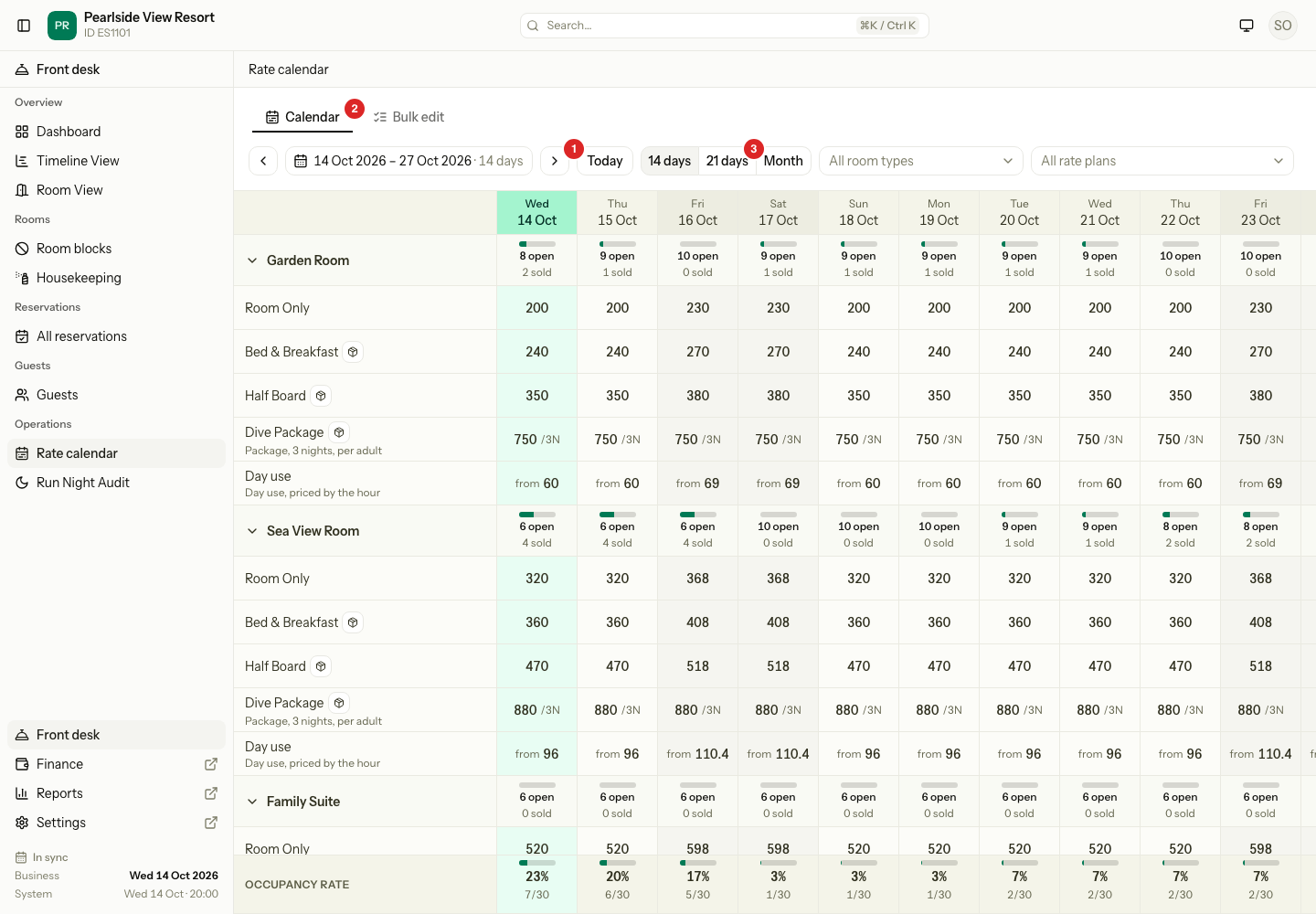
Each room type is a group. Its heading row shows how many rooms are open and sold on each date. A date with nothing open turns to the warning colour. Under the heading, you see one row for each rate plan that sells the room type. The last row shows the occupancy of each date.
Use the toolbar to find your way:
| Control | What it does |
|---|---|
| Today | Goes to today. |
| Arrows | Move back or forward by the length of the range. |
| Date range | Pick any range up to 62 days. |
| 14 days, 21 days, Month | Change how many days you see. |
| Room type and rate plan lists | Show only one room type or one rate plan. |
| The Legend button | Explains the marks in the cells. |
Weekend nights have a tinted column. Today has its own colour. Select the arrow next to a room type to hide or show its plans.
What the marks mean
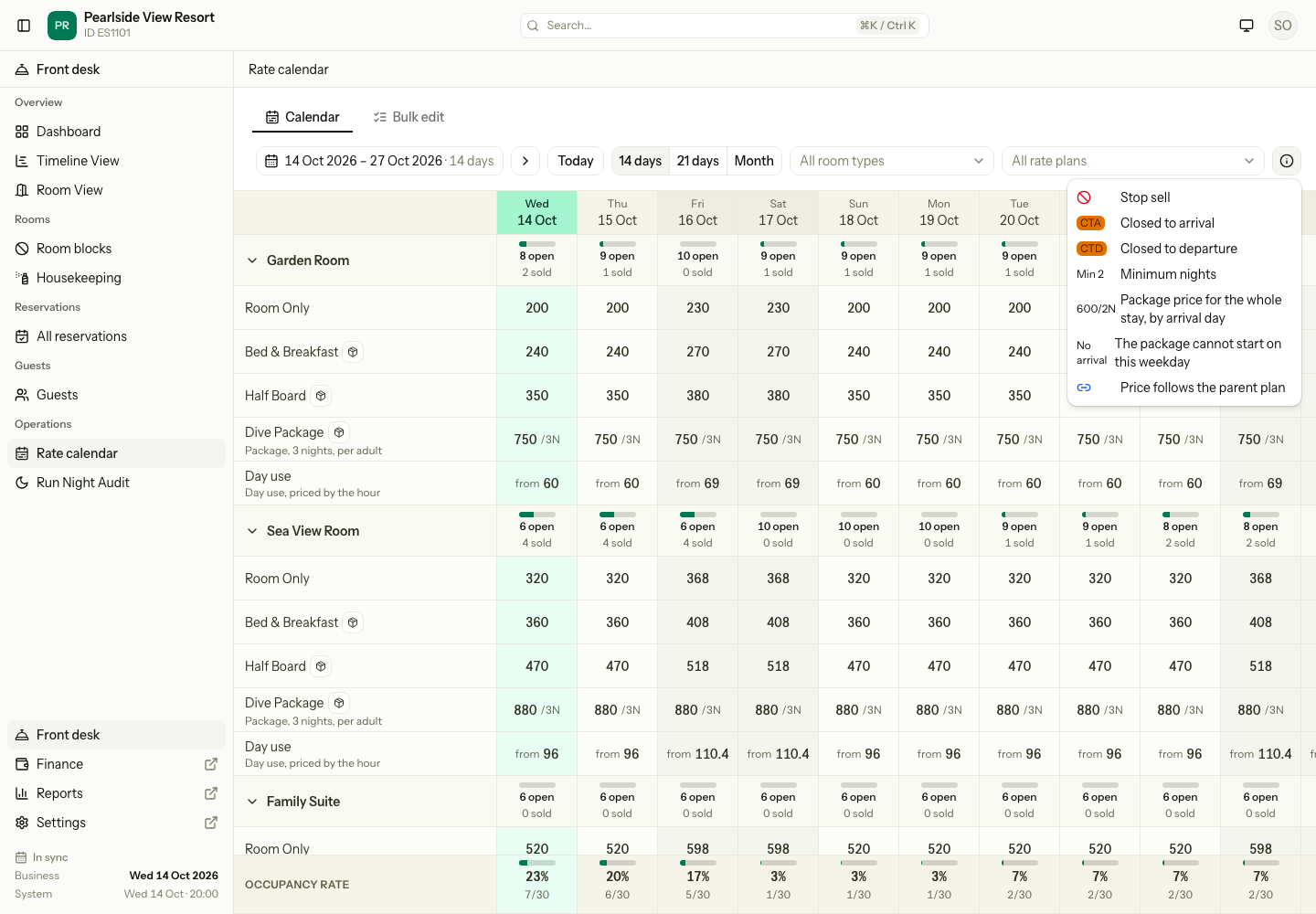
Restrictions
A restriction is a selling rule for one date. Estatell checks it when someone books.
| Restriction | Mark | What it does |
|---|---|---|
| Stop sell | A red crossed circle | Nothing can be sold for this night. |
| Closed to arrival | CTA | No stay can start on this date. |
| Closed to departure | CTD | No stay can end on this date. |
| Min stay | Min 2 (shows as 2-5 nights when both limits are set) | The stay must have at least this many nights. Estatell reads it from the arrival date. |
| Max stay | Max 5 | The stay can have at most this many nights. Estatell reads it from the arrival date. |
A Day use plan has Stop sell only.
Staff and guests meet a restriction in different places:
| Where the booking comes from | What happens when a restriction fails |
|---|---|
| The guest portal | The booking is blocked. The plan shows the reason, for example "Min stay 2 nights". |
| Front desk | Estatell warns the staff member. Owners and managers can book anyway. Others cannot. |
| Channels such as booking sites | The booking is accepted. The site already checked its own rules. |
Change one date
- Open Rate calendar.
- Select the cell for the plan and date. A side sheet opens. You can also select an empty date to give it a price.
- Change the price. The field is called Room price, Price per adult or Price per bed, depending on the plan.
- If you want a price for a number of adults, fill Price by adults (optional). Leave a field blank to use the main price.
- Turn on Stop sell, Closed to arrival or Closed to departure, or enter Min stay or Max stay. Leave a stay limit blank for no limit.
- Select Apply.
- Repeat for the other dates you want to change.
- Select Save changes in the bar at the bottom. It says how many changes are waiting.
Nothing is saved until you select Save changes. Select Discard to drop all the waiting changes. If you leave the page with changes waiting, Estatell asks first.
Plans that follow another price
| Plan type | What you see in the cell | What you can change |
|---|---|---|
| Derived plan | The parent plan's price after the change, with a link mark. | Restrictions only. |
| Package plan | The price for the whole stay, for example 750 /3N, for guests who arrive that day. | Restrictions only. Set the price in the plan's own settings. |
| Day use plan | The lowest hour price, for example "from 60". | Stop sell only. Set hour prices in bulk edit. |
Select the box button next to a plan name to see what the plan includes, such as breakfast. It does not change the price.
When prices run out
If a room type has no price in the next 60 days, a Prices are running out warning shows above the toolbar. Select Extend 12 months next to the plan. Estatell copies the last 7 days of prices forward for 12 months. See bulk update for the details.
Special cases
| Situation | What happens | What to do |
|---|---|---|
| You want to remove a price | Estatell cannot remove a price here. A blank price keeps the old one. | Turn on Stop sell for the dates. |
| You set a price by adults without a main price | Estatell asks for the main price first. | Enter the main price. |
| Max stay is lower than Min stay | Estatell shows "The max stay cannot be below the min stay." | Change one of them. |
| You enter prices for more adults than the room type sleeps | Estatell shows "That is more adults than the room type sleeps." | Remove the extra rows. |
| You pick a range longer than 62 days | Estatell shows "Pick at most 62 days." | Pick a shorter range. For longer jobs, use bulk edit. |
| You change the date range with changes waiting | The waiting changes stay. | Save or discard them when you are done. |
| You do not have Edit rates and restrictions | You see the calendar but cannot select a cell. There is no Bulk edit tab. | Ask an owner or manager. |
| A room type or plan is archived | It does not show. | Restore it in Settings. |