
Long-stay discounts
Give a discount on a rate plan from a minimum number of nights, and check the result with the price preview.
A long-stay discount says "stay at least 3 nights and get 10 percent off". It belongs to one rate plan. It applies on direct bookings only: the front desk, your website and the company portal. It is never sent to a channel.
This page is about the Discounts tab of a plan. For discounts that staff apply on a bill or at booking, see Discounts.
Before you start
- Permission: Manage property settings. Owners and managers have it by default.
- The plan needs prices. The preview shows "No rate" for a date with no price.
- Package and Day use plans have no Discounts tab.
Steps
- Open Settings, then Rate plans, and select the plan.
- Select the Discounts tab.
- Select Add long-stay discount.
- Enter the Minimum nights. It must be 2 or more.
- Choose the Discount: Percent of the night or Amount off.
- Enter the Value.
- Enter the From night. 1 discounts every night. 2 keeps the first night at full price.
- Check the Price preview.
- Select Save discounts.
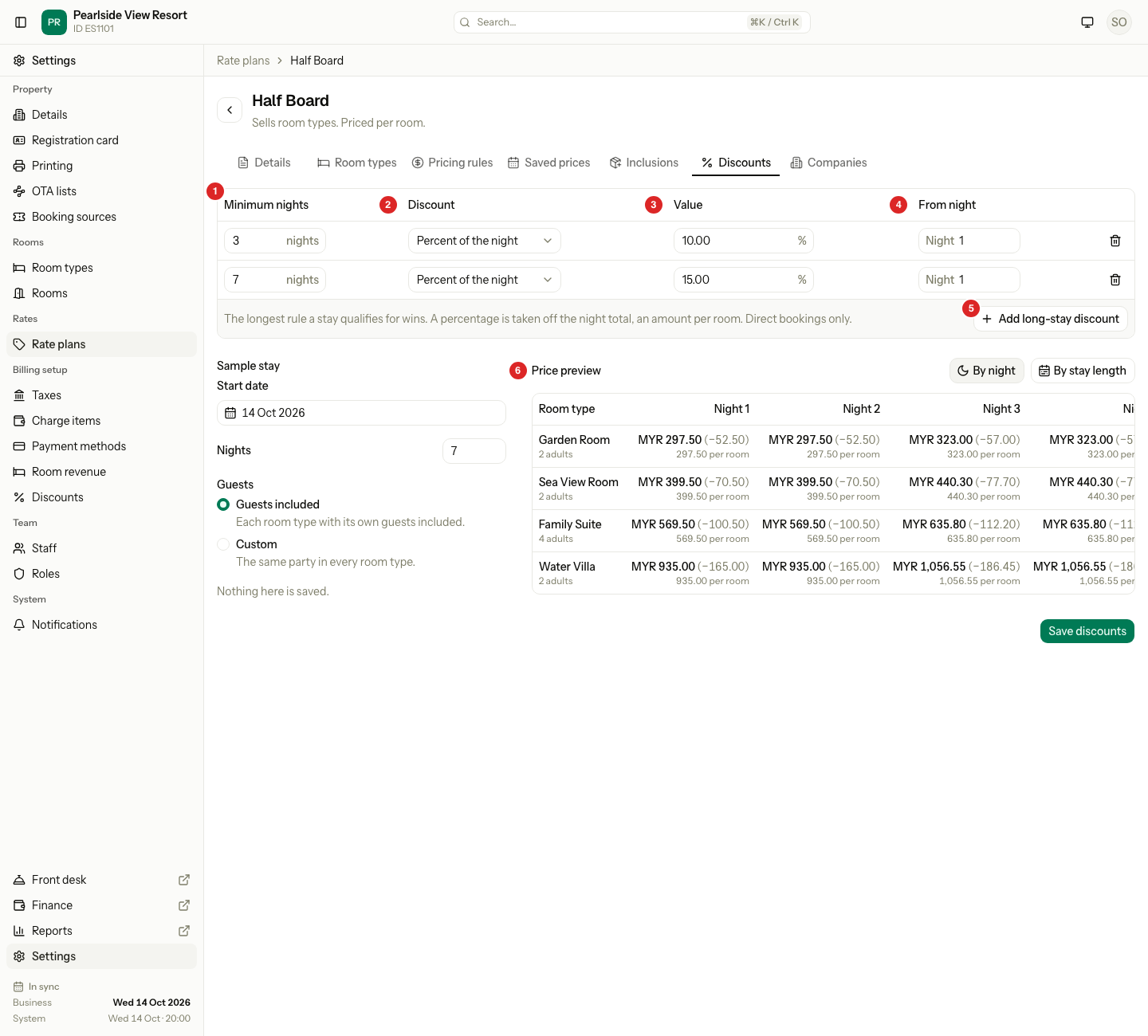
| Field | What to enter |
|---|---|
| Minimum nights | The shortest stay that gets the discount. At least 2. Two rules cannot have the same number. |
| Discount | Percent of the night takes a percent off the whole night: the room, extra guests, children and supplement. Amount off takes an amount off for each guest, bed or room, the way the plan is priced. |
| Value | A percent from 1 to 100, or an amount above 0. |
| From night | The first night that gets the discount. At least 1, and no later than Minimum nights. |
If a stay qualifies for more than one rule, the longest rule wins. A night never goes below zero.
Worked example
Half Board has two rules: 10 percent from 3 nights and 15 percent from 7 nights. A Garden Room costs RM350 on weekdays and RM380 on Fridays and Saturdays. A guest books Wed 14 Oct to Sat 17 Oct, which is 3 nights.
| Night | Price | Discount (10%) | Guest pays |
|---|---|---|---|
| Wed 14 Oct | RM350 | RM35 | RM315 |
| Thu 15 Oct | RM350 | RM35 | RM315 |
| Fri 16 Oct | RM380 | RM38 | RM342 |
| Total | RM1,080 | RM108 | RM972 |
A 7-night stay gets the 15 percent rule on every night, not both rules.
With From night 2 the first night stays at full price. A rule of "3 nights or more, 20 percent off from night 2" on RM200 a night costs 200 + 160 + 160 = RM520.
The price preview
The preview prices every room type on the plan with the rules on screen, before you save. It saves nothing.
- Choose the Start date and Nights of the sample stay.
- Under Guests, choose Guests included or Custom. Custom sets the adults, and the children of each age group on a Per guest plan.
- Switch between By night and By stay length.
By night shows one stay, with a column for each night and a Total. Each night shows its price, the discount and the amount for each unit. By stay length shows a column for 1 night and for each rule, up to four, so you can compare them.
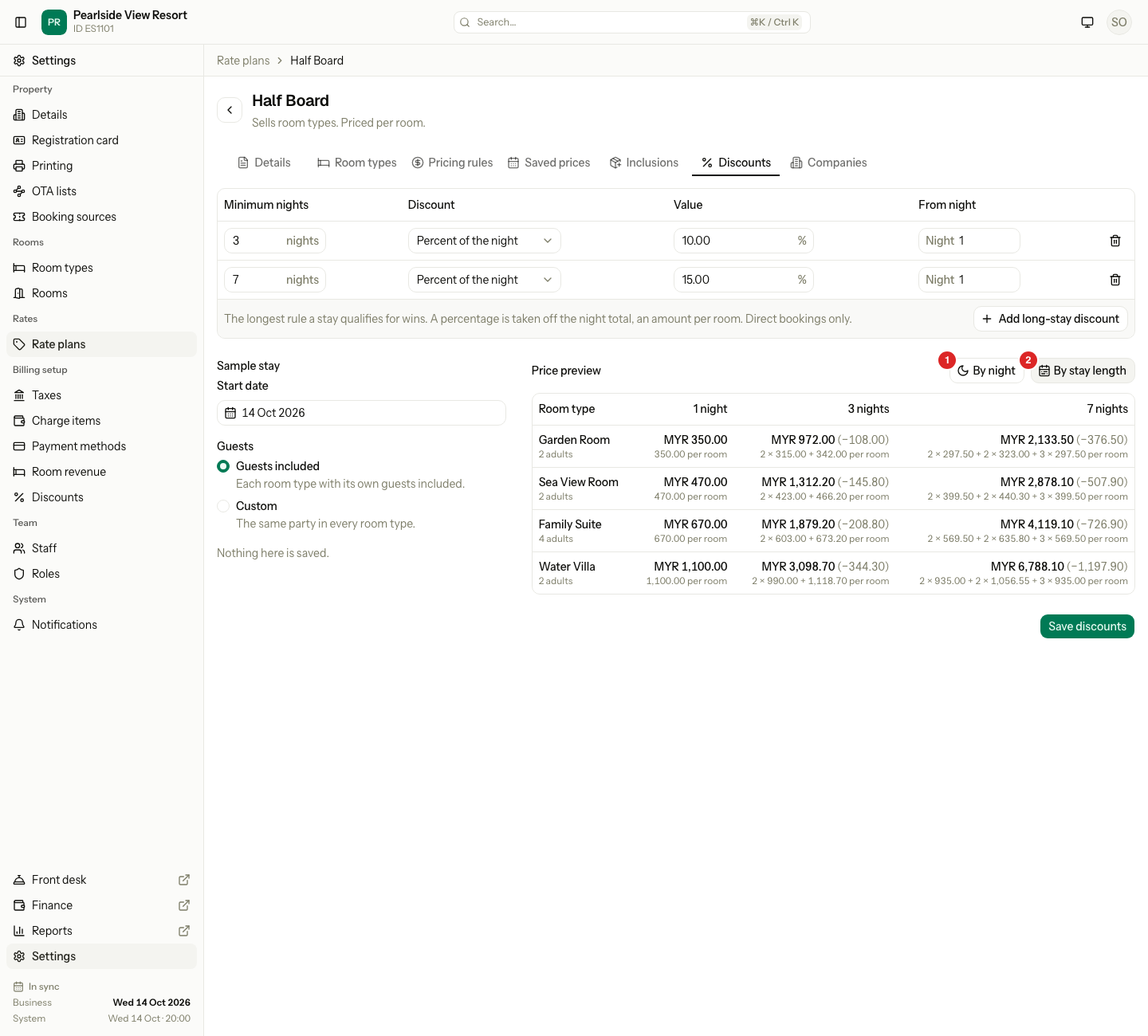
A room type shows a reason instead of prices when a date has no price, a child price is missing, or a custom party is larger than the room type fits.
Special cases
| Situation | What happens | What to do |
|---|---|---|
| The plan has no discounts | The tab says "No long-stay discounts". | Select Add long-stay discount. |
| A plan that follows another has none | Copy discounts from the parent shows when the parent has rules. It makes an unlinked copy. | Select it, or add your own. Later changes to the parent do not reach the copy. |
| A plan follows another plan | Its own rules apply after the percent or amount change. The parent's rules are ignored. | Add rules on the plan that follows. |
| A percent is outside 1 to 100 | "Enter a percentage from 1 to 100." | Change the value. |
| An amount is 0 or less | "Enter an amount above 0." | Enter an amount above 0. |
| From night is later than Minimum nights | "Start from a night no later than the minimum nights." | Lower From night. |
| Two rules have the same Minimum nights | Estatell refuses to save. | Keep one rule. |
| A guest books through a channel | No long-stay discount applies. | Price the channel plan on the channel. |
| You change a rule | Existing bookings keep their discount. | Nothing. |
| Some rows are not valid yet | The preview leaves them out and says how many. | Finish the rows. |
| The plan is archived | The save is refused. | Restore the plan. |