
Discounts
The discounts staff apply on a bill or when they make a booking, such as a staff rate or a returning guest rate.
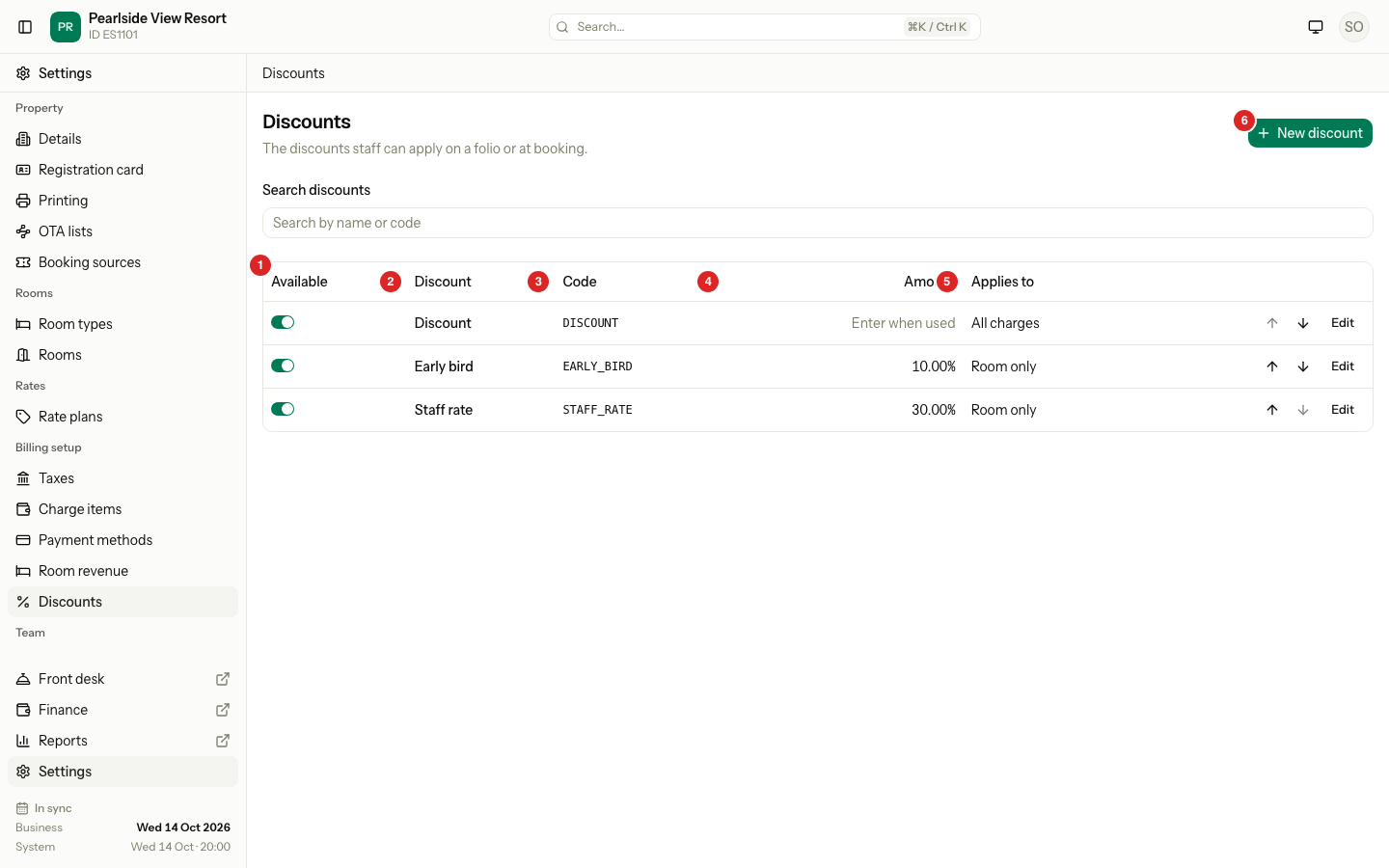
A discount is a reduction that staff choose from a list. Staff apply it on a guest bill or, for room only discounts, when they make a booking. Each discount owns a Code, so reports show "Staff rate" and "Complaint" on separate lines.
This page is for the discounts staff apply by hand. A discount that Estatell gives by itself for a long stay is part of a rate plan. See Long-stay discounts.
You set your first discounts in onboarding. See Discounts.
Before you start
- Permission to manage the list: Manage property settings. Owners and managers have it.
- Permission to apply a discount: Apply and remove folio discounts. To type an amount, staff also need Apply discounts with an entered amount.
Steps
- Open Settings, then Discounts under Billing setup.
- Select New discount. To change one, select Edit on its row.
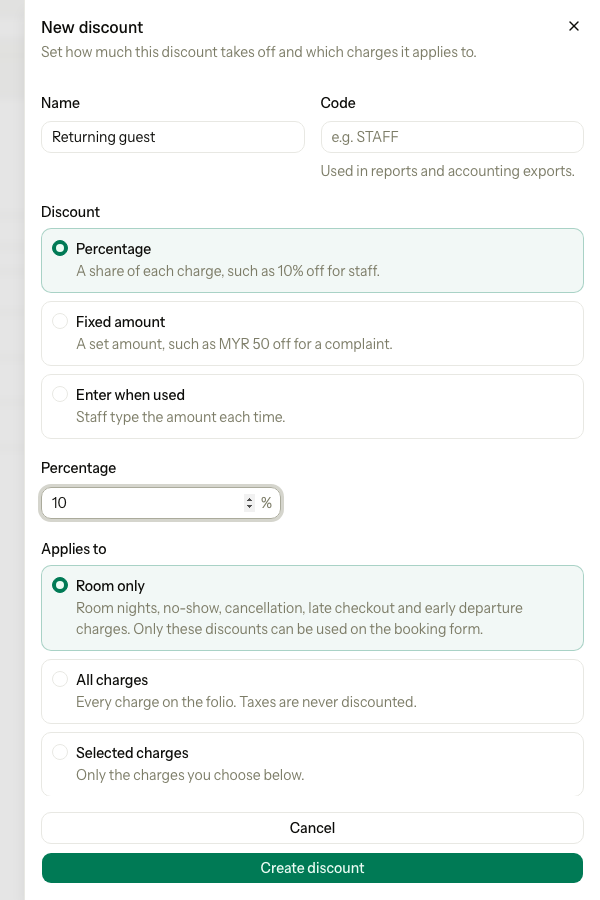
- Enter the Name, for example "Returning guest".
- Check the Code. Estatell suggests one from the name.
- Under Discount, choose Percentage, Fixed amount or Enter when used.
- Enter the Percentage or Amount. An Enter when used discount has no value.
- For a fixed amount, turn on Allow amount override if staff may change the amount.
- Under Applies to, choose Room only, All charges or Selected charges.
- For Selected charges, choose the Charges.
- Keep Available to apply on. Select Create discount, or Save changes.
Types
| Type | Value | Can staff change it? | Example |
|---|---|---|---|
| Percentage | 1 to 100 | No | 10% off for staff |
| Fixed amount | More than 0 | Only with Allow amount override | MYR 50 off for a complaint |
| Enter when used | None | Yes, always | The manager decides at the desk |
Applies to
| Choice | Takes money off |
|---|---|
| Room only | Room nights and the fees for a no-show, a cancellation, a late check-out and an early departure. Only these discounts show on the booking form. |
| All charges | Every charge on the bill. Taxes are never discounted. |
| Selected charges | Only the charges you choose. The list also shows inactive charges. |
Special cases
| Situation | What happens | What to do |
|---|---|---|
| The name is used | Estatell shows "Another discount already uses this name." | Use a different name. |
| The code is used | Estatell says the code is already in use. | Choose another code. |
| Selected charges with nothing chosen | Estatell shows "Choose at least one charge." | Choose at least one. |
| You want to remove a discount | You cannot delete a discount. | Turn Available to apply off. It then shows Inactive. |
| A discount needs to work at booking | Only Room only discounts show on the booking form. | Choose Room only. |
| The starter discount | It is named Discount, Enter when used, All charges. Its code is fixed. | Rename it, change it, or turn it off. |
| You want a discount for long stays | Not here. | Use Long-stay discounts. |