
Meals and meal periods
Set the times meals are served, and see how a plan's meal inclusions become the meal counts for the kitchen.
A meal period is a time of day when you serve a meal, such as breakfast. Rate plans use meal periods to say which meals are in the price. The kitchen then sees how many guests to feed at each meal.
Before you start
- Permission: To change meal periods, you need Manage property settings. Owners and managers have it by default. To see the meal counts, you need access to Reports.
- To give a plan a meal, set up the plan first. See Inclusions.
Set your meal periods
Estatell starts you with Breakfast 07:00 to 10:00, Lunch 12:00 to 14:30 and Dinner 19:00 to 22:00.
- Open Settings, then Details, then the Meal periods tab.
- To change a period, edit its Name, Starts at or Ends at.
- To add a period, select Add meal period. Enter a name, for example "Hi-tea", and the times.
- To stop offering a period, turn off its Served switch.
- Select Save meal periods.
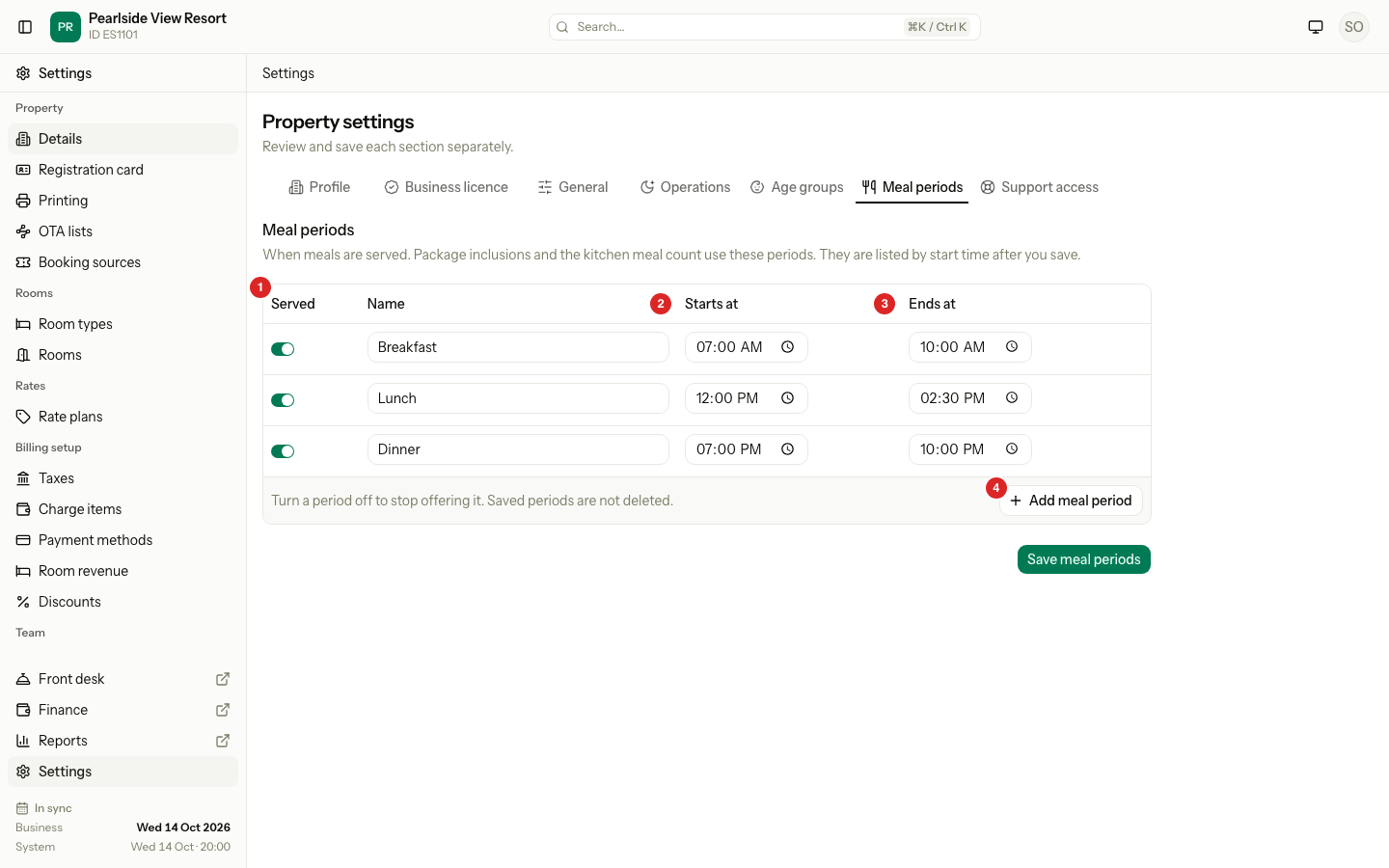
After you save, Estatell lists the periods by start time. A new Hi-tea at 15:30 sits between lunch and dinner by itself.
| Rule | Detail |
|---|---|
| Name | Up to 100 characters. Two periods cannot have the same name, in any capitals. |
| Times | A period ends after it starts. It cannot go past midnight. |
| Overlap | An active period cannot overlap another active period. Periods that only touch, such as one ending at 10:00 and one starting at 10:00, are fine. |
| Number | A property can have up to 12 periods. |
| Delete | You cannot delete a saved period. Turn it off instead. Rate plans and old bookings keep their link to it. |
From inclusion to meal count
A rate plan can include a meal for each night of the stay. Each inclusion says when the meal starts and when it ends. Estatell uses the dates only, not the time of arrival or departure.
| Start | End | The guest gets the meal from | Until |
|---|---|---|---|
| Arrival day | Departure day | The arrival day | The departure day |
| Arrival day | Night before departure | The arrival day | The day before departure |
| Day after arrival | Departure day | The day after arrival | The departure day |
| Day after arrival | Night before departure | The day after arrival | The day before departure |
For a guest who arrives on 14 Oct and leaves on 17 Oct:
| Start and end | 14 Oct | 15 Oct | 16 Oct | 17 Oct |
|---|---|---|---|---|
| Arrival day to Departure day | Yes | Yes | Yes | Yes |
| Arrival day to Night before departure | Yes | Yes | Yes | No |
| Day after arrival to Departure day | No | Yes | Yes | Yes |
| Day after arrival to Night before departure | No | Yes | Yes | No |
When you add a meal to a plan, Estatell fills in the usual start and end for you:
| Meal | Starts | Ends |
|---|---|---|
| Breakfast | Day after arrival | Departure day |
| Lunch | Arrival day | Departure day |
| Dinner | Arrival day | Night before departure |
You can change them for each plan. If the first date is after the last date, no meal is served.
Every guest on the booking gets every meal. If a plan lists the same meal period twice, a guest is still counted once.
See the meal counts
- Open Reports, then Meal counts under Kitchen.
- Pick the dates.
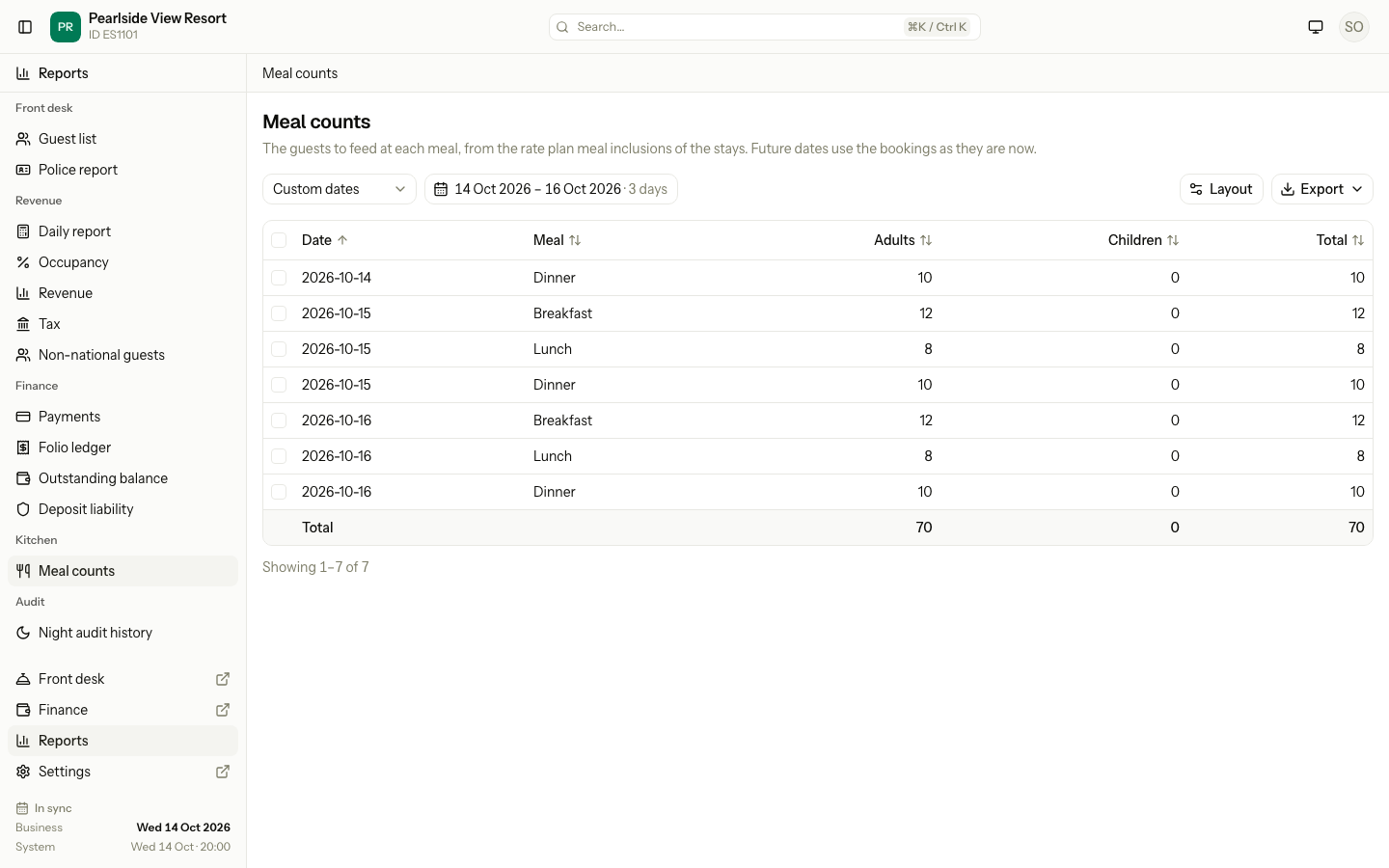
Each row is one date and one meal. It shows the Adults, Children and Total to feed. Future dates use the bookings as they are now.
Estatell counts bookings that are Confirmed, Checked-in or Checked-out. It does not count Cancelled or No-show bookings, or day use. If a guest left early, the new departure date counts. The night audit message gives the same counts for the next morning.
Special cases
| Situation | What happens | What to do |
|---|---|---|
| A time overlaps another active period | Estatell shows "These times overlap another active meal period." | Change the times, or turn the other period off. |
| Two periods have the same name | Estatell shows "Another meal period already uses this name." | Rename one. |
| The end time is not after the start time | Estatell shows a time error. | Make the end later than the start. |
| You turn off a period | It stays on plans and on existing bookings. | Remove it from the plan if you do not want it for new bookings. |
| You want to delete a period | Estatell does not delete saved periods. | Turn it off. |
| Another person added a period while you were editing | Your save does nothing and Estatell shows an error. | Reload the tab and try again. |
| No plan has a meal | The report says "No rate plan includes meals". | Add a meal to a plan. See Inclusions. |
| A guest checks out early | The meals after the new departure date drop out of the counts. | None. |
| Day use booking | It has no meals in the counts. | None. |
| You have more than 12 periods | Add meal period is grey. | Turn off a period you do not use. |