
Check-in and check-out
Set your currency, time zone, language, check-in and check-out times and automatic room assignment.
The General tab sets the basics of how your days run: the clock you work by, the usual check-in and check-out times, and whether Estatell picks rooms for you.
Before you start
- Permission: Manage property settings. Owners and managers have it by default.
- Set the currency and time zone before go-live. After go-live they are fixed.
Steps
- Open Settings, then Details, then the General tab.
- Before go-live, check the Currency and Time zone.
- Choose the Default language.
- Enter the Arrival grace period (minutes).
- Set the Check-in time and Check-out time.
- Turn Assign rooms automatically on or off.
- Select Save settings.
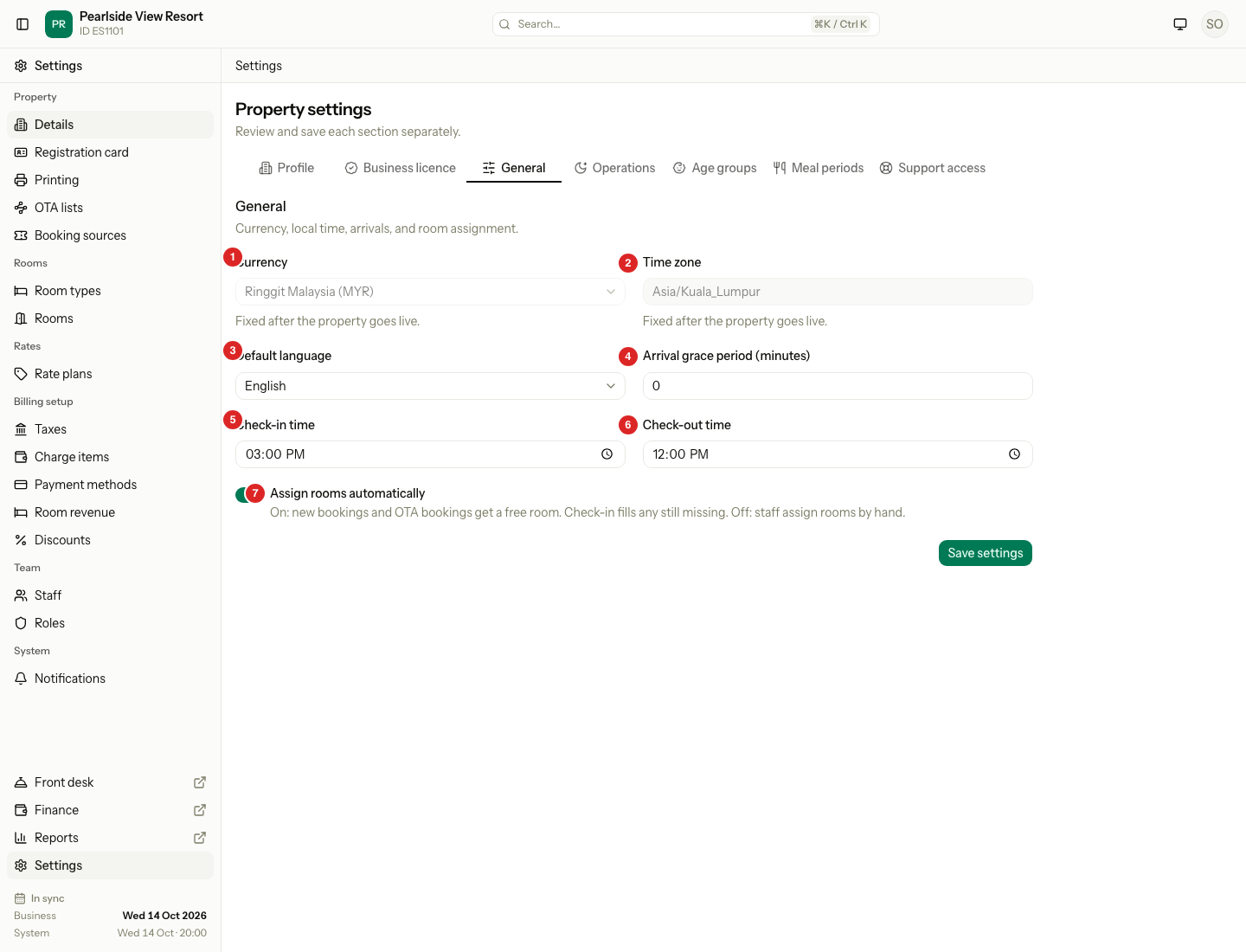
| # | Field | What it does |
|---|---|---|
| 1 | Currency | The money of every price and payment. Pick from the list, for example "Thai Baht (THB)". Fixed after go-live. |
| 2 | Time zone | The clock behind your business date and night audit. Type a name like Asia/Kuala_Lumpur. Fixed after go-live. |
| 3 | Default language | English or Bahasa Malaysia. It is the starting language for registration card terms and booking messages. |
| 4 | Arrival grace period (minutes) | A number from 0 to 1440. The seeded value is 0. Estatell saves it, but no screen or rule uses it yet. |
| 5 | Check-in time | The time a new booking shows as the arrival time. Seeded at 15:00. |
| 6 | Check-out time | The time a new booking shows as the departure time. Seeded at 11:00. |
| 7 | Assign rooms automatically | On: new bookings and OTA bookings get a free room, and check-in fills any still missing. Off: staff assign rooms by hand. |
How automatic room assignment works
| Setting | A new booking | At check-in |
|---|---|---|
| On | Estatell picks a free room for the whole stay. | Estatell picks a room if the unit still has none. |
| Off | The unit has no room. It shows in the Unassigned lane. | Staff assign a room first. Check-in is refused without one. |
With the switch on, a room you choose yourself always wins. If no room is free, the booking still saves with no room.
Special cases
| Situation | What happens | What to do |
|---|---|---|
| The property is live | Currency and Time zone are grey and say "Fixed after the property goes live." | Plan these before go-live. |
| You pick an unknown time zone | Estatell refuses the save. | Use a name from the standard list, for example Asia/Kuala_Lumpur. |
| You change the check-in time | Only new bookings use it. Old bookings keep their times. | Edit an old booking if it needs a new time. |
| You turn Assign rooms automatically off | New bookings have no room. | Assign rooms from the reservation. See Check in. |
| A booking has no free room | The booking saves with no room. Check-in tries again. | Free a room, or assign one by hand. |
| A guest arrives before check-in time | The check-in time does not stop check-in. | Check the guest in as usual. |
| You change the language | Estatell does not change old documents. | Print them again if needed. |