
Front deskOverview
Overview
Check in a guest who has a booking, and collect the taxes and deposit at the desk.
Check in a guest when they arrive at the desk. The unit becomes Checked in, and you can collect the taxes and the deposit in the same step.
| Situation | Use |
|---|---|
| A guest with a booking for one room or bed | Check in, on this page |
| A group whose rooms arrive together | Check in all |
| A guest at the desk with no booking | Walk-in. It books and checks in in one save. |
| You checked in the wrong unit today | Undo check-in |
Before you start
- Permission: Check in units. Owners, managers and front desk staff have it by default.
- To collect money in the same step you also need Record payments and download receipts.
- The unit must be Confirmed. Check in shows in the menu from the arrival date until the day before departure.
- The unit needs a room or bed for tonight. If your property assigns rooms automatically, check-in picks one for you.
How check-in works
Steps
- Open the reservation.
- Open the check-in form:
-
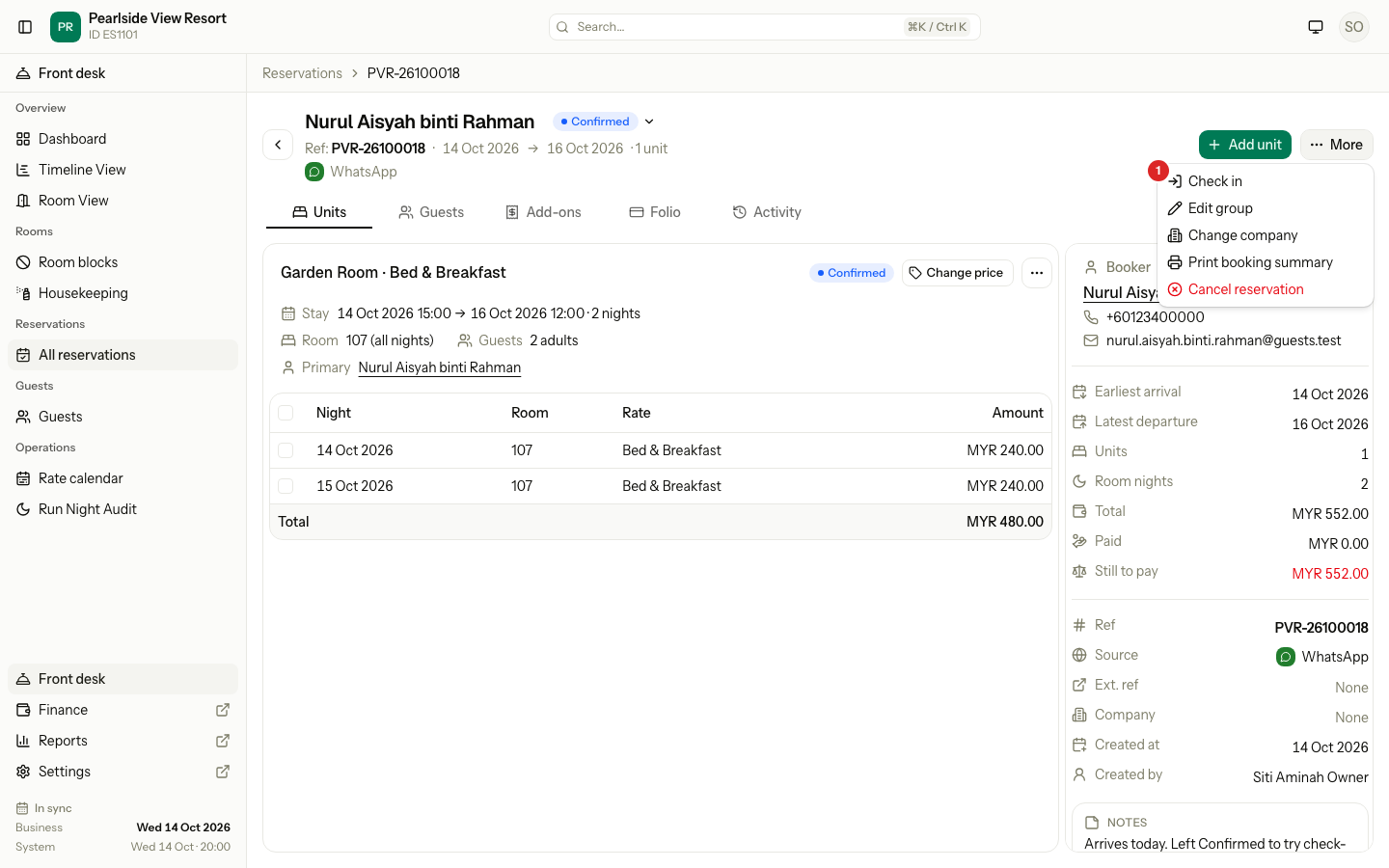
For a reservation with one unit, select More, then Check in.
-
For a group, select the ⋯ menu on the unit, then Check in.
-
- Check the Room:
- A room number means the room is ready.
- Assigned when you check in means Estatell picks a free room when you save.
- Not assigned for tonight means you must select Assign a room first.
- If Registration card shows a card not signed, sign the card first. If you may, tick Check in without a card instead.
- If Nationality shows, choose the guest's nationality. A tax depends on it.
- Choose what to collect now:
- Tick Room charges and tax if the guest pays the whole bill now.
- Check the taxes under Collected at check-in, for example tourism tax.
- Leave Security deposit ticked to take the deposit.
- With Collect now ticked, choose the Method. For card, transfer or e-wallet, enter the Reference.
- Select Check in.
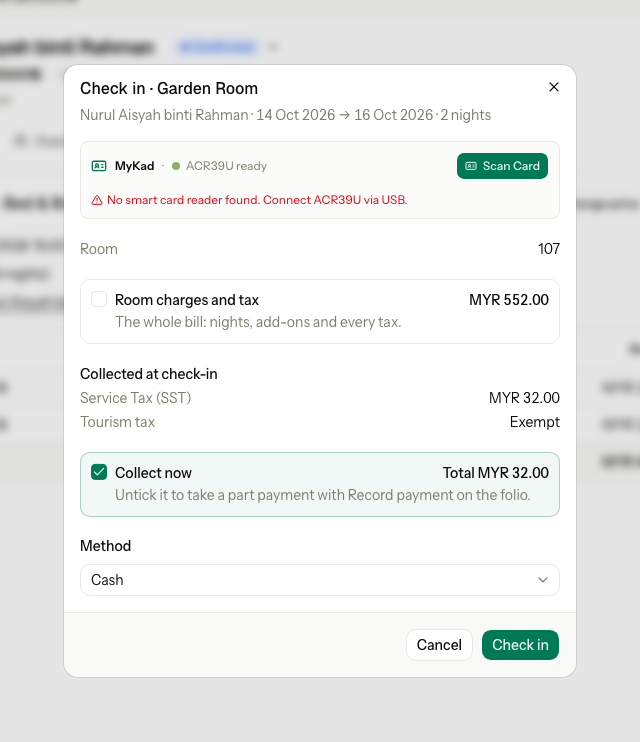
If your desk has a MyKad reader, the dialog shows it at the top. Select Scan Card to read the guest's details from their MyKad.
What happens
- The unit becomes Checked in, and the reservation shows In house.
- Add-ons with no date post to the folio.
- The money you collected is recorded as payments on the folio: the taxes and room charges as an advance, the deposit as a security deposit.
- If anything is refused, nothing is saved: not the check-in, not the nationality, not a payment.
Special cases
| Situation | Example | What happens | What to do |
|---|---|---|---|
| The guest is early | A guest booked from tomorrow is at the desk today. | • Check in is not in the menu yet. • "The guest cannot check in before the arrival date." | • Change the dates so the stay starts today. See Change a stay. Then check in. |
| No room for tonight | Every Garden Room is taken or not assigned. | • Not assigned for tonight. Check in is disabled. | • Select Assign a room. Without the permission: "Ask someone who can assign rooms." |
| The card is not signed | Your property needs a signed card before check-in. | • "A registration card is not signed. Sign it, or tick Check in without a card." | • Sign the card. Or tick Check in without a card. It is logged with your name. |
| You cannot skip the card | A front desk user without the permission. | • The tick box is not shown. | • Sign the card, or ask a manager. |
| Nationality is missing | A foreign-only tax applies, and the guest has no nationality. | • Nationality shows. It is saved to the guest. | • Choose the nationality. |
| The guest is exempt from a tax | A Malaysian guest and a tourism tax for foreigners only. | • The tax shows Exempt and adds 0. | • Nothing. |
| The guest pays only part | The guest pays MYR 20.00 of MYR 32.00. | • Collect now takes the full amount only. | • Untick Collect now. After check-in, use Record payment on the folio. |
| Nothing to collect | Every tax is exempt and there is no deposit. | • "No collection is needed. You can check in the guest." | • Select Check in. |
| A deposit is already held | The guest paid the deposit when booking. | • The deposit is not asked again. | • Nothing. |
| The company pays | A company booking with the room charges on the company's folio. | • Room charges and tax is hidden. | • Collect only what the guest pays, such as the deposit. |
| Over the credit limit | The company owes more than its credit limit. | • "This company is over its credit limit." | • Enter a Credit limit override reason if you may. Or ask a manager. |
| After midnight, before the night audit | A guest booked 20 → 21 Oct arrives at 1 am on 21 Oct. | • The check-in is for the night of 20 Oct. | • Check in as normal. |
| A late arrival | A guest due on 8 Oct arrives on 10 Oct, kept as a late arrival. | • The missed nights of 8 and 9 Oct are charged too, each on its own date. | • To not charge them, reverse them on the folio. Or change the dates before check-in. |
| A day use | A 4-hour day use. | • It checks in only on its date. Its price posts at check-in. | • See Day use. |