
Operations
Set the night audit time, what happens to missed arrivals and overdue departures, weekend nights and the migration window.
The Operations tab sets the rules the night audit follows each night, and a few other rules that run in the background.
Before you start
- Permission: Manage property settings. Owners and managers have it by default.
- Know how your hotel treats a guest who does not arrive, and a guest who stays past check-out.
- Set the time zone first. See Check-in and check-out.
Steps
- Open Settings, then Details, then the Operations tab.
- Set the Night audit time.
- Choose Missed arrival.
- Choose Overdue departure.
- Choose Weekend nights.
- Enter the Migration window (days).
- Turn Run night audit automatically on or off.
- Select Save settings.
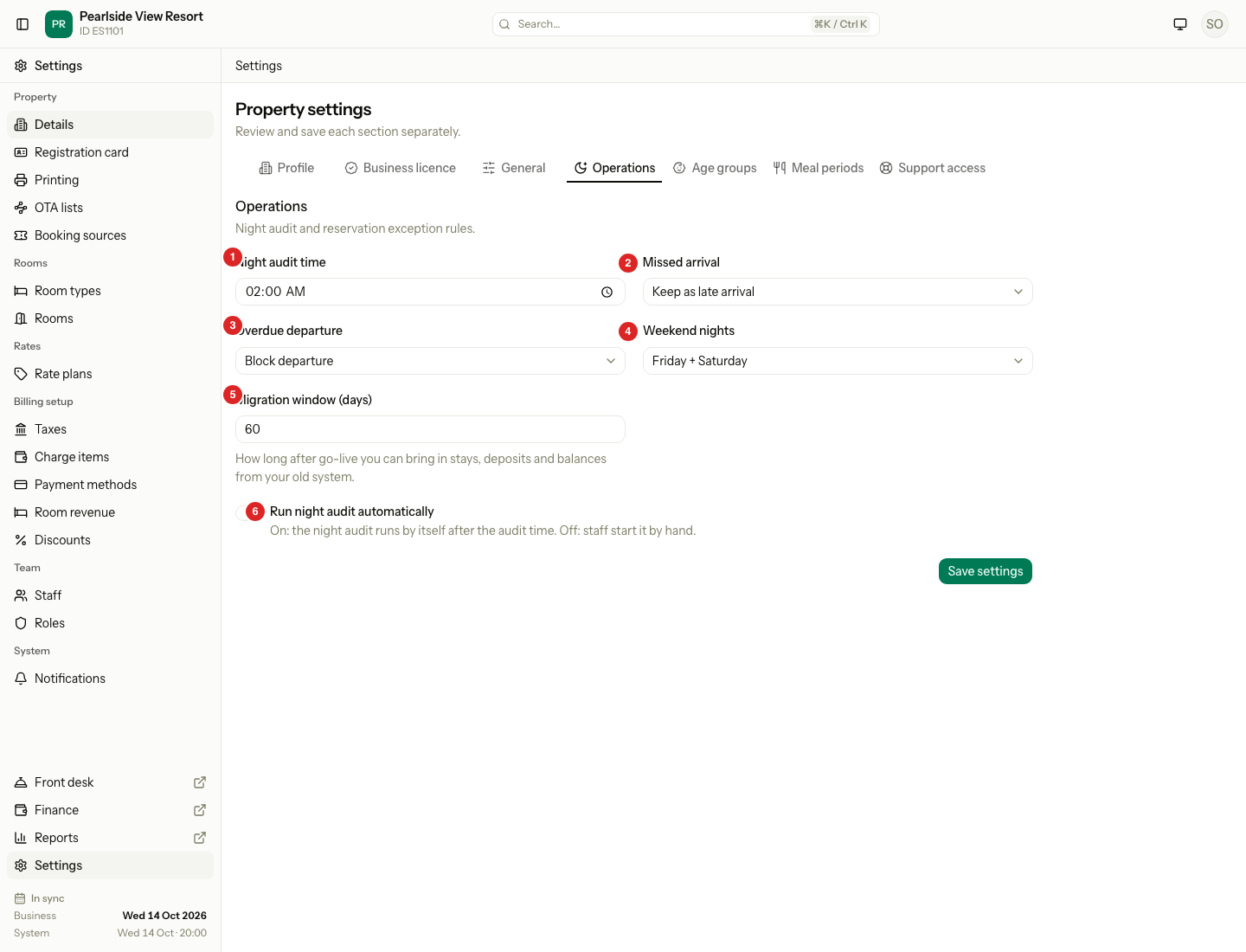
What each choice does
| # | Field | Choice | What happens |
|---|---|---|---|
| 1 | Night audit time | A time, seeded at 02:00 | The automatic audit starts at this time on the day after the business date. Even 23:00 runs on the next day. |
| 2 | Missed arrival | Mark no-show | The audit marks a guest who did not arrive as a no-show. The no-show fee is charged and the room is freed. |
| 2 | Missed arrival | Keep as late arrival | The booking stays. Nothing is charged. |
| 3 | Overdue departure | Extend one night | A guest still in house on the departure date gets one more night, and it is charged. |
| 3 | Overdue departure | Block departure | No night is added. The audit lists the guest, and you check them out later. |
| 4 | Weekend nights | Friday + Saturday or Saturday + Sunday | The starting choice when you set weekend prices. It does not change prices you have already saved. |
| 5 | Migration window (days) | 0 to 365, seeded at 60 | How long after go-live you can bring in stays, deposits and balances from your old system. |
| 6 | Run night audit automatically | On | The audit runs by itself after the audit time. |
| 6 | Run night audit automatically | Off | Staff start the audit by hand. |
A guest who is a day use is never extended. The audit lists that guest for you to check out.
A guest who is more than one day past the departure date is not extended either, whatever you choose. The audit lists the guest, and you check them out.
Special cases
| Situation | What happens | What to do |
|---|---|---|
| Automatic audit is off | Nothing runs by itself. | Start the audit from the night audit screen each night. |
| A blocker is open at audit time | The automatic audit does not run. Estatell tries again every five minutes. | Fix the blocker. The audit then runs. |
| The audit failed halfway | The date stays in audit and the schedule does not retry it. | Resume the audit from the night audit screen. |
| Migration window is 0 | The migration tools stay closed. | Enter a number of days if you still need to bring in old stays. |
| You change Weekend nights | Saved prices stay as they are. | Open the rate and check its weekend prices. |
| You change Missed arrival during the day | The new choice applies at the next audit. | Make the change before the audit time. |