
Room blocks
Take a room or a bed out of sale for repairs or owner use, then end or cancel the block.
A room block takes a room or one bed out of sale for some nights. Use it for repairs, maintenance, owner use or any other reason a room cannot be sold. A blocked room cannot be booked for those nights.
This screen is in the front desk menu, not in Settings. Open Front desk → Room blocks.
Before you start
- Permission: Block rooms and beds. Owners, managers and front desk staff have it by default.
- The room must have no stay on the nights you want to block. Move the stay first. See Change a stay.
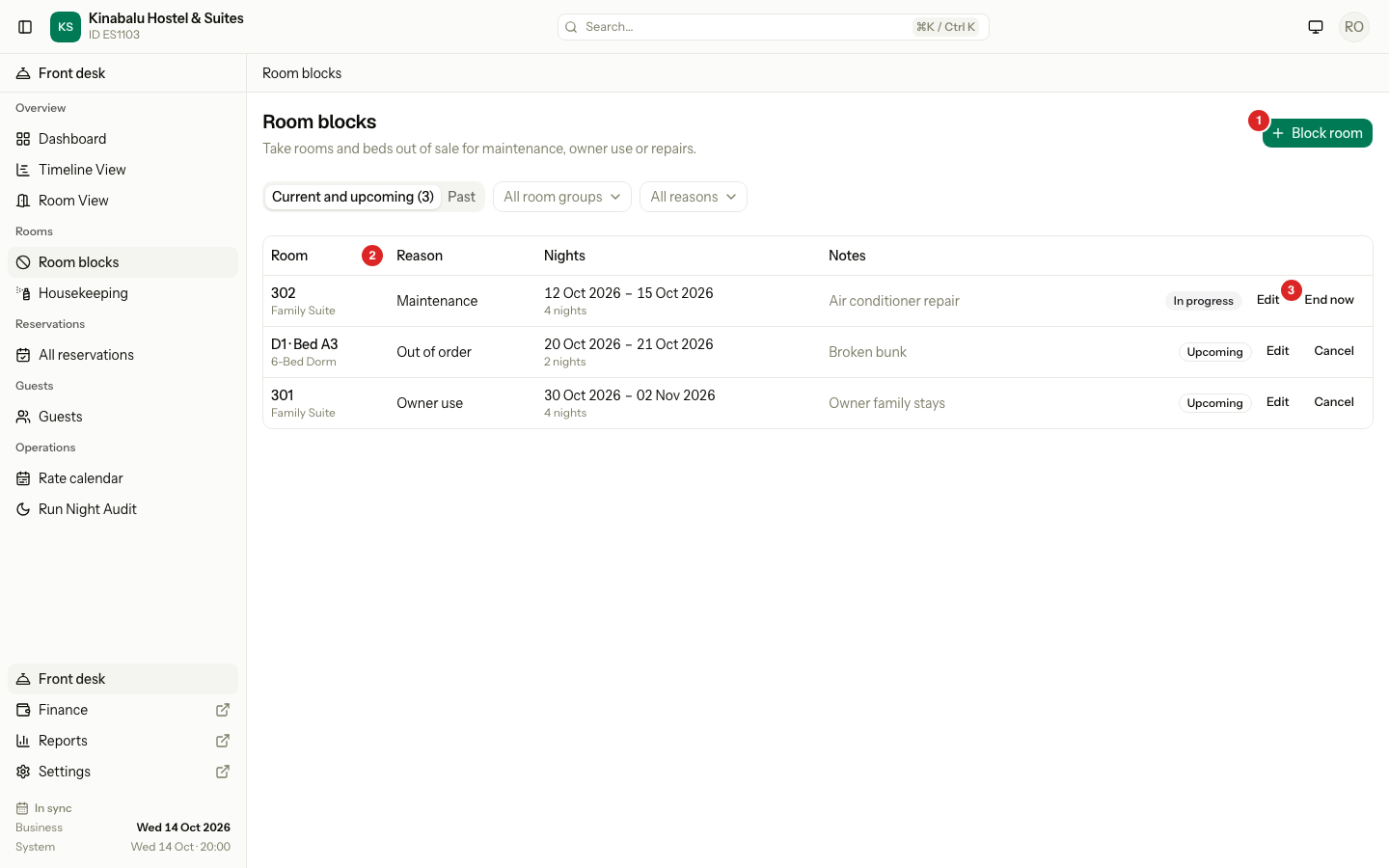
The Room blocks screen
| # | What | What it does |
|---|---|---|
| 1 | Block room | Opens the form to add a block. |
| 2 | Reason | Why the room is out of sale: Maintenance, Owner use, Out of order or Other. |
| 3 | End now | Ends a block that is running. A block that has not started shows Cancel. |
The Current and upcoming tab lists blocks that are running or still to come. The Past tab lists blocks that have ended, the latest 50. You can filter by room group and by reason.
Block a room
- Select Block room.
- Choose the Room.
- If the room is a dorm, choose the Bed. Leave Whole room to block all its beds.
- Choose the Reason.
- Pick the first and last night under Nights. Both nights are blocked. For one night, pick one day.
- Enter Notes. They are optional, except for the reason Other.
- Select Block room.
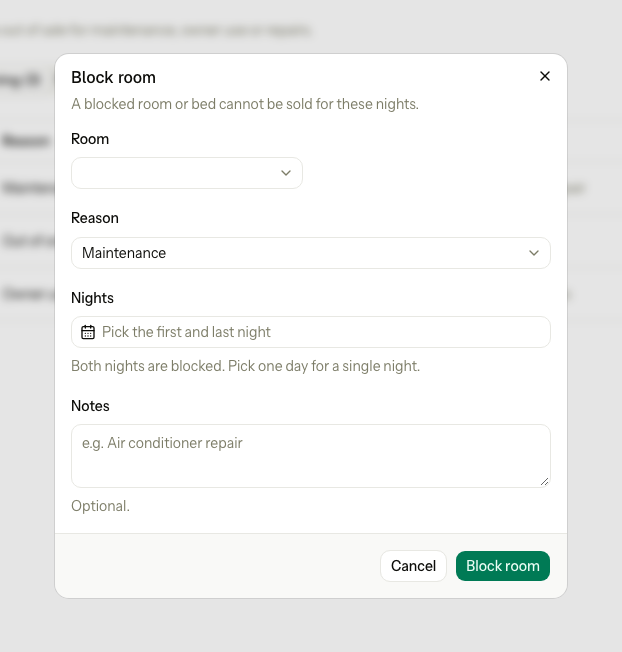
A block can cover up to 365 nights. The first night cannot be in the past.
Change a block
Select Edit on a block. What you can change depends on where the block is:
| State | Shown as | What you can change | Other action |
|---|---|---|---|
| Not started | Upcoming | Reason, nights and notes. | Cancel removes the block. |
| Running today | In progress | Reason, last night and notes. The first night stays. | End now puts the room back on sale. |
| Ended | On the Past tab | Nothing. | The tab keeps it as history. |
You cannot change the room or the bed of a block. To block another room, cancel or end this block and make a new one.
End a block now
Use End now when the repair is done early.
- Select End now on the block.
- For a whole room, choose how the room was left: Dirty or Clean. Dirty is the default. Housekeeping then sees the right status.
- Select End block.
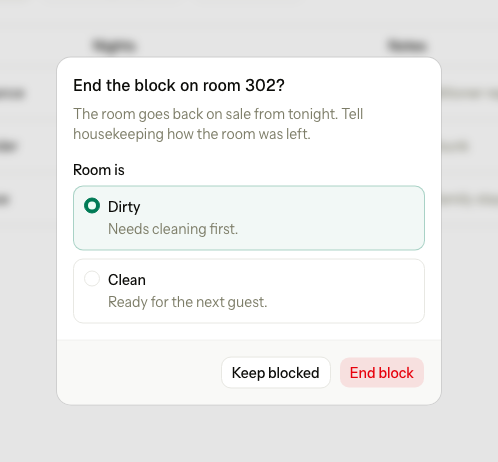
The room or bed goes back on sale from tonight. The block stays on the Past tab with the day it ended. Ending a bed block leaves the room status as it is.
Cancel a block
Use Cancel on a block that has not started.
- Select Cancel on the block.
- Select Cancel block.
Estatell removes the block and puts the nights back on sale. To keep it, select Keep block.
Special cases
| Situation | What happens | What to do |
|---|---|---|
| A stay holds a night | "Room 203 has a stay on some of these nights. Move the stay first." | Move the stay to another room. Then block the room. |
| Another block covers a night | "Room 203 is already blocked for some of these nights." | Change the nights. Blocks that follow each other are fine. |
| A bed block and a whole-room block meet | They clash. Blocks on two different beds never clash. | Block the whole room, or only the beds. |
| The reason is Other and notes are empty | "Add a note when the reason is Other." | Type a note. |
| The first night is in the past | "The first night cannot be in the past." | Pick today or later. |
| The block is longer than 365 nights | "A block can cover at most 365 nights." | Make two blocks. |
| You edit a block that has started and change the first night | "A block that has started keeps its first night." | Change only the last night. |
| You select End now on a block that has not started | "Block for Room 203 cannot be ended. Only a block that is running today can end." | Use Cancel instead. |
| You select Cancel on a block that has started | "Block for Room 203 cannot be cancelled because it has started. End it instead." | Use End now. |
| The room or bed was archived | "Room 203 is no longer active." Archiving a room or bed also ends its current and future blocks. | Restore the room, then block it again. |
| A day use is booked in the room | A day use holds no night, so it does not stop a block. | Move or cancel the day use yourself. |
| A room needed maintenance on the housekeeping board | Blocking the room clears that flag. | Nothing. |
| You have only the front desk role | You can use this screen. You cannot change rooms or room types. | Nothing. |