
Change a stay
Change the dates of a booking, extend a stay in house, or move a guest to another room or bed.
Use this page when a guest changes their plans: new dates, more nights, or another room. You can do each from the reservation page, or by dragging the stay on the Timeline.
| The guest wants to | Use | Who |
|---|---|---|
| Come on other dates | Change dates | A booking that has not arrived |
| Stay more nights | Extend a stay | A guest in house |
| Leave a few hours later today | Late check-out | A guest in house, on the departure day |
| Leave before the departure date | Early departure | A guest in house |
| Change room or bed | Move room | A booking, or a guest in house |
Before you start
- Permission: Manage reservations. Owners, managers and front desk staff have it by default.
- To book past a rate restriction, such as a minimum stay, you also need Book past rate restrictions.
- A day use and a package plan cannot change their dates here.
Change dates
For a booking that has not arrived. You can move the arrival, the departure, or both.
-
Open the reservation.
-
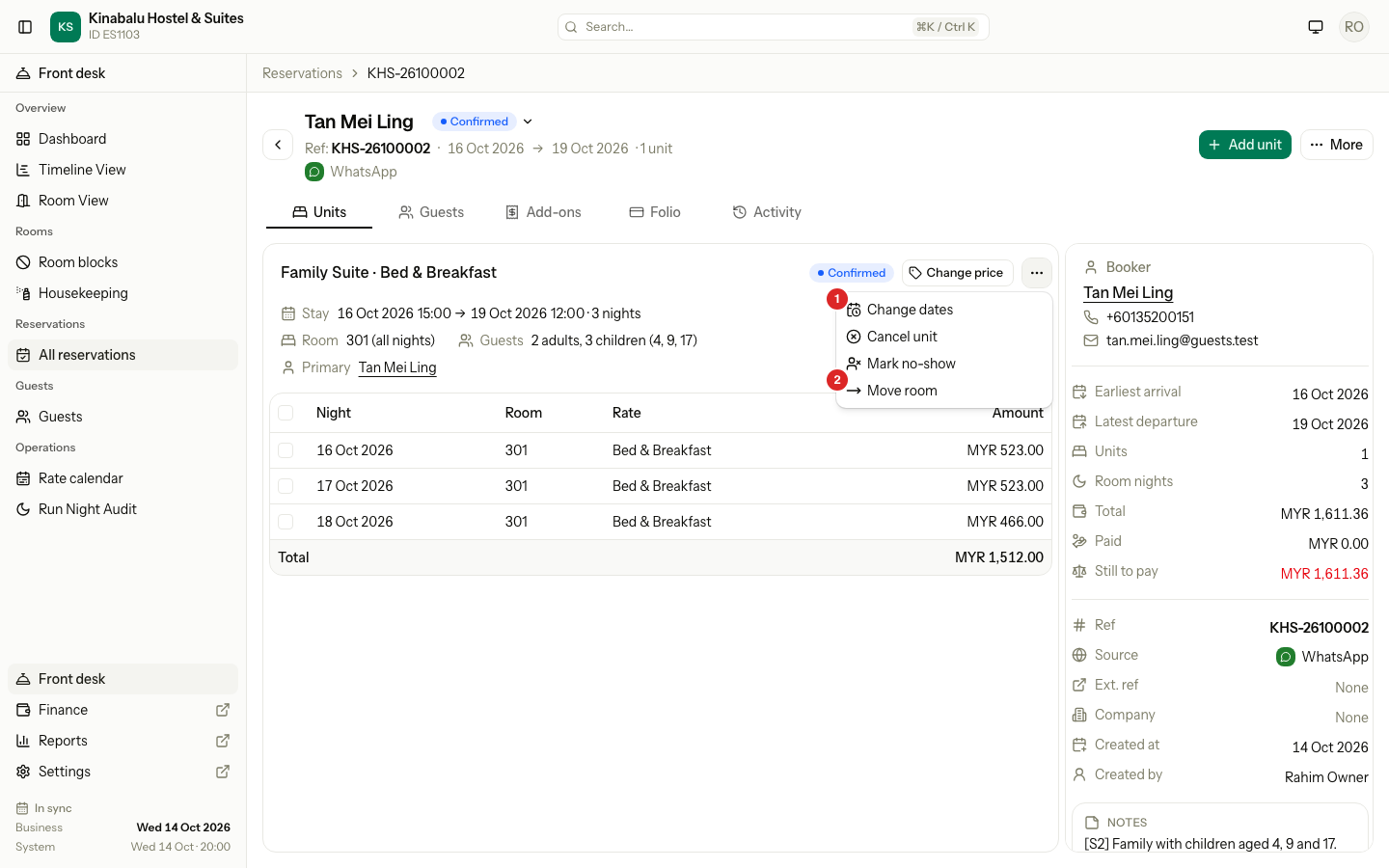
Select the ⋯ menu on the unit, then Change dates.
-
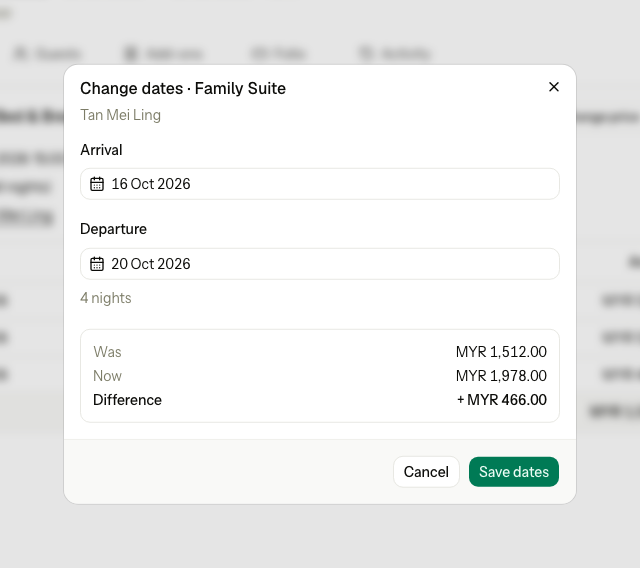
Pick the new Arrival and Departure. The number of nights updates.
-
Check the price: Was, Now and Difference.
-
Select Save dates.
A shorter stay before arrival has no fee. The guest has not left early.
Extend a stay
For a guest in house who stays more nights. It uses the same Change dates form. The arrival is locked, because the guest is already here.
- Open the reservation.
- Select the ⋯ menu on the unit, then Change dates.
- Pick the new Departure.
- Check the price Difference. Only the added nights are priced.
- Select Save dates.
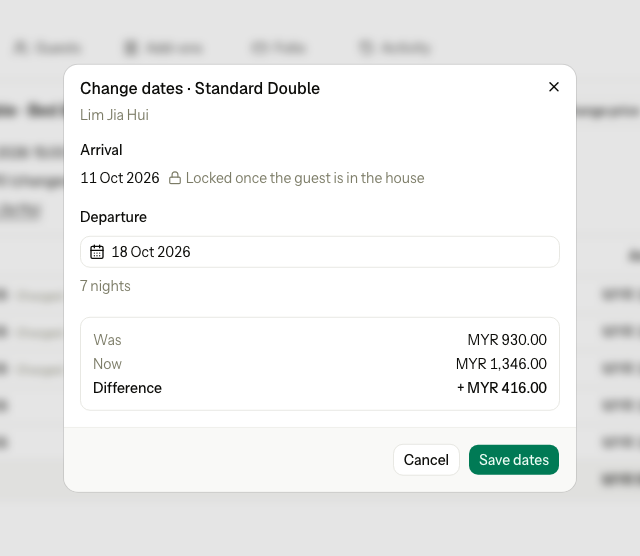
If you pick an earlier departure for a guest in house, the form becomes an early departure, with the early departure fee. To check out now, use Early departure.
Move room
Move a booking, or a guest in house, to another room or bed. For a bed unit, the dialog says Move bed.
-
Open the reservation.
-
Select the ⋯ menu on the unit, then Move room.
-
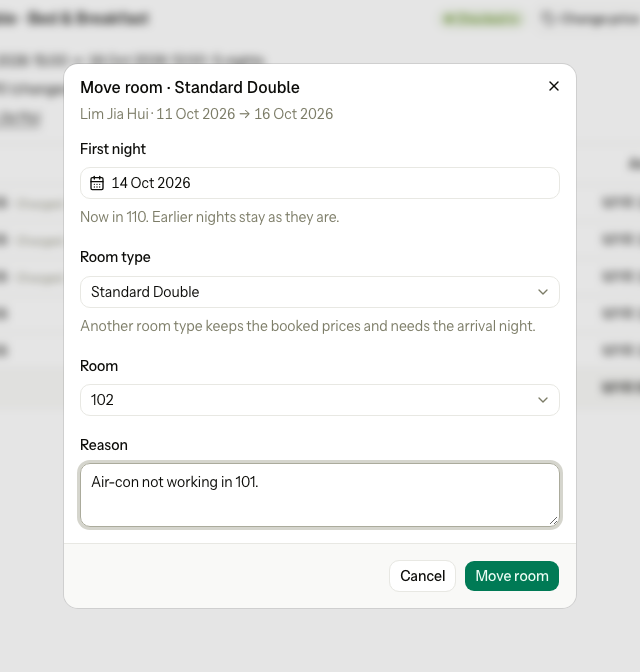
Check First night. Nights before it keep their room. For a guest in house it starts tonight.
-
Optional: choose another Room type. The move then covers the whole stay, from the arrival night.
-
Choose the Room. The list shows only rooms that are free.
-
Enter the Reason, for example "Air-con not working".
-
Select Move room.
- A booking with no room yet shows Assign room instead, and the reason is optional. See Assign rooms and beds.
- Another room type keeps the booked prices. To change the price, see Change a night's price.
On the Timeline
You can make the same changes by dragging a stay on the Timeline View. A dialog asks you to confirm. See Edit on the Timeline.
What happens
- Prices: nights you keep never change, even if the rate changed since booking. Added nights are priced at today's rates, for the added nights only.
- Rooms: an added night keeps the same room when it is free. If not, the night has no room, and you assign one.
- Add-ons: nightly add-ons, such as breakfast, are added to the new nights and removed from removed nights. Posted add-ons stay.
- Activity: the change is logged with the old and new dates, the totals and the reason.
Special cases
| Situation | Example | What happens | What to do |
|---|---|---|---|
| No room of that type is free | Every Standard Double is booked on 18 Oct. | • "No unit of this room type is free for these dates." | • Pick other dates, or move the guest to another room type. |
| The room is booked for the extra night | Room 204 is booked by another guest on 20 Oct. | • "Room 204 is booked by another guest for 20 Oct. Move one of them first." | • Move one of the guests, then extend. |
| A rate restriction | The new stay breaks a 3-night minimum. | • "The new nights break a rate restriction, for example a minimum stay. Ask someone who may book past restrictions." | • With Book past rate restrictions, enter a reason. Otherwise ask a manager. |
| No rate for a new night | The rate calendar has no rate for one of the new nights. | • "No rate is set for these dates." or the date with no rate. | • Set the rate on the rate calendar first. |
| The arrival of a guest in house | You try to change the arrival of a guest who is here. | • "Arrival cannot change once the guest is in the house." | • Change only the departure. |
| An arrival in the past | You move a booking to arrive yesterday. | • "Arrival cannot be before the business date." | • For a stay that already happened, use Past stay. |
| A package plan | A 3-night dive package. | • "A package plan sells a fixed number of nights, so its dates cannot change here." | • Cancel the unit and book the new dates. |
| A day use | A 4-hour day use. | • "A day use has one date and fixed hours, so its dates cannot change." | • Cancel it and book a new day use. |
| A move without a reason | A guest in house moves to room 102. | • "Enter a reason." | • Enter why the guest moves. |
| A move to another room type, mid-stay | A guest in house wants an upgrade from tonight. | • "A move to another room type must start on the arrival night." | • Move within the same room type, or change the room type from the arrival night. |
| A room type not on the plan | The rate plan does not sell Family Suites. | • "This room type is not sold on the unit's rate plan." | • Choose a room type the plan sells. |
| One room of a group | One room of a wedding group stays an extra night. | • Only that unit changes. | • Change the dates on that unit. |