
Revenue and tax
See what the property earned by transaction code, and the tax you collected, for each day or month.
Two reports answer the money questions of a period. Revenue lists what you charged, one row for each transaction code. Tax lists the tax you collected, for the tax return. Both read the folio ledger live, by the day each line was posted.
Payments are not revenue. A guest paying a bill moves money, and it does not change what you earned. See Payments and cash-up.
Before you start
- Permission: View and export reports (
reports.view). Owners, managers and finance staff have it by default. - Your taxes are set up. See Taxes.
Revenue
- Open Reports, then Revenue under Revenue.
- Pick the dates. See Use a report. The range can be 366 days.
- Select Day for one row for each day and code, or Month for one row for each month and code.
- To see the folio lines behind a row, select its Amount.
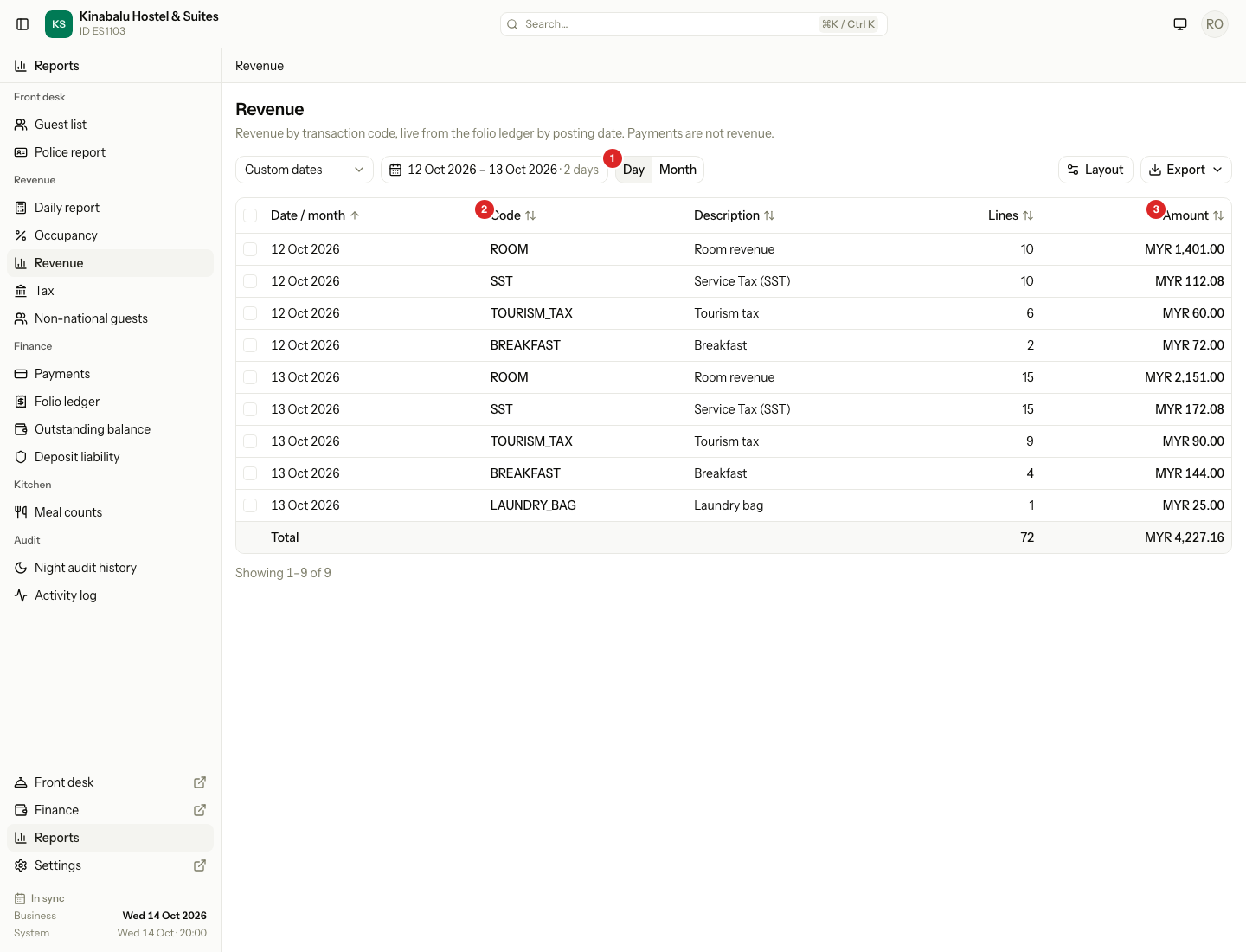
| Column | What it shows |
|---|---|
| Date / month | The day, or the month. A month holds only the days inside your dates. |
| Code | The transaction code, for example ROOM or SST. |
| Description | The name of the code. |
| Lines | How many folio lines the row adds up. |
| Amount | The sum of those lines. It is a link. |
The total row adds Lines and Amount.
What counts as revenue
| Counts | Does not count |
|---|---|
| Charges: rooms, meals, add-ons, fees | Payments and refunds |
| Taxes on the charges | Lines copied from the old system |
| Discounts and adjustments, as negative figures | The opening balance of a migrated guest |
| A reversal, on the day it was posted |
A tax has its own code, so it has its own row. To see revenue without tax, read the ROOM row and leave out the tax codes.
A worked example
One day of the report, 13 Oct:
| Code | Description | Lines | Amount |
|---|---|---|---|
| ROOM | Room revenue | 15 | MYR 2,151.00 |
| SST | Service Tax (SST) | 15 | MYR 172.08 |
| TOURISM_TAX | Tourism tax | 9 | MYR 90.00 |
| BREAKFAST | Breakfast | 4 | MYR 144.00 |
| LAUNDRY_BAG | Laundry bag | 1 | MYR 25.00 |
| Total | 44 | MYR 2,582.08 |
The same day on the Daily report Revenue tab shows the same total, grouped as buckets.
Open the folio lines
The Amount link opens the Folio ledger for that code and those dates. A day row opens that day. A month row opens the month, cut to your report's dates.
Tax
- Open Reports, then Tax under Revenue.
- Pick the dates and Day or Month. The range can be 366 days.
- Read one row for each date (or month) and tax.
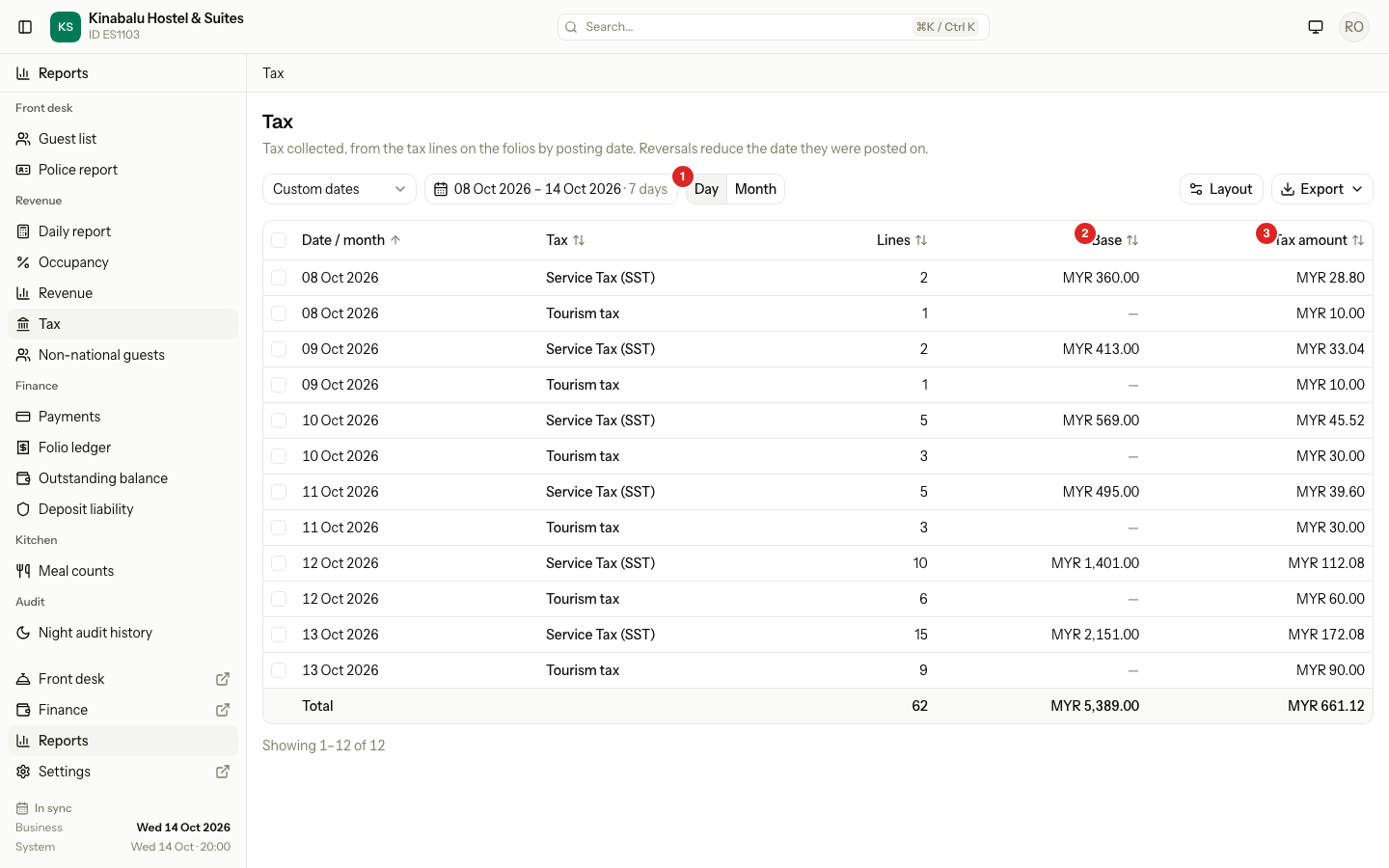
| Column | What it shows |
|---|---|
| Date / month | The day or month the tax was posted. |
| Tax | The name of the tax. |
| Registration no. | Your tax registration number. It is off at first. A manager can turn it on with Layout. |
| Lines | How many tax lines the row adds up. |
| Base | The price the tax was worked out on. |
| Tax amount | The tax collected. |
The base
Base is the charge the tax was added to, less any discount booked with it. For SST at 8%, a base of MYR 2,151.00 gives MYR 172.08.
A flat tax charges the same amount for each night, whatever the price. Tourism tax is one. It has no base, so Base shows "—". The total row adds the base of percentage taxes only.
A reversal lowers the base and the amount on the day it was posted.
Migrated from old system
If you moved from another system, the tax on its old bills is not in the main table or its total. Estatell lists it in a separate table under the main one, titled Migrated from old system (not in the total above). It shows each tax with its Lines and Amount for your dates. It shows on screen and in the PDF. It does not show in the spreadsheet.
Special cases
| Situation | What happens | What to do |
|---|---|---|
| A discount is added after the charge | The discount counts on the day it was posted. The tax on it is negative on that day. | Pick a range that holds both days. |
| A charge is reversed | The negative lines count on the day of the reversal. | Open the Amount link and read the ledger. |
| A tax has Base "—" | It is a flat tax. | Read Tax amount. |
| A guest from the old system has tax | It is in the Migrated from old system table, not in the total. | Read the two tables together. |
| The Revenue total differs from Room revenue on Occupancy | Revenue adds taxes, extras and fees too. | Read the ROOM row. It is the room revenue. |
| A month row | It holds only the days inside your dates. | Pick whole months to get whole-month totals. |