
Payments and cash-up
List every payment and refund by business date, and count each cashier's money for the day.
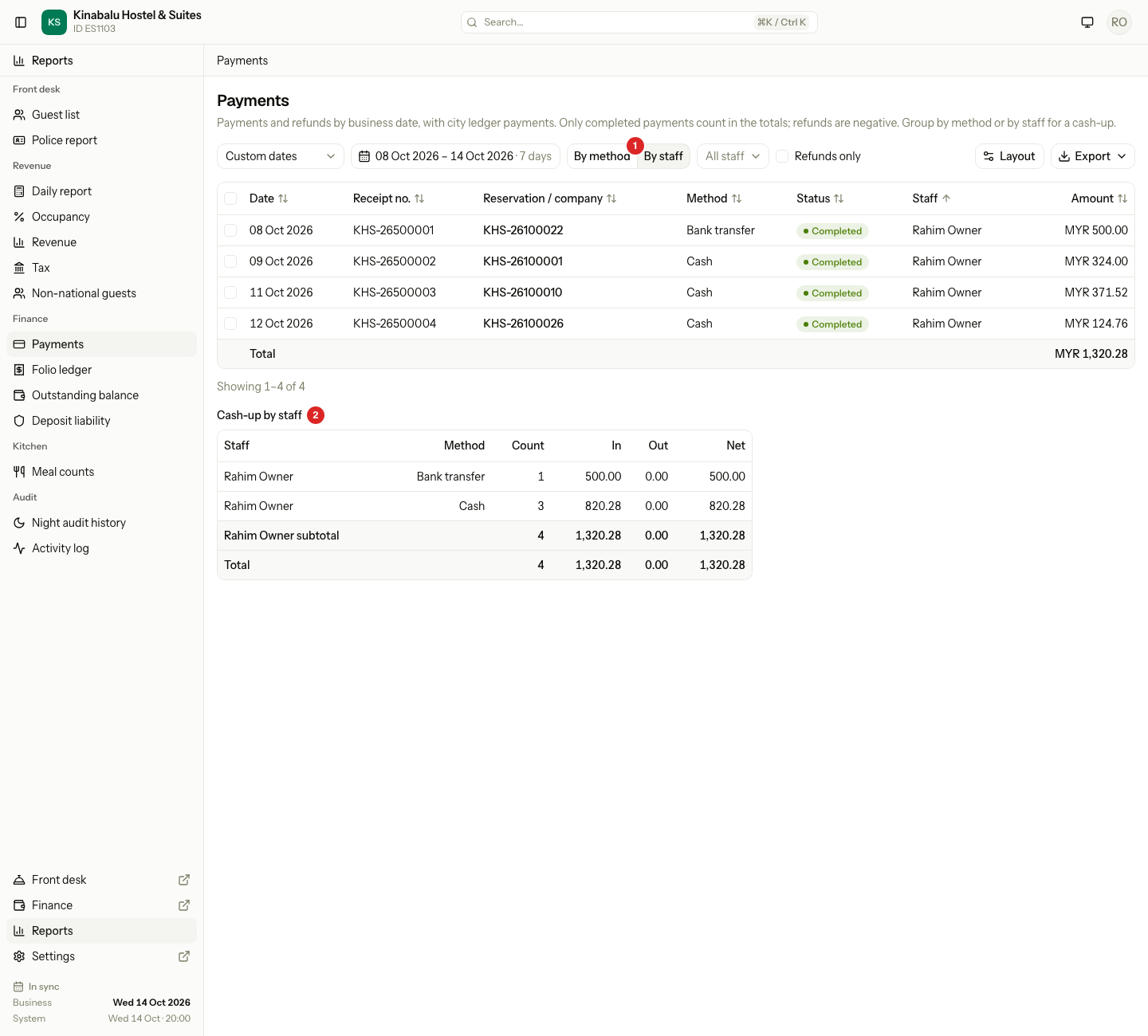
The Payments report lists every payment and refund that Estatell recorded in the dates you pick. Group it By method to see how much came in by cash, card and transfer. Group it By staff to count each cashier's money. That is the cash-up.
Before you start
- Permission: View and export reports. Owners, managers and finance staff have it by default.
- The report counts by business date, not by the clock. A payment taken at 01:00, before the night audit, belongs to the open business date. See Business date.
- For dates, sorting, selecting rows and export, see Use a report.
What the report lists
Open Reports, then Finance, then Payments. The report opens on the open business date. You can pick up to 366 days.
Each row is one payment or one refund. Payments from the city ledger are in the list too.
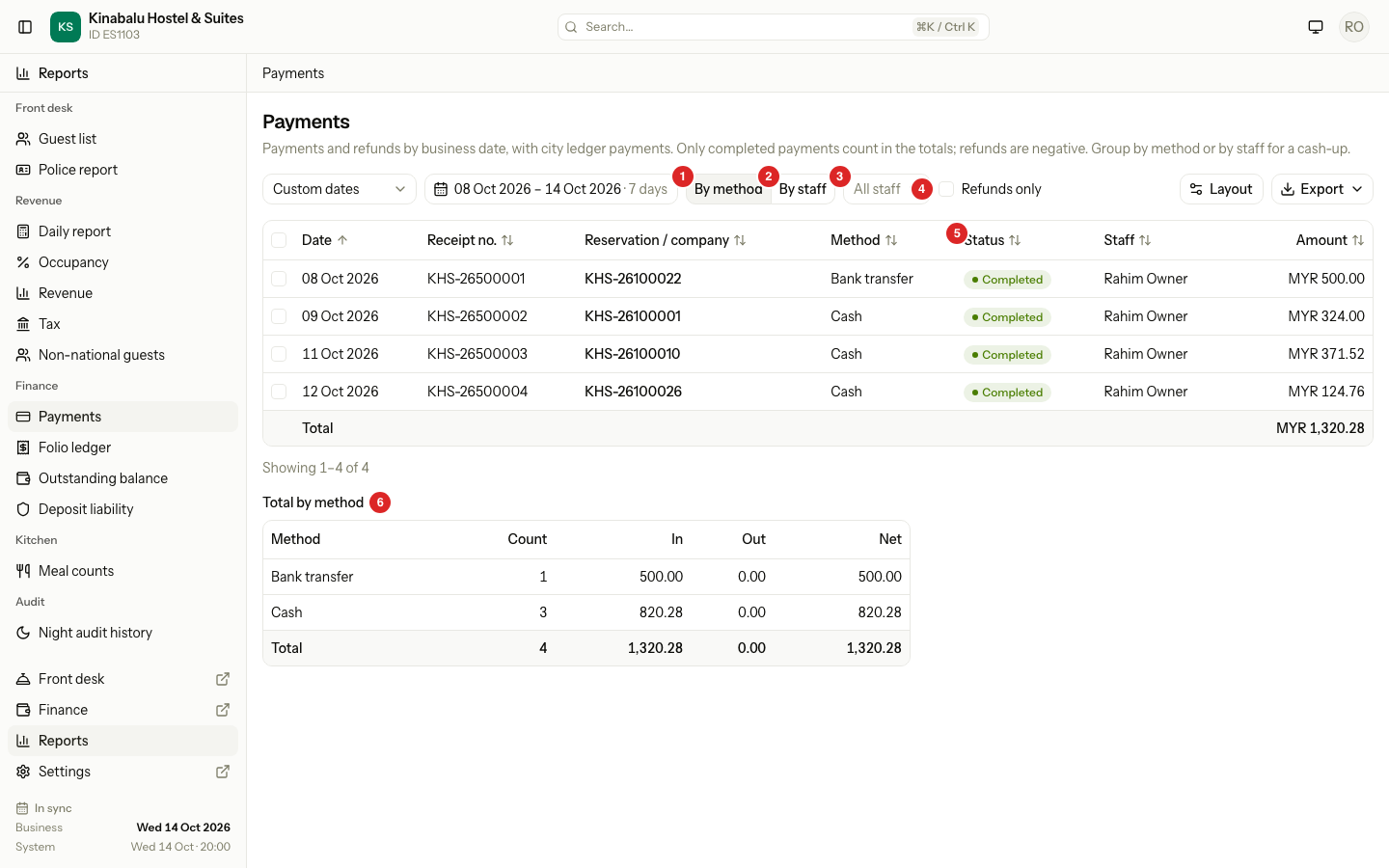
| Column | What it shows |
|---|---|
| Date | The business date of the payment. For a city ledger payment, the date it was received. |
| Receipt no. | The receipt number. A refund has no receipt, so it shows "—". |
| Reservation / company | The reservation number. For a city ledger payment, the company name. |
| Method | Cash, Card, Bank transfer, E-wallet and so on. |
| Status | Pending, Completed, Failed or Voided. |
| Staff | The person who recorded the payment or gave the refund. |
| Amount | The money received. A refund shows as a negative amount. |
| Reference | Your note, such as a card slip number. Hidden at first. |
| Original receipt | On a refund, the receipt number of the payment it gave back. Hidden at first. |
To show the hidden columns, use Layout. See Report layout.
Payments recorded with the Old system method are not in this report. They are balances brought from another system, not money you took.
What the totals count
The total row and the summary table under the list follow the same rules.
| Row | In the total? |
|---|---|
| A Completed payment | Yes, it adds. |
| A refund of a completed payment | Yes, it subtracts. |
| A Pending payment | No. It shows in the list but adds nothing. |
| A Failed payment | No. It shows in the list but adds nothing. |
| A Voided payment | No. It shows in the list but adds nothing. |
| A city ledger payment that is not voided | Yes. It counts as Completed. |
The summary has these columns:
| Column | Meaning |
|---|---|
| Count | The number of Completed rows. |
| In | The Completed payments added up. |
| Out | The Completed refunds added up, as a negative figure. |
| Net | In plus Out. This is the money you keep. |
The total row at the bottom of the list shows the Net amount.
Count money by method
- Open Reports, Finance, Payments.
- Pick the dates.
- Select By method.
Under the list, Total by method shows one row for each method and a Total row. Use it to match the bank, the card machine and the cash drawer.
Do a cash-up
A cash-up counts what each cashier took. Do it at the end of a shift or day.
- Open Reports, Finance, Payments.
- Set the dates to the business date you count. Use one date for a daily cash-up.
- Select By staff.
- To see one person only, open All staff and choose a name. The list shows only staff who took a payment in these dates.
- Read Cash-up by staff. Each person has one row for each method. A subtotal row follows, in bold, with the person's own total.
- Compare the Cash line with the money in the drawer.
- To keep a record, select Export. See Use a report.
To see only the refunds, tick Refunds only. The list then shows the refunds of folio payments. City ledger payments are not refunds, so they leave the list.
Each choice you make stays in the page address. You can bookmark it or send it to a colleague. Changing the dates, the group, All staff or Refunds only clears the rows you selected.
Special cases
| Situation | What happens | What to do |
|---|---|---|
| Two cashiers share one day and one login | The report shows one person. | Give each cashier a login. The cash-up follows the login. |
| Two shifts on one business date | The cash-up is by business date and person. It has no shift times. | Use one login for each shift, or count the drawer at each hand-over. |
| A folio payment was voided | The payment stays Completed. The void is a refund row for the whole amount, so the two cancel out. | Nothing. See Refund or void a payment. |
| A city ledger payment was voided | It shows as Voided and adds nothing. | Nothing. |
| A refund goes back by a different method | The refund counts under the method that gave the money back. | Check Total by method for that method. |
| A refund is on a later day than the payment | The refund counts on the day it was posted. | Pick both dates to see them together. |
| A card payment has a surcharge | The surcharge is a separate charge on the folio. It is not in this report. | Look in the Folio ledger. |
| A payment you took is missing | It may have another business date, or its method is Old system. | Widen the dates. Check the folio. |
| You export only some rows | The totals and the summary cover only the rows you selected. | Select no rows to export every row that matches. |