
Occupancy
See occupancy, ADR and RevPAR for each business date, with the open day shown live.
The Occupancy report shows how full the property was on each business date, and what each room earned. Use it to compare days, and to check the figures you read in the night audit morning report.
For a quick look with charts, see Performance on the dashboard. It uses the same totals.
Before you start
- Permission: View and export reports (
reports.view). Owners, managers and finance staff have it by default. - Closed dates need a night audit. A day has figures only after the audit closed it. See Run the night audit.
Steps
- Open Reports, then Occupancy under Revenue.
- Pick the dates. See Use a report. The range can be 366 days.
- Read one row for each business date. The last row is the total.
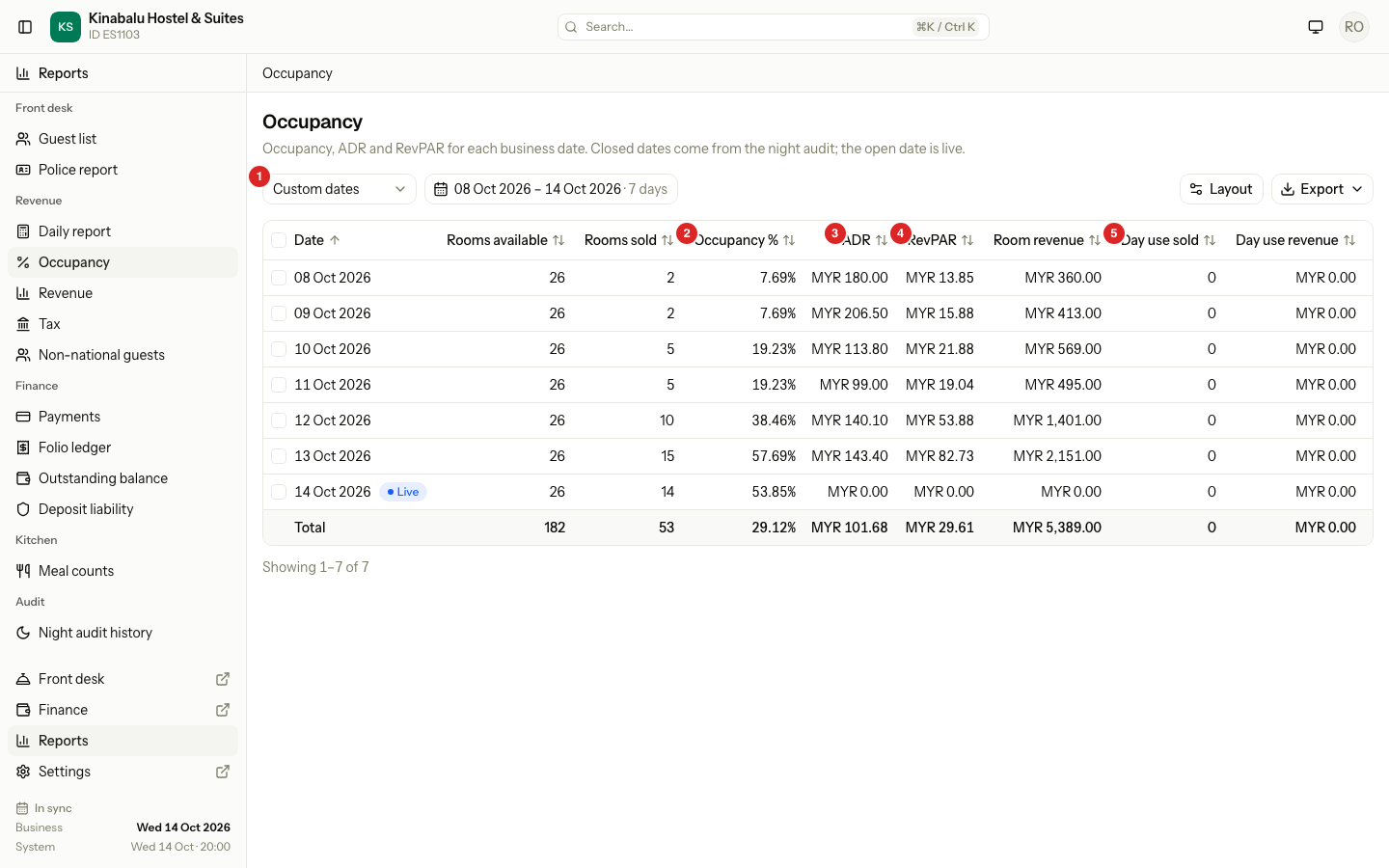
What each column shows
| Column | What it shows |
|---|---|
| Date | The business date. The open date has a Live badge. |
| Rooms available | Rooms and beds you could sell that night. A room in a room block is not counted. |
| Rooms sold | Rooms and beds with a guest that night. |
| Occupancy % | Rooms sold divided by Rooms available. |
| ADR | Average daily rate: Room revenue divided by Rooms sold. |
| RevPAR | Revenue per available room: Room revenue divided by Rooms available. |
| Room revenue | Room charges for the date, after discounts, without tax. |
| Day use sold | Day use bookings that day. |
| Day use revenue | What day use earned, without tax. |
| Arrivals | Guests checked in that day. |
| Departures | Guests checked out that day. |
| No-shows | Bookings marked no-show that day. |
| In-house guests | Adults and children in house at the close. |
A room and a bed count as one each. A dorm with four beds adds four to Rooms available, not one. The column names say "Rooms", but they count beds too.
A worked example
One night with 26 rooms and beds, 15 sold, and MYR 2,151.00 of room revenue:
| Figure | Working | Result |
|---|---|---|
| Occupancy % | 15 ÷ 26 | 57.69% |
| ADR | 2,151.00 ÷ 15 | MYR 143.40 |
| RevPAR | 2,151.00 ÷ 26 | MYR 82.73 |
The total row
The total row adds Rooms available, Rooms sold, Room revenue, Arrivals, Departures and No-shows. It then works Occupancy %, ADR and RevPAR out again from those sums. It does not average the rows. In-house guests has no total, because each night counts the same guests again.
The Live row
The open business date has a Live badge. Estatell works its figures out now, so you see them before the audit.
- Rooms sold counts the guests who sleep in the property tonight.
- ADR, RevPAR and Room revenue read 0.00 until the audit posts the night's room charges.
- When the audit closes the date, the badge goes and the figures are saved. A closed date never changes.
Which dates show
| Date | Shows? |
|---|---|
| A closed date | Yes. |
| The open business date | Yes, as Live. |
| A date after the open date | No. Estatell does not forecast. |
| A date before go-live | No. There are no saved figures. |
If the range holds no figures at all, the report says "No figures for these dates". Figures start on the first closed business date.
Day use
Day use has its own columns, Day use sold and Day use revenue. It is not in Rooms sold, Occupancy %, ADR or RevPAR, because the room is sold again that night. See Day use.
Special cases
| Situation | What happens | What to do |
|---|---|---|
| A date has no row | It is after the open date, or before go-live. | Pick dates between go-live and today. |
| ADR or RevPAR is negative | A correction reversed charges of earlier nights, and the day had fewer new charges. The figure keeps the sign. | Open Folio ledger for the day and read the reversals. |
| The Live row has no ADR | The night is not charged yet. | Look again after the audit. |
| A room is under a room block | It is not in Rooms available. | Remove the block if the room is back in use. |
| You find a mistake on a closed date | The date is closed, so the row never changes. | Post the correction on the open date. |
| The figures differ from the dashboard | The dashboard shows another period or comparison. | Use the same dates. The totals agree. |