
Folio ledger
List every line posted to every folio on the dates you pick, and find one line fast.
The Folio ledger lists every line posted to every folio on the dates you pick: charges, taxes, payments and corrections. It is the full record behind the other finance and revenue reports. Use it when a figure looks wrong and you need to see the lines.
Before you start
- Permission: View and export reports. Owners, managers and finance staff have it by default.
- The ledger counts by Posting date, the business date a line was posted on. It is not the date of the stay.
- For dates, sorting, selecting rows and export, see Use a report.
Read the ledger
Open Reports, then Finance, then Folio ledger. The report opens on the open business date. You can pick up to 31 days.
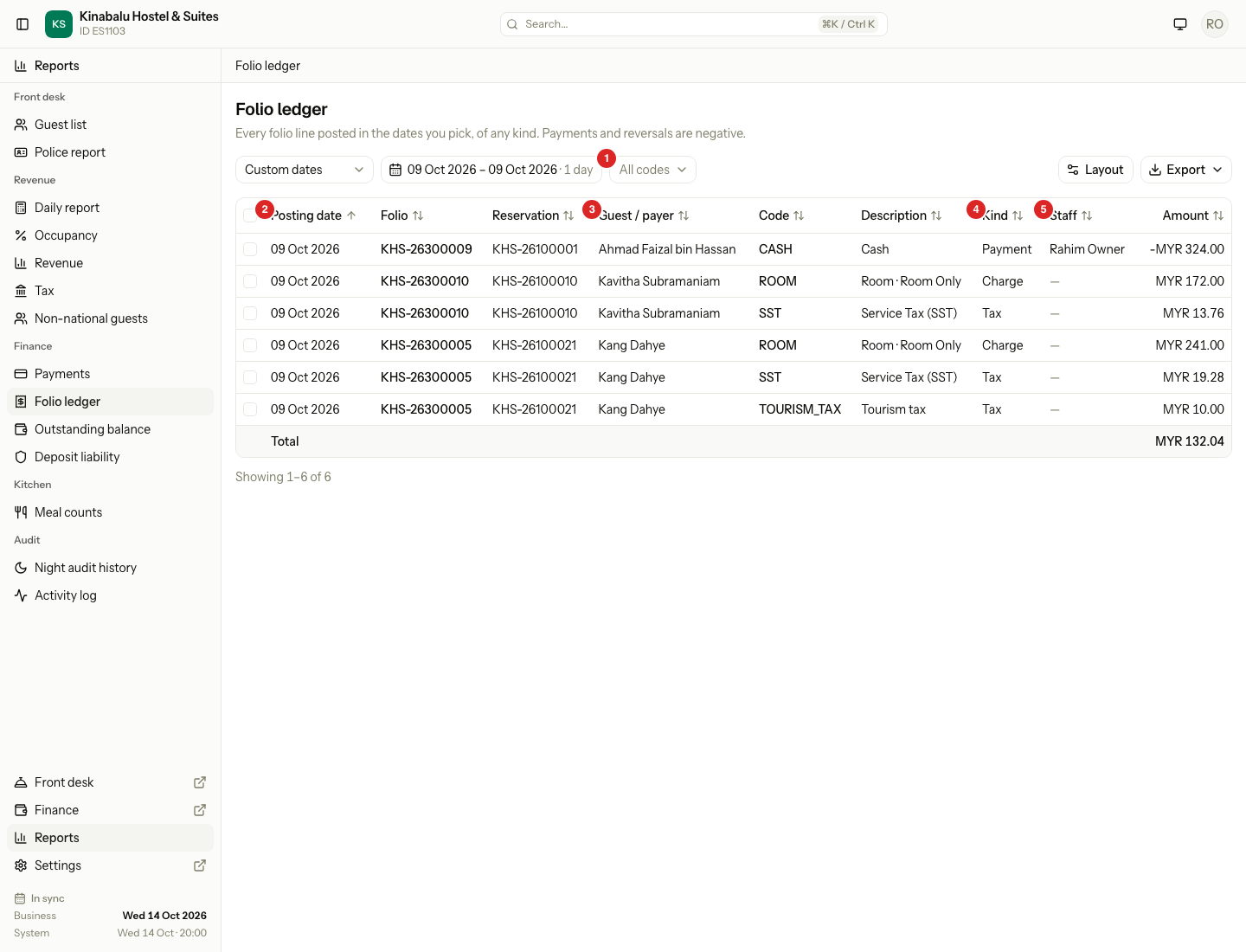
| Column | What it shows |
|---|---|
| Posting date | The business date the line was posted on. |
| Folio | The folio number. |
| Reservation | The reservation number. |
| Guest / payer | Who pays the folio. See Who is the payer. |
| Code | The transaction code, such as ROOM, SST or CASH. |
| Description | The text of the line. |
| Kind | Charge, Tax, Payment or Adjustment. |
| Staff | The person who posted the line. Empty for a line Estatell posted by itself. |
| Amount | The signed amount of the line. |
| Service date | The date the service was for. Hidden at first. |
To show Service date, use Layout. See Report layout.
The Amount is signed like the folio. A payment is negative. A reversal is negative. The total row adds all the amounts you see, so on a day with payments it is the charges minus the money received.
Who is the payer
Guest / payer shows one name for each folio, in this order:
- The company, if a company pays the folio.
- Else the guest who pays the folio.
- Else the person who made the booking.
Staff is empty
A line with no Staff was posted by Estatell, not by a person. The room charge and its tax, posted by the night audit, are examples.
Find the lines of one code
- Open Folio ledger and pick the dates.
- Open All codes and choose a code. The list shows the code and its name, for example
ROOM · Room revenue.
The list now shows only that code. Choose All codes to go back. The choice stays in the page address, so you can bookmark it.
Changing the code or the dates clears the rows you selected.
Come from another report
On the Revenue and tax report, select the Amount of a code. The Folio ledger opens with that code and the dates of the row. Read the lines to see what makes the figure.
Special cases
| Situation | What happens | What to do |
|---|---|---|
| You need a line from a month ago | The ledger holds 31 days at most. | Search one month at a time. |
| A mistake was fixed | The first line stays. A reversal line, with the opposite sign, is posted on the day of the fix. | Read both lines. Reports count each on its own posting date. See Post charges. |
| Staff is empty | Estatell posted the line, for example the night audit. | Nothing. |
| A folio was settled to the city ledger | Its lines stay. One negative line with the code DIRECT_BILL takes the balance off the folio. | See Settle to City ledger. |
| A payment shows under a different date than the stay | The ledger uses Posting date. | Show Service date with Layout to see the date the service was for. |
| A reservation has several folios | Each folio has its own lines, with its own folio number. | Find the folio in the Folio column. |
| You pick a code that has no lines | The list is empty. | Pick other dates or All codes. |