
Taxes
Add, change and turn off the taxes on a guest bill, such as SST and tourism tax, and see how each one is worked out.
A tax describes one tax: its name, its rate, and who pays it. The Taxes screen holds the list. It does not choose which charges a tax is added to. You do that on Room revenue for room nights and on Charge items for extras.
You set your first taxes in onboarding. See Taxes. This page is for changes after go-live.
Before you start
- Permission: Manage property settings. Owners and managers have it by default.
- Know the rate, whether the price already contains the tax, and your registration number if you have one.
Steps
- Open Settings, then Taxes under Billing setup.
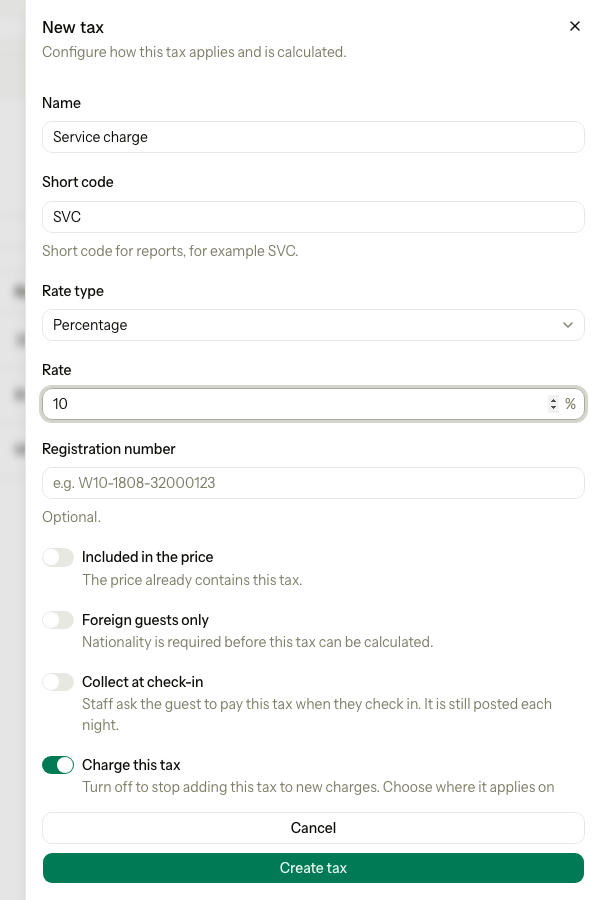
- Select New tax. To change a tax, select Edit on its row.
- Enter the Name, for example "Service charge".
- Enter the Short code, for example
SVC. Estatell makes it upper case. - Choose the Rate type: Percentage or Flat amount.
- Enter the Rate. A flat amount is per night, in your currency.
- Enter the Registration number if you have one. It is optional.
- Turn on the switches you need. See The switches.
- Select Create tax, or Save changes.
- Open Room revenue or Charge items and choose where the new tax applies.
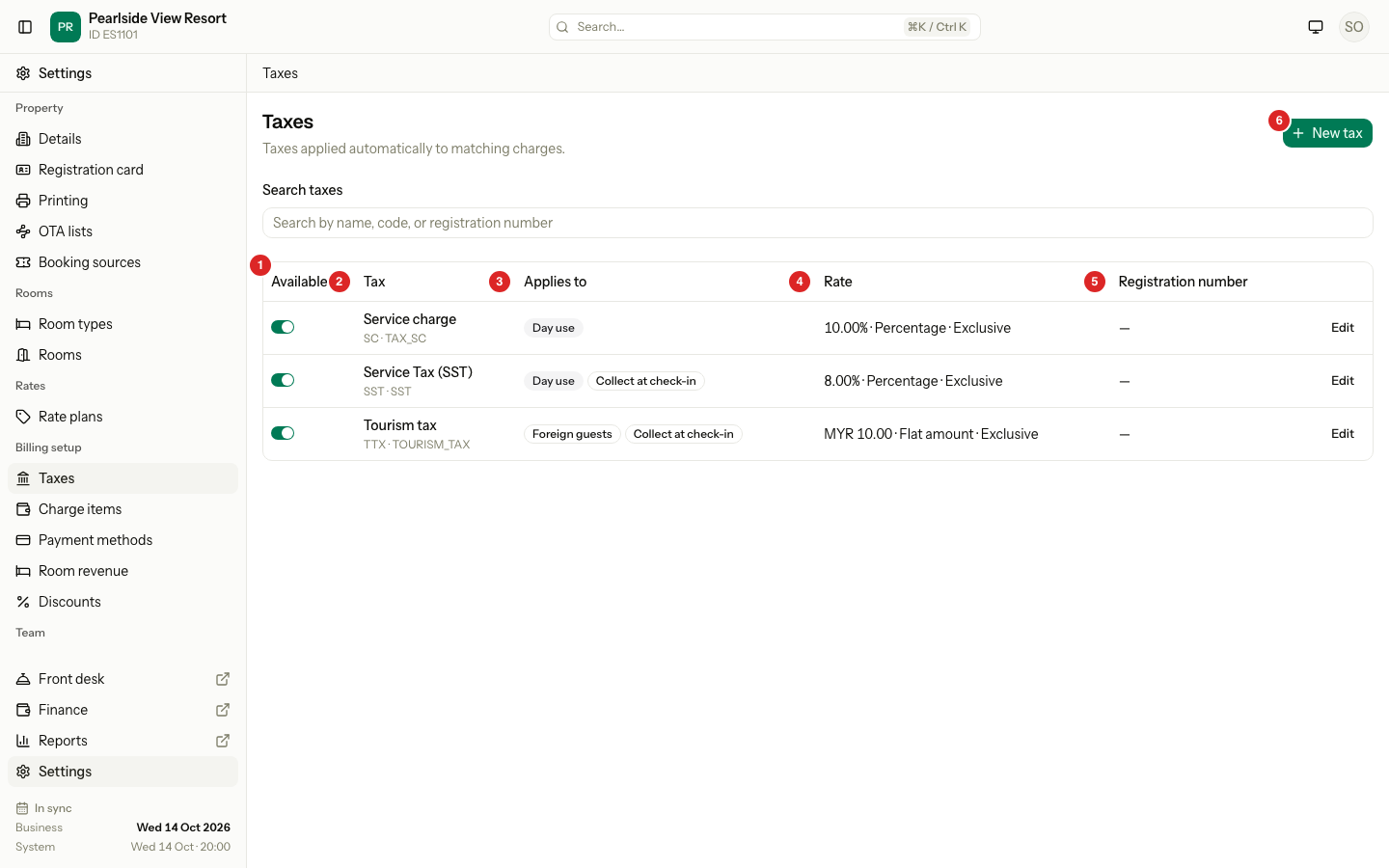
The list
| # | Column | What it shows |
|---|---|---|
| 1 | Available | A switch. Off means Estatell stops adding the tax to new charges. The row shows Inactive. |
| 2 | Tax | The name, the short code, and the code on the bill. |
| 3 | Applies to | The charge items and codes that use the tax, and the tags Foreign guests and Collect at check-in. |
| 4 | Rate | For example "8.00% · Percentage · Exclusive". |
| 5 | Registration number | Your tax number, or a dash. |
The list shows turned on taxes first. Use Search taxes to find a tax by name, code or registration number.
A red tag Not applied to any charge means no charge uses the tax yet. The Applies to column does not list room nights. Open Room revenue to see those.
The switches
| Switch | What it does |
|---|---|
| Included in the price | The price already contains the tax. Estatell takes the tax out of the price. Without it, Estatell adds the tax on top. |
| Foreign guests only | Estatell adds the tax only for guests from another country. It needs the guest's nationality. |
| Collect at check-in | The check-in form adds this tax to the amount staff ask for. It is still posted each night. |
| Charge this tax | Turn off to stop adding the tax to new charges. |
Example: how the tax is worked out
The room price is MYR 100.00 for one night.
| Tax | Setting | Guest pays | Of which tax |
|---|---|---|---|
| Service Tax (SST) 8% | Added on top | 108.00 | 8.00 |
| Service Tax (SST) 8% | Included in the price | 100.00 | 7.41 |
| Tourism tax MYR 10 per night | Added on top, Foreign guests only | 110.00 for a foreign guest, 100.00 for a Malaysian guest | 10.00 |
Rules Estatell follows:
- Taxes never add tax on tax. SST and a 10% service charge both take 8% and 10% of MYR 100.00, so a Malaysian guest pays MYR 118.00.
- A flat tax is the amount times the number of nights. Three nights of the tourism tax is MYR 30.00.
- For an included percentage tax, Estatell splits the price: 100.00 ÷ 1.08 = 92.59 for the room, and 7.41 is the tax.
- A flat tax that is included is taken out first.
Special cases
| Situation | What happens | What to do |
|---|---|---|
| The rate is 0 or empty | Estatell refuses to save. | Enter a rate above 0, or turn the tax off. |
| A percentage is more than 100 | Estatell shows "A percentage tax cannot exceed 100%." | Enter a lower rate. |
| Another tax has the same name | Estatell shows "Another tax already uses this name." | Use a different name. |
| Another tax has the same short code | Estatell shows "Another tax already uses this code." | Use a different code. |
| The code clashes with an existing bill code | Estatell says the posting code TAX_ plus your code is already in use. | Choose a different short code. |
| A tax is for foreign guests and the guest has no nationality | Estatell cannot work out the tax. | Add the nationality to the guest. |
| You want to remove a tax | You cannot delete a tax. | Turn Available off. |
| You change a rate | New charges use the new rate. Charges already on a bill do not change. | Fix an old bill with a correction on the bill. |
| A tax is turned off but still chosen on Room revenue | Estatell skips it until it is turned on. | Turn it on again, or remove it from Room revenue. |