
Non-national guests
List the foreign guests who stayed, with their nights and the tourism tax charged to them.
The Non-national guests report lists the stays of guests from another country. It shows how many nights each one stayed and the tourism tax charged, so you can check the tax you collect from foreign guests.
Before you start
- Permission: View and export reports (
reports.view). Owners, managers and finance staff have it by default. - ID numbers: staff without View guest documents (
guests.view-documents) see them masked. See ID numbers. - Guests need a nationality. See Special cases.
Steps
- Open Reports, then Non-national guests under Revenue.
- Pick the dates. See Use a report. The range can be 31 days.
- Read one row for each stay. The last row is the total.
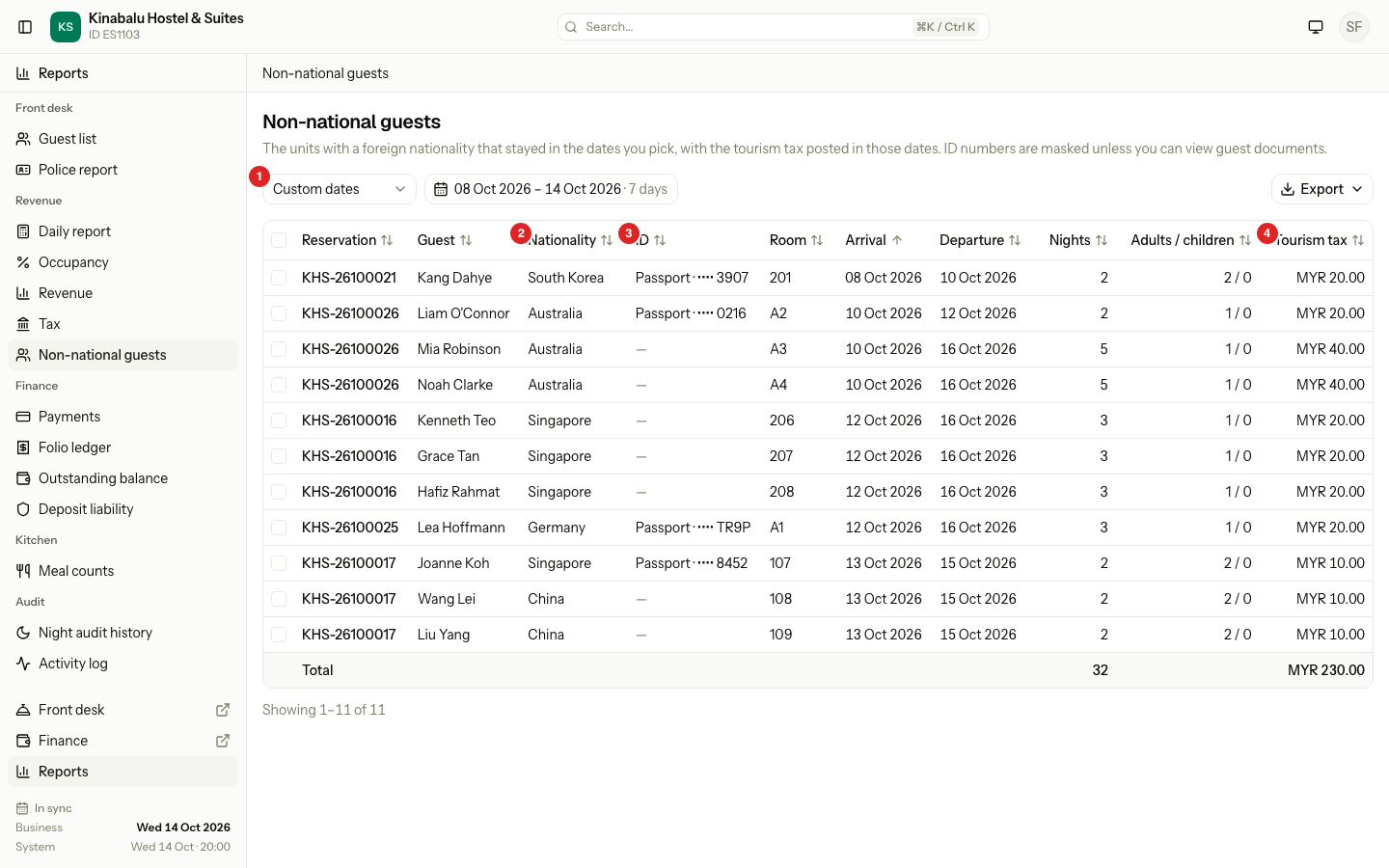
Which stays are listed
A stay is in the report when all of these are true:
- The guest is Checked in or Checked out. Confirmed, cancelled and no-show bookings are left out.
- The stay overlaps your dates.
- The nationality is set and is not Malaysia.
The nationality is the main guest's. If the room has no main guest, it is the nationality of the person who booked.
What each column shows
| Column | What it shows |
|---|---|
| Reservation | The booking number. |
| Guest | The main guest, or the person who booked. |
| Nationality | The country, in full, for example "Singapore". |
| ID | The type and number of the guest's latest document. A passport comes first. A dash means no document is saved. |
| Room | The room or bed of the first night. |
| Arrival, Departure | The dates of the stay. |
| Nights | The nights of the stay inside your dates. |
| Adults / children | The guests in that room. |
| Tourism tax | The tourism tax posted in your dates, after reversals. |
Six more columns are off at first: ID type, ID number, Arrival time, Departure time, Adults and Children. A manager can turn them on. See Report layout.
The total row adds Nights, Adults, Children and Tourism tax.
Nights and tourism tax
Nights counts only the nights inside your dates. A guest who arrives on 10 Oct and leaves on 16 Oct shows 5 nights for 8 to 14 Oct.
Tourism tax counts the tax lines posted in your dates for taxes marked Foreign guests only. A reversal is negative, so a refunded tax lowers the figure. The tax can be posted on a different day than the night, so a stay that has not been charged yet can show MYR 0.00. See Taxes.
ID numbers
Without View guest documents, a number shows with only its last four characters, for example "Passport · •••• 3907". The masking holds on screen, in the PDF and in the spreadsheet.
Staff with the permission see the full number. When they export full numbers, Estatell writes an entry in the activity log, without the number. See Police report.
Special cases
| Situation | What happens | What to do |
|---|---|---|
| A room has no nationality | It is not listed. Above the table, a note says "1 unit has no nationality. Its tourism tax may be missing." (or "N units"). | Add the nationality to the guest. Estatell cannot add foreign-only tax without it. |
| A guest from Malaysia | The stay is not listed. | Use the Police report for every guest. |
| A guest has no ID | ID shows "—". | Add the document on the guest profile. |
| A day use booking | It is listed on its date, with 0 nights. | None. |
| A stay is not yet checked in | It is not listed. | Look again after check-in. |
| The tourism tax is missing on a row | The tax line may not be posted yet, or the property has no tax marked Foreign guests only. | Check Taxes and the folio. |
| You need every guest, not only foreign ones | This report lists one row for each stay. | Use the Police report and turn on Foreign only. |