
Police report
List every guest who stayed, of any nationality, with their ID, address and check-in details, for the police or the tourism office.
The Police report is your guest register. It lists each guest who stayed in the dates you pick, with the details an officer asks for: nationality, date of birth, ID, address and the times the guest checked in and out. Print it, or export it to a file.
Before you start
- Permission: View and export reports. Owners, managers and finance staff have it by default.
- To see full ID numbers, you also need View and manage guest ID documents. Owners, managers and front desk staff have it by default. Without it, numbers are masked. See ID numbers.
- Guests need their details on the reservation. See Identity documents.
Read the report
- Open Reports in the staff sidebar, then Police report under Front desk.
- Pick the dates. The longest range is 31 days. See Use a report.
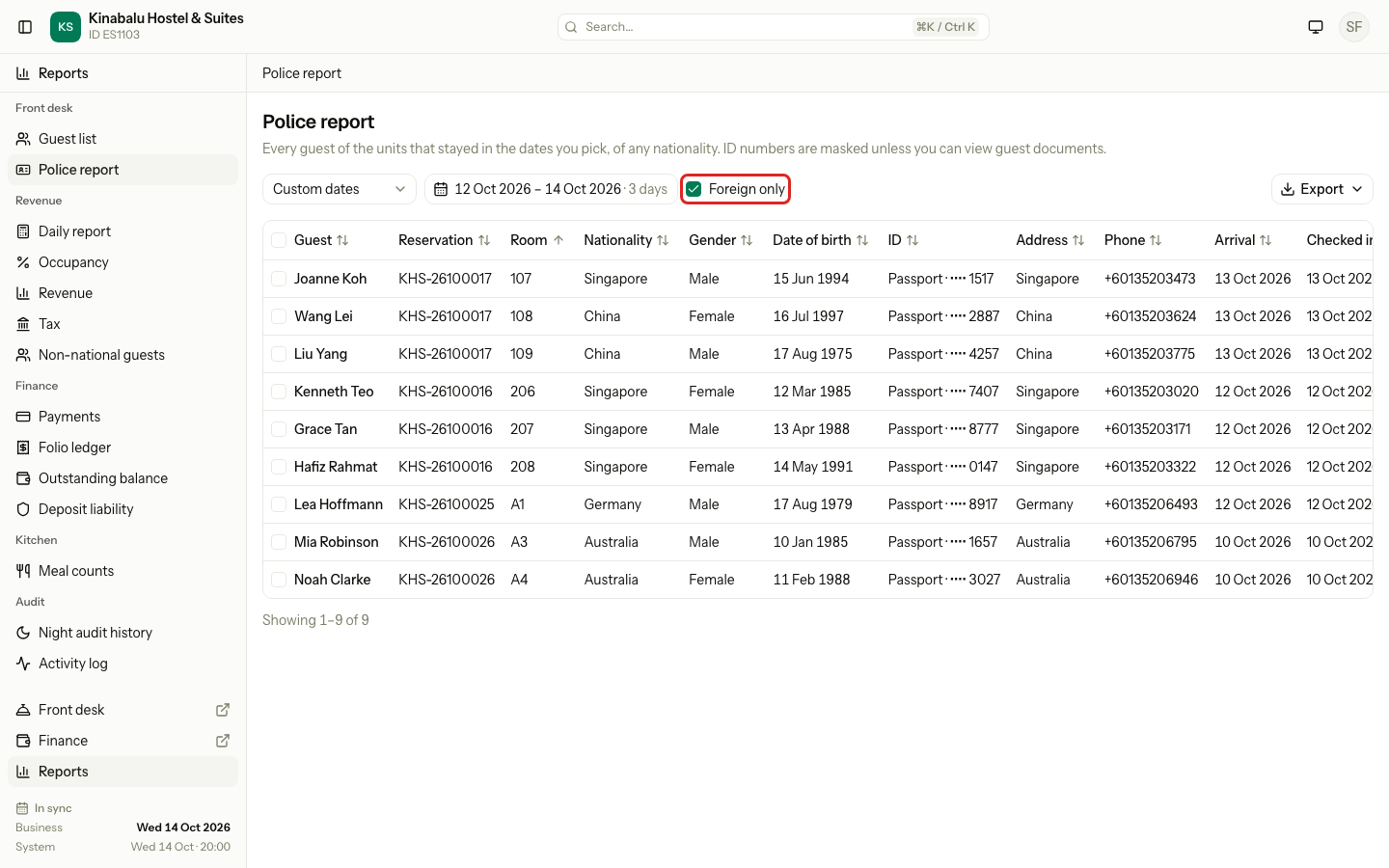
- To see only foreign guests, select Foreign only.
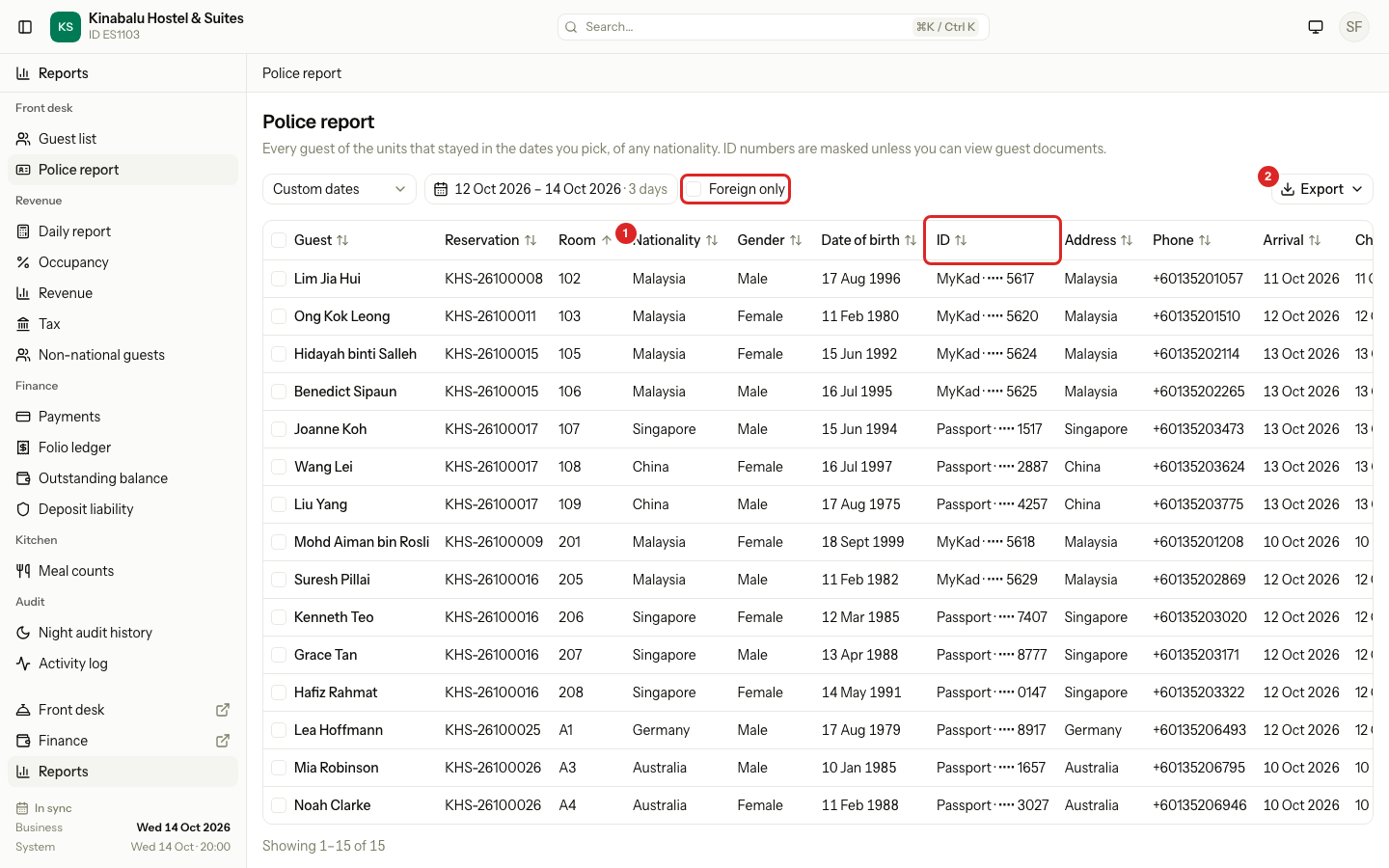
The report lists guests of every nationality. A foreign guest is a guest whose nationality is set and is not the country of your property.
Who is on it
There is one row for each guest of each room or bed that stayed in the dates. A room with two guests gives two rows.
| Situation | On the report? |
|---|---|
| Checked in, or checked out, with arrival on or before the last date and departure after the first date | Yes |
| A day use stay on a date in the range | Yes |
| Confirmed but not arrived yet | No |
| Cancelled or no-show | No |
| A room or bed with no guest attached | One row for the person who made the booking |
Columns
| Column | What it shows |
|---|---|
| Guest | The guest's name. |
| Reservation | The reservation number. |
| Room | The room or bed. |
| Nationality | The full country name, for example "Singapore". |
| Gender, Date of birth | From the guest profile. |
| ID | The type and the number, for example "Passport · •••• 1517". |
| Address | One line with the address and the country. |
| Phone | The guest's phone number. |
| Arrival, Departure | The dates of the stay. |
| Checked in, Checked out | The date and time the guest checked in and out, in the property's time zone. |
| Status | The status of the room or bed. |
Some columns are hidden at first: ID type, ID number, the times, and the separate date and time of check-in and check-out. Show them in Layout. See Report layout. The report has no total row.
ID numbers
The ID column shows the guest's latest ID document. If the guest has a passport, Estatell shows the passport first, even when another document is newer. Otherwise it shows the newest document.
Estatell hides ID numbers from staff who may not see them. The mask hides all but the last four characters.
| Your permission | What the ID column shows | In an export |
|---|---|---|
| View and manage guest ID documents | The full number. A MyKad number shows its dashes. | The full number. |
| Without it | "Passport · •••• 1517" | The masked number. |
The mask applies on screen, in the PDF, and in CSV and Excel files. A masked file never holds the full number.
The activity log
When you export full ID numbers, Estatell records it. The activity log shows an entry with the event report.exported_identity_numbers. It names the user, the report, the dates, the number of rows and the format. It never holds an ID number.
Estatell records an entry when all of these are true:
- You can view guest documents.
- You export a PDF, CSV or Excel file, or you select Preview PDF in Layout.
- The ID or ID number column is visible.
- At least one exported row has an ID.
Looking at the report on screen writes no entry. A masked export writes none.
Special cases
| Situation | What happens | What to do |
|---|---|---|
| A guest has no ID on file | ID shows "—". | Add the document on the guest profile. See Identity documents. |
| A guest has no nationality | They show on the report with a blank Nationality. Foreign only leaves them out. | Add the nationality to the guest profile. |
| A room has guests who are not attached to it | Only the attached guests have a row. | Attach each guest to the room before check-in. |
| The guest checked out early | The report lists the stay up to the new departure date. | None. |
| You export with a layout that hides ID and ID number | The file has no ID. Estatell records nothing. | Show the ID column in Layout if the officer needs it. |
| You cannot see full numbers and need them | The report shows masked numbers. | Ask an owner or manager to export it, or to give you View and manage guest ID documents. |
| The range is longer than 31 days | The calendar does not let you pick it. | Run the report for each month. |