
Charge items
The products and services staff add to a bill, their prices, and the code each one owns.
A charge item is something you sell on top of the room: breakfast, laundry, an extra bed, an airport transfer. Staff pick charge items when they add a charge to a bill or an add-on to a booking.
Each item owns a Code. The code shows in reports and in the accounting export. Two items never share a code, so you can report parking apart from laundry. There is no separate code screen.
You set your first items in onboarding. See Charge items. This page covers changes after go-live.
Before you start
- Permission: Manage property settings. Owners and managers have it by default.
- Set your taxes first, so you can choose them on the item.
- For an item priced per child, set your age groups. See Age groups.
Steps
- Open Settings, then Charge items under Billing setup.
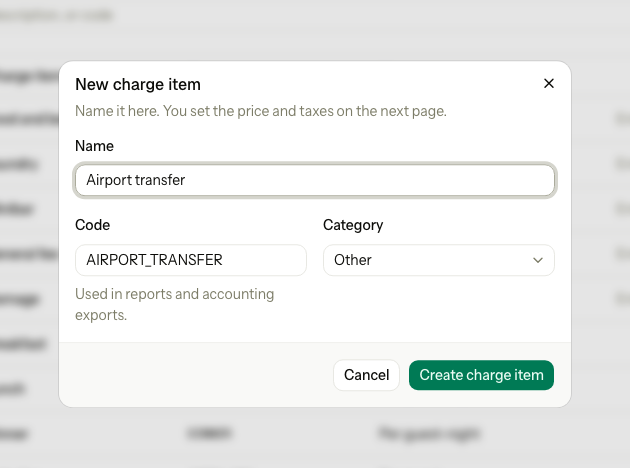
- Select New charge item.
- Enter the Name, for example "Airport transfer". Estatell suggests a Code.
- Check the Code. Change it if you want a different one. It is upper case, up to 20 characters.
- Choose the Category. Select Create charge item.
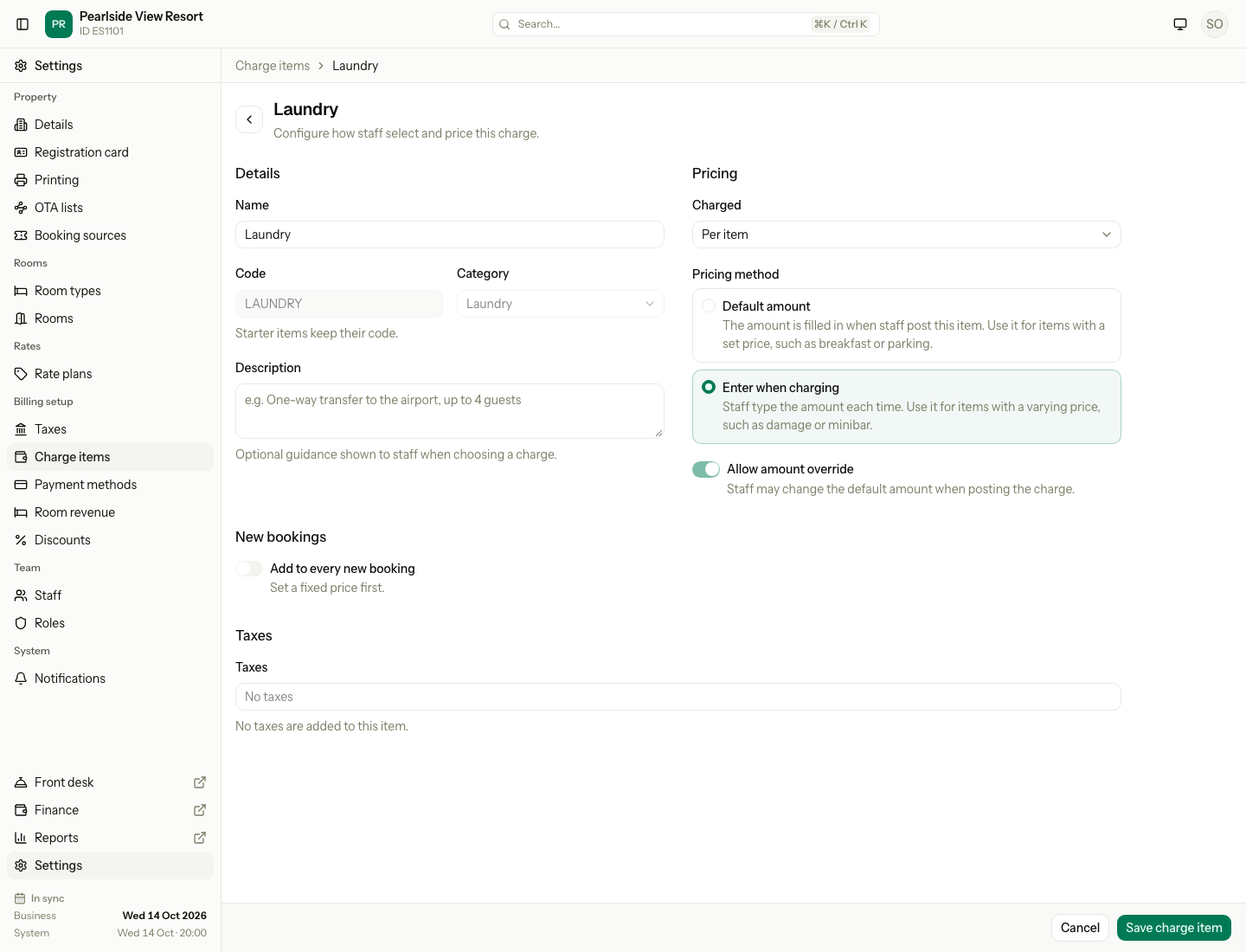
- On the edit page, choose Charged.
- Under Pricing method, choose Default amount and enter the Price, or choose Enter when charging.
- Turn on Allow amount override if staff may change the price when they add the charge.
- If the item is per guest, set the Children prices.
- Turn on Add to every new booking if every new room should get this item.
- Choose the Taxes for the item.
- Select Save charge item.
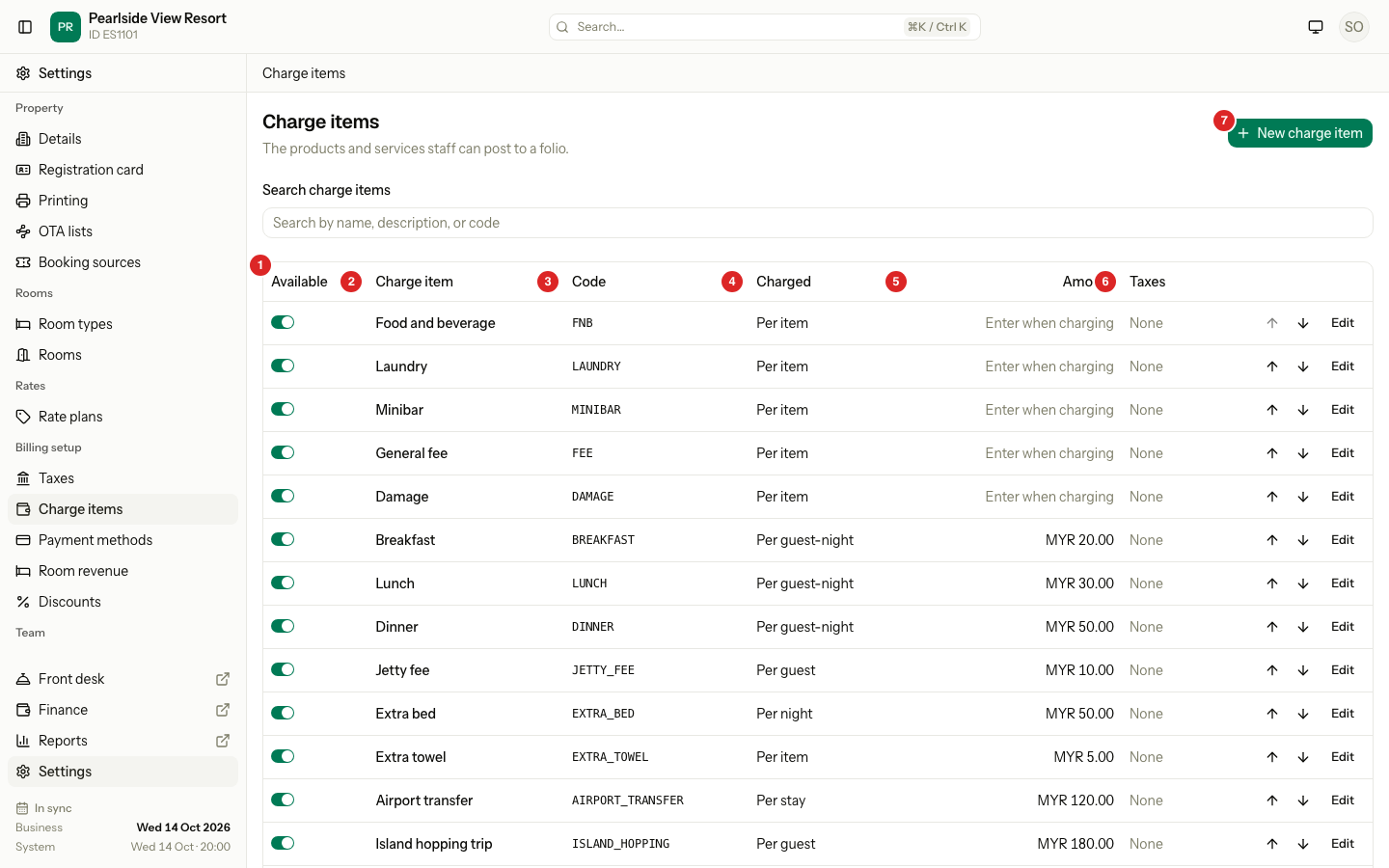
The list
| # | Column | What it shows |
|---|---|---|
| 1 | Available | A switch. Off hides the item from staff. |
| 2 | Charge item | The name. Tags: Auto (added to every new booking) and Check child prices. |
| 3 | Code | The code for reports and the accounting export. |
| 4 | Charged | How Estatell counts the price. See the table below. |
| 5 | Amount | The price, or "Enter when charging". Override allowed shows under a price staff may change. |
| 6 | Taxes | The taxes added to the item, or "None". |
Select the arrows to move an available item up or down. Staff see items in this order. Use Search charge items to find one.
Charged
| Charged | Estatell charges the price | Example |
|---|---|---|
| Per item | Once for each item | A drink from the minibar |
| Per night | Once for each night | An extra bed |
| Per stay | Once for the whole stay | An airport transfer |
| Per guest-night | For each guest, each night | Breakfast |
| Per guest | Once for each guest | A jetty fee |
Prices, children and new bookings
| Setting | What it does |
|---|---|
| Default amount | Estatell fills in the Price when staff add the item. |
| Enter when charging | Staff type the amount each time. Estatell turns Allow amount override on for you. |
| Children | Shows for Per guest and Per guest-night items. For each age group choose Free, Percent of adult price, or Fixed amount. A new per-guest item starts at 100% for every group. |
| Add to every new booking | Puts the item on every new room as an add-on. It needs a Default amount. Bookings that already exist do not change. |
Starter items
A Malaysian property starts with five items: Food and beverage (FNB), Laundry (LAUNDRY), Minibar (MINIBAR), General fee (FEE) and Damage (DAMAGE). You can rename, price and reorder them. Their Code and Category are fixed.
Special cases
| Situation | What happens | What to do |
|---|---|---|
| The name is used by another item | Estatell shows "Another charge item already uses this name." Turning an item off does not free its name. | Use a different name. |
| The code is used | Estatell shows that the code is already in use. | Choose another code. |
| Add to every new booking with Enter when charging | The switch is off and says "Set a fixed price first." | Choose Default amount and enter a price. |
| A boat trip uses the fare | The switch says "Added by boat trips". Estatell refuses to turn the fare off while an available departure uses it. | Change the departure's fare first. |
| You add an age group later | Per-guest items show Check child prices. | Open the item, check the Children prices, and save. |
| A percentage child price on Enter when charging | Estatell shows "A percentage needs a default amount. Choose Free or a fixed amount." | Choose Free or Fixed amount. |
| You change the price | New charges use the new price. Charges already on a bill do not change. | Fix an old bill with a correction. |
| You want to remove an item | You cannot delete an item. | Turn Available off. |
| A percentage service charge on an item | Charge items have no percentage price. | Add it as a tax. |
Related pages
- Taxes
- Payment methods, where a card fee uses a charge item
- Discounts
- Charge items in onboarding