
Overview
How the setup wizard takes a new property to go live.
After you sign up, Estatell opens the setup wizard. It asks for your property, rooms, taxes and prices, one section at a time. Estatell fills in sensible defaults, so you check and change them instead of starting from nothing. The required sections take about 15 minutes.
Only the owner can use the wizard. Until the property goes live, the owner sees nothing else in Estatell.
Before you start
- You have an owner account. See Sign up.
- Have these ready: the property address, your room types and how many rooms of each, your taxes, and your room prices.
Phases and sections
The wizard has 6 phases. Each phase has one or more sections. A section is one screen.
| Phase | Section | Required? |
|---|---|---|
| Property | Basics | ✅ |
| Check-in essentials | ✅ | |
| Team | ❌ | |
| Rooms | Room types | ✅ |
| Rooms | ✅ | |
| Finance | Taxes | ✅ |
| Payment methods | ✅ | |
| Companies | ❌ | |
| Prices | Basic rate | ✅ |
| Charge items | ❌ | |
| Discounts | ❌ | |
| Channels | Channel manager | ❌ |
| Review | Review | – |
The top bar shows your progress, for example "Setup 0 of 7 required · ~13 min". Only the 7 required sections count. You can go live when all 7 are done.
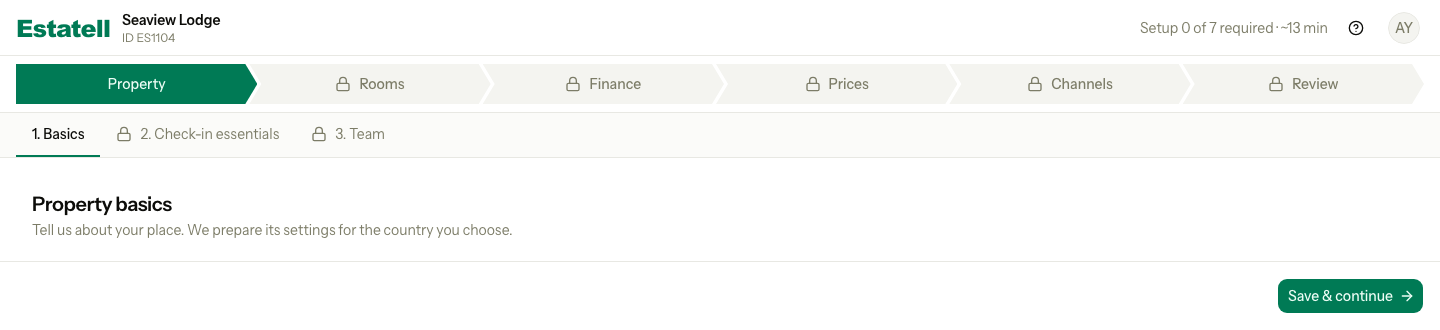
- The phase bar shows the 6 phases. The current phase is solid green.
- The section tabs show the sections of the current phase, with numbers.
- A padlock marks a section that is locked.
Move through the wizard
- Fill in the section.
- Select Save & continue. Estatell saves the section and opens the next one, in number order.
- If a section is optional and you do not need it, select Skip.
- Select Back to go to the section before.
You can also select any section in the phase bar or the section tabs to jump to it.
| Button | Where | What it does |
|---|---|---|
| Save & continue | Every section you can fill in | Saves the section and opens the next one. |
| Skip | Optional sections only | Marks the section as skipped and opens the next one. |
| Back | Every section except the first | Opens the section before, without saving. |
| Next | Locked sections (a preview) | Opens the next section, without saving. |
If you change a section and then leave it without saving, Estatell asks what to do. Select Save, Discard or Cancel.
You do not have to finish in one visit. Estatell keeps each section you saved. Sign in again and pick up where you stopped.
Taxes cannot be skipped. If you do not charge any tax, answer We don't charge tax. That counts as done.
Section states
Estatell works out the state of each section from your real data.
| State | What it means |
|---|---|
| Locked | A section it depends on is not done yet. |
| Not started | The section is open and has no data yet. |
| In progress | The section has some data, but it is not complete. |
| Done | The section is complete. A skipped optional section also counts as done. |
| Needs attention | The section was done, but a change somewhere else made it incomplete. |
Changing an earlier section never resets a later one. A later section shows Needs attention only if it is now incomplete.
Locked sections
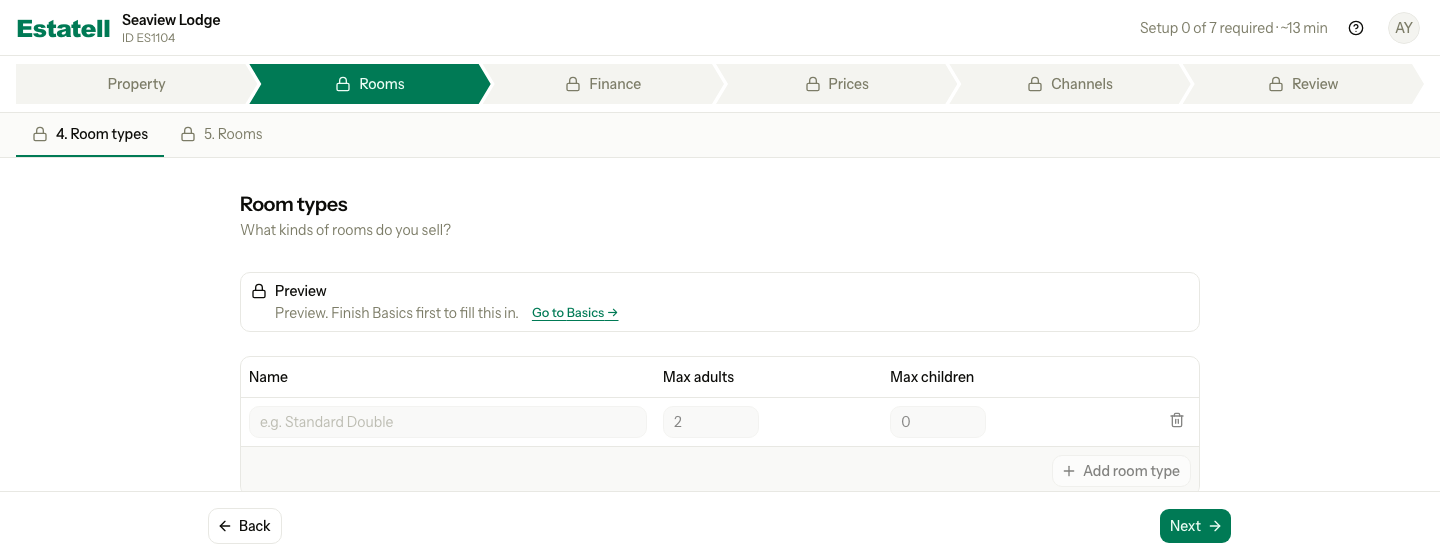
Some sections need data from an earlier section. For example, you cannot set a price for a room type that does not exist. These sections are locked until the section they need is done.
The other sections open as soon as Basics is done. Review opens when all 7 required sections are done.
| Section | Opens when this is done |
|---|---|
| Basics | Always open |
| Check-in essentials, Team, Room types, Taxes, Payment methods, Companies, Discounts, Channel manager | Basics |
| Rooms | Room types |
| Basic rate | Room types and Taxes |
| Charge items | Taxes |
| Review | All 7 required sections (you can still preview it) |
A locked section still opens, as a preview. You see the real form, but you cannot type in it. A banner says which section to finish first, with a link to it.
Special cases
| Situation | What happens | What to do |
|---|---|---|
| You skip an optional section | The section counts as done. | Add it later. After go-live, the Recommended next card lists each skipped section, with a link to its settings page. |
| You change an earlier section after a later one was done | The later section is not reset. | Check the later section. If it is now incomplete, it shows Needs attention. Fix it there. |
| A staff member signs in before the property is live | They see "Your property is still being set up. Ask" and the owner's name. | Wait for the owner to go live. You can add staff in Team early, so their accounts are ready on day one. |
| You want to open Settings, Reservations or the dashboard | Estatell sends you back to the wizard. | Finish the required sections and go live. After that, Settings is the only place to change the setup. |
| You use a phone | The phase bar becomes one line, for example "Finance · 5 of 13", with a progress bar and a menu button. | Select the menu button to see every section and its state. |
| You are not sure what to enter | The Help button in the top bar shows a short guide and the support contact. | Select the question mark icon. |