
Review
Check every setup section on one page before you go live.
Review is the last step of the setup wizard. It lists every section on one page, grouped by phase. It shows what is done, what is missing and what needs a second look. You can open it at any time, even when setup is not finished. Use it as your to-do list.
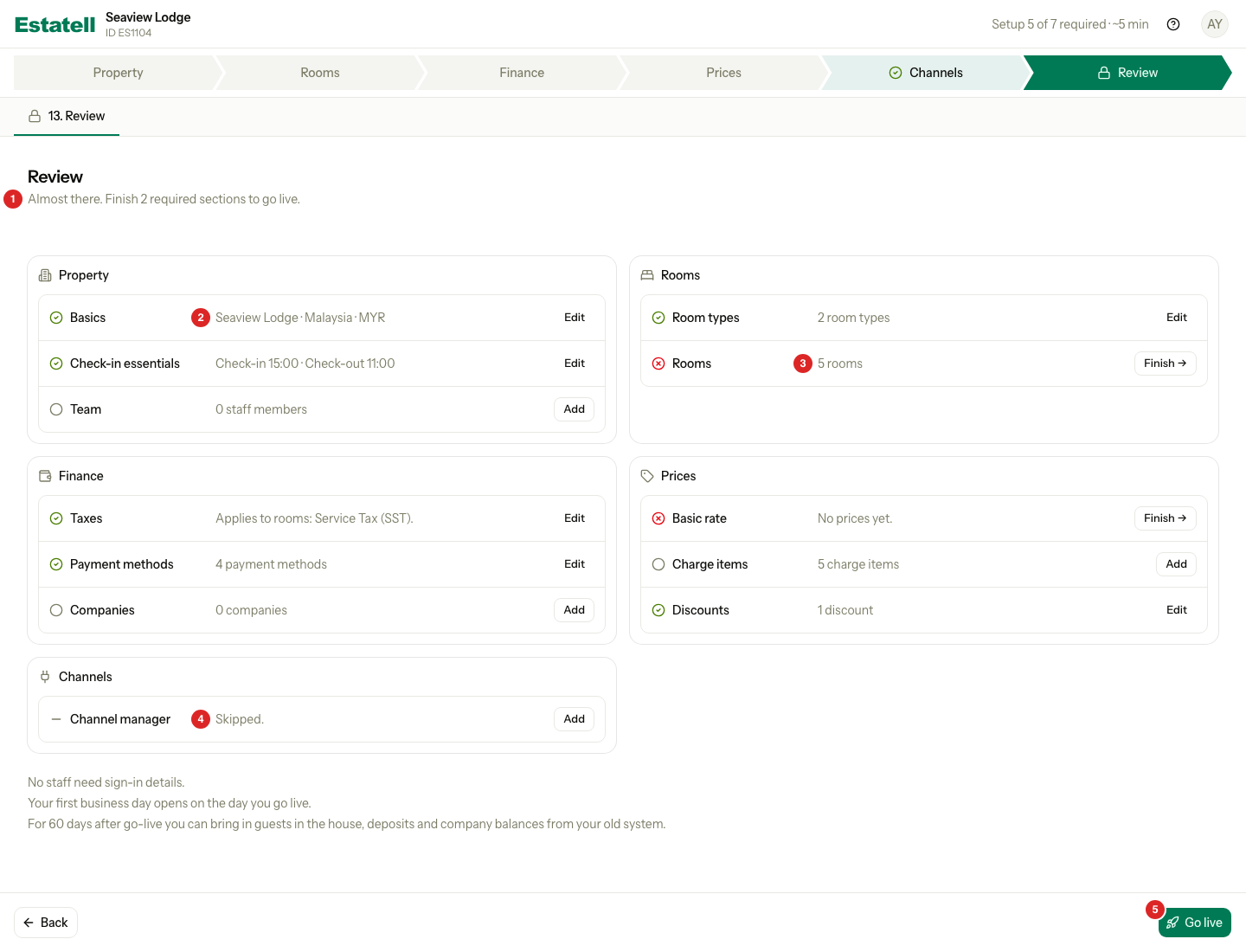
| Number | What you see |
|---|---|
| 1 | The headline. It says how many required sections are left. |
| 2 | A done section. The line shows a summary of what you saved. |
| 3 | A required section that is not done. Its icon is a red cross, and its button says Finish. |
| 4 | A section that you skipped. |
| 5 | Go live. You cannot select it until every required section is done. |
The rows
Each row is one section. It has a state icon, the name, a short summary and one button.
| Icon | State | What it means |
|---|---|---|
| Green tick | Done | The section has what it needs. |
| Red cross | Required, not done | You must finish this section before you can go live. |
| Empty circle | Optional, not started | You can leave it empty. |
| Dash | Skipped | You chose to skip it. It counts as done. |
| Warning triangle | Needs attention | The section was done, but a change in another section means it no longer has what it needs. |
| Flag | Flagged by support | The estatell team asked you to look at this section again. This only happens when your account needs approval to go live. See Go live. |
| Lock | Locked | Another section must be done first. |
The icon always comes with a word for screen readers, so the colour is never the only sign.
The buttons
| Button | Shown when | Where it takes you |
|---|---|---|
| Edit | The section is done | The section, to change it |
| Finish | A required section is not done | The section, to complete it |
| Add | An optional section is empty or skipped | The section, to fill it in |
| Fix in Taxes (the name changes with the warning) | A warning at the top of the page | The section that causes the warning |
When you save a section, estatell opens the next one. Select Review in the phase bar to come back.
What a required section needs
Seven sections are required. Review counts only these.
| Section | Done when |
|---|---|
| Basics | The property has a type, name, address, city and country. |
| Check-in essentials | Check-in and check-out times are set, and the terms document is published. Both start with a default, so this is usually done. |
| Room types | There is at least one room type. |
| Rooms | Every room type has at least one room. |
| Taxes | At least one tax is turned on, or you ticked We don't charge tax. |
| Payment methods | At least one payment method is on. The starter methods are on, so this is usually done. |
| Basic rate | Every room type has a price for the next 30 days. |
The other sections never stop you from going live: Team, Companies, Charge items, Discounts and the channel manager list. In the screenshot above, Channel manager is the Channels section.
Warnings
A warning is a hint. It never stops you from going live. Warnings sit in a card above the phases. Each one has a Fix in button.

| Warning | What it means |
|---|---|
| No tax is applied to rooms | No tax is turned on for room charges. Your room prices will have no tax. |
| A tax is applied to no charge | A tax is turned on, but no charge uses it. |
| A rate for a room type is missing | A more rate follows the basic rate, but one room type has no price in it. |
If you do not charge tax, you can ignore the first warning.
When everything is ready
When every required section is done, the headline says "Everything is set. Go live when you are ready." The button is ready to select.
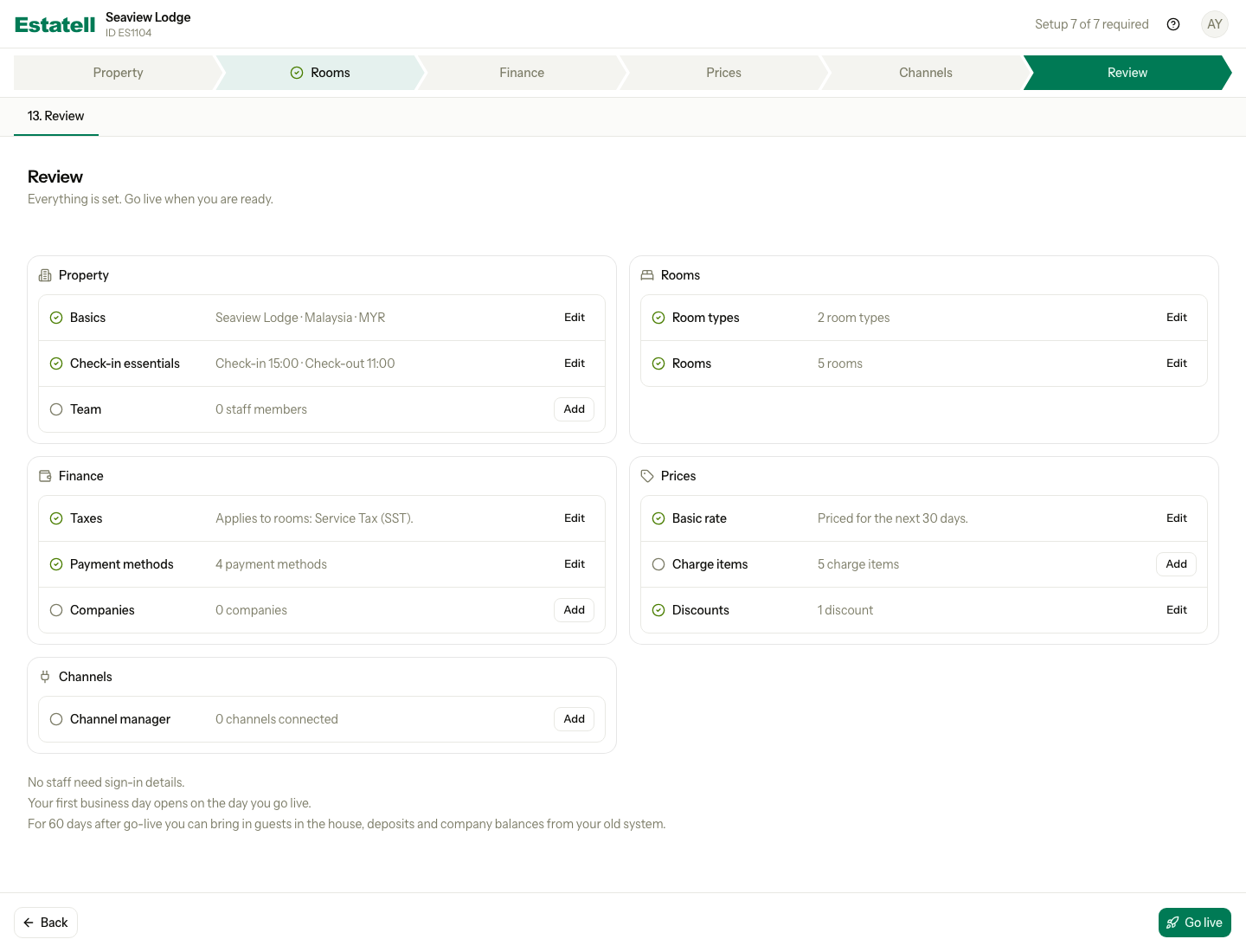
Under the phase cards, a few lines tell you what happens next:
- How many staff members get their sign-in details when you go live. Estatell counts staff only.
- That your first business day opens on the day you go live. There is no opening date to set.
- For a number of days after go-live, you can bring in guests in the house, deposits and company balances from your old system.
Select Go live, or Send for approval if your account needs approval. See Go live.
Special cases
| Situation | What happens | What to do |
|---|---|---|
| You change an earlier section after you finish a later one | Estatell does not reset the later section. It shows Needs attention only when its own check now fails. | Select Finish on that row. |
| You open Review before Basics is done | Review opens as a preview. It shows what is missing. | Select Finish on the first red row. |
| You turn off the last payment method | Payment methods is no longer done. | Turn one on. |
| You add a room type after you finish Rooms | Rooms needs a room for the new type. | Add a room for it. |
| You skip an optional section | It counts as done. You can open it again with Add. | None. |
| Your staff sign in before you go live | They see a waiting page, not Review. | Tell them to wait for go-live. |
| You use a phone | Each row stacks: icon and name first, then the summary and button. | Scroll down. |