
Aging and statements
See what every company owes by days past due, and print a statement of account for one company.
Two screens show the money companies owe the hotel. Aging lists every company with a balance and sorts each invoice by how late it is. A statement lists the invoices, credit notes and payments of one company between two dates. Use aging to decide who to call. Send a statement to the company.
Before you start
- Permission:
company.view. Owners, managers, front desk staff and finance staff have it by default. - Both screens show invoices only. A folio you have not settled to the city ledger is not in them. That money counts in credit control as Open folios.
Open the aging report
- Open Finance and select City ledger › Aging.
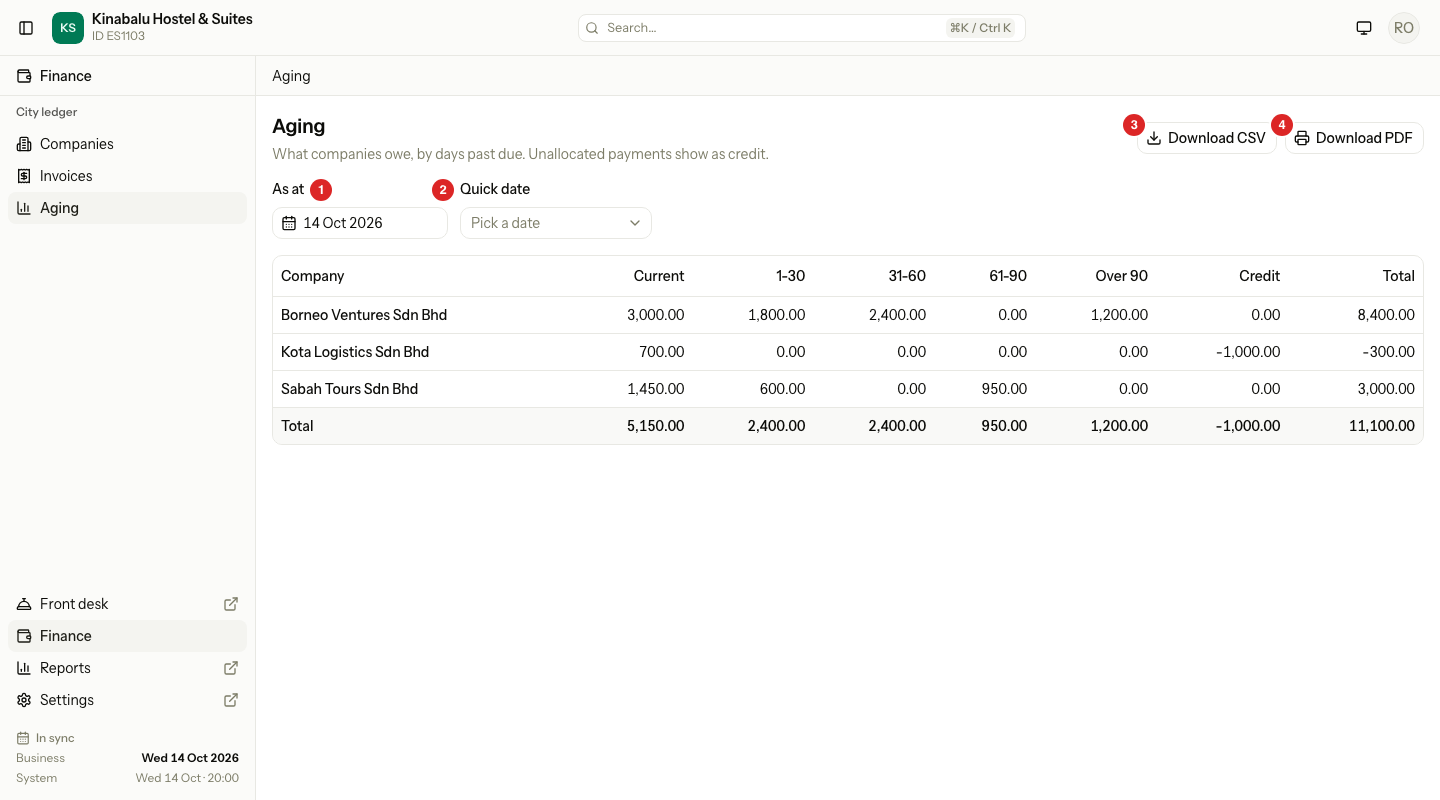
- Read the table. Each row is one company. Select the company name to open its page.
- To see an earlier day, change As at, or pick one from Quick date.
- To keep a copy, select Download CSV or Download PDF.
| Number | What it is |
|---|---|
| 1 | As at: the day the report is for. It starts on the business date and never goes past it. |
| 2 | Quick date: Today, End of last month, End of last quarter or End of last year. |
| 3 | Download CSV: the table as a file for a spreadsheet. |
| 4 | Download PDF: the table to print. |
The columns
Estatell counts the days from the invoice due date to the As at date. It counts only invoices that are Open and have a balance, and it uses the balance of each invoice, not the full amount.
| Column | What it counts |
|---|---|
| Current | Invoices not yet due |
| 1-30 | Invoices 1 to 30 days past due |
| 31-60 | Invoices 31 to 60 days past due |
| 61-90 | Invoices 61 to 90 days past due |
| Over 90 | Invoices more than 90 days past due |
| Credit | Money the company paid that nobody has matched to an invoice yet. It shows as a negative amount. |
| Total | The five age columns plus Credit. It is the company's balance, and it can be below 0. |
The last row, Total, adds up each column for all companies.
A company with nothing owed and no credit does not appear. If no company is left, the page says Nothing is owed.
A worked example
The business date is 14 Oct 2026. An invoice for MYR 1,800.00 is due on 5 Oct, so it is 9 days past due.
| Invoice | Due date | Days past due | Column |
|---|---|---|---|
| AR-0004, MYR 3,000.00 | 8 Nov 2026 | Not yet due | Current |
| AR-0003, MYR 1,800.00 | 5 Oct 2026 | 9 | 1-30 |
| AR-0002, MYR 2,400.00 | 10 Sep 2026 | 34 | 31-60 |
| AR-0001, MYR 1,200.00 | 1 Jun 2026 | 135 | Over 90 |
The company's Total is MYR 8,400.00. A company that paid MYR 1,000.00 and has no invoice shows Credit of -1,000.00 and a Total of -1,000.00.
Look at an earlier day
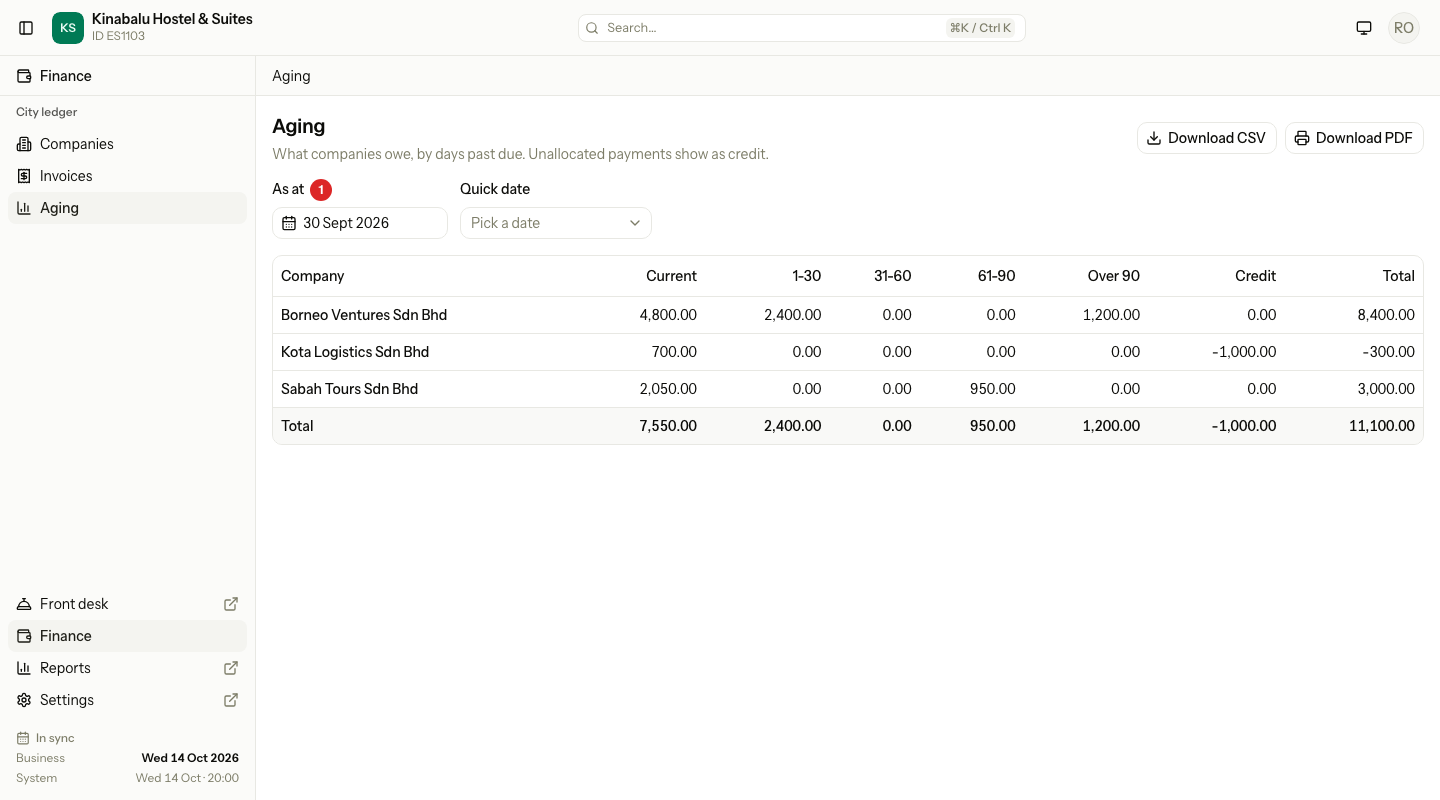
Change As at to a past date to see the report as it was then. Estatell uses today's matching of payments to invoices, so an earlier day is an estimate.
Open a statement
- Open Finance and select City ledger › Companies.
- Select the company, then select the Statement tab.
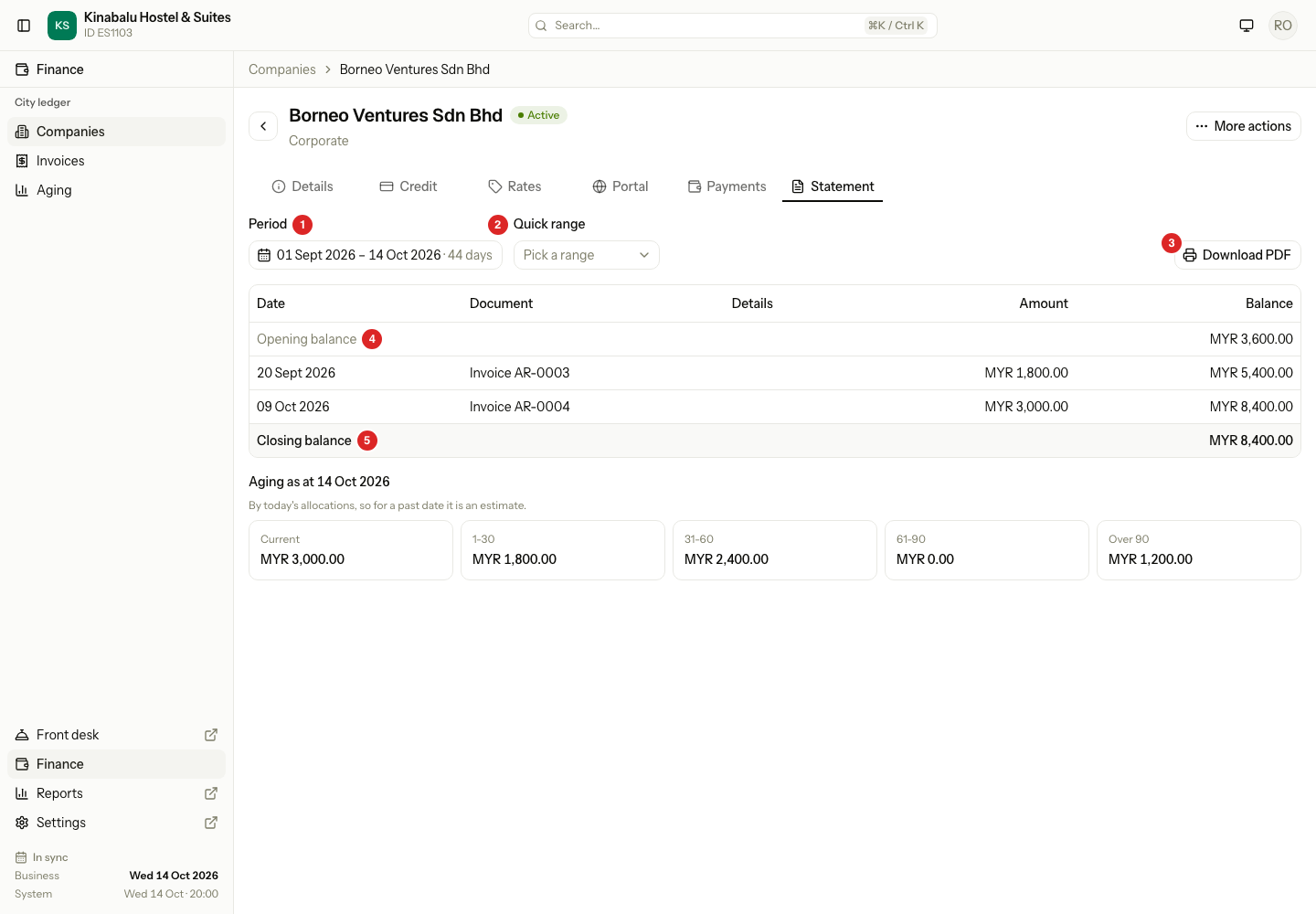
- Pick the days in Period, or choose one from Quick range: This month, Last month, Last 3 months, This year or Last year.
- Read the table, then select Download PDF to print it or send it to the company.
| Number | What it is |
|---|---|
| 1 | Period: the first and last day. The statement opens on the first of the month up to the business date. |
| 2 | Quick range |
| 3 | Download PDF: the statement with the hotel letterhead and the company's billing details. |
| 4 | Opening balance: what the company owed at the end of the day before the period starts. |
| 5 | Closing balance: the opening balance plus every line. |
The lines
Lines are in date order, then by number.
| Line | Effect on the balance |
|---|---|
| Invoice | Adds to the balance |
| Credit note | Lowers the balance |
| Payment | Lowers the balance. A payment shows once at its full amount, even when it pays several invoices. |
A voided invoice, credit note or payment is not on the statement.
When the period ends today, the Closing balance is the same as the company's Total on the aging report. Below the table, Aging as at shows the same five age columns for this one company, using today's matching of payments to invoices.
Special cases
| Situation | What happens | What to do |
|---|---|---|
| A guest left, but nobody settled the folio | The folio is not in the report or the statement. | Settle it to the city ledger. |
| A company paid, and the payment is not matched to an invoice | The payment shows as Credit on the aging report. The invoice stays in its age column. | Match the payment to the invoice. |
| You pick an As at date in the future | Estatell does not allow it. The date stops at the business date. | Pick today or an earlier day. |
| A voided invoice | It is not in the aging report, and not on the statement. | Nothing. |
| An old system invoice | It shows with its old number, like any invoice. | See Old system balances. |
| No lines in the period | The table says Nothing in this period. The opening and closing balances still show. | Pick a longer period. |
| A company with only a credit | It shows in the aging report with a negative Total. | Nothing, or match the credit to an invoice. |