
Run the night audit
Open the Run Night Audit sheet, start the audit once the day has ended, follow its steps, and resume it if it stops.
The night audit closes the business day. It charges the night, settles missed arrivals and overdue departures by your rules, saves the day's figures, and opens the next day. You start it from the Run Night Audit sheet.
Most hotels let Estatell run the audit by itself. See Scheduled audit. Use the sheet when the automatic run is off, or when you want to close the day sooner.
Before you start
- Permission: Run the night audit. Owners and managers have it by default.
- The business date must have ended. Estatell closes a day only after midnight, in your property's time zone.
- Fix what the sheet lists under Fix before running. See Readiness checks.
- The audit follows the rules on the Operations tab. See Operations.
How a run goes
Steps
-
In the staff sidebar, open the Operations group and select Run Night Audit.
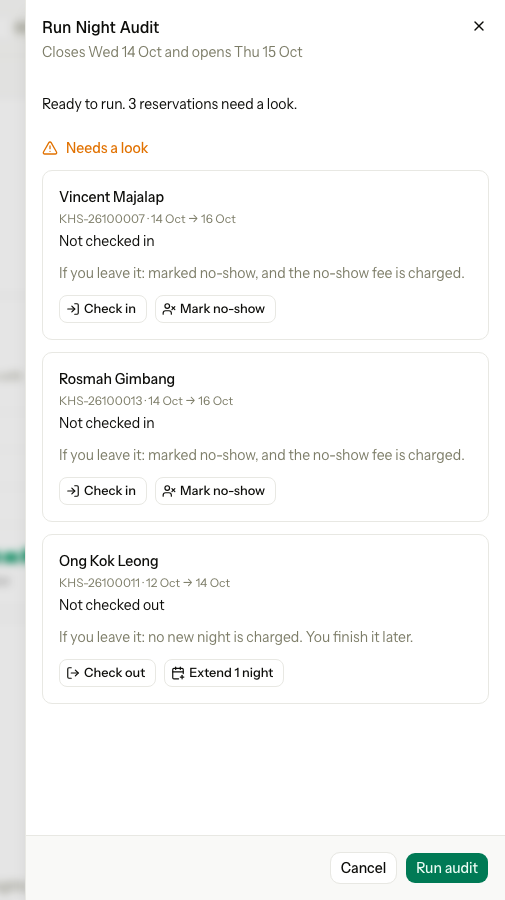
The sheet shows when it closes the day, for example "Closes Wed 14 Oct and opens Thu 15 Oct".
-
Read what is on the sheet.
- If it says Not over yet, the day has not ended. Wait until after midnight. See The sheet states.
- If Fix before running lists a reservation, fix it first. See Readiness checks.
- Needs a look lists items the audit settles by your rules. You can leave them.
-
Select Run audit.
-
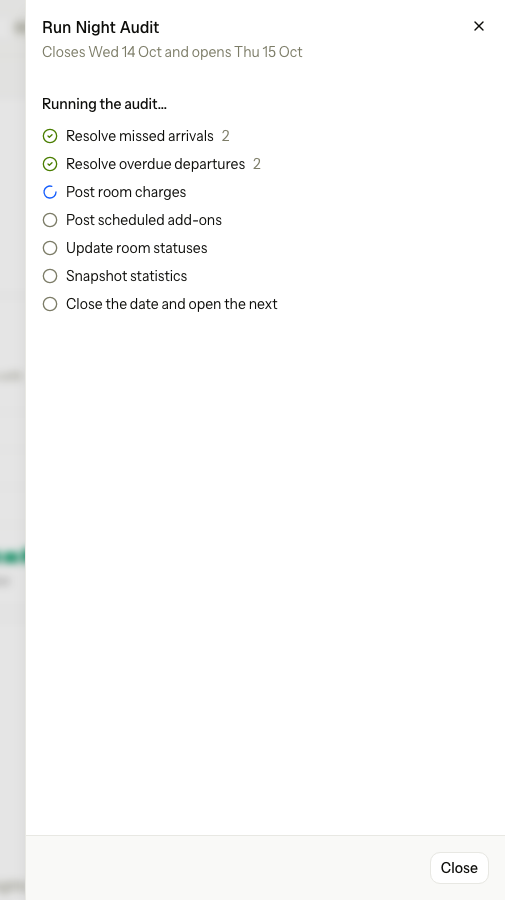
Watch the steps. The sheet refreshes every 3 seconds. You can select Close and carry on. The audit keeps running.
-
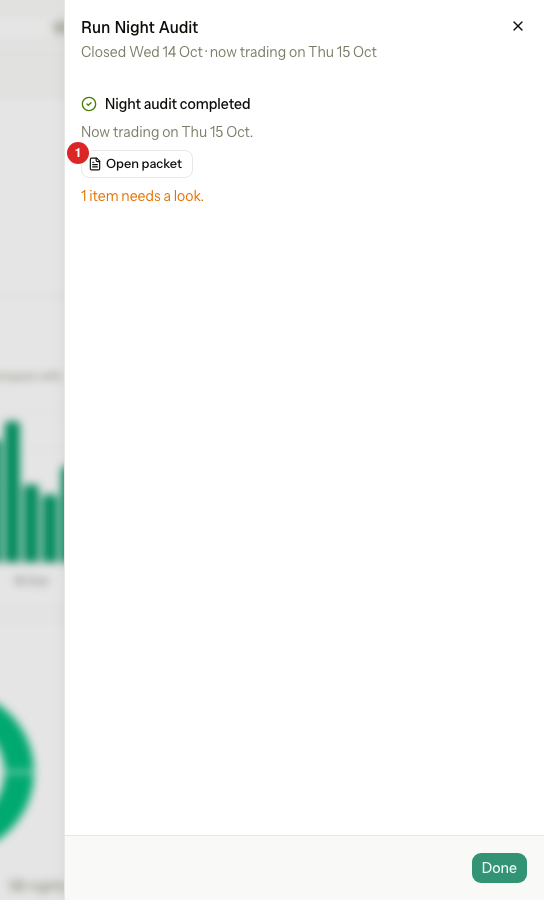
When the sheet says Night audit completed, select Done.
An audit takes about one to two minutes.
What the audit does
The audit has seven steps. They always run in this order.
| # | Step | What it does |
|---|---|---|
| 1 | Resolve missed arrivals | Applies your Missed arrival rule to guests who did not arrive. They are marked no-show and the fee is charged, or they stay as late arrivals. |
| 2 | Resolve overdue departures | Applies your Overdue departure rule to guests still in house past their departure date. One more night is charged, or the guest is left for you to check out. |
| 3 | Post room charges | Charges tonight's room night to every guest in house. |
| 4 | Post scheduled add-ons | Charges add-ons that are due tonight, such as meals. |
| 5 | Update room statuses | Marks the rooms of guests who sleep in house tonight as Dirty, so housekeeping can plan the morning. |
| 6 | Snapshot statistics | Saves the day's occupancy, ADR, RevPAR and revenue. |
| 7 | Close the date and open the next | Closes the business date and opens the next one. |
A step counts what it did, for example "Post room charges 12". If one guest cannot be settled, the audit goes on with the others. The step shows "N left for you". Those items wait on the next day's sheet as Left from an earlier audit. See Earlier audit issues.
The sheet states
| What the sheet shows | What it means | Buttons |
|---|---|---|
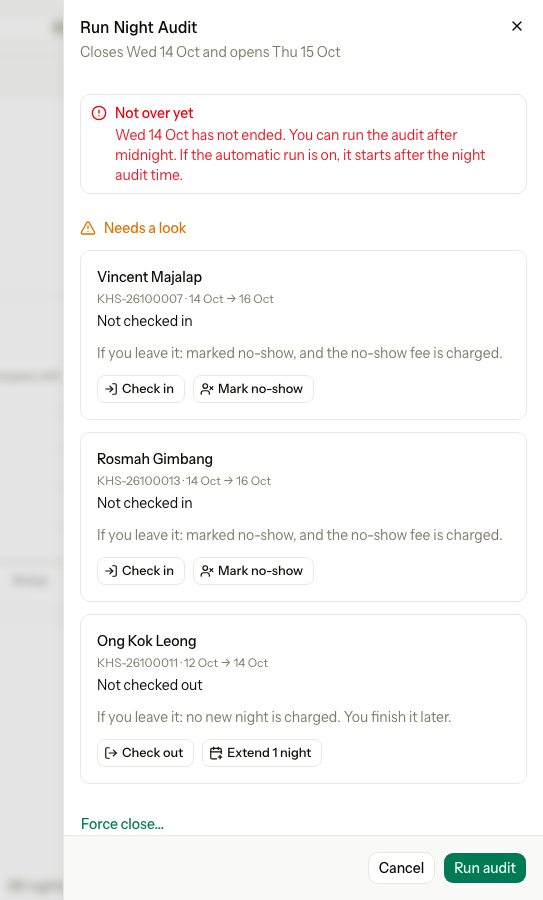
| Not over yet, then "Wed 14 Oct has not ended" | The calendar date has not passed the business date. | Cancel. Run audit is off. Owners and managers also see Force close…. See Force close. |
| Fix before running | A guest in house has no room or bed tonight. | Cancel. Run audit is off until you fix it. |
| "Ready to run. 3 reservations need a look." | The day has ended and nothing blocks the run. | Cancel, Run audit |
| "Ready to run. Nothing needs you." | The day has ended and every check is clear. | Cancel, Run audit |
| Running the audit… with the seven steps | The audit is working. A spinner marks the step it is on. | Close |
| The audit stopped at a step | A step failed. | Cancel, Resume audit |
| Night audit completed | The date is closed. The top of the sheet says "Closed Wed 14 Oct · now trading on Thu 15 Oct". | Done, and Open packet |
| "This property has no business date yet. Go live first." | The property has not gone live. | Done |
In the running and failed states, each step has a mark:
| Mark | Meaning |
|---|---|
| Green tick | The step is done. A number shows how many items it handled. |
| Spinner | The step is running now. |
| Red cross | The step failed. |
| Empty circle | The step has not started. |
Not over yet
Not over yet shows while the business date is still today. Estatell will not close a day that is still going, because the business date would run ahead of the calendar.
The alert says what to expect: you can run the audit after midnight, and the automatic run starts after your Night audit time on the next day, only when Run night audit automatically is on. See Scheduled audit.
After the run
Night audit completed shows these things:
| Line | What it means |
|---|---|
| "Closed Wed 14 Oct · now trading on Thu 15 Oct" | At the top: the date the audit closed, and the new business date. |
| "Now trading on Thu 15 Oct" | The new business date. Charges and payments now count for this day. |
| Open packet | A PDF of the closed night's figures. It shows only if you have the View and export reports permission. See Night audit history. |
| "1 item needs a look" or "N items need a look" | Issues the audit could not settle. They wait on the next sheet as Left from an earlier audit. See Earlier audit issues. |
Staff who receive the report also get a message. See Morning report.
If the audit stops
A step can fail, for example when the connection drops. The audit stops at that step. The date stays Auditing, and the sidebar still shows Night audit running.
-
Open Run Night Audit. It says The audit stopped at and names the step.
-
Read the list. Finished steps have a green tick. They are kept and never post again.
-
Select Resume audit.
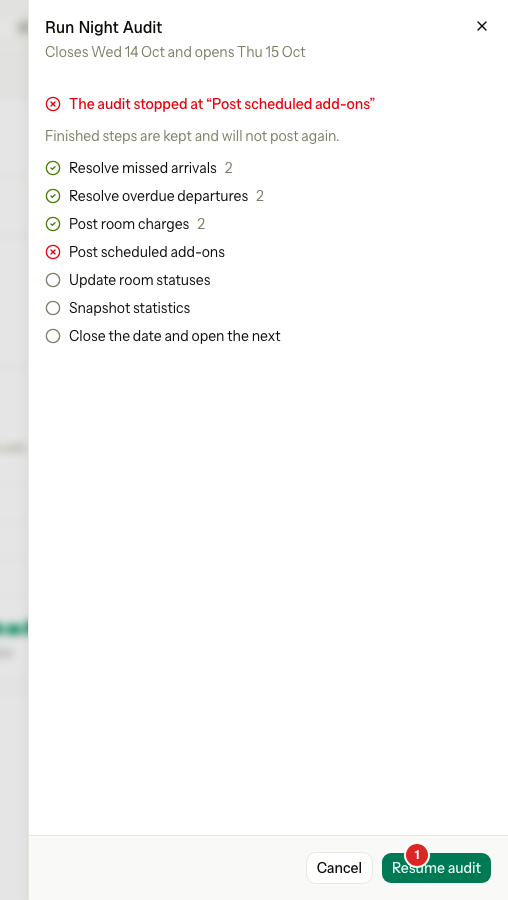
The audit carries on from the step that failed. Resume audit works even if you have not fixed the cause. If the step fails again, try again later or ask for help.
The automatic run never resumes a failed audit by itself. See Scheduled audit.
Running twice never posts twice
Every night charge has its own key. If you run, stop and resume the audit, or two people select Run audit together, a night is still charged once.
Special cases
| Situation | What happens | What to do |
|---|---|---|
| You open the sheet before midnight | It shows Not over yet. | Come back after midnight. Use Force close… only if you must close the day early. See Force close. |
| Fix before running lists a reservation | Run audit is off. | Select Assign on the row, or force the close. See Readiness checks. |
| The audit is already running | A second run is refused. | Wait for it. Open the sheet to follow it. |
| The audit failed | The date stays Auditing. | Select Resume audit. |
| The sheet says the audit completed, but items need a look | The date is closed. The items wait for you. | Fix them from the next sheet. See Earlier audit issues. |
| You made a mistake on a closed day | A closed day never changes. There is no undo. | Post the correction on the current business date. |
| You close the sheet while the audit runs | The audit keeps running. | Open the sheet again to see how it is going. |
| You do not have Run the night audit | The Run Night Audit button does not show. | Ask an owner or manager. |
| The property has not gone live | There is no business date. | Go live first. See Go live. |