
Early departure
Check out a guest before the departure date, remove the unused nights and charge the early departure fee.
Use early check-out when a guest leaves before the departure date. One step removes the unused nights, charges the early departure fee, settles the folio and checks the guest out.
Before you start
- Permission: Check out units and Manage reservations. Owners, managers and front desk staff have both by default.
- To skip the fee you also need Do not charge cancellation and no-show fees.
- The unit is Checked in, and it arrived before today. A guest who arrived today has no night to remove. Use Check out as day use.
- Set up first: the early departure policy, in Settings › Billing setup › Room revenue › Early departure. See Set the policy.
Steps
-
Open the reservation.
-
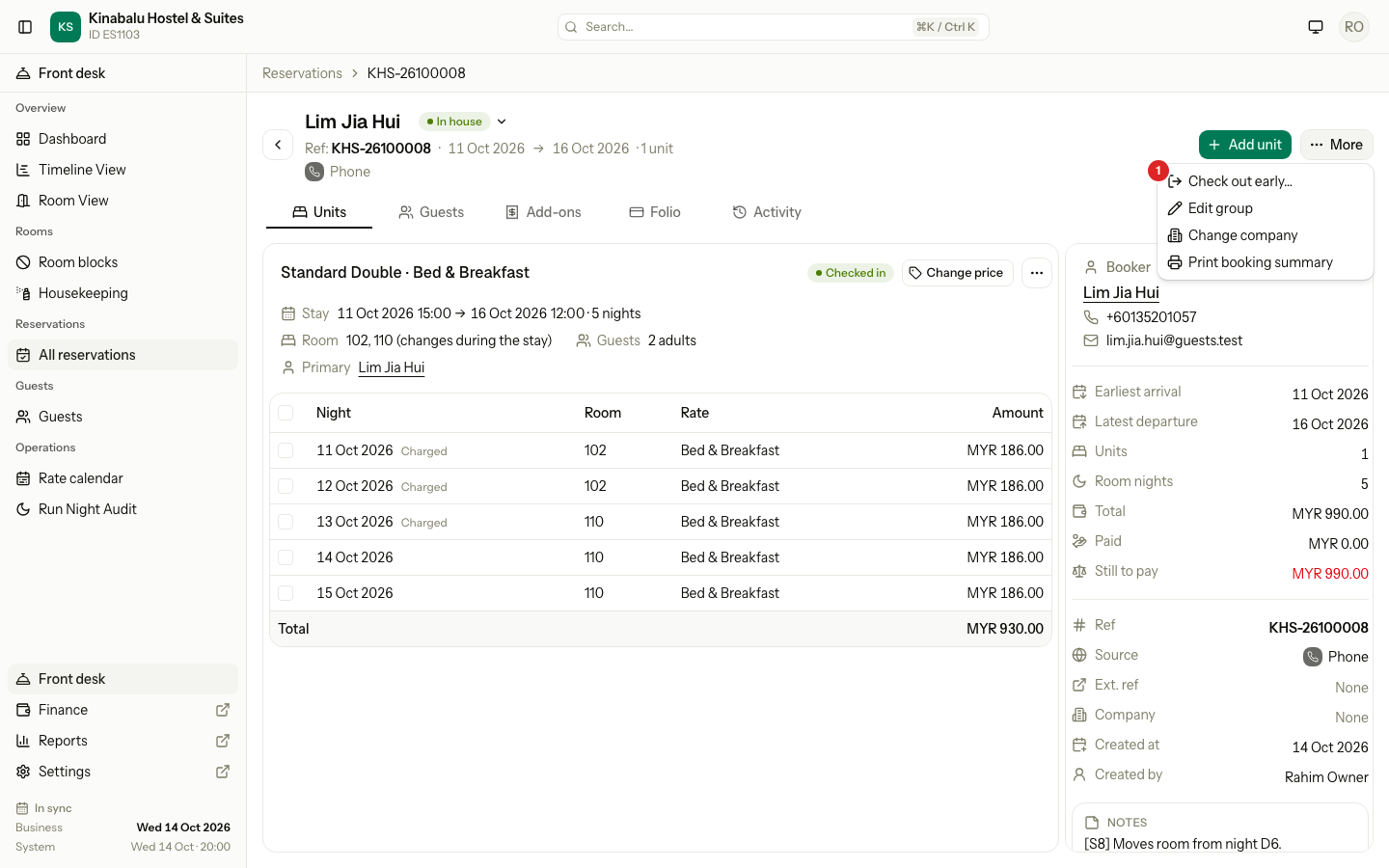
Select More, then Check out early…. For a group, use the unit's ⋯ menu. The form opens as Early check-out.
-
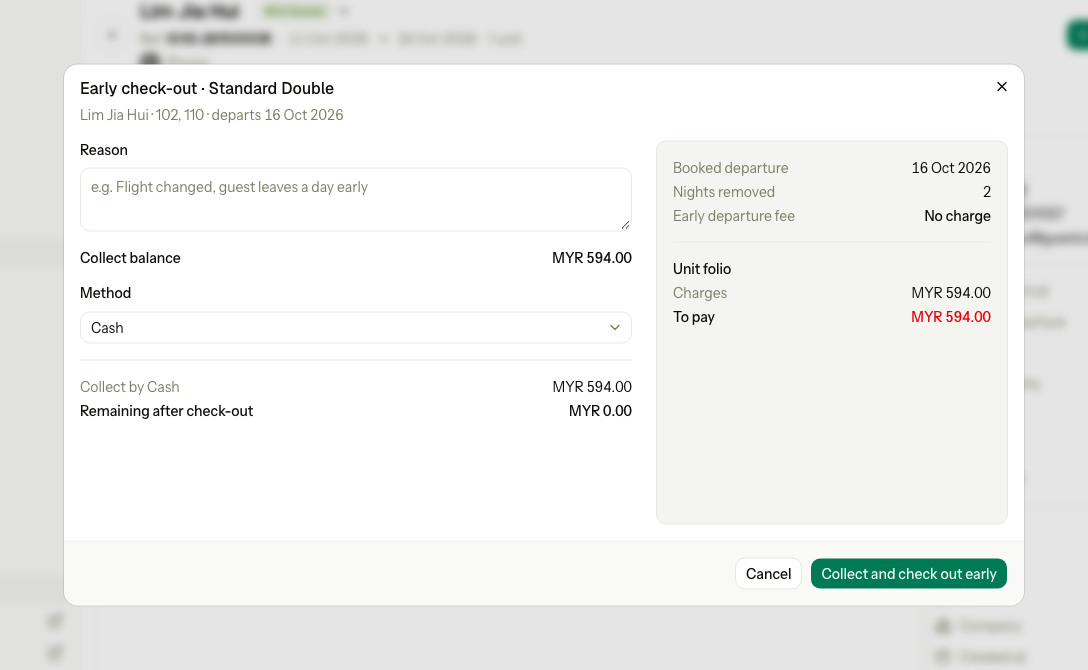
Check the facts on the right: Booked departure, Nights removed and Early departure fee.
-
Enter the Reason, for example "Flight changed".
-
To skip the fee, tick Do not charge. The reason is then required.
-
Settle the folio as for a normal check-out: collect the balance, or refund the credit.
-
Select the green button, for example Collect and check out early.
What happens
- The new departure date is today. The unused nights are removed.
- The fee, if any, posts to the unit's folio with tax.
- Breakfast and other nightly add-ons on the removed nights are removed too. Add-ons already posted stay.
- Money paid for the removed nights stays on the folio as a credit. The form refunds it at check-out.
- If one step is refused, nothing is saved.
How the fee is worked out
Set the policy
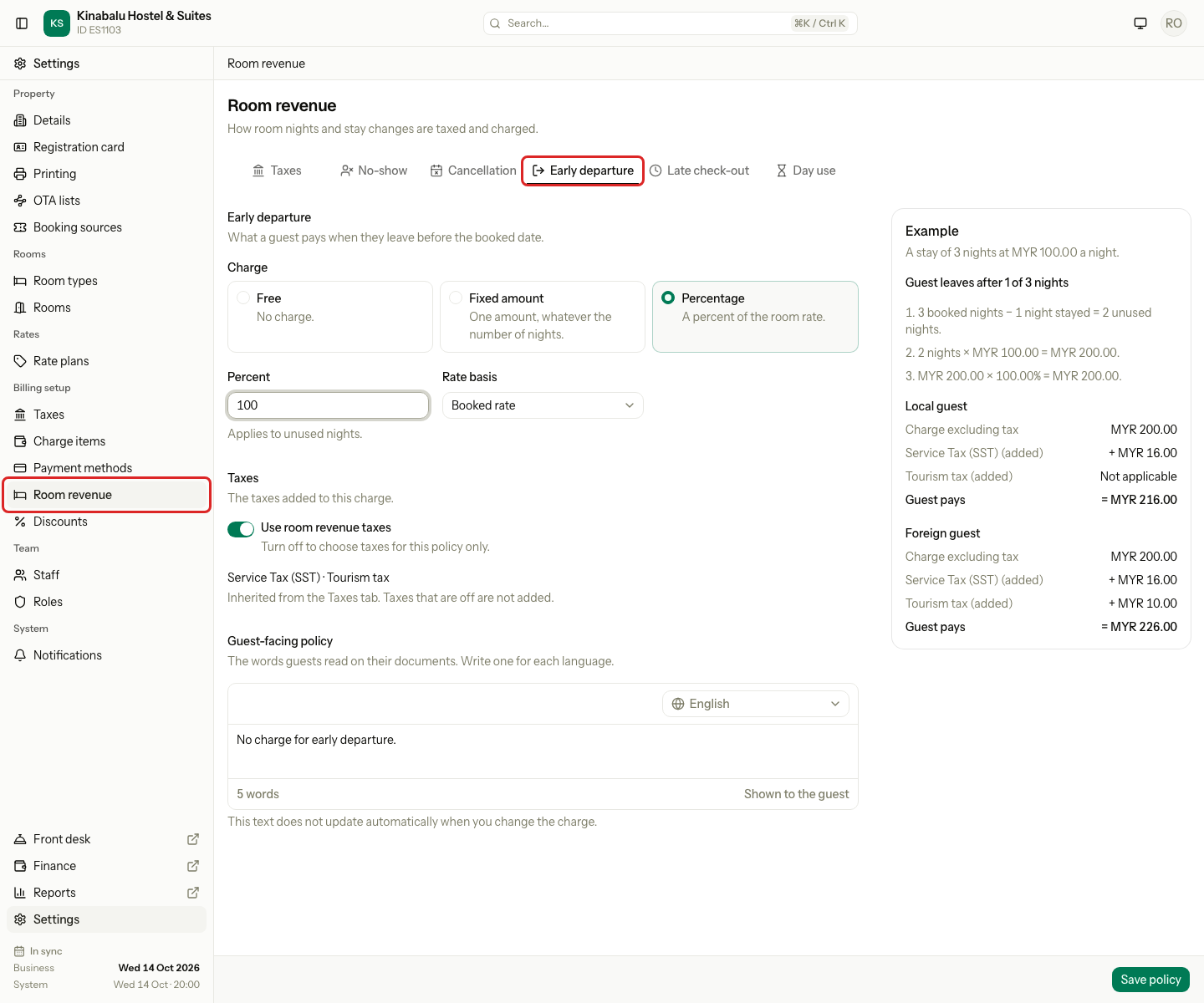
Owners and managers set it in Settings › Billing setup › Room revenue › Early departure. Choose the Charge, check the Example, then select Save policy.
| Policy | Fee |
|---|---|
| Free | Nothing |
| Fixed amount | The amount, once |
| Percentage | A percentage of the unused nights |
Worked examples
A guest booked 3 nights at MYR 100.00, from 19 to 22 Oct. They paid MYR 300.00 in advance and a MYR 100.00 deposit, and leave on 20 Oct after 1 night. Taxes are left out.
| Policy | Night charged | Fee | Paid | Balance | At check-out |
|---|---|---|---|---|---|
| Free | 100.00 | 0.00 | 400.00 | −300.00 | Refund 300.00: the deposit 100.00 and 200.00 of the advance |
| Fixed amount 50.00 | 100.00 | 50.00 | 400.00 | −250.00 | Refund 250.00: the deposit 100.00 and 150.00 of the advance |
| 100% of unused nights | 100.00 | 200.00 | 400.00 | −100.00 | Refund 100.00: the deposit |
| Free, nothing paid before | 100.00 | 0.00 | 100.00 | 0.00 | Use the deposit toward the bill, or refund it |
| Free, no deposit, unpaid | 100.00 | 0.00 | 0.00 | 100.00 | Collect 100.00 |
| Do not charge | 100.00 | 0.00 | 400.00 | −300.00 | Refund 300.00, as Free |
Special cases
| Situation | Example | What happens | What to do |
|---|---|---|---|
| The guest arrived today | Checked in this afternoon, leaves tonight. | • "This unit arrived today, so there is no night to remove. It can check out on its departure date. If it checked in by mistake, use Undo check-in." | • If the guest stayed a few hours, use Check out as day use. • If the guest checked in by mistake, undo the check-in, then cancel the unit. See Undo check-in. |
| The guest left yesterday | Before the night audit, you find the room empty. | • The form asks They left yesterday or They stayed last night. | • Choose They left yesterday and enter a reason. Last night is not charged. |
| Skip the fee | The guest has a family emergency. | • Do not charge needs a reason. | • Tick it and enter the reason. |
| A tour on a removed day | A posted island tour for tomorrow. | • The tour stays on the folio. | • Reverse it on the folio if the guest did not use it. |
| A card fee on the prepayment | The guest paid by card with a surcharge. | • The surcharge is not refunded. | • Reverse it on the folio if it must go too. |
| The group bill pays the room | Room charges go to the Master folio. | • The unit folio holds no prepayment. | • The credit is settled when the group settles. |
| The night audit is 2 or more days behind | The audit has not run for 2 days. | • "The night audit for 12 Oct has not run. Run it first, so the night of 12 Oct is charged." | • Run the night audit first. |
| You undo it later | The guest decides to stay after all. | • Undo check-out does not bring back the nights or remove the fee. | • Extend the stay and reverse the fee. See Undo check-out. |