
Overview
How a reservation is built, what its statuses mean, and how to find one.
A reservation is one booking. It holds one or more units. A unit is one room or one bed for one stay. A family in one room is a reservation with one unit. A dive club in four rooms is a reservation with four units.
Before you start
| Task | Who can do it |
|---|---|
| See reservations | Owner, Manager, Front desk, Finance |
| Create and change reservations | Owner, Manager, Front desk |
The roles come with these permissions by default. An owner can change them in Settings › Roles.
How a reservation is built
| Part | What it is | Example |
|---|---|---|
| Reservation | The booking, with one reference number, a booker and a source | PVR-26100022, booked by Rachel Lim on WhatsApp |
| Unit | One room or bed, with its own dates, room type, rate plan and guests | Sea View Room, 14 to 17 Oct, 2 adults |
| Night | One night of a unit, with its price and its room | 14 Oct, room 205, MYR 346.67 |
Each unit has its own status, its own room and its own guests. You check in, check out or cancel one unit at a time. A group action does the same thing to every unit you pick.
Find a reservation
Open Reservations › All reservations.
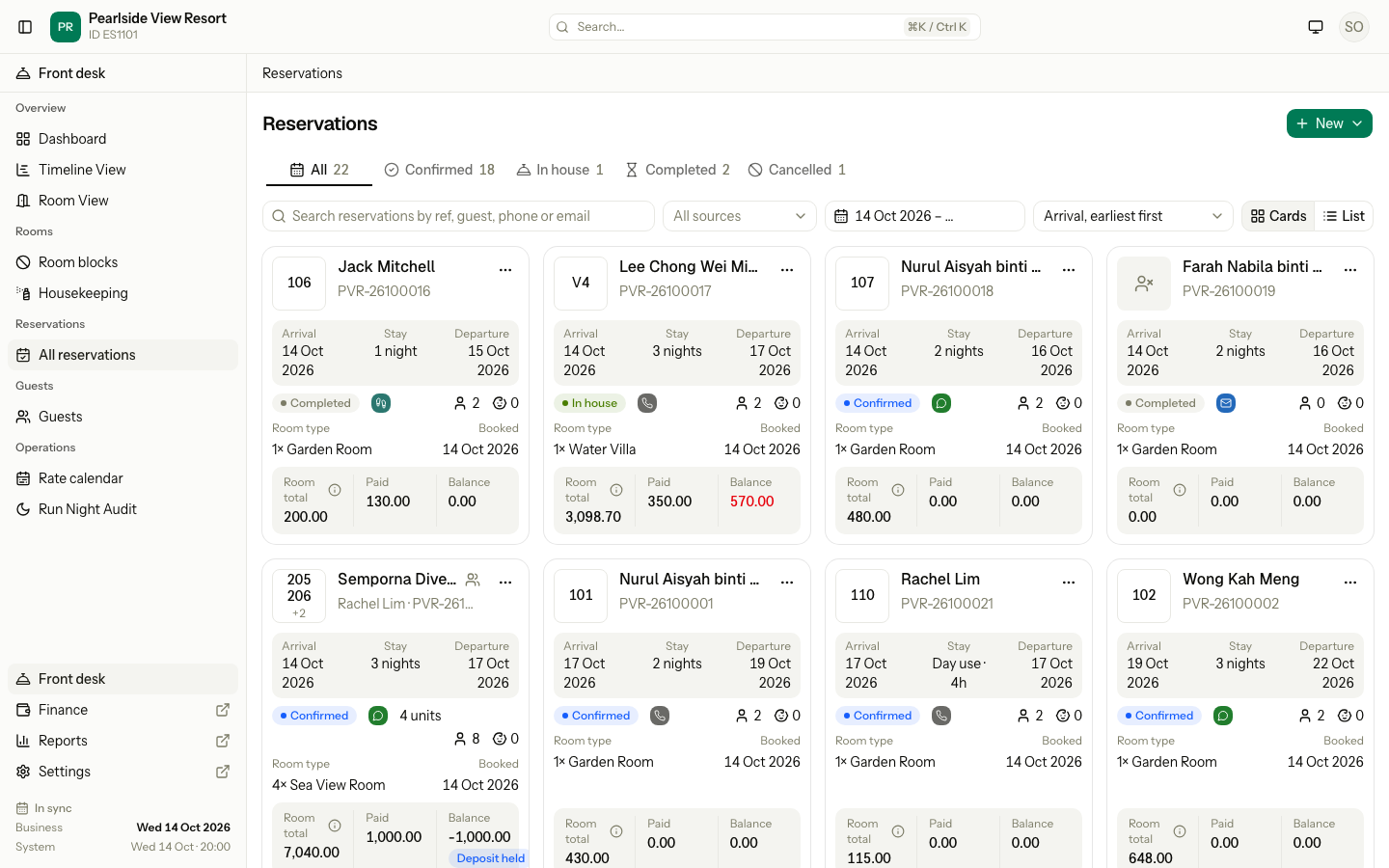
| Control | What it does |
|---|---|
| Status tabs | Show All, Confirmed, In house, Completed or Cancelled. Each count follows the search, source and dates you picked. |
| Search | Finds a reservation by reference, OTA booking number, or the name, phone or email of the booker or any guest. A local phone number such as 012-345 6789 also works. |
| All sources | Shows only one booking source, for example Booking.com. Old sources you turned off are still listed. |
| Date range | Shows reservations with a stay inside these dates. It starts at the business date with no end. Clear it to see every date. |
| Sort | Orders by arrival (the default), departure, reference, total or booked date. |
| Cards and List | Switch between cards and a table. |
Each card shows the room, the guest, the dates, the status, the source, the guests, the room total, what is paid and the balance. A red balance is still to pay. A negative balance is a deposit held.
Reservation statuses
Estatell sets the reservation status from its units. You never set it by hand.
| Status | Meaning |
|---|---|
| Confirmed | Booked. No unit is in the house yet, or some units still have to arrive. |
| In house | At least one unit is checked in. |
| Completed | Every unit that stayed has checked out. |
| Cancelled | Every unit is cancelled. |
Each unit has its own status. See Single unit.
Special cases
| Situation | What happens | What to do |
|---|---|---|
| A group has some units checked out and others still to arrive | The reservation stays Confirmed. | Nothing. It changes when the next unit checks in. |
| Some units are cancelled and the rest have checked out | The reservation is Completed. Cancelled units do not count. | Nothing. |
| Every unit is a no-show | The reservation is Completed, not Cancelled. | To charge a no-show fee, see Cancel and no-show. |