
Check out as day use
Charge the hours, not the night, for a guest who checks in and leaves on the same day.
A guest booked a night, checked in today, and leaves before midnight. For example, a traveller who checks in at 14:05 and leaves for a night flight at 18:20. Check out as day use charges the hours the guest stayed instead of the night. The booked nights are removed and the room is free again.
It works with or without a Day use plan. Without one, you enter the amount. See Day use.
Before you start
- Permission: Manage reservations and Check out units. Owners, managers and front desk staff have both by default.
- The unit is an overnight stay, Checked in today, and it departs on a later date.
- The room type is sold by the room. Dorm beds cannot check out as day use.
- It is before midnight. After midnight the guest has stayed the night.
- Set up first (optional): the taxes on the Day use tab of the Room revenue page. The day use charge uses those taxes, not the room night taxes.
Steps
- Open the reservation.
- Open Check out as day use:
- For a reservation with one unit, select More, then Check out as day use.
- For a group, select the ⋯ menu on the unit, then Check out as day use. It is also on the Group check-out page.
- Check Start and End. Start is when the guest checked in. End is now. You can change both.
- Check the Plan. Estatell picks the first Day use plan that prices the stay. Pick another plan, or No plan · enter price.
- Check the Price. To change it, select ✎ and enter the amount and an optional reason. With No plan · enter price, enter the Amount.
- Check Folio after check-out.
- Settle the folio: collect the balance, or refund the credit.
- Select Check out as day use.
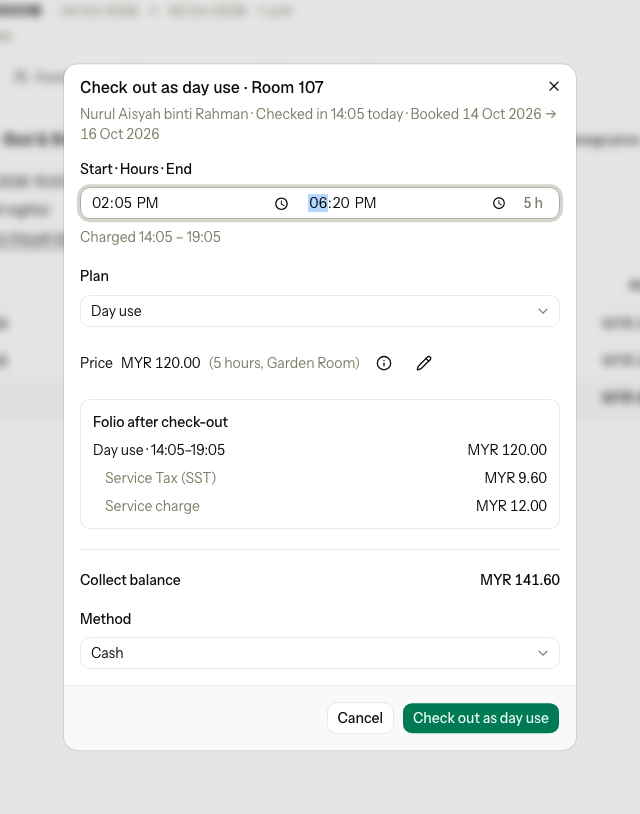
| Part | What it shows or does |
|---|---|
| Start · Hours · End | When the guest came and left. Hours follows them, rounded up to whole hours. |
| Charged | The block that is charged, for example "Charged 14:05 – 19:05". It shows when it differs from End. |
| Plan | The Day use plans of the room type, then No plan · enter price. A plan that cannot price the stay is greyed out, with the reason, for example "Sells 2–6 hours". |
| Price | The plan price for the hours. ✎ changes it. |
| Folio after check-out | The day use line and its taxes, as they will post. |
| Collect balance or Refund | What the guest pays now, or what goes back. |
How the hours are charged
The hours are rounded up to whole hours from the start.
| Start | End | Charged as |
|---|---|---|
| 14:05 | 18:20 | 5 hours, 14:05 to 19:05 |
| 10:00 | 14:00 | 4 hours, 10:00 to 14:00 |
| 20:00 | 23:40 | 3 hours, 20:00 to 23:00. A day use must end before midnight, so the last part hour is not charged. |
The plan and the price
| Plan | When | Price |
|---|---|---|
| A Day use plan | It sells the hours and has a price for today. Its Sold between hours do not apply here. | The plan price. ✎ to change it. |
| No plan · enter price | Always. It is the only choice when the room type has no Day use plan. It shows "Keeps" and the unit's own plan, for example "Keeps Bed & Breakfast". | The amount you enter. Zero is allowed. |
When no Day use plan can price the stay, No plan · enter price is picked and a note says why, for example "Day use sells 2–6 hours."
What happens
- The booked nights are removed. The room is free for those nights.
- The unit becomes a day use on today's date, with the charged block, for example "Day use · 14:05–19:05".
- The day use price posts with the day use taxes. The Tourism tax is not charged.
- Add-ons for the removed nights that were not charged yet are removed. The dialog lists them, for example "Breakfast × 2 · 15 Oct".
- The guest is checked out. The room becomes Dirty.
- The activity log keeps the booked dates and the reason.
- Reports count the unit in Day use sold and Day use revenue, not in occupancy, ADR or RevPAR.
Special cases
| Situation | Example | What happens | What to do |
|---|---|---|---|
| The guest arrived before today | Checked in yesterday, leaves today. | • Check out as day use is not in the menu. • "Only an overnight unit that arrived on the business date can check out as day use." | • Use Early departure or the normal check-out. |
| After midnight | The guest leaves at 00:30. The night audit has not run. | • "The guest stayed past midnight, so this is a night. Use normal or early check-out." | • Use the normal check-out or Early departure. The night is charged. |
| A dorm bed | A guest in a 6-bed dorm leaves the same day. | • "A dorm bed cannot check out as day use. Use Undo check-in or check out on the departure date." | • Use Undo check-in if the guest did not stay. |
| End before Start | You type an end of 13:00 for a start of 14:05. | • "Choose an end time after the start on the business date." | • Fix the times. |
| Start too late | You type a start of 23:15. | • "Choose a start time before 23:00 on the business date." | • Use an earlier start. |
| No amount | No plan · enter price, with the amount empty. | • "Enter an amount of 0 or more for this day use." | • Enter the amount. Enter 0 for no charge. |
| The plan does not sell the hours | The guest stayed 8 hours. The plan sells 2 to 6. | • The plan is greyed out: "Sells 2–6 hours". | • Use No plan · enter price. |
| No day use taxes | The Day use tab has no taxes. | • "DAY_USE has no taxes set. Set them under Room revenue." | • Ask an owner to set the taxes first. |
| The guest paid for the nights in advance | MYR 500.00 paid. The day use costs MYR 141.60. | • Folio after check-out shows a refund. | • Refund the credit in the dialog. |
| The guest checked in by mistake | The guest never used the room. | • Day use still charges the hours. | • Use Undo check-in. |
| You undo it later | The guest comes back to stay the night. | • Undo check-out does not bring back the removed nights. | • Book the night again. |