
Check in all
Check in several rooms or beds of a group booking in one step.
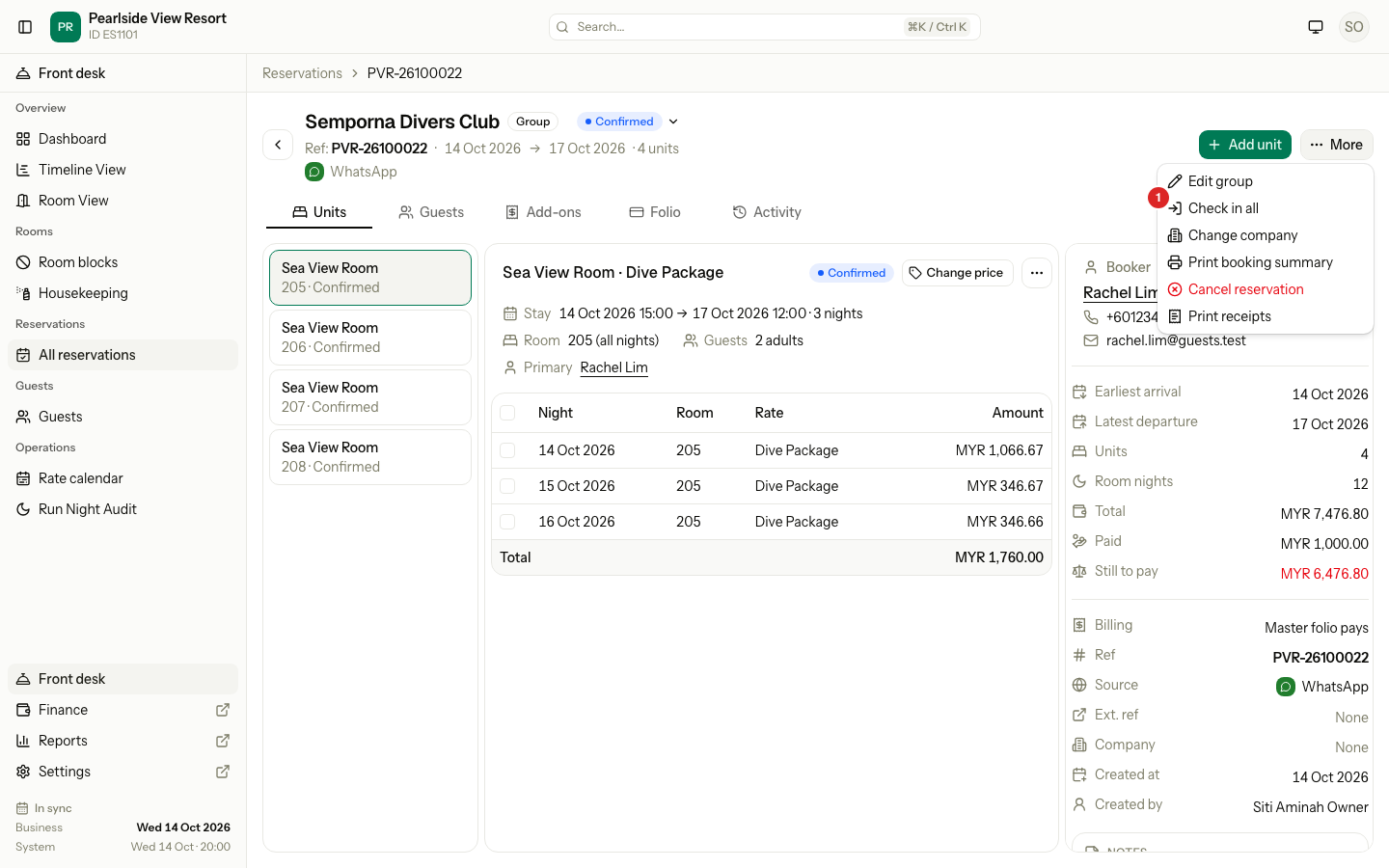
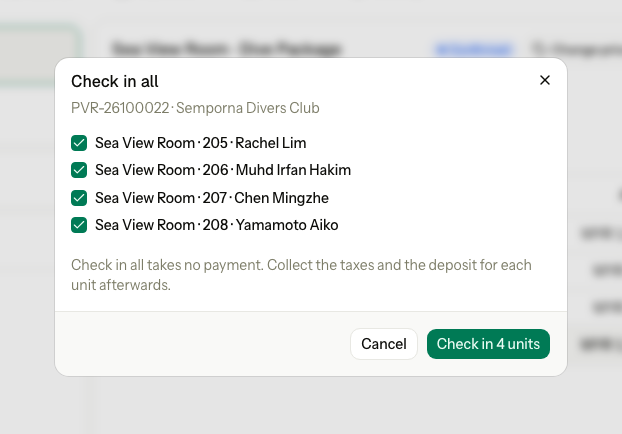
Use Check in all when a group arrives together. One dialog checks in the rooms you tick. It takes no payment: collect the taxes and the deposit for each unit afterwards.
Before you start
- Permission: Check in units.
- The reservation has 2 or more units, and at least one is Confirmed.
- Each unit needs a room or bed for tonight, or your property assigns rooms automatically.
Steps
-
Open the reservation, select More, then Check in all.
-
Every unit that can check in today is ticked. A unit that cannot is greyed out, with the reason under its name. Untick a unit whose guest is not here yet.
-
If cards are not signed and you may skip them, tick Check in without a card.
-
Select the green button. It says how many units, for example Check in 4 units.
-
Collect the taxes and the deposit for each unit on the folio.
You can also open Check in all from a group row on the dashboard, and from the night audit checklist.
How it differs from one check-in
| Check in | Check in all | |
|---|---|---|
| Units | One | The ones you tick |
| Collect now | Yes | No. Collect per unit afterwards. |
| Nationality | Asked when missing | Not asked. That unit is refused. |
| Credit limit override | Yes, with a reason | No. That unit is refused. |
| A unit is refused | Nothing is saved | The others still check in. The refused unit shows its reason. |
Cancel works the other way. Cancel reservation cancels all the ticked rooms or none. See Cancel.
Special cases
| Situation | Example | What happens | What to do |
|---|---|---|---|
| One unit is refused | Room 207 has no nationality, and a tax depends on it. | • The other rooms check in. • Room 207 stays Confirmed and shows the reason on its row. | • Check in room 207 on its own, from the unit's ⋯ menu. |
| The company is over its credit limit | A company group with a large unpaid balance. | • Each unit is refused with "This company is over its credit limit." | • Check in each unit on its own and enter the override reason. Or ask a manager. |
| No unit can check in today | The group arrives tomorrow. | • "No guest in this booking can check in today. The reason is under each name." | • Wait until the arrival date. |
| Rooms arrive on different days | 2 rooms arrive today, 3 tomorrow. | • Only the 2 rooms of today are ticked. The other 3 are greyed out with the reason. | • Run Check in all again tomorrow. |
| Cards not signed | Your property needs signed cards. | • Units without a signed card are refused. | • Sign the cards, or tick Check in without a card if you may. |
| A dorm group | 4 backpackers in 4 beds. | • Each bed is a unit with its own row. | • Tick the beds that arrived. |