
Group bookings
Book many rooms or beds under one reservation, and choose who pays.
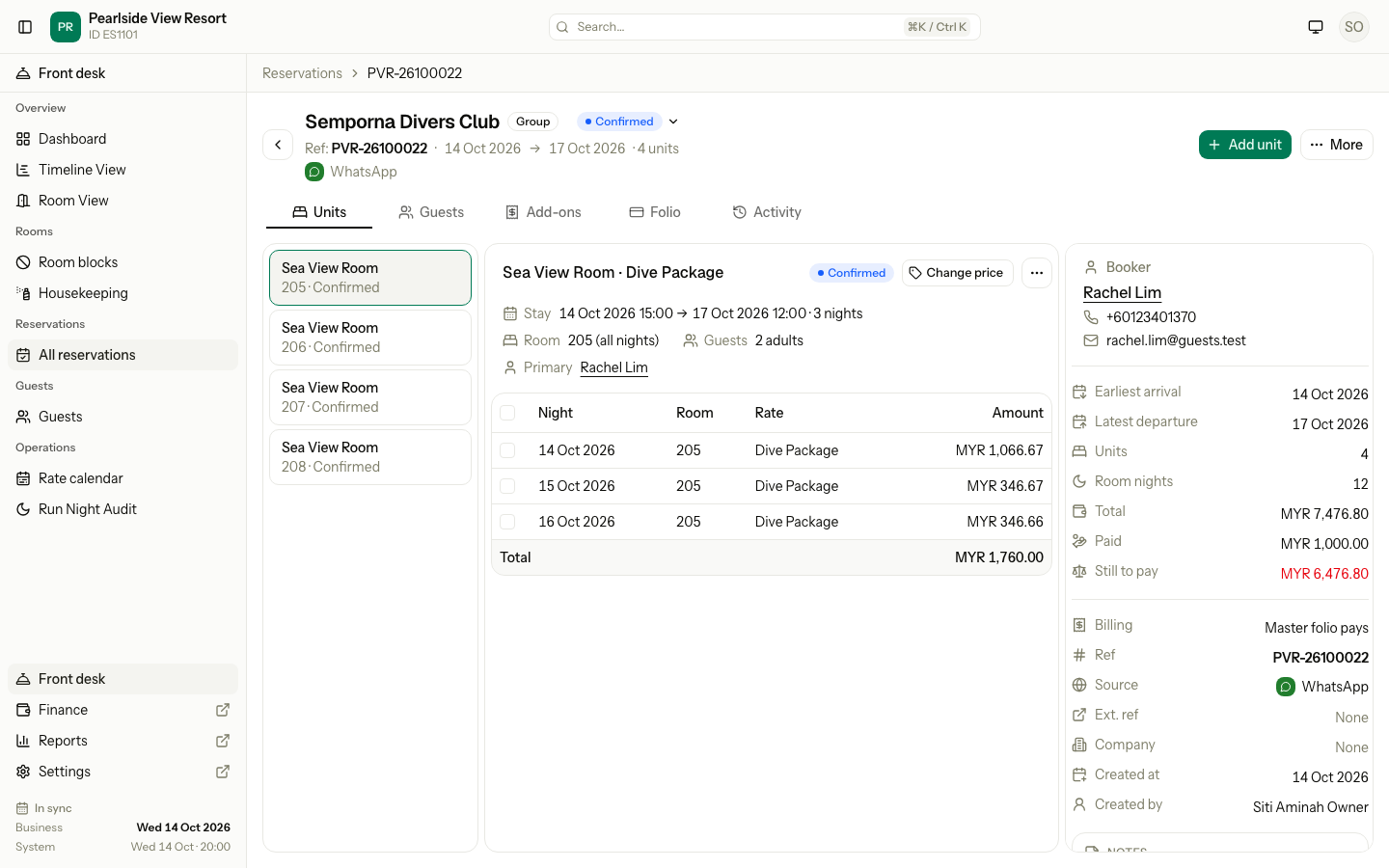
A group is a reservation with two or more units. Use it for a family in three rooms, a dive club, a wedding party or a tour group. The whole group has one reference number and one booker. Each room keeps its own dates, room type, rate plan and guests.
You do not create a group in a special way. Estatell shows the Group label as soon as a reservation has two units.
Before you start
- Permission: Manage reservations. Owners, managers and front desk staff have it by default.
- Set up first: the same as for a single booking. If the company pays, add the company in Companies first.
Book a group
- Open the booking form.
- In Rooms and beds, add one line for each room type and rate plan. Select Add line for the next one.
- Give each line its own dates if the guests do not arrive and leave together.
- Fill in Group name. It appears next to the source when you have two or more units. Leave it empty to show the booker's name.
- In the Summary, pick Billing. The next section explains the choices.
- Add the guests, then select Create booking.
If one line fails, for example no room is free, Estatell saves nothing and names the line. Fix that line and select Create booking again. The reference number is not used up.
Choose who pays
Billing decides which folio gets each charge. A folio is the list of charges and payments. The Master folio belongs to the whole reservation. Each unit also has its own folio.
| Billing | Room charges go to | Extras go to | Use it when |
|---|---|---|---|
| Master folio pays | The Master folio | Each unit's folio | One person or company pays for the rooms. Guests pay their own meals, laundry and so on. |
| Master folio pays all | The Master folio | The Master folio | One person or company pays for everything. |
| Each unit pays | Each unit's folio | Each unit's folio | Every room pays for itself. |
Room charges are the nightly rate. Extras are every other charge, such as add-ons and items you post on the folio.
The first option in the list is the default for a new booking. You can change it any time, as described below.
A company on the booking
If the reservation has a company, Estatell makes the Master folio even with one unit. The company invoice comes from the Master folio. Each unit pays with a company means nothing is billed to the company. The form warns you: "Guests pay everything. Nothing is billed to the company. Choose Master folio pays to bill the company."
Change the group name or billing
- Open the reservation.
- Select More, then Edit group.
- Change Group name or Who pays the room charges. The billing choice shows only with two or more units.
- Select Save group.
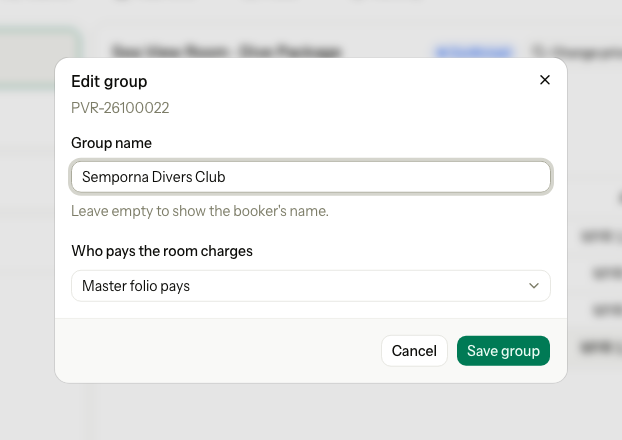
This works on closed reservations too. A change affects later charges only. Charges that are already posted stay where they are. Move them by hand if you need to. See Move charges.
If a unit's own folio already holds room charges or an advance payment, the change saves and a warning names the unit. Example: "Unit added. Room charges now go to the Master folio, but a unit's own folio holds a MYR 200.00 advance. Transfer its room charges back to it, or refund the advance." Check-out still needs the unit folio at zero, so nothing is lost.
Add a room to a group
- Open the reservation and select Add unit.
- Pick the Room type and Rate plan, then the dates, the room and the guests.
- Select Add unit.
You add one room at a time. For a dorm bed, see Dorm beds. A reservation with one unit becomes a group when you add the second.
Cancel, check in and check out
| Task | How |
|---|---|
| Cancel one room | Open the unit's menu and cancel it. The other rooms stay booked. See Cancel and no-show. |
| Cancel every room | More › Cancel reservation. |
| Check in one room | Open the unit and check it in. |
| Check in every room | More › Check in all. |
| Check out every room | More › Check out all. See Group check-out. |
You can mix private rooms and dorm beds in one group.
Special cases
| Situation | Example | What happens | What to do |
|---|---|---|---|
| The rooms arrive on different days | A wedding party: 2 rooms from 14 Oct, 2 more from 15 Oct to 17 Oct. | • Each unit has its own dates. • The list shows the earliest arrival (14 Oct) and the latest departure (17 Oct). | • Nothing. This is normal. |
| One room is cancelled | A dive club of 4 rooms. One diver is ill and cancels room 206. | • Rooms 205, 207 and 208 stay booked. • The reservation is Cancelled only when all 4 are. | • Cancel the rest if the whole group drops out. |
| The Master folio holds a payment and you change Billing | The booker paid a MYR 1,000.00 deposit, then asks to split the bill with Each unit pays. | • The change is refused. • "The Master folio holds MYR 1,000.00 in payments. Refund it before changing the billing mode." | • Refund the payment, then change Billing. See Payments and refunds. • A name-only change is always allowed. |
| You change Billing after charges were posted | Room 205 already has 2 nights posted on the Master folio. You change to Each unit pays. | • Those 2 nights stay on the Master folio. • Only later nights go to the unit folios. | • Move the old charges by hand if needed. |
| You add a second room to a one-room booking | A couple booked 1 room. Their friends join, so you add a second room. | • Room charges now go to the Master folio. • If the first room's folio holds an advance of MYR 200.00, a warning names it. | • Move the charges back. • Or refund the advance. |
| A company is set and Each unit pays is picked | Semporna Marine pays for 3 staff rooms, but Each unit pays is on. | • Nothing is billed to the company. • Each guest pays. | • Pick Master folio pays to bill the company. |
| The group name is empty | The booker is Rachel Lim and Group name is empty. | • The list shows "Rachel Lim". | • Enter "Semporna Divers Club" to find the group faster. |
| A line is not available when you book | Line 2 asks for a Sea View Room on 15 Oct, but all are taken. | • Nothing is saved. • The message names line 2. | • Change line 2 or remove it. • Select Create booking again. |
| The reservation is Cancelled or Completed | A group that checked out last week needs one more room. | • Add unit is hidden. | • Make a new booking. |
| The last room is taken while you add a unit | You add the last Garden Room while a colleague books it. | • The unit is not added. | • Pick another room. • Or leave the room empty. |
| A unit has no guest yet | You book 4 rooms but know only 2 guests' names. | • The 2 other units still book. | • Add the guests on the reservation page. |
| A channel booking has several rooms | A guest books 3 rooms in one Booking.com order. | • It arrives as one group reservation. | • Treat it like any group. • Staff checks apply when you add a unit. |