
Cancel
Cancel one unit, or many units of a reservation in one go, and charge the cancellation fee.
Cancel when a guest tells you they will not come. Cancel one unit from its own menu. Cancel several units, or the whole reservation, from Cancel reservation.
For the fee and what happens to the unit, see the overview.
Before you start
- Permission: Manage reservations. To skip the fee you also need Do not charge cancellation and no-show fees.
- The unit must be Confirmed. A checked-in guest is checked out instead.
Cancel one unit
-
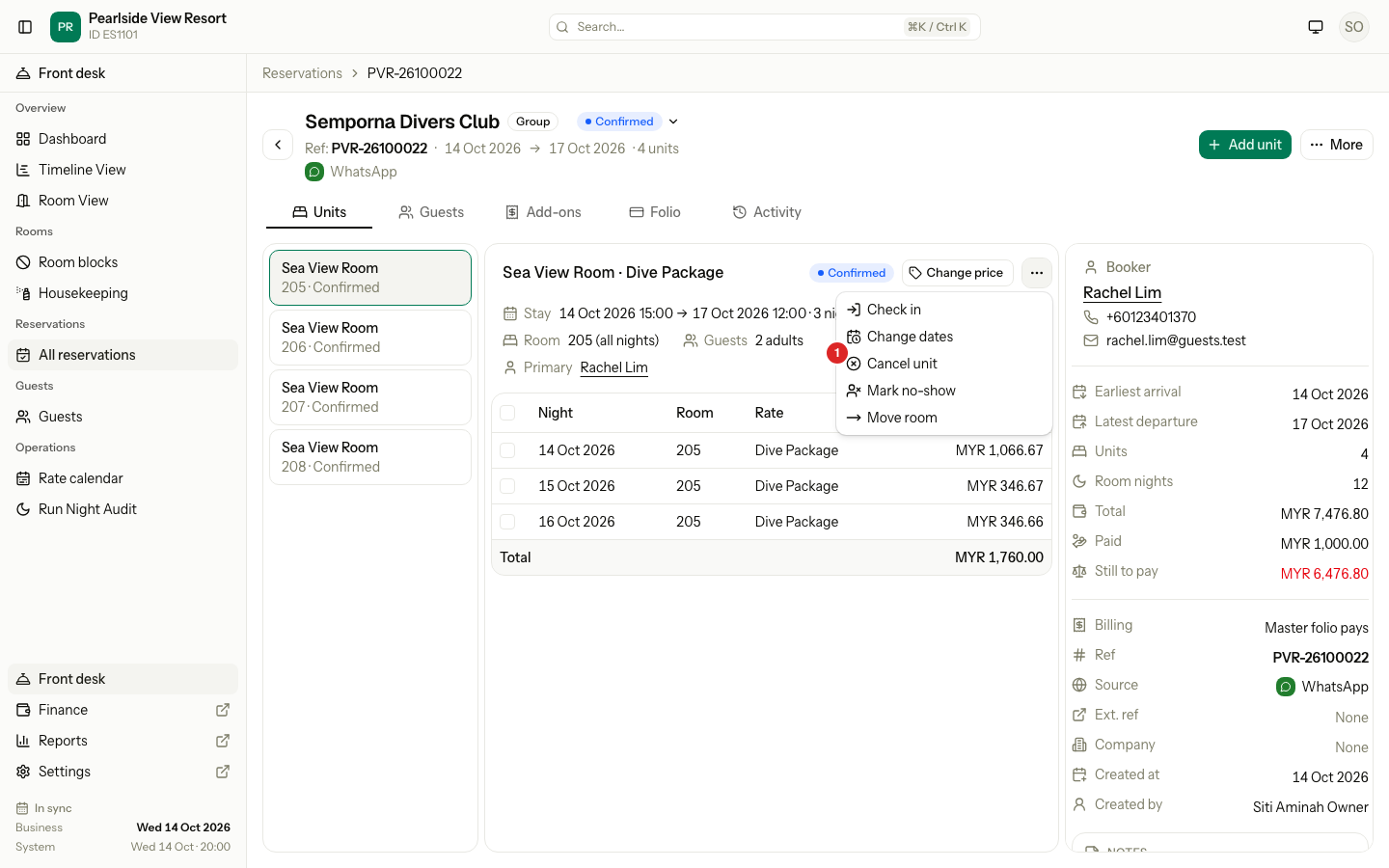
Open the reservation. On the Units tab, pick the unit.
-
Select the ⋯ menu on the unit, then Cancel unit.
-
Check the Fee. It shows No charge when the policy allows free cancellation.
-
To skip a fee, tick Do not charge and enter a Reason. This shows only if you have the permission.
-
Tick Also remove add-ons if the extras should go too.
-
Select Cancel unit.
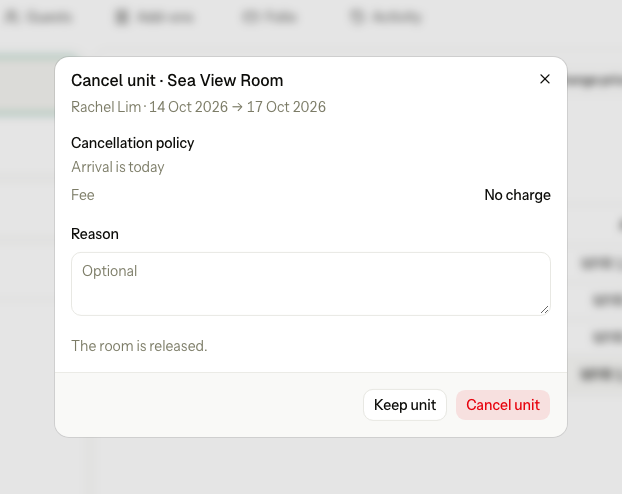
The dialog also tells you how close the arrival is, for example "Today is 1 day before arrival", so you can see if the free window still applies.
Cancel the whole reservation
One dialog cancels many units, so a group is never left half cancelled.
-
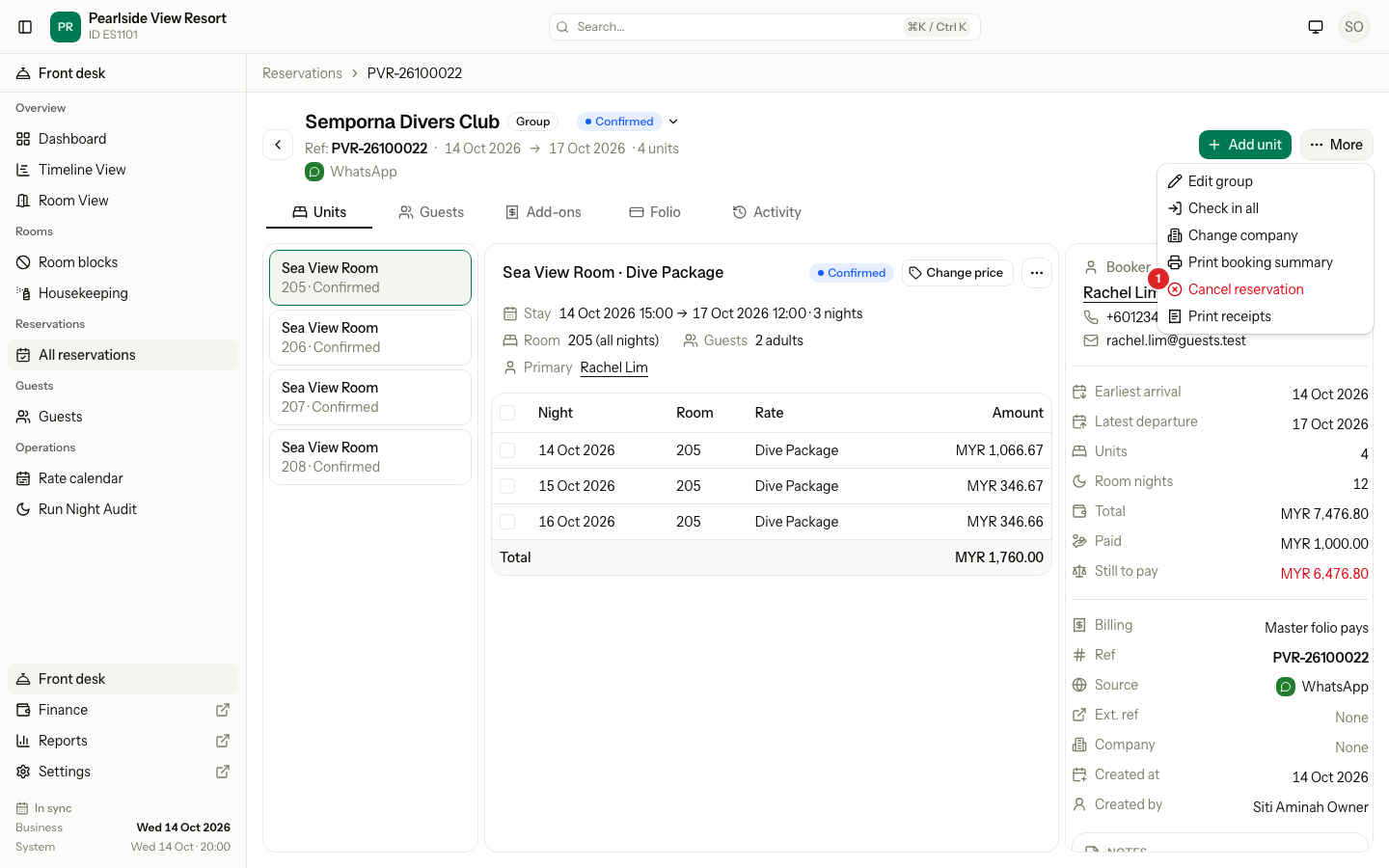
Open the reservation, select More, then Cancel reservation.
-
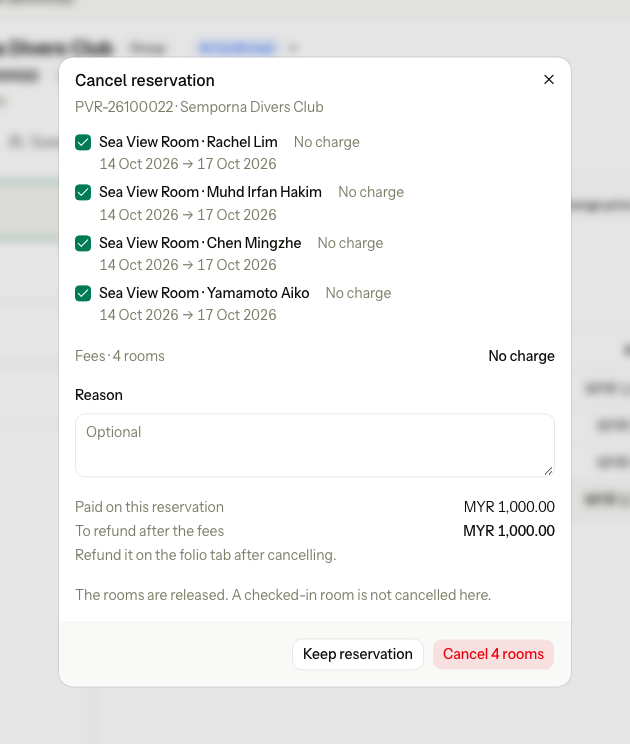
Every Confirmed unit is ticked. Untick the units that stay.
-
Check the fee on each row and the Fees total.
-
Optional: enter a Reason. Tick Do not charge or Also remove add-ons if you need to.
-
Check the money lines: Paid on this reservation, and To refund after the fees or what the guest still owes.
-
Select the red button. It says how many rooms, for example Cancel 4 rooms.
- A room that is not Confirmed is dimmed with the reason. A checked-in room says: use check-out or early check-out.
- Do not charge applies to every ticked room. To skip the fee for one room only, use Cancel unit on that room.
- If a company asked to cancel from the company portal, a banner names the company and the date. Cancelling answers the request.
- If one room cannot be cancelled, nothing is cancelled. The message names the room.
Special cases
| Situation | Example | What happens | What to do |
|---|---|---|---|
| Free window | Policy: free until 2 days before arrival. You cancel 5 days before. | • The fee shows No charge. | • Cancel as normal. |
| Inside the window | You cancel 1 day before arrival. | • The fee shows, for example MYR 302.40. | • Cancel, or tick Do not charge if you may. |
| A guest already paid | The guest paid MYR 1,000.00 and the fee is MYR 302.40. | • The dialog shows To refund after the fees: MYR 697.60. | • Refund it on the Folio tab after cancelling. |
| A checked-in room | One room of a group is already in house. | • It is dimmed in Cancel reservation. | • Check the guest out, or use early check-out. |
| One room of a group | One diver out of four cancels. | • Only that unit is cancelled. The other three stay. | • Use the unit's Cancel unit, or untick the others in Cancel reservation. |
| One room cannot be cancelled | Room 106 has a closed folio. | • Nothing is cancelled. • "Room 106: The unit folio is closed, so it cannot change." | • Fix that room, or untick it, and try again. |
| A company asked to cancel | The company cancelled from its portal. | • A banner names the company and the date. | • Check the rooms and cancel. The request is then answered. |
| A booking that should not exist | A duplicate or a test booking. | • Cancel counts it as a cancellation in reports, and may charge a fee. | • Tick Do not charge and enter "Duplicate" as the reason. |