
Boat trips
Set how each room's guests come in and go out by boat, change a trip, and find bookings that still have no boat.
A boat trip records how a room's guests travel: on a scheduled boat, on a charter, or on their own boat. Staff set a Boat in and a Boat out for each room. The trip sets the room's expected arrival or departure time. That time then shows on the front desk lists, on the housekeeping board and on the Boat manifest.
Boat in and Boat out show only when the Estatell team has turned the Boats feature on for your property. Add the departures first. See Boat settings.
Before you start
- Permission: Manage reservations, to set or clear a trip. View reservations, to see trips. Owners, managers and front desk have both by default.
- Add your departures and fares in Boat settings.
- A day use booking has no boat trips. The boat fields do not show for day use.
The trip types
| Choice in the list | What it means | What you enter | What happens |
|---|---|---|---|
| Not set | No trip yet. | Nothing. | The room keeps the time it has. |
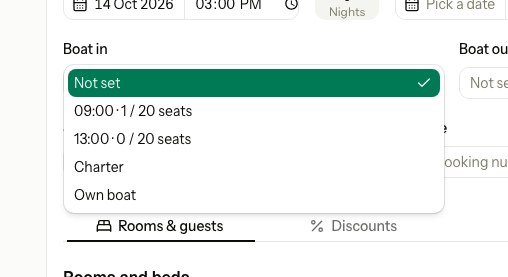
| A departure, for example 09:00 · 14 / 20 seats | A scheduled boat. | Nothing more. | The time is set from the departure and cannot be typed. The fare is added to the booking. |
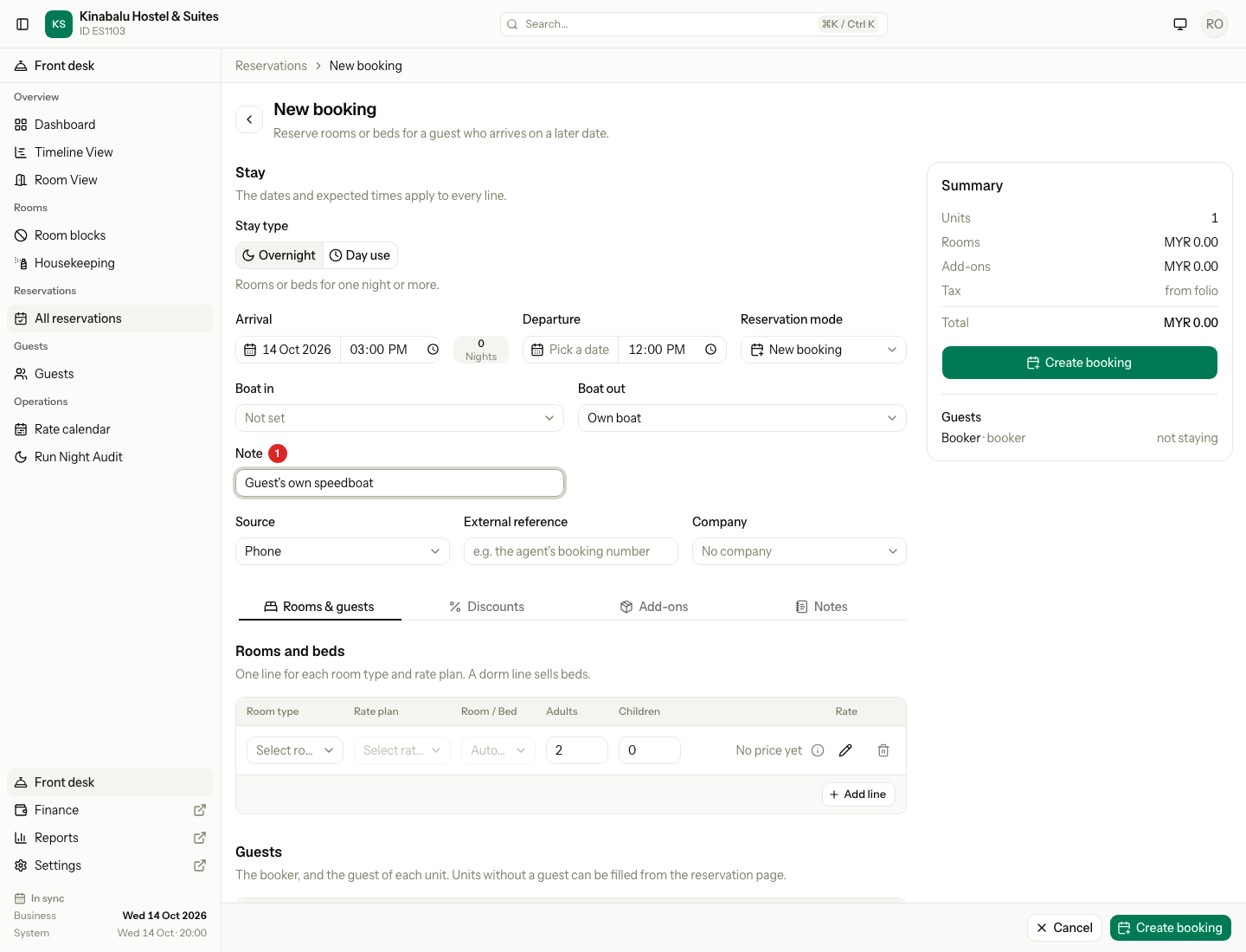
| Charter | A boat hired for this guest. | The time, and a Note if you want one. | The time you type is the room's time. No fare is added. |
| Own boat | The guest comes on their own boat. | The time, and a Note if you want one. | The time you type is the room's time. No fare is added. |
The list shows each departure by the time it leaves. The count after it is the seats already taken on that date, for example "14 / 20 seats". A boat with no seat limit shows only its time.
For a scheduled boat in, the room's arrival time becomes the time the boat arrives at your property. For a scheduled boat out, the room's departure time becomes the time the boat leaves your property.
Set a trip on a new booking
-
Open Reservations, then select New.
-
Fill in the stay as usual. The dates and times apply to every room on the booking.
-
Under the dates, choose Boat in and Boat out.
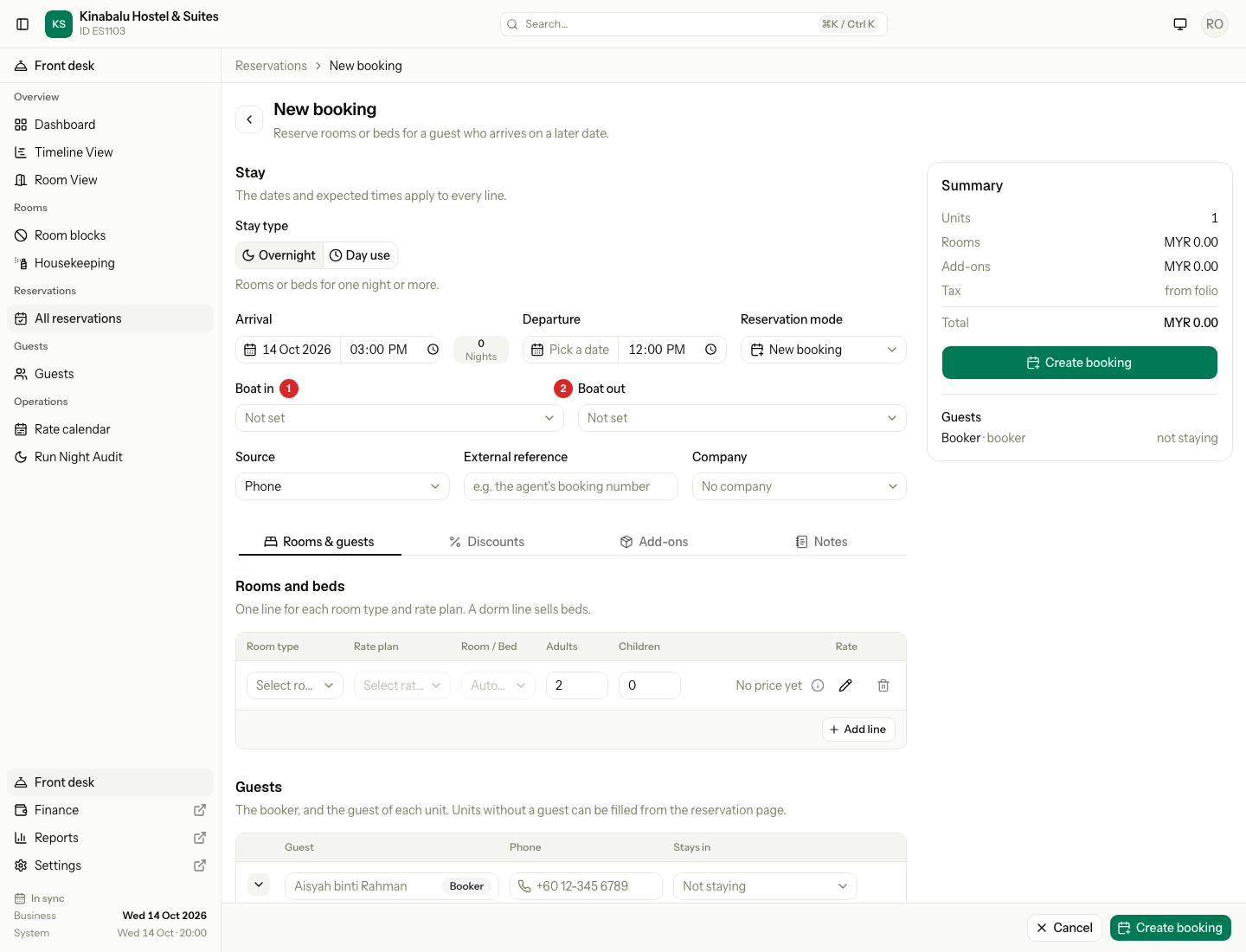
The list shows the departures that are on for that direction.
-
If you choose Charter or Own boat, enter the time in the stay row and a Note.
-
Finish the booking and select Create booking.
The trip applies to every room on the booking. If Estatell refuses one trip, it saves nothing, and the message shows under the Boat in or Boat out field.
See and change a trip
-
Open the reservation. On the Units tab, find the Boat row of the room.
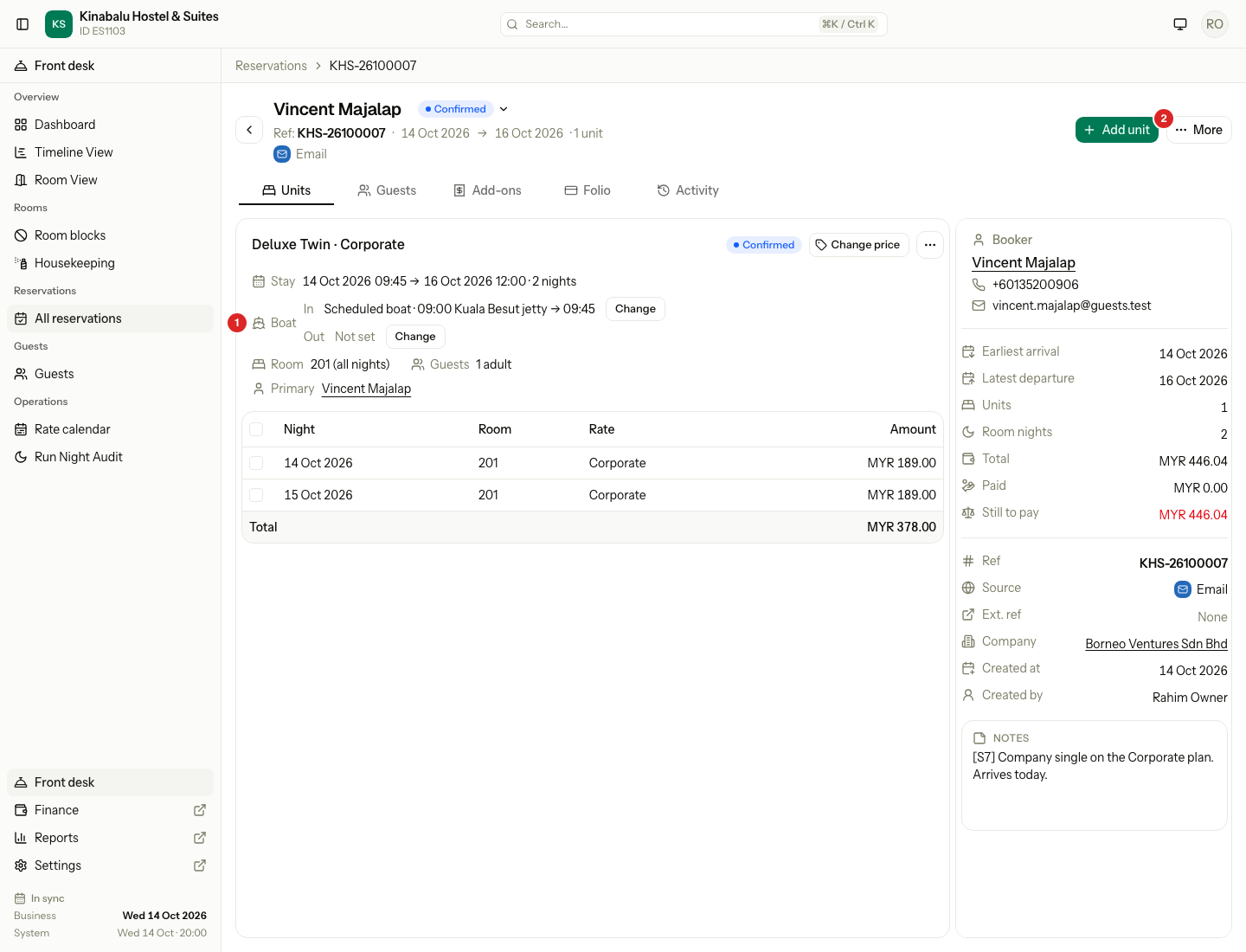
In is the boat in. Out is the boat out.
-
Select Change next to the direction.
-
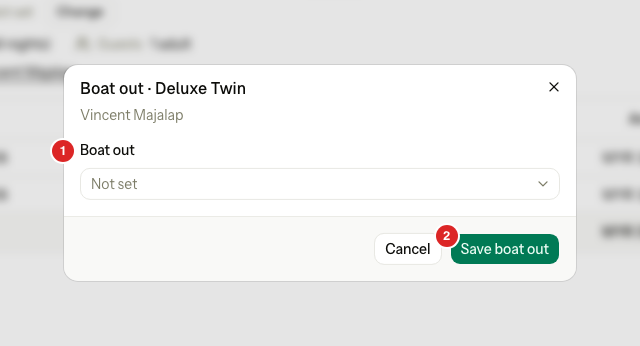
Choose another departure, Charter, Own boat, or Not set. For Charter or Own boat, enter the Time.
-
Select Save boat in or Save boat out.
Not set clears the trip. It removes the fare if the fare is not posted yet. The room keeps the time it has.
When can I change a trip?
| Trip | You can change it while the room is |
|---|---|
| Boat in | Confirmed. |
| Boat out | Confirmed or Checked in. |
After that, the row is read only. A trip on a departure that is now off shows "unavailable" on the row. The list in Change shows only departures that are on, so choose another.
Set the boats for every room at once
-
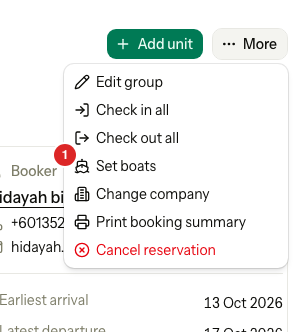
Open the reservation and select More, then Set boats.
-
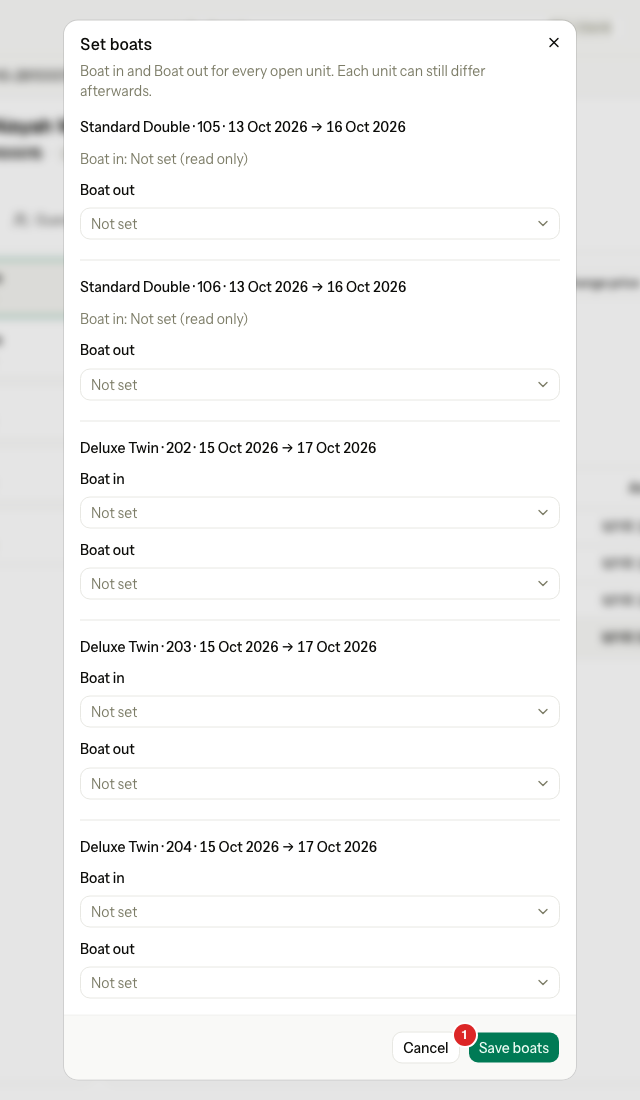
Choose Boat in and Boat out for each room.
-
Select Save boats.
The dialog lists every room that is Confirmed or Checked in. For a room that has checked in, the Boat in is read only. Day use rooms are left out. Each room can still differ afterwards.
If Estatell refuses one room, it saves nothing and names the room, for example "Deluxe Twin · 202: This unit cannot take a boat trip in its current status."
When you use Add unit on a reservation, Estatell copies the first room's boat trips to the new room, as it copies the times. If a departure is now off, Estatell skips that trip and says so, for example "09:00 was skipped. It is no longer available." The room is still added.
The fare
A scheduled boat with a fare adds the fare to the booking as an add-on. See Add-ons.
| Rule | What it means |
|---|---|
| One fare for each trip | The fare is one way, per guest. A guest on a boat in and a boat out pays two fares. |
| Children | Child prices follow the age groups of the fare. |
| Posting | The fare has no service date. It posts at check-in like other undated add-ons. A boat out set after check-in posts in that night's audit. |
| Package | If the rate plan already includes the same charge item, Estatell adds no fare. |
| Charter and own boat | No fare is added. Add a charge by hand if you want one. See Add a charge. |
| A new fare on the departure | It applies to new trips only. Booked trips keep the fare they have. |
| Change or clear a trip | Estatell removes the old fare if it is not posted yet, then adds the new one. If the old fare is already posted, it stays, and the message says "The old fare is already posted. Reverse it on the folio if needed." |
Seats
Every guest takes a seat, infants included. Estatell counts the adults and children of every confirmed, in-house and checked-out room with a scheduled trip on that departure and date.
If a booking would pass the limit, the list shows a warning, for example "This boat is over its 20 seats." The warning does not stop you. You can still save.
Find bookings with no boat
With the feature on, To do today on the dashboard has a No boat row for each reservation that has a confirmed room arriving today or tomorrow with no Boat in. The row shows Today or Tomorrow and the number of rooms, for example "3 rooms".
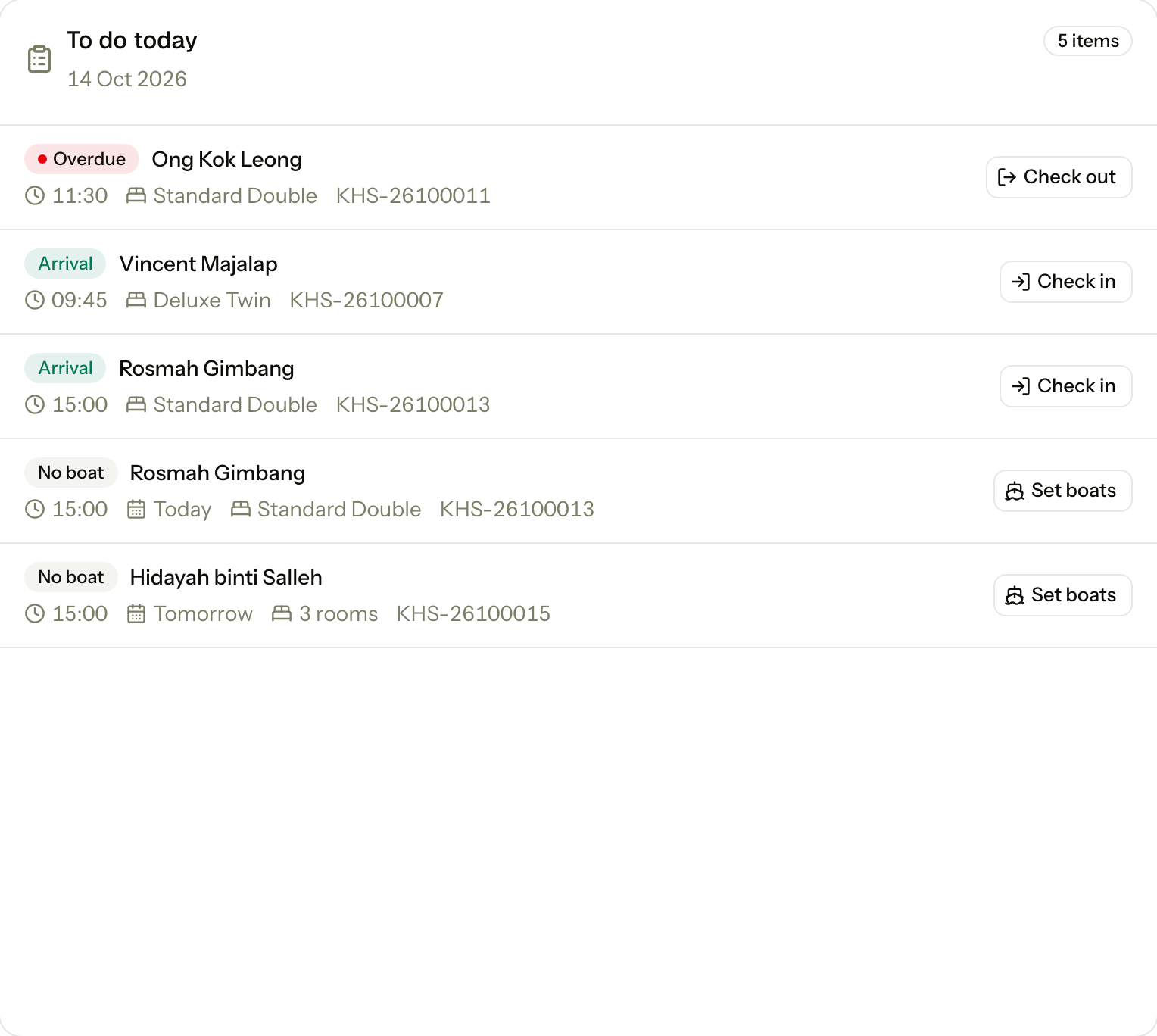
Select Set boats to open the reservation. Then use More, Set boats. See the dashboard.
Bookings that arrive from a channel or the company portal come without trips. They show in this list until staff set the boats.
Where the boat shows
-
Arrivals and Departures: a Boat column after the time column. Arrivals shows the boat in. Departures shows the boat out. It reads for example "09:45 boat", "Charter 10:30" or "Own 11:30", or "—" when there is no trip. The time is the room's expected time. See Guest lists.

-
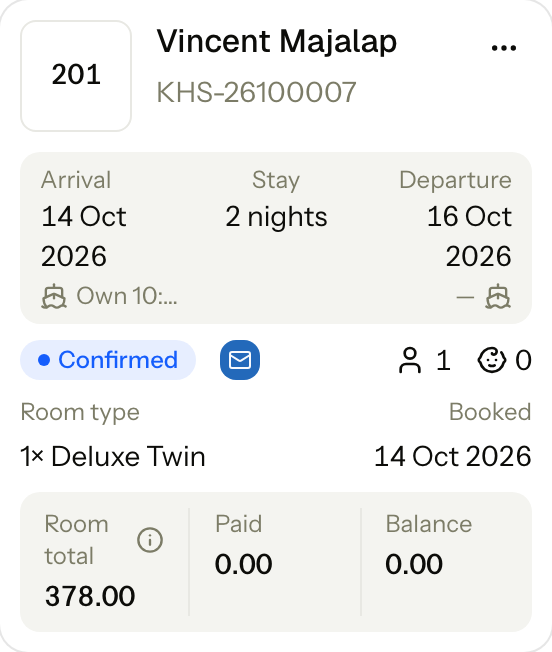
Reservation card: a line under Arrival and Departure, with a ship icon. Point at the icon to see "Boat in" or "Boat out". It shows one label if every room agrees, Mixed if they differ, and "—" if no room has a trip.
-
Housekeeping board: rooms come in the order of their expected times, so the order follows the boats.
-
Activity tab: each trip change shows with a ship icon.
Boat times also change the Meal counts for the kitchen on the first and last day of a stay. See Meals and meal periods and Meal counts.
Special cases
| Situation | What happens | What to do |
|---|---|---|
| The boat is full | Estatell warns but lets you save. | Choose another departure, or save and tell the boat crew. |
| A booking has Boat in set and the guest has checked in | Change is gone for Boat in. Boat out can still change. | Nothing. The guest has arrived. |
| A room is cancelled or a no-show | Trips and fares stay as history. | Nothing. When you reinstate the room, the trip comes back, but not its fare. Add the fare again with Change. |
| The departure for a trip is turned off later | The trip keeps it and shows "unavailable". New bookings cannot choose it. | Choose another departure with Change if the guest should move. |
| The fare of a departure is turned off | Estatell refuses to save a trip on that departure. It says "This boat's fare is not available. Turn it on or change the departure's fare." | Turn the fare on in Boat settings, or change the fare of the departure. |
| You change the stay dates or the room | The trip moves with the room. | Check the time on the booking. |
| The booking is day use | There is no boat row. Estatell says "Day use bookings have no boat trips." | Nothing. Day use rooms have fixed hours. |
| A charter or own boat has no time | Estatell says "Enter the time." | Type a time and save again. |
| You turn Boats off | Boat data stays. The boat fields, the No boat row and the manifest are hidden. | Ask the Estatell team to turn it on again. |