
Boat settings
Add the boats that bring guests in and out, set their seats and fares, and turn a boat on or off.
Boat settings hold two lists. Departures are the boats: when each one leaves and arrives, where guests board, and how many seats it has. Fares are the one-way price per guest. Staff then pick a departure for each room on a booking. See Boat trips.
Boats shows in Settings only when the Estatell team has turned the feature on for your property. See Set up your property.
Before you start
- Permission: Manage property settings. Owners and managers have it by default.
- Add your fares first if you want a departure to charge one. A departure can have No fare.
- A departure runs every day at its time. For a season when no boats run, use closed dates or room blocks. See Room blocks.
Add a departure
-
Open Settings, then Boats under Property. The Departures tab opens.
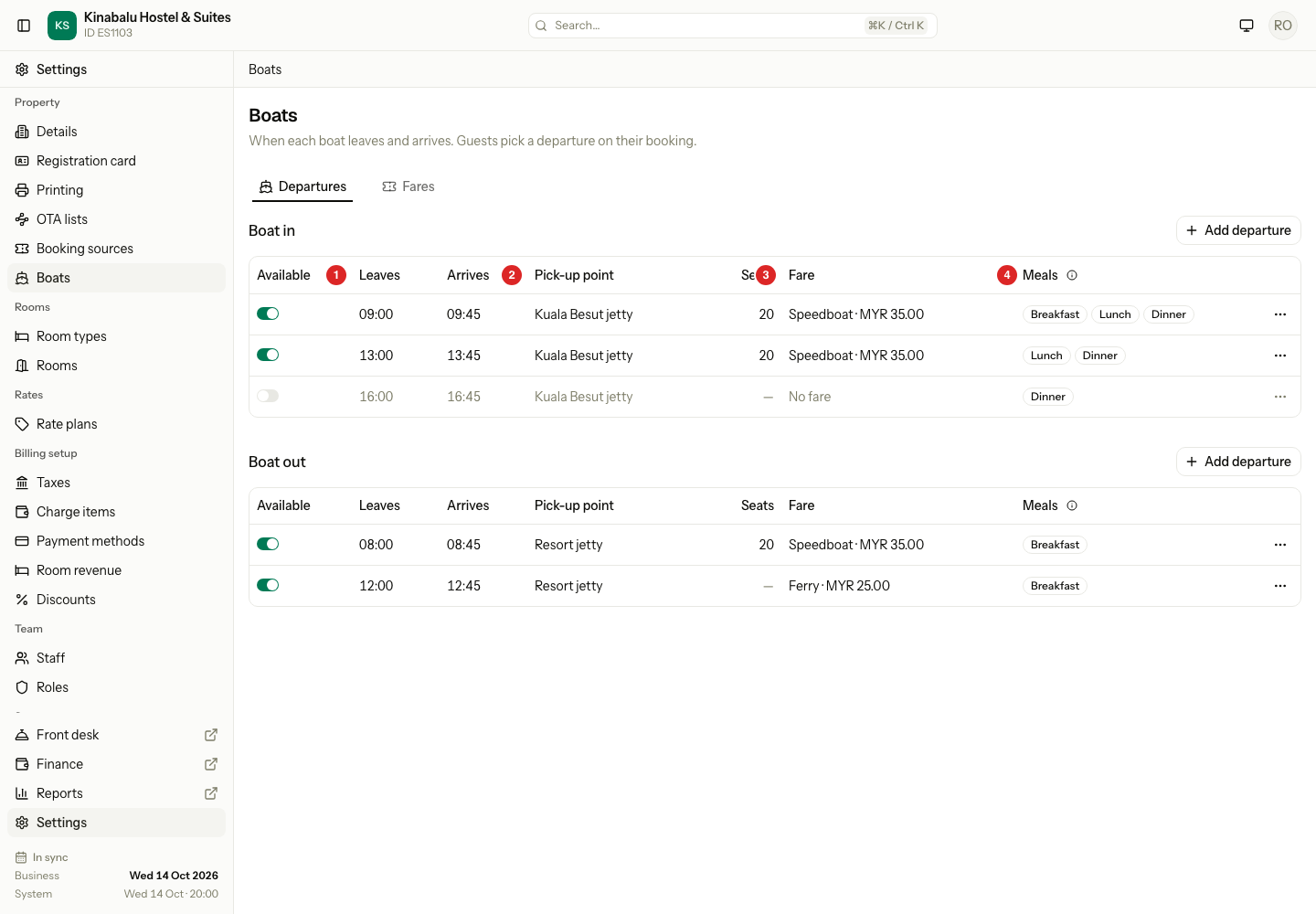
Each list is in order of the Leaves time. A boat that is off stays in the list, in grey.
-
In the Boat in or Boat out list, select Add departure.
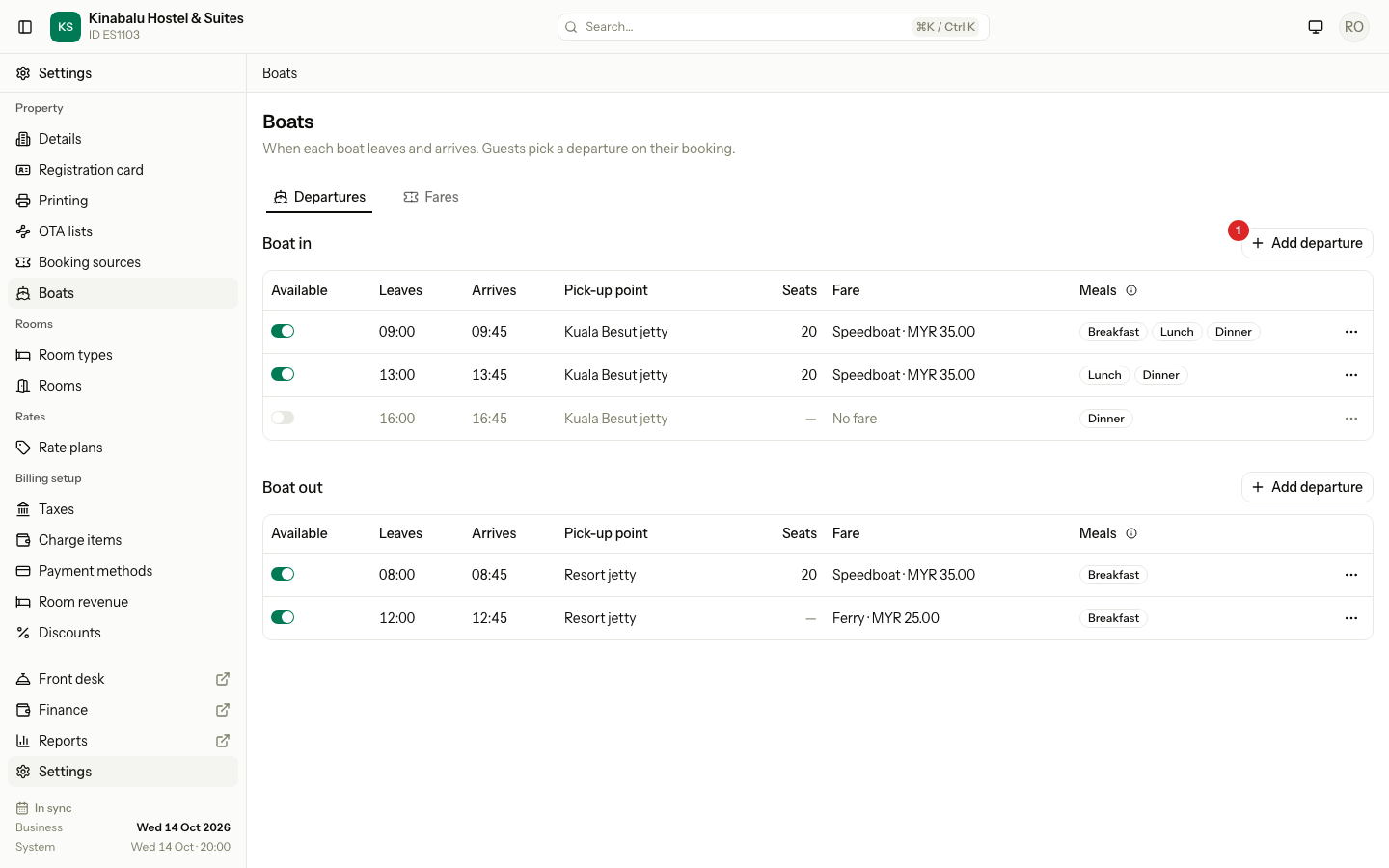
-
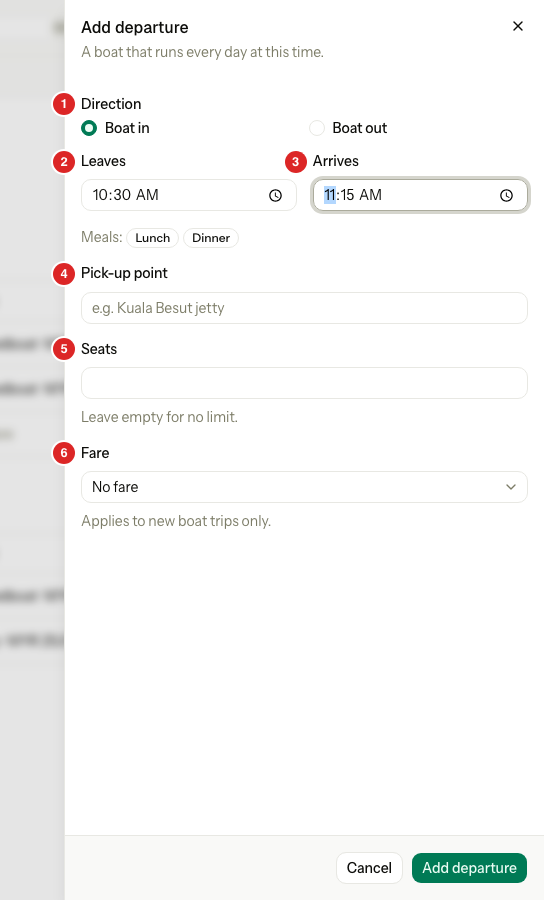
Fill in the form.
-
Select Add departure.
The new departure is available at once.
| Field | What to enter |
|---|---|
| Direction | Boat in takes guests to your property. Boat out takes them away. The list you used sets it for you. |
| Leaves | When the boat leaves. For Boat in this is the jetty. For Boat out it is your property. |
| Arrives | When the boat arrives. It must be after Leaves, on the same day. |
| Pick-up point | Where guests board. For Boat in, the jetty on the mainland, for example "Kuala Besut jetty". For Boat out, the jetty at your property, for example "Resort jetty". Optional. It shows on the reservation and on the Boat manifest. |
| Seats | How many guests the boat holds. Leave it empty for no limit. |
| Fare | The price guests pay for this boat. Choose No fare for a free boat. The list shows only fares that are on. |
Under the times, the form shows the meals a guest on this boat can get. It changes as you type.
How the fields fit together
The pick-up point is always where the boat leaves from. The time at your property becomes the guest's expected time: Arrives for a boat in, Leaves for a boat out.
| Pick-up point | Leaves | Arrives | Guest's expected time | |
|---|---|---|---|---|
| Boat in | The mainland jetty | At the mainland jetty | At your property | Arrival time, from Arrives |
| Boat out | Your property's jetty | At your property | At the mainland jetty | Departure time, from Leaves |
Edit a departure
- In the row, select the ⋯ button, then Edit.
- Change the fields and select Save departure.
If you change the time at your property (Arrives for a boat in, Leaves for a boat out), the sheet warns you how many upcoming bookings change with it, for example "Updates the times on 12 upcoming bookings." Estatell moves the expected time of those rooms to the new time.
A new fare or seat count applies to new trips only. Trips already booked keep the fare they have.
The Meals column
Meals shows which meals a guest on that boat can get on the day they arrive or leave. You cannot change it here. It follows your meal times:
- A Boat in guest gets a meal that ends after the boat arrives.
- A Boat out guest gets a meal that starts before the boat leaves.
Select the info button next to Meals to see your meal times.
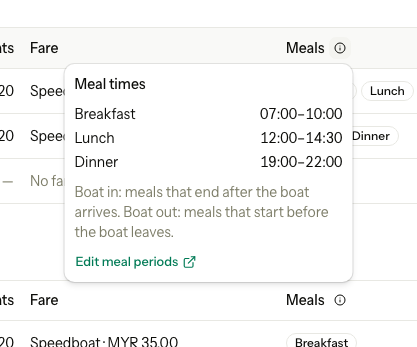
If a meal is wrong, change the meal times, not the boat. Select Edit meal periods. See Meals and meal periods. The column shows what the boat time allows. A guest still gets only the meals in their rate plan.
Turn a departure on or off
Use the Available switch in the first column. An unavailable departure leaves the lists staff pick from. Trips that already use it keep it, and it stays on the Boat manifest.
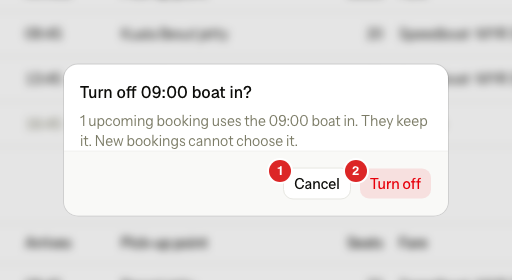
If upcoming bookings use the departure, Estatell asks first.
| Situation | What happens |
|---|---|
| You turn on a departure | It saves. A message says "09:00 boat in is available." |
| You turn off a departure with no upcoming bookings | It saves. A message says "09:00 boat in is unavailable." |
| You turn off a departure with upcoming bookings | Estatell asks first. Select Turn off to continue. The bookings keep the boat. New bookings cannot choose it. |
| The departure has a fare that is off | You cannot turn the departure on. Turn the fare on first. |
Delete a departure
- In the row, select the ⋯ button, then Delete.
- Select Delete departure.
You can delete only a departure that no booking has ever used. If any booking used it, even an old one, Estatell refuses and says "Boat trips use this departure. Turn it off instead." Turn the switch off.
Add a fare
A fare is a charge item in the Transport category, priced per guest. It also shows on the Charge items screen. See Charge items.
-
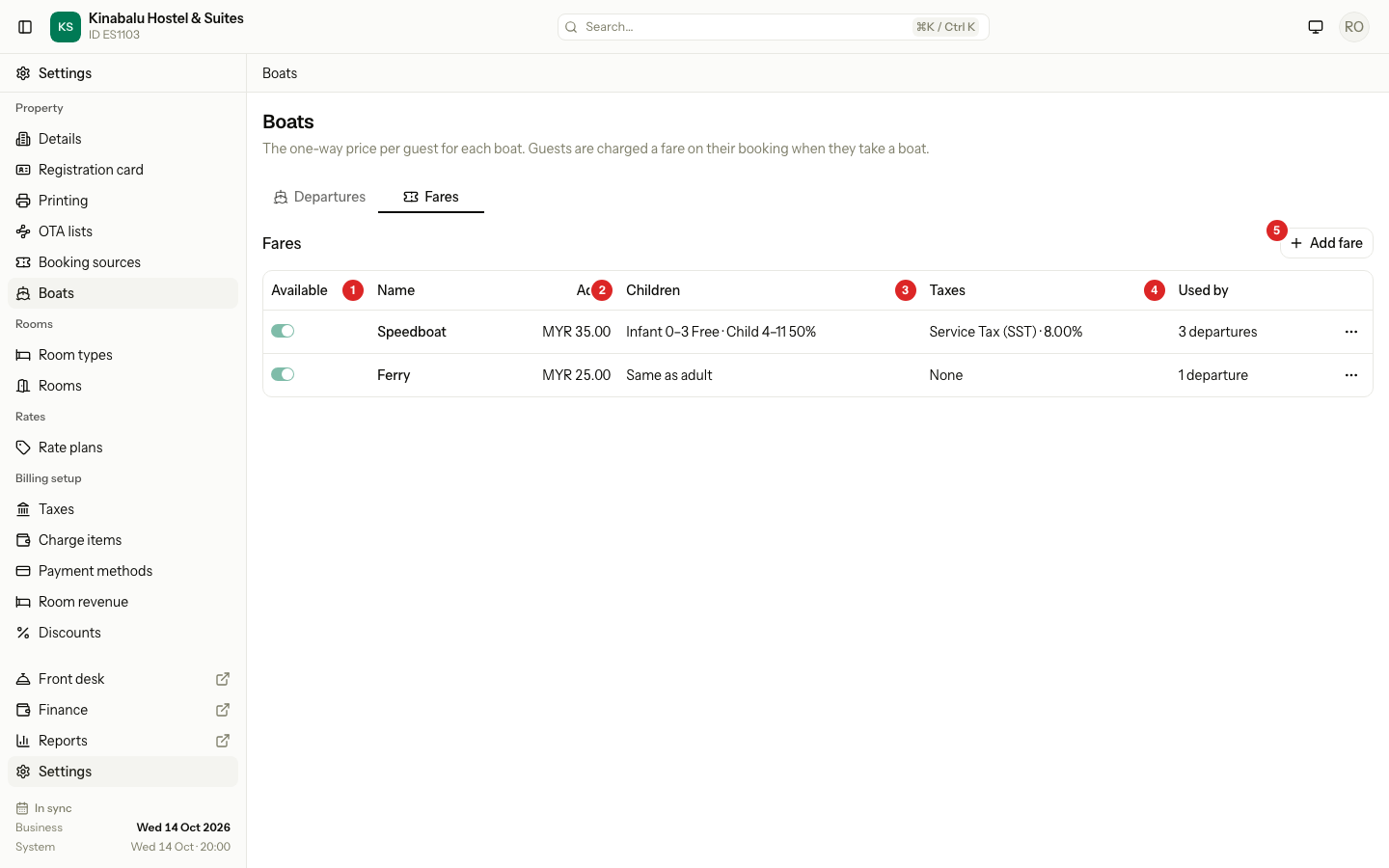
On the Boats page, open the Fares tab.
-
Select Add fare.
-
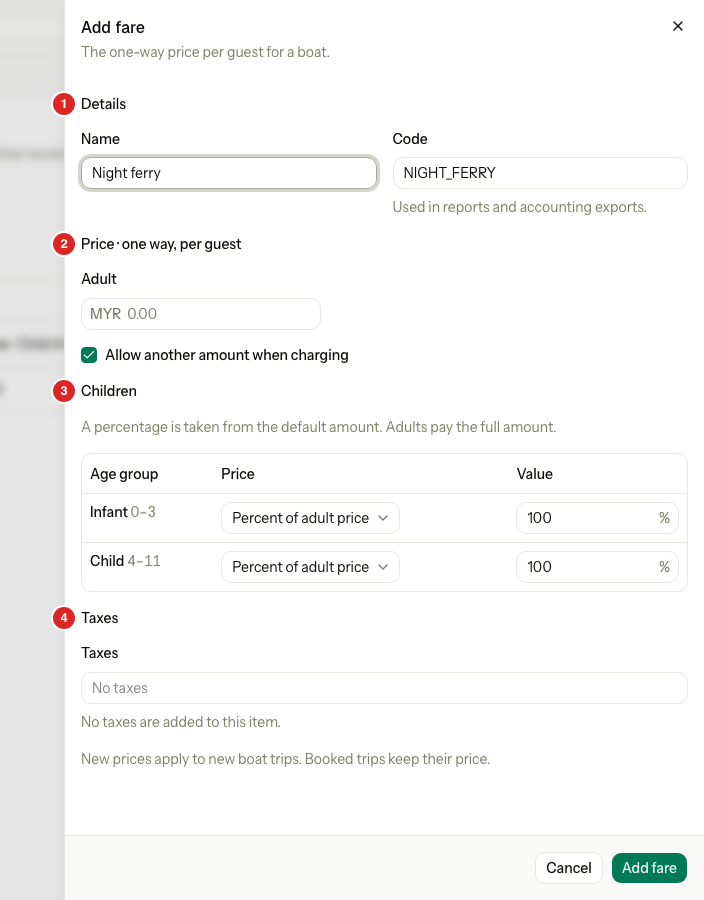
Fill in the form.
-
Select Add fare.
| Part | What to enter |
|---|---|
| Details | The Name guests and staff see. The Code is suggested from the name. You can type it now, and cannot change it here later. |
| Price · one way, per guest | The Adult price. It must be more than 0. Select Allow another amount when charging if staff may type a different price on a booking. |
| Children | What each age group pays: Free, a percent of the adult price, or a fixed amount. |
| Taxes | The taxes added to the price. The price is before tax. |
The fare is one way. A guest who takes a boat in and a boat out pays two fares.
Used by shows how many available departures use the fare. A fare that is off stays in the list, in grey.
To edit a fare, select ⋯, then Edit. For the description and other fields, select More settings. This opens the charge item.
Turn a fare on or off
Use the Available switch. You cannot turn off a fare while an available departure uses it. Point at the switch to see why. Change the fare of those departures first, or turn the departures off.
Special cases
| Situation | What happens | What to do |
|---|---|---|
| Two boats leave in the same direction at the same time | Estatell refuses. It says "A boat in already leaves at 09:00." | Change the time, or edit the existing departure. |
| Arrives is not after Leaves | Estatell refuses. | Enter an Arrives time after Leaves. A boat cannot cross midnight. |
| You choose a fare that is off | Estatell refuses. It says "Turn the fare Speedboat on first." | Turn the fare on in the Fares tab. |
| The fare is set to Add to every new booking | Estatell refuses it as a boat fare. | Turn that option off on the charge item first. |
| You change the direction of a departure that bookings use | Estatell refuses. | Add a new departure in the other direction. |
| A departure has no seat limit | The booking form shows no seat count for it. | Enter Seats if you want the count. |
| You change a fare price | It applies to new trips. Booked trips keep their price. | Nothing. |
| A boat does not run in the monsoon months | A departure runs every day. | Use closed dates or room blocks for those dates. |