
Post charges
Add an extra to a guest's bill, reverse a charge that is wrong, and see how room nights and add-ons post by themselves.
Use Post charge to add something the guest bought, such as laundry or a broken glass, to a folio. Use Reverse to cancel a charge that should not be there. Room nights and add-ons you booked ahead post by themselves at the night audit.
Before you start
- Permission to post: Post charges to folios. Owners, managers, front desk staff and finance staff have it by default.
- Permission to reverse: Reverse folio lines. Owners, managers and finance staff have it. Front desk staff do not.
- Permission to change a night's price: Change the price of booked nights. Owners, managers and finance staff have it.
- The folio must be Open.
- The room must be Checked in or Checked out. You cannot post to a guest who has not arrived.
- Set up the charge first as a charge item. See Charge items.
Post a charge
-
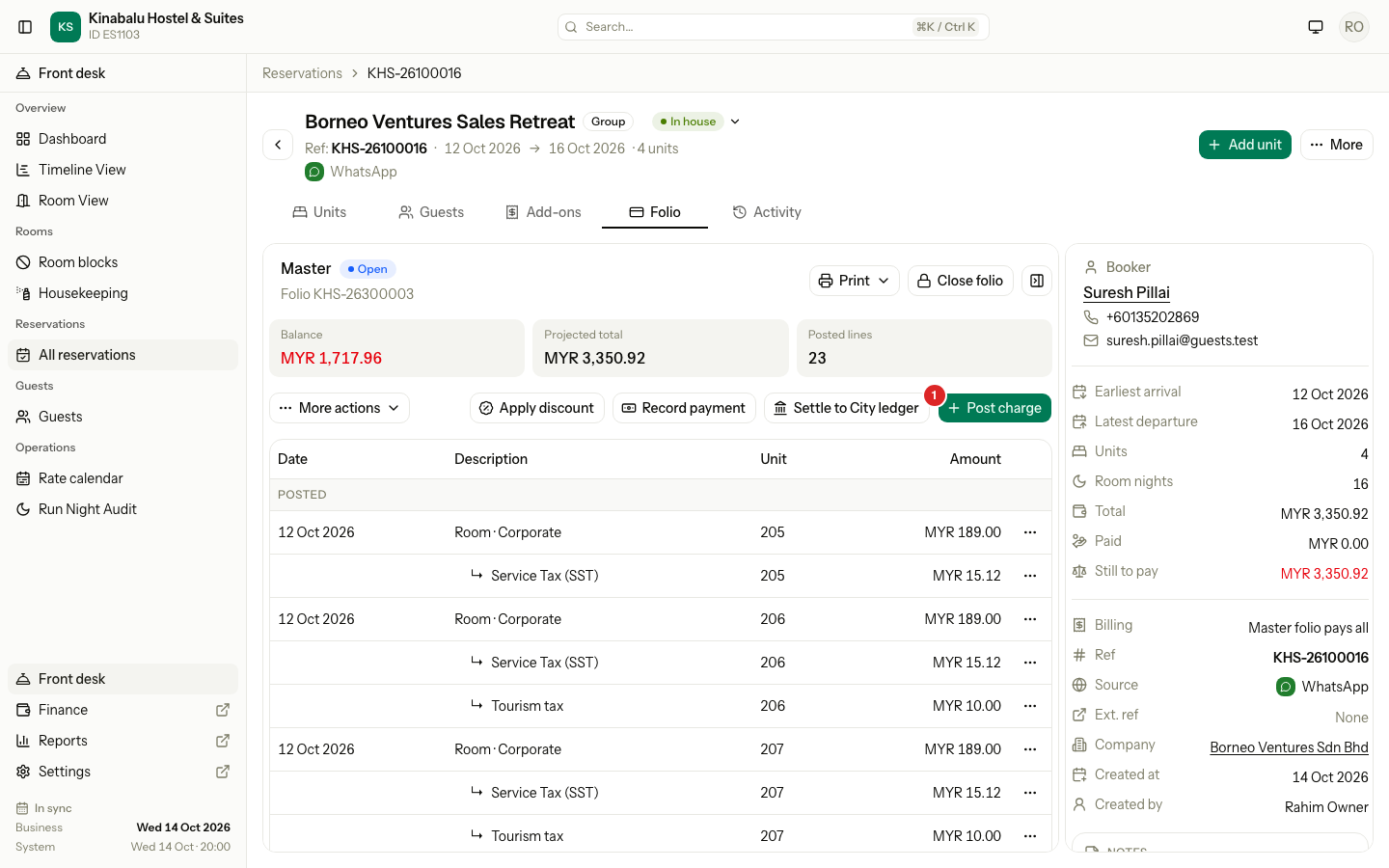
Open the reservation and select the Folio tab.
-
Select the folio the charge belongs to in the folio rail.
-
Select Post charge.
-
In Folio, check where the charge will land. It starts on the folio you opened.
-
In Room, choose the room the charge is for. On a unit folio the room is fixed. On a Master or third-party folio, choose the room. With one room, it is already chosen.
-
In Charge, choose the charge item.
-
If you want other words on the bill, type them in Description. It is optional. It replaces the item name on the line.
-
Set Quantity. It can be 1 to 999.
-
If the item lets you change the price, or has no price, enter the Unit amount. Otherwise the dialog says The price is 25.00 for each.
-
Select Post charge.
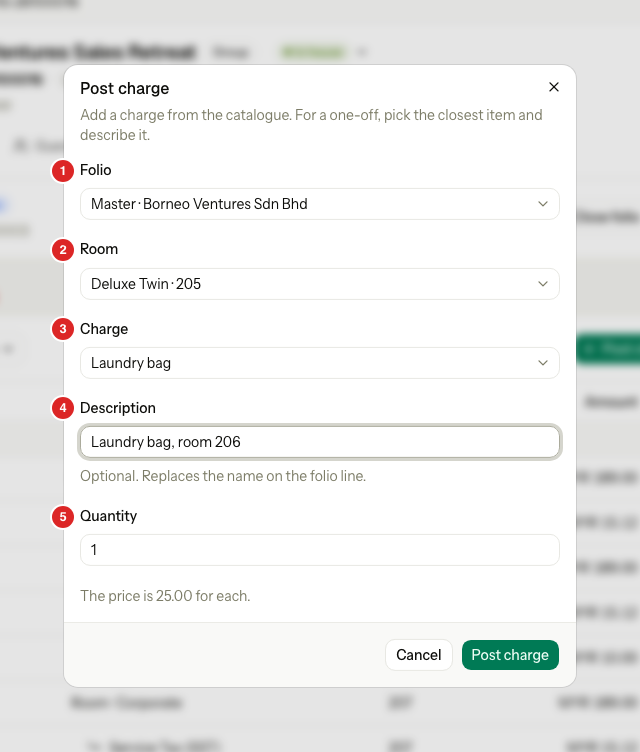
| # | Field | What to enter |
|---|---|---|
| 1 | Folio | The bill that takes the charge. Open folios only. |
| 2 | Room | The room the charge is for. It keeps the room on the bill and in reports. |
| 3 | Charge | The charge item, such as Laundry bag. |
| 4 | Description | Optional words for the line, up to 120 characters. |
| 5 | Quantity | How many. The line amount is the price times the quantity. |
Estatell adds the item's taxes to the line. A toast names the folio that took the charge. If you select Post charge twice by mistake, the charge posts once.
Good to know
- One-off charges. Pick the closest item and describe it. For a broken glass, choose a general fee item and write Broken glass in Description. If you post the same thing often, ask an owner to add a charge item.
- The folio you choose wins. Routing rules do not apply to Post charge. Estatell does not warn you when a rule would have chosen another folio, because you picked this one. See Routing.
- A unit with no folio. It shows last in Folio as Unit 102 · new folio. Choose it, and Estatell makes the unit's own folio when you post.
Reverse a charge
A reversal cancels a charge. The old line stays on the folio, crossed out, and a new line with the opposite amount sits under it. The ledger is never edited, so the history is complete.
-
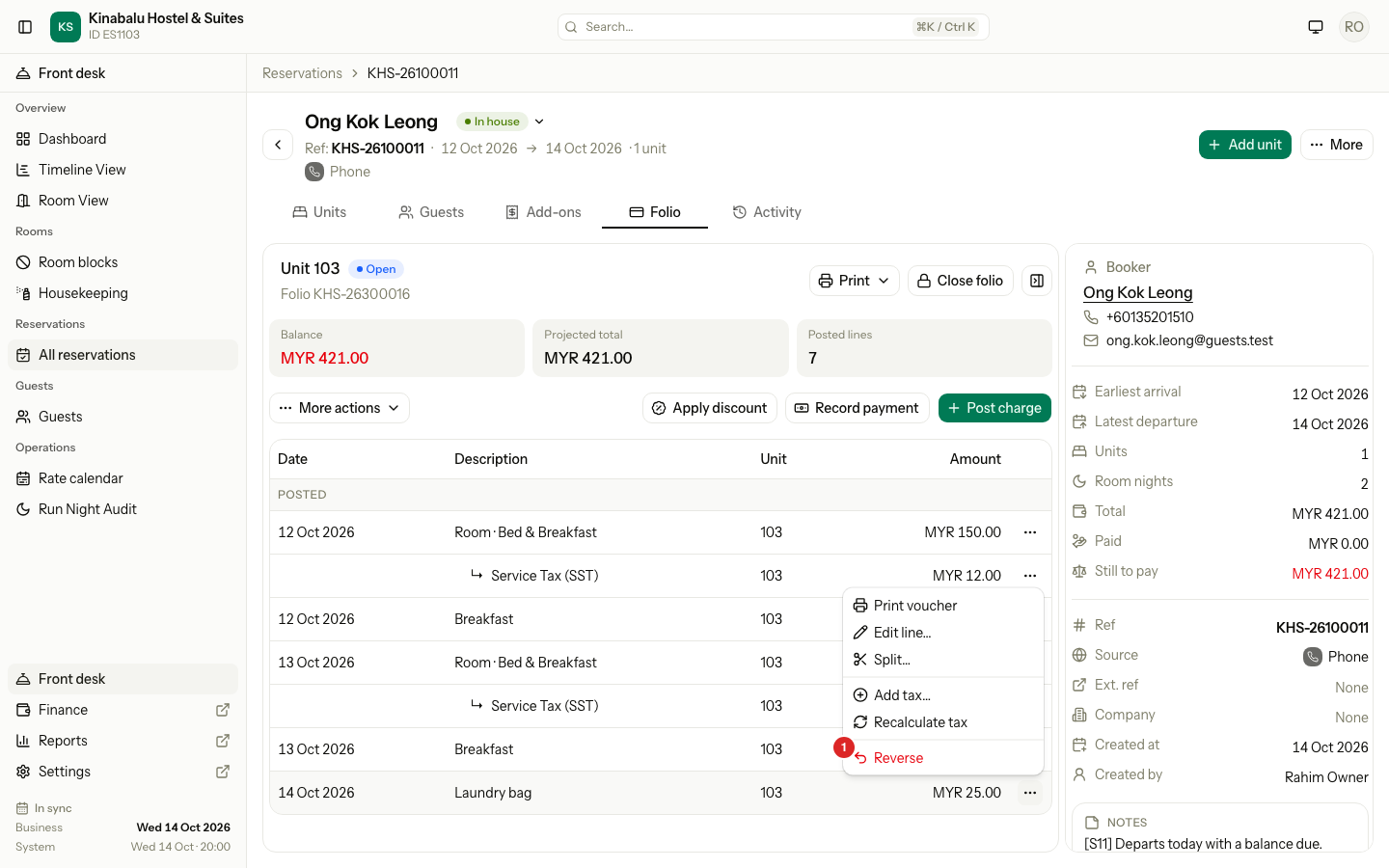
Open the Folio tab and find the charge.
-
Select the ⋯ menu on its row.
-
Select Reverse.
-
Check the name in Reverse Laundry bag? and select Reverse charge.
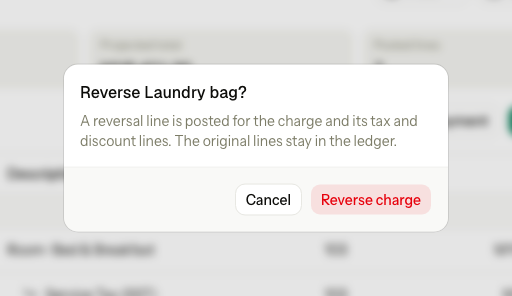
The charge's tax and discount lines reverse with it. The folio now shows the charge as Reversed and the new line as Reversal of an earlier line. Both rows have a warm tint, so they read as a pair.
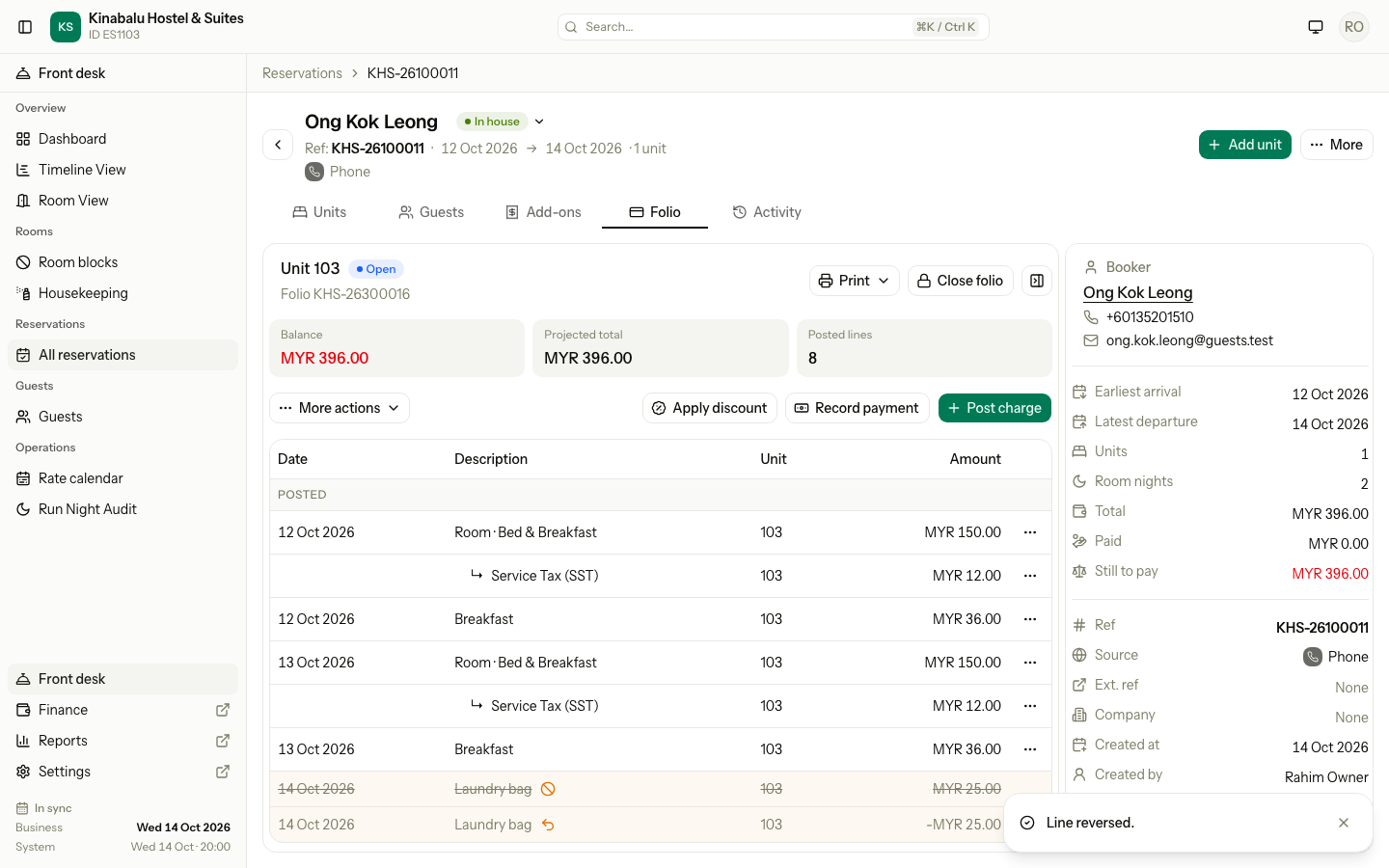
You cannot add a reason when you reverse. If you need to record why, use the Manual Folio Editor, which asks for one.
Correct the price of a room night
To change what a room night costs, do not reverse it. Use Correct price… in the same row menu. It opens the change price dialog for that night. See Change the price of a night.
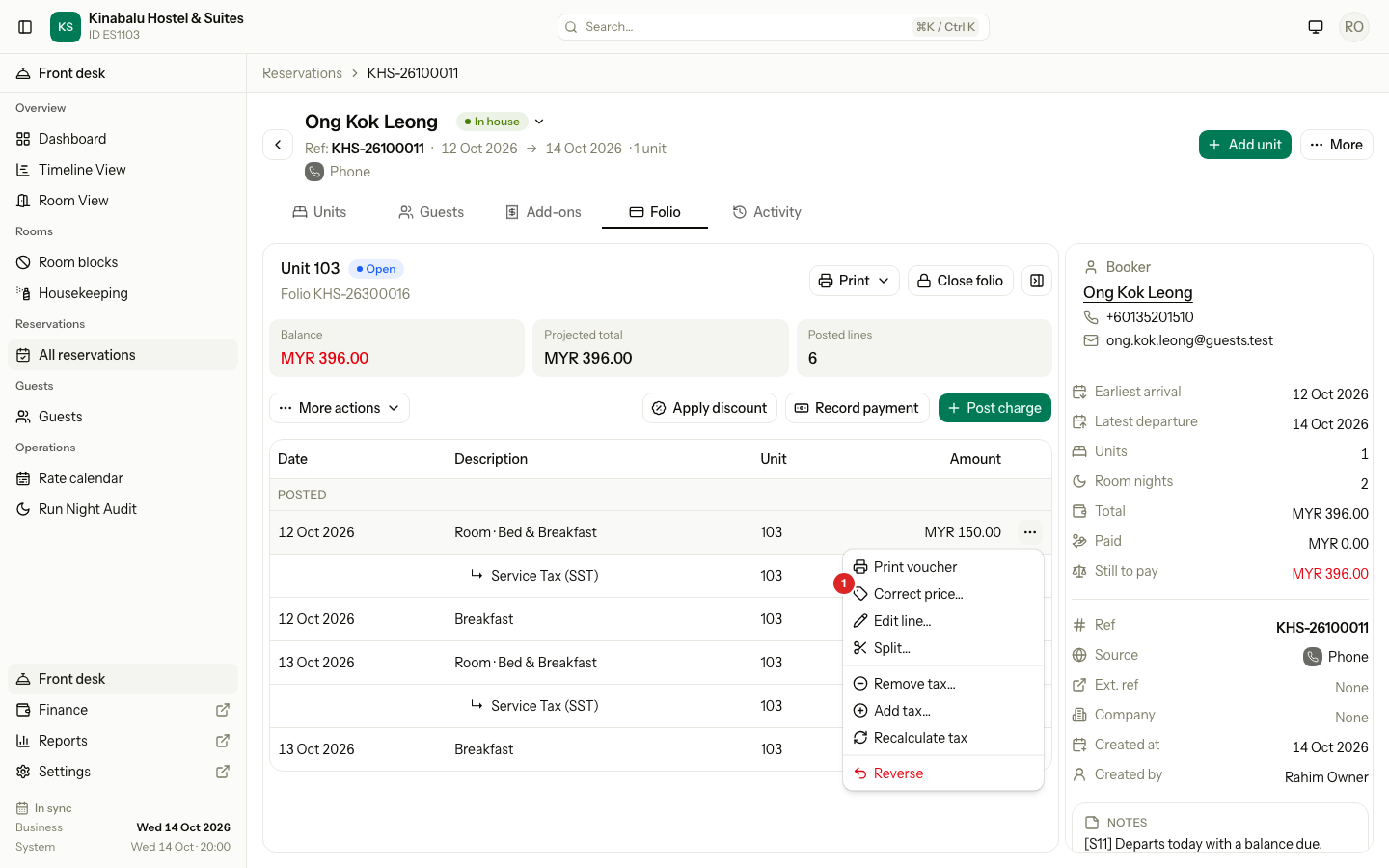
Correct price… shows on a posted room line of an open folio.
What posts by itself
| What | When it posts | Where you see it first |
|---|---|---|
| A room night | At the night audit of that night | SCHEDULED on the Folio tab, then POSTED |
| An add-on with a date | At the night audit of its date | SCHEDULED, then POSTED |
| An add-on with no date | At check-in, on the arrival date | SCHEDULED, then POSTED |
| A day use block | At check-in | SCHEDULED, then POSTED |
The night audit posts a night once. If you reverse a posted night, the night audit does not post it again. See Run the night audit and Add-ons.
Special cases
| Situation | What happens | What to do |
|---|---|---|
| Post charge is not on the tab | The folio is closed, no room can take a charge, or you lack the permission. | Check the folio status. Reopen it if you may. See Close and reopen. |
| This folio is closed. Reopen it on the folio tab first, then try again. | A closed folio takes no charges. | Reopen the folio, then post. |
| Charges can be posted to units that are checked in or checked out. | The guest has not arrived. | Check the guest in first, or post after arrival. |
| This room does not belong to the chosen folio. Pick its own folio or a Master folio. | You chose a unit folio for another room. | Choose the right folio or room. |
| Enter an amount greater than 0. | The item has no price and you left the amount empty. | Type the amount. |
| The price of this charge cannot be changed. | The item has a fixed price. | Leave the amount as it is, or pick another item. |
| Quantity must be from 1 to 999. | The quantity is 0 or too big. | Enter a number from 1 to 999. |
| The folio these charges go to is settled to the city ledger. | The company already has an invoice for this folio. | Open a third-party folio for the company and post there. See Routing. |
| This charge has a tax that depends on nationality. Add the booker's nationality to the guest first. | The item has a tax for foreign guests only. | Add the guest's nationality, then post again. |
| A tax or discount line moves and reverses with its charge. | You tried to reverse a tax or discount alone. | Reverse its charge. To drop only a discount, see Folio discounts. |
| A payment cannot be reversed or moved. Refund it instead. | Reverse is not for payments. | See Refund or void. |
| This line is already reversed. or A reversal cannot be reversed. | The line is already cancelled. | Post the charge again if you need it. |
| You posted to the wrong folio | The charge is on the wrong bill. | Use Move charges. Do not reverse and post again. |