
Refund or void a payment
Give money back, fix a payment made by mistake, or refund a folio's credit.
A payment line cannot be changed or reversed. To fix it, give the money back. Estatell has three ways:
| Use | When | What it does |
|---|---|---|
| Refund | Any day, a whole payment or part of it | Posts a refund line for the amount you choose. |
| Void payment | The payment was recorded by mistake, on the same business day | Gives all of it back to the same method. |
| Refund credit | The folio holds a credit and the guest is not leaving yet | Gives back the credit from the payments the folio holds. |
To give back a deposit when the guest leaves, use check-out instead. It refunds the deposit for you.
Before you start
- Permission: Refund payments. Owners, managers, front desk staff and finance staff have it by default.
- To refund to a method other than the one the guest used, you need Refund to a method other than the payment's own. Owners, managers and finance staff have it by default. Front desk staff do not.
- The folio must be Open. If it is closed, reopen it first.
- Estatell refunds only a payment, never a refund.
Refund a payment
-
Open the reservation and select the Folio tab.
-
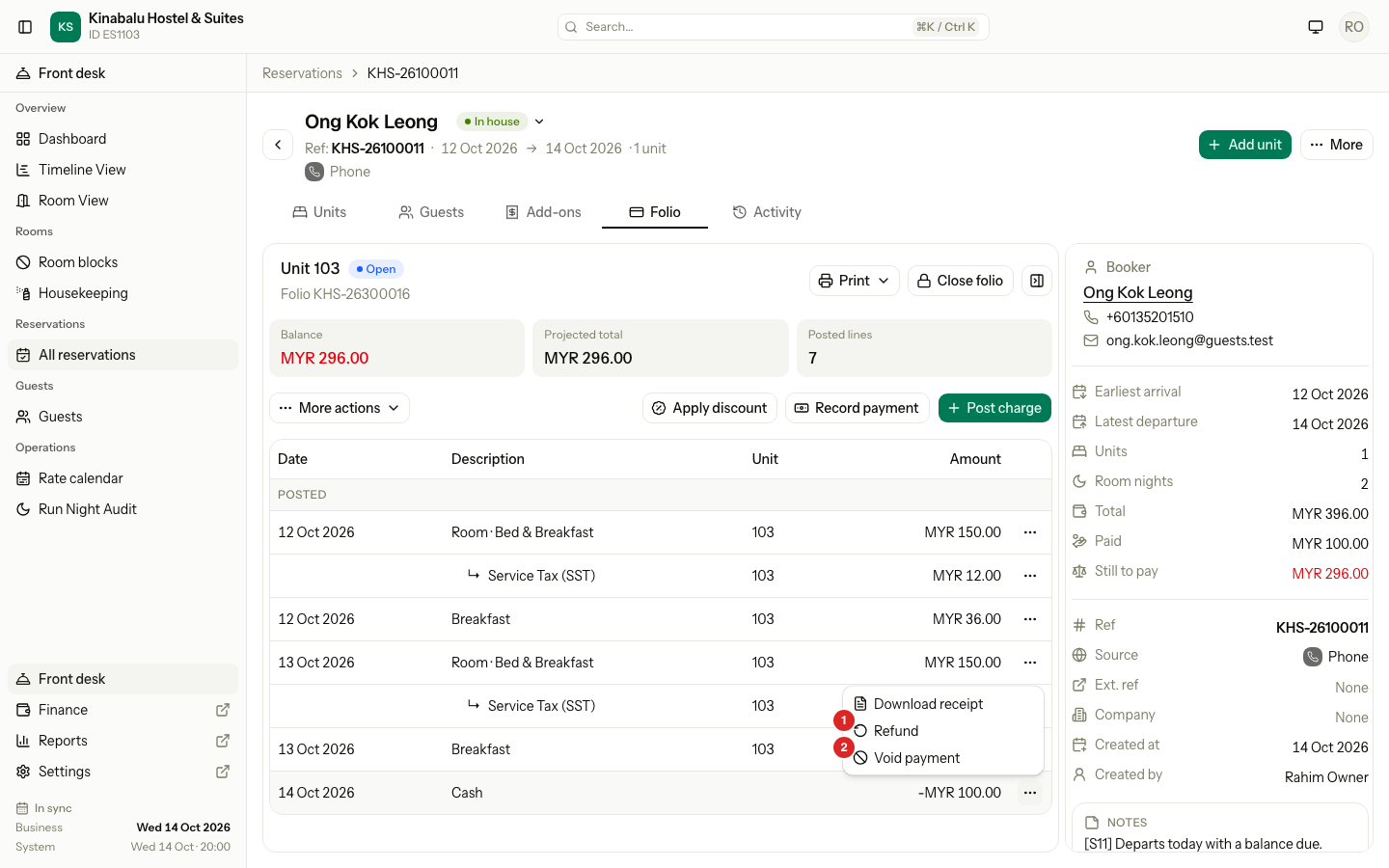
Find the payment row. Select its ⋯ menu, then Refund.
-
Check the Amount. Estatell fills in the most you can refund. Lower it for a part refund.
-
If you see Refund to, choose where the money goes. See Refund to another method.
-
Enter a Reference if you have one. It is optional, for example
RF-1024. -
Select Refund.
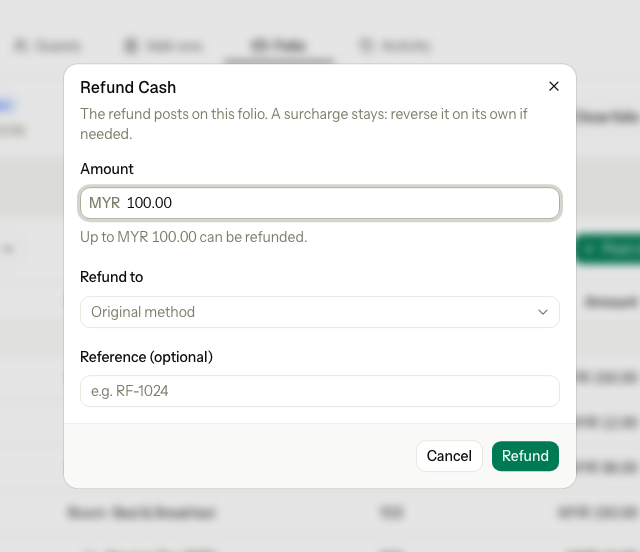
The refund posts on the same folio as a positive line tagged Refund. It copies the purpose of the payment. It has no receipt.
You can refund one payment more than once, up to the amount left. When nothing is left, the Refund item disappears from the menu.
Refund to another method
By default the money goes back to the method the guest used. A user with the right permission can choose another one.
- Open the Refund to list and choose a method. The list starts with Original method.
- Enter a Reason, for example
Guest asked for a bank transfer. It is required. - Select Refund.
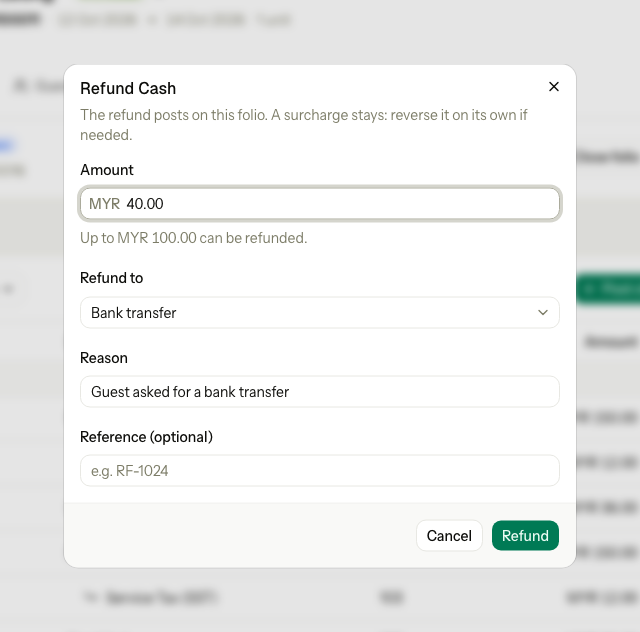
Estatell books the money under the method that gave it back. Reports and the daily cash count use that method.
Cash goes back only to cash. If the guest paid by card, bank transfer or e-wallet, Cash is greyed out with the hint "Only a cash payment is refunded in cash." The same rule holds for owners. A card payment can go back to the card, or to a non-cash method.
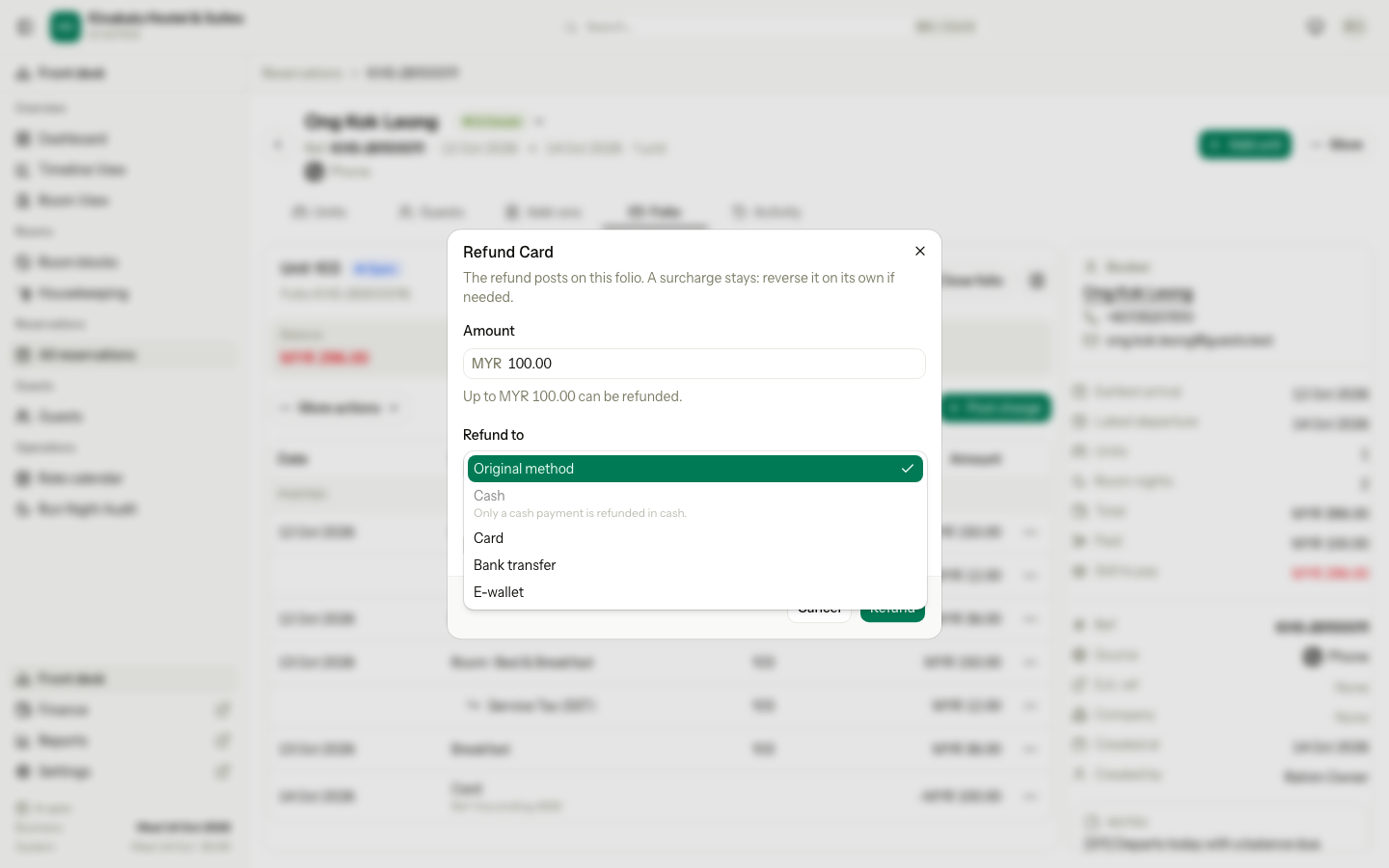
You can choose only Cash, Card, Bank transfer or E-wallet here. City ledger, OTA collected and Old system never appear.
The surcharge stays
A card surcharge is a charge on the folio, not part of the payment. A refund does not give it back. If the fee must go too, use Reverse on the surcharge line. Owners, managers and finance staff can reverse it. See Post charges.
Void a payment
Use Void payment when a payment was recorded by mistake, for example the wrong amount or the wrong reservation, and the business date is still the same.
- Find the payment row. Select its ⋯ menu, then Void payment.
- Read the message. It names the full amount and the method it goes back to.
- Select Void payment.
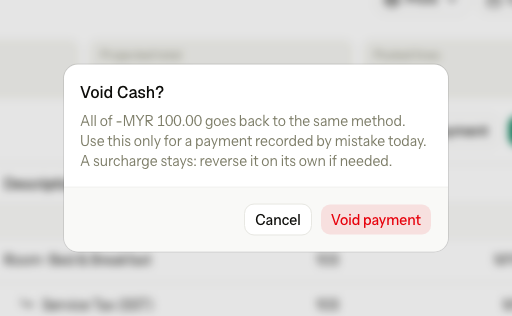
The folio gets a line named Void payment for the whole amount. It is tagged Refund. The balance returns to what it was.
A void is never partial. Use it only the same business day. After the night audit, use Refund.
Refund credit
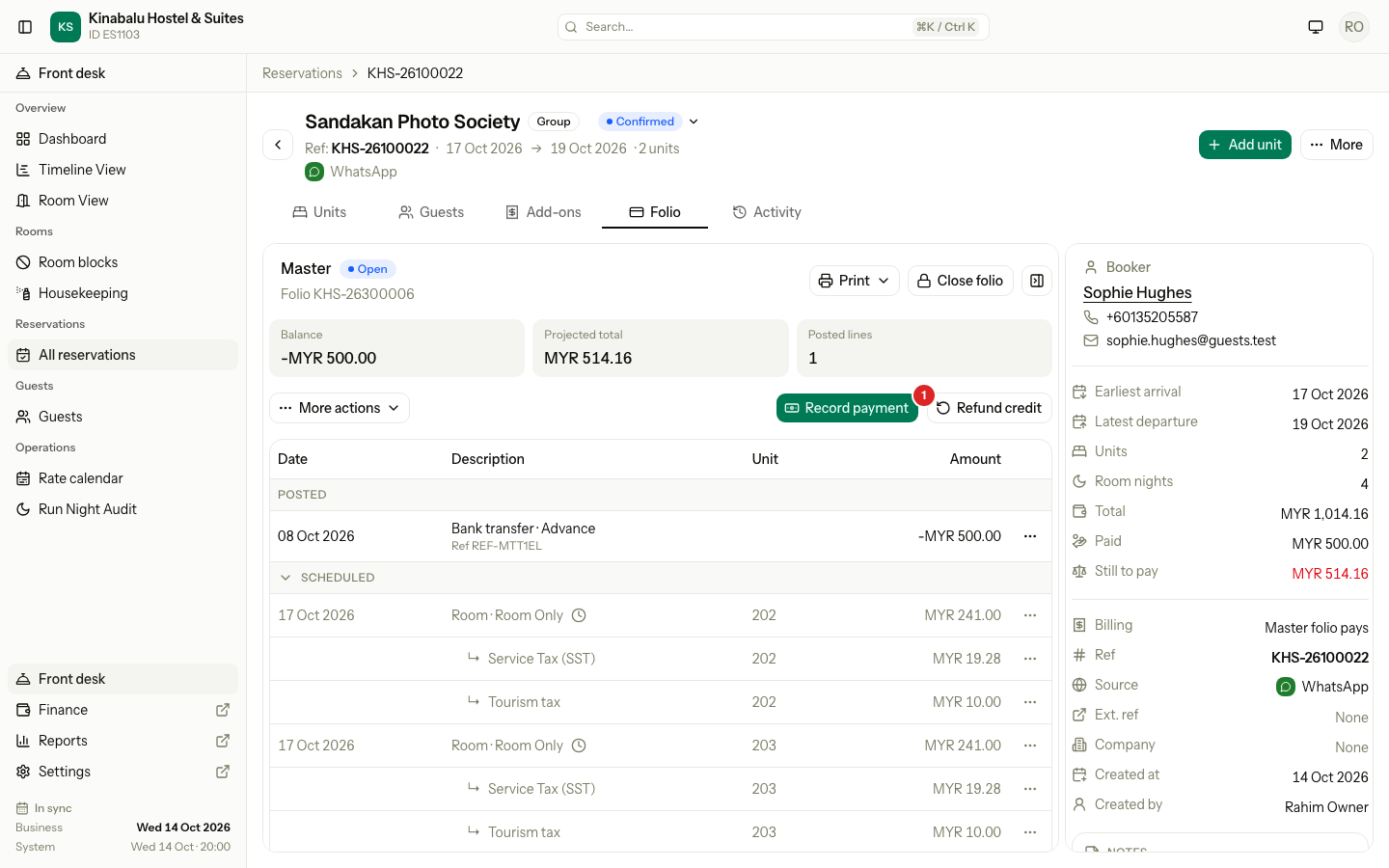
When a folio holds more money than it owes, the balance shows a credit. Refund credit gives it back without a check-out, for example when a group cancels a room and has paid in advance.
-
On the Folio tab, select Refund credit. It shows only on an open folio with a credit.
-
Check the Amount. Estatell fills in the most it can give back.
-
If you see Refund to, choose a method and enter a Reason, the same way as for a refund.
-
Select Refund.
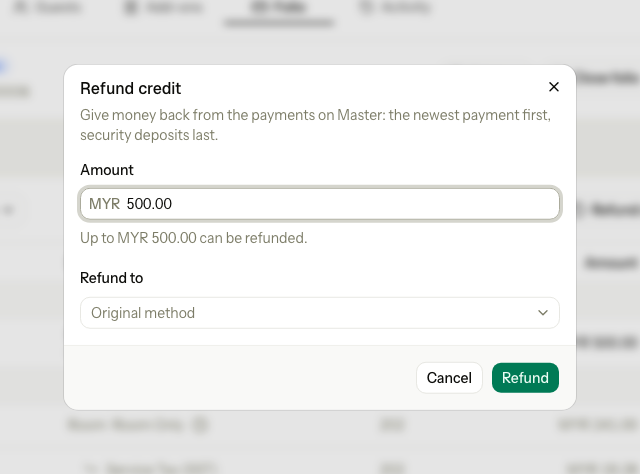
Estatell takes the money from the newest payment first and from security deposits last, because the guest is still in house. Each part goes back to its own method, unless you choose one method for all.
If any part is refused, nothing is refunded. A folio that holds money a payment cannot give back, such as a City ledger line, offers no Refund credit.
When to refund and when to void
| Situation | Use |
|---|---|
| Wrong amount entered today | Void payment, then record the payment again |
| Payment taken yesterday or earlier | Refund |
| The guest cancels and wants part of an advance back | Refund with a lower amount |
| The guest wants the money in another form | Refund with Refund to and a Reason |
| The folio has a credit and the guest stays | Refund credit |
| The guest leaves and has a deposit | Check-out |
| The payment already has a refund | Refund for what is left. A void is not possible. |
Messages you may see
| Message | Why | What to do |
|---|---|---|
| "Only a cash payment can be refunded in cash. Refund it to the original method, or to another non-cash method." | You chose Cash for a payment that was not cash. | Choose another method. |
| "You can only refund to the original method. Ask a manager to use another one." | You do not have the permission to refund to another method. | Refund to the original method, or ask a manager. |
| "Add a reason for refunding to another method." | You chose another method and left Reason empty. | Enter a reason. |
| "The refund is more than what is left of this payment." | The amount is higher than the payment minus earlier refunds. | Lower the amount. |
| "Enter an amount greater than 0." | The amount is empty or 0. | Enter an amount. |
| "This payment was taken on an earlier day. Refund it instead of voiding it." | The business date has moved on. | Use Refund. |
| "This payment already has a refund, so it can't be voided." | A refund exists for this payment. | Refund what is left. |
| "This folio has no credit that can be refunded." | Refund credit with no credit left. | Close the dialog and check the balance. |
| "Only a completed payment can be refunded." | The row is not a payment. | Refund the payment row instead. |
| "This folio is closed. Reopen it on the folio tab first, then try again." | The folio is closed. | Reopen the folio. |
Special cases
| Situation | What happens | What to do |
|---|---|---|
| The guest has already checked out | The unit folio is closed. | Reopen it, refund, and it closes again at 0. |
| You want to reverse or move a payment line | Estatell does not allow it. | Refund or void it. |
| The payment had a surcharge | The surcharge stays on the folio. | Reverse the surcharge line if the fee must go too. |
| A front desk user cannot see Refund to | They lack the other-method permission. | They refund to the original method. A manager can choose another. |