
Record a payment
Take money from a guest or company, add a card surcharge, and print the receipt.
Use Record payment when a guest or company gives you money. Estatell posts a payment line on the folio, lowers the balance and gives the payment a receipt number.
Before you start
- Permission: Record payments and download receipts. Owners, managers, front desk staff and finance staff have it by default.
- The folio must be Open. If it is closed, reopen it first.
- The property must have an open business date.
- Set up your payment methods in Settings. Estatell does not offer City ledger here. OTA collected is offered when it is turned on.
Steps
-
Open the reservation and select the Folio tab.
-
If the reservation has more than one folio, pick the one that should get the money from the folio rail.
-
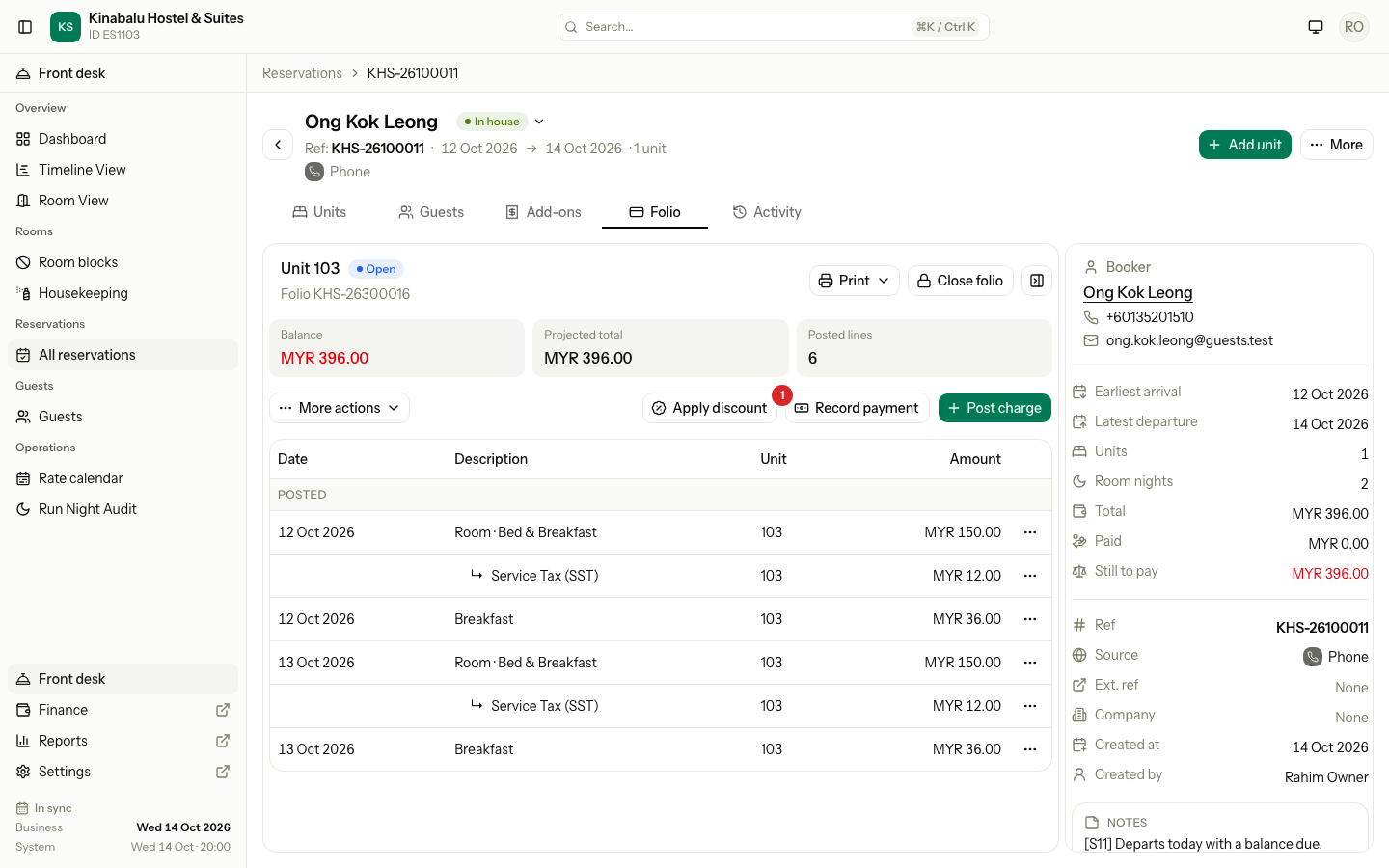
Select Record payment.
-
Check the Method. Estatell picks the first method in your list. Change it if the guest pays another way.
-
If you see a Purpose field, choose the purpose. See Purposes by stage.
-
Check the Amount. Estatell fills in the balance when the guest owes money. Change it for a part payment or a deposit.
-
If the method needs a Reference, enter it. Card, bank transfer and e-wallet need one by default, for example
Visa ending 4242. -
Read Total to collect. It is the amount plus any surcharge.
-
Select Record. The button shows the total, for example Record MYR 396.00.
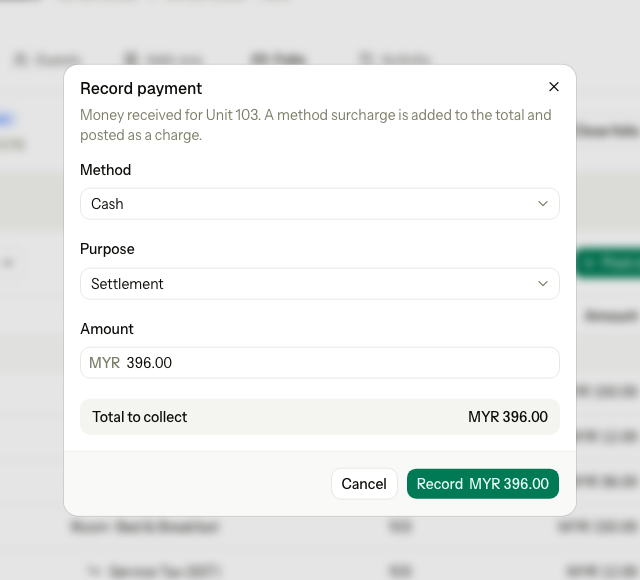
Estatell shows a message with the amount and the receipt number. The new line appears under Posted.
Fields
| Field | What to enter | Notes |
|---|---|---|
| Method | How the guest pays | Starts on the first method in Settings → Billing setup → Payment methods. |
| Purpose | Advance, Settlement or Security deposit | Shown only when you have a choice. |
| Amount | The money the guest hands over for the bill | Up to two decimals. It can be more than the balance. |
| Reference | A card slip, transfer or wallet number | Shown only when the method needs one. Up to 100 characters. |
Surcharge
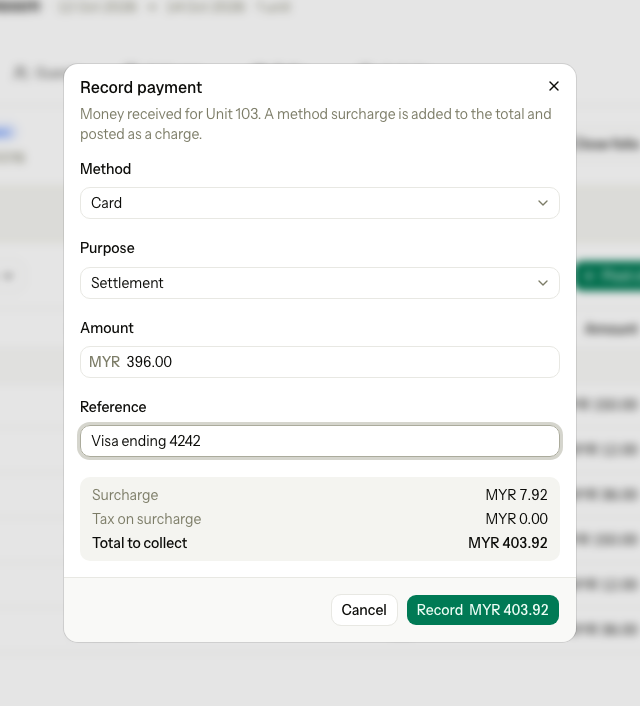
An owner can set a surcharge on a method, for example 2% on cards. Estatell then adds it for you.
| Line | Meaning |
|---|---|
| Surcharge | The fee for the method. A fixed amount, or a percent of the amount. |
| Tax on surcharge | Tax on the fee, when the fee has tax. |
| Total to collect | What you take from the guest. |
The folio balance goes down by the Amount, not by the total. The surcharge posts as a separate charge on the same folio. For a fee that rounds to MYR 0.00, estatell posts nothing. OTA collected never takes a surcharge, because the guest paid the booking site, not the desk.
Pay on a unit that has not started
A unit with no posted lines shows Not started in the folio rail. It can still take a payment before arrival.
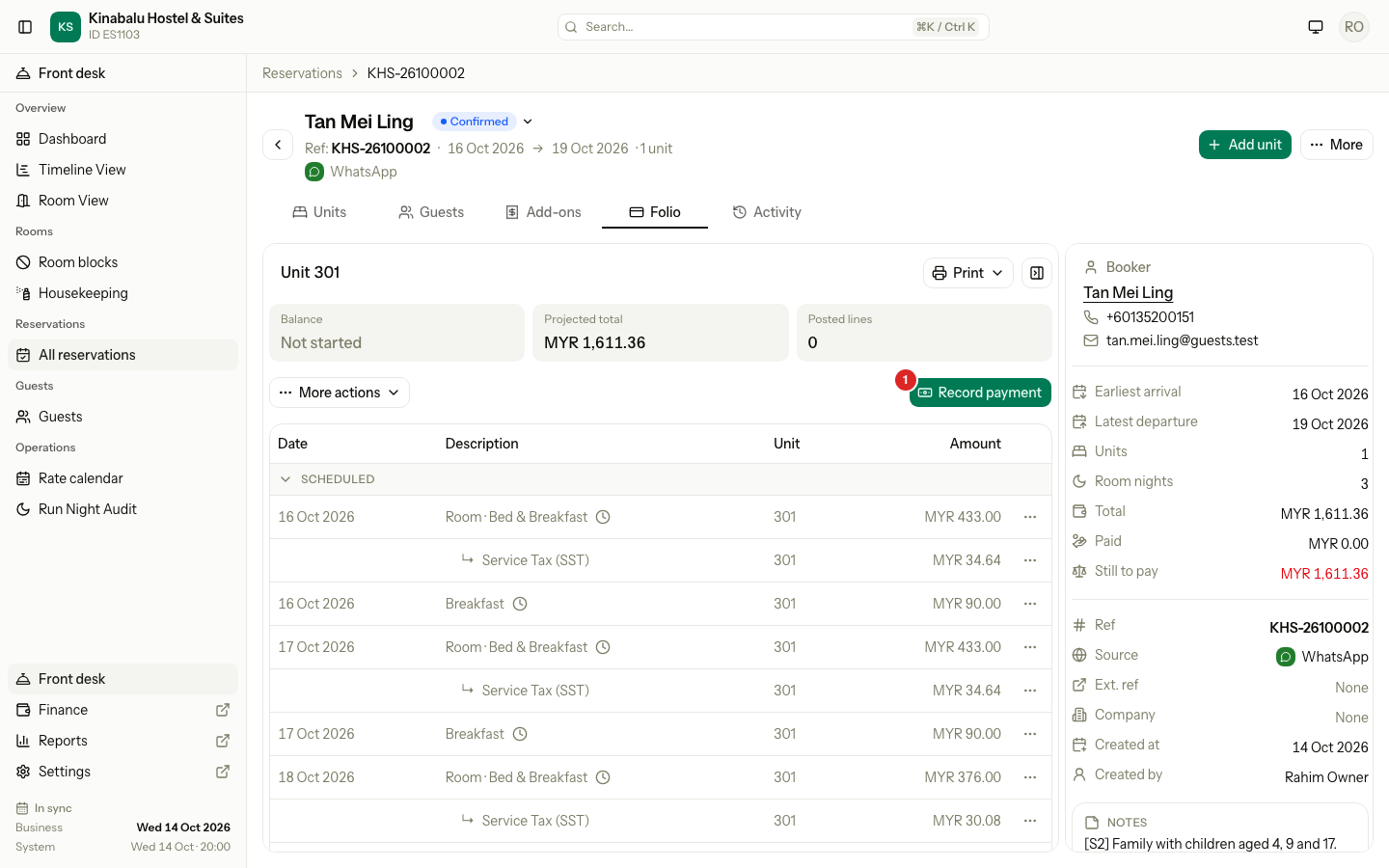
- Select the unit's entry in the folio rail.
- Select Record payment.
- Fill in the dialog. The purpose is Advance, so estatell hides the Purpose field.
Estatell creates the unit's folio when you record the payment. The page then opens that folio.
Download a receipt
Every payment you record has a receipt. A refund does not, and neither does an OTA collected payment that a channel booking posts.
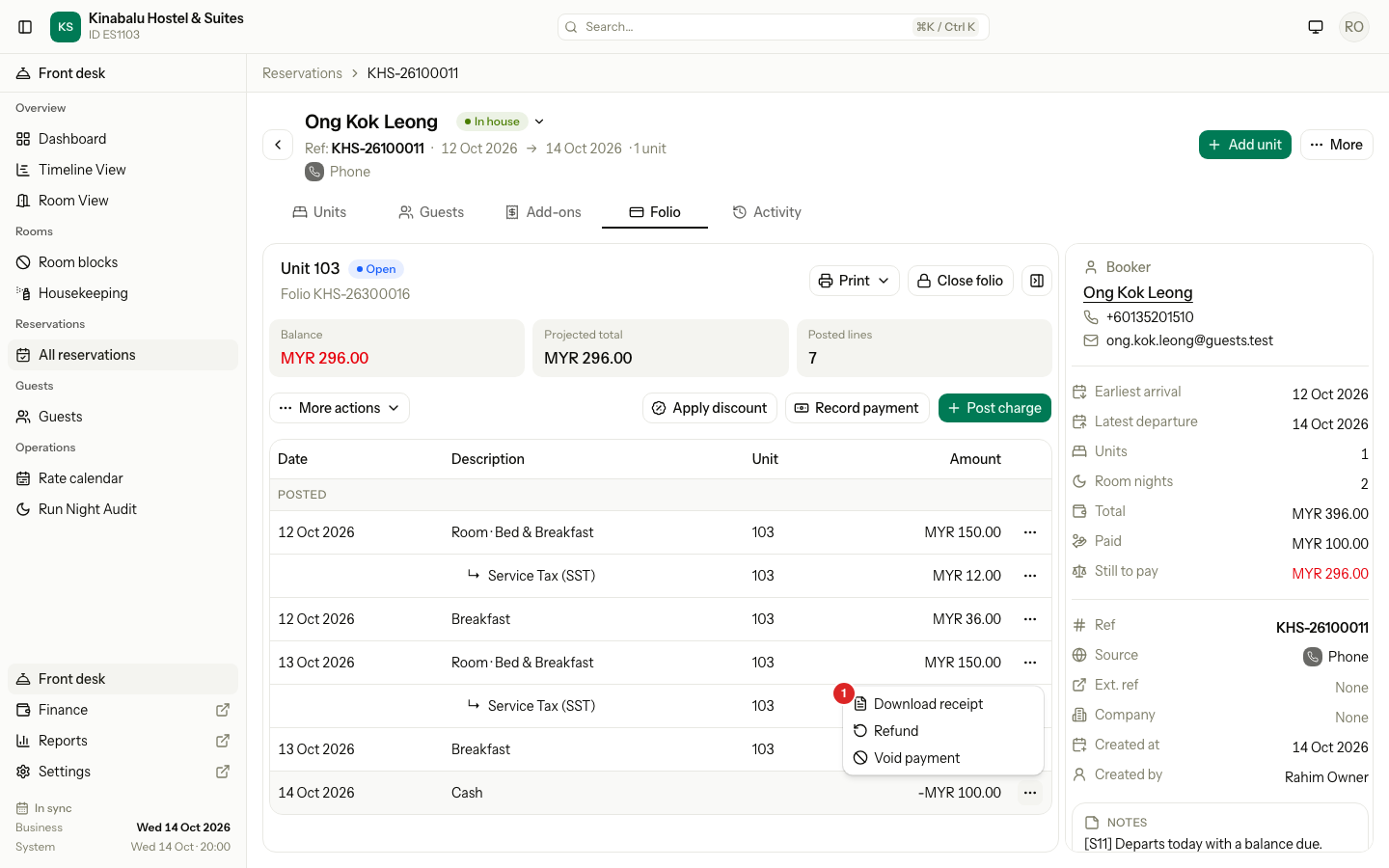
- Find the payment row under Posted.
- Select the ⋯ menu on the row.
- Select Download receipt. The receipt opens in a new tab, where you print or save it.
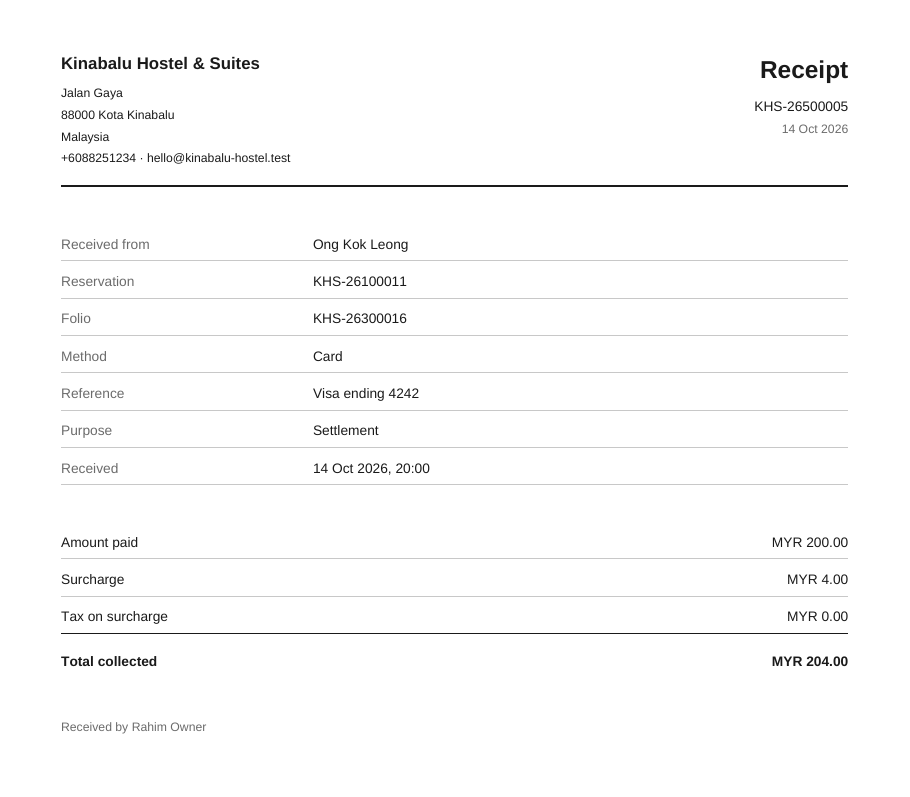
The receipt shows:
| Block | What it shows |
|---|---|
| Header | Property name, address, phone and email |
| Title | Receipt, the receipt number and the date |
| Received from | The folio's payer guest or company. If there is none, the booker. Also the reservation reference and folio number. |
| Payment | Method, Reference, Purpose and the time received |
| Amounts | Amount paid, Surcharge and Tax on surcharge (only with a fee), and Total collected |
| Footer | Received by, the name of the staff member |
A closed folio still lets you download receipts.
Special cases
| Situation | What happens | What to do |
|---|---|---|
| The folio is closed | Estatell says: "This folio is closed. Reopen it on the folio tab first, then try again." | Reopen the folio, then record the payment. |
| You record a security deposit on a Master or Third party folio | "A security deposit stays on the unit's own folio. Record it on the unit folio." | Open the unit folio and record it there. |
| You record an advance on a unit whose room charges go to the Master folio | "An advance for this room goes on the Master folio, because the Master folio pays the room charges. Record it there." | Open the Master folio and record it there. |
| You choose another purpose on a Third party folio | "A third party folio takes settlement payments only." | Choose Settlement. |
| The method needs a reference | "This payment method needs a reference." | Enter the reference. |
| The amount is 0 or empty | "Enter an amount greater than 0." | Enter an amount. |
| The method is not available | "This payment method is not available." | Choose another method. Ask an owner if a method is missing. |
| The surcharge has a tax that depends on nationality | Estatell asks you to add the booker's nationality to the guest first. | Add the nationality to the guest, then record again. |
| The guest pays more than the balance | The payment is accepted. The folio shows a credit. | Refund the credit later. See Refund or void. |
| The guest paid the booking site | A channel booking usually posts this money as OTA collected for you. | Check the folio first. If it has no OTA collected line, record the money with the OTA collected method. |
| You click Record twice | Estatell records one payment. | Nothing. |
| The payment was recorded by mistake | The line stays on the folio. | Void it on the same business day, or refund it. |
| The guest paid after check-out | The unit folio is closed after check-out. | Reopen the folio, record the payment. At 0 it closes again. |