
The Folio tab
Read a reservation's bills, with the folio rail, the figures, the rows that have posted, the rows that will post and the markers on each row.
The Folio tab of a reservation shows what the guest owes. It lists every bill (folio) of the reservation, the charges that have posted, and the charges that will post later. Open it to check a balance, find a line, or start a task such as taking a payment or posting a charge.
Before you start
- Permission: View reservations. Owners, managers, front desk staff and finance staff have it by default.
- Each button on the tab needs its own permission. See Who can do what.
Read the tab
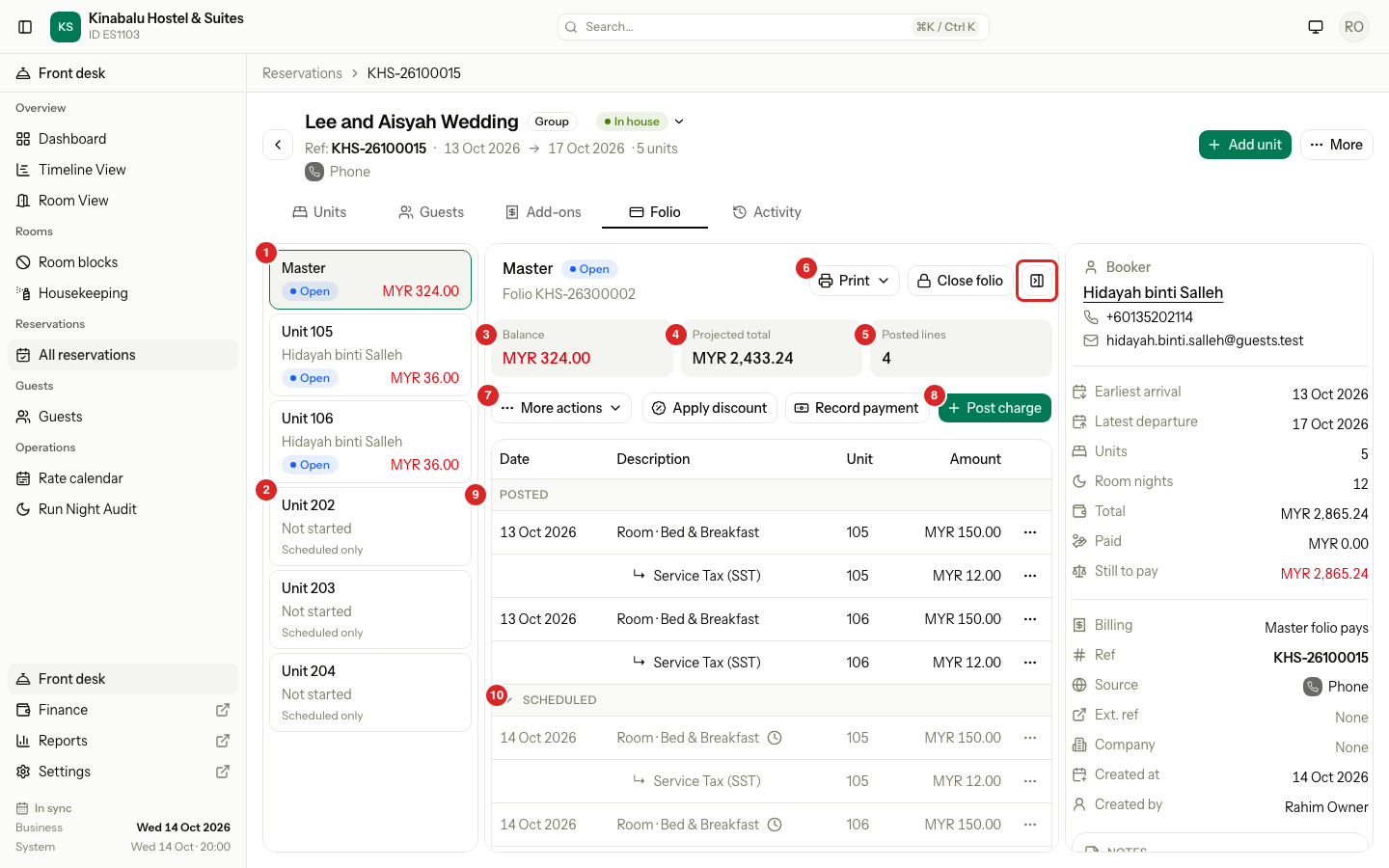
| # | What | What it shows |
|---|---|---|
| 1 | Folio rail, the open folio | One card for each folio. The open folio has a green outline. |
| 2 | Folio rail, a unit that has not started | A unit with no folio yet. See A unit that has not started. |
| 3 | Balance | What the payer still owes for the lines that have posted. |
| 4 | Projected total | The posted lines plus the scheduled rows. |
| 5 | Posted lines | How many lines have posted on this folio. |
| 6 | Print voucher, and Print invoice on a closed folio. See Invoices and vouchers. | |
| 7 | More actions | Move charges, routing, and the Manual Folio Editor. See The More actions menu. |
| 8 | Post charge | Add a charge to the folio. See Post charges. |
| 9 | Posted | The lines the guest has been charged for. |
| 10 | Scheduled | The nights and add-ons that will post later. Select the header to hide them. |
The red box marks the Hide summary button. It hides the reservation summary on the right so the folio has more room. Select it again to show the summary. Estatell remembers your choice on this computer, for the Folio and Guests tabs only.
The folio rail
The rail lists the folios of the reservation. It shows when the reservation has two or more entries. On a phone it becomes a list above the folio, named Choose folio.
| Folio | What it is | Shown as |
|---|---|---|
| Master | One bill for the whole reservation. A group or a company often pays here. | Master and the payer |
| Unit | The bill of one room or bed. | Unit and the room, with the guest under it |
| Third party | A bill paid by someone else, such as a company or a friend. | Third party and the payer |
Each card shows the folio's status (Open or Closed) and its balance. A balance above 0 shows in red. Folios are in this order: Master, then the unit folios, then the third-party folios, then the units that have not started.
When a reservation has one folio, the tab shows it with no rail. The page opens on the Master folio when there is one, and on the first unit folio when there is not.
A unit that has not started
A unit that has charges to come but no folio yet shows as Unit 201 · Not started. The card says Scheduled only. The folio is made when the first line posts.
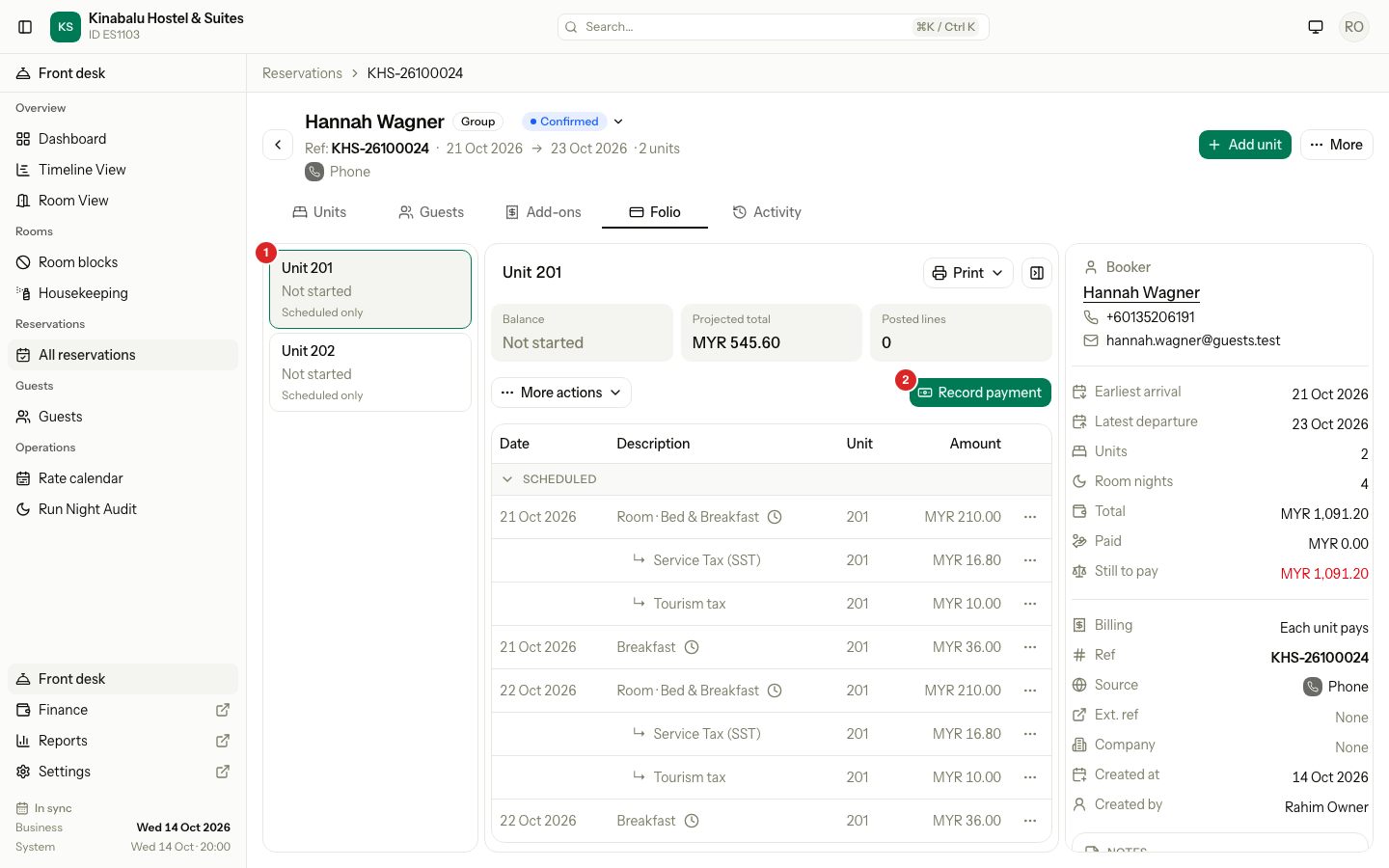
For a unit that has not started:
- Balance reads Not started. Projected total shows what the stay will cost.
- Only Record payment and Print voucher work. Taking a payment makes the folio. See Record a payment.
- When the room charges go to the Master folio, Record payment is not on this card. Take the advance on the Master folio.
The figures
| Figure | What it counts | Counts scheduled rows? |
|---|---|---|
| Balance | Charges and taxes, less discounts and payments. A refund adds back. A reversal cancels its line. | No |
| Projected total | Balance plus the scheduled rows, with their tax and discounts. | Yes |
| Posted lines | The number of lines that have posted. | No |
A positive Balance is what the payer still owes. A negative one is a deposit or an overpayment. Projected total is what the folio will come to if nothing changes. It is not an amount due.
Balance never counts scheduled rows. A scheduled night can still change: you can change its price, change the stay or cancel. If Balance counted it, the guest would owe nights that may not happen, and a folio could not close at 0.00 until the nights post.
Posted and scheduled rows
The table has the columns Date, Description, Unit and Amount. It has up to three sections.
| Section | What is in it | Counts in Balance? |
|---|---|---|
| OLD SYSTEM | Lines copied from the old system, with a section total. It starts closed. See Migrated and old stays. | Yes |
| POSTED | Every line that has posted: charges, discounts, taxes, payments, refunds and reversals. | Yes |
| SCHEDULED | The room nights and add-ons that have not posted yet. They post when the night audit runs. | No |
A tax or a discount shows under the charge it belongs to, with an arrow and an indent. A discount shows before its tax.
- A scheduled row is in grey text and has a clock marker.
- Select the SCHEDULED header to hide the scheduled rows. It then reads N rows hidden. Balance and Projected total do not change. The header opens again when you reload the page.
- With the Master folio pays all billing mode, the room rows are scheduled on the Master folio and not on the unit folios. See Routing.
- A scheduled day use block shows as one row, for example Day use · 10:00–14:00.
The date of a line
Date shows the day the service happened. When a line posted on a later day, a grey line under the date reads posted 14 Oct 2026. This happens for a night posted late, or a line the Manual Folio Editor adds for an earlier day.
Payment rows
A payment row shows the method, then the purpose when it is Advance or Security deposit. The reference shows under it.
| Row shows | Meaning |
|---|---|
| Cash · Advance | A payment taken before or at arrival, toward the stay. |
| Cash · Security deposit | A deposit the hotel holds. |
| Card | A payment toward the bill. It shows no purpose because most payments are this kind. |
| Refund · Security deposit | A refund of a deposit, with the refund marker. |
Row markers
A row can carry one or more small icons. Hover over an icon to read its name.
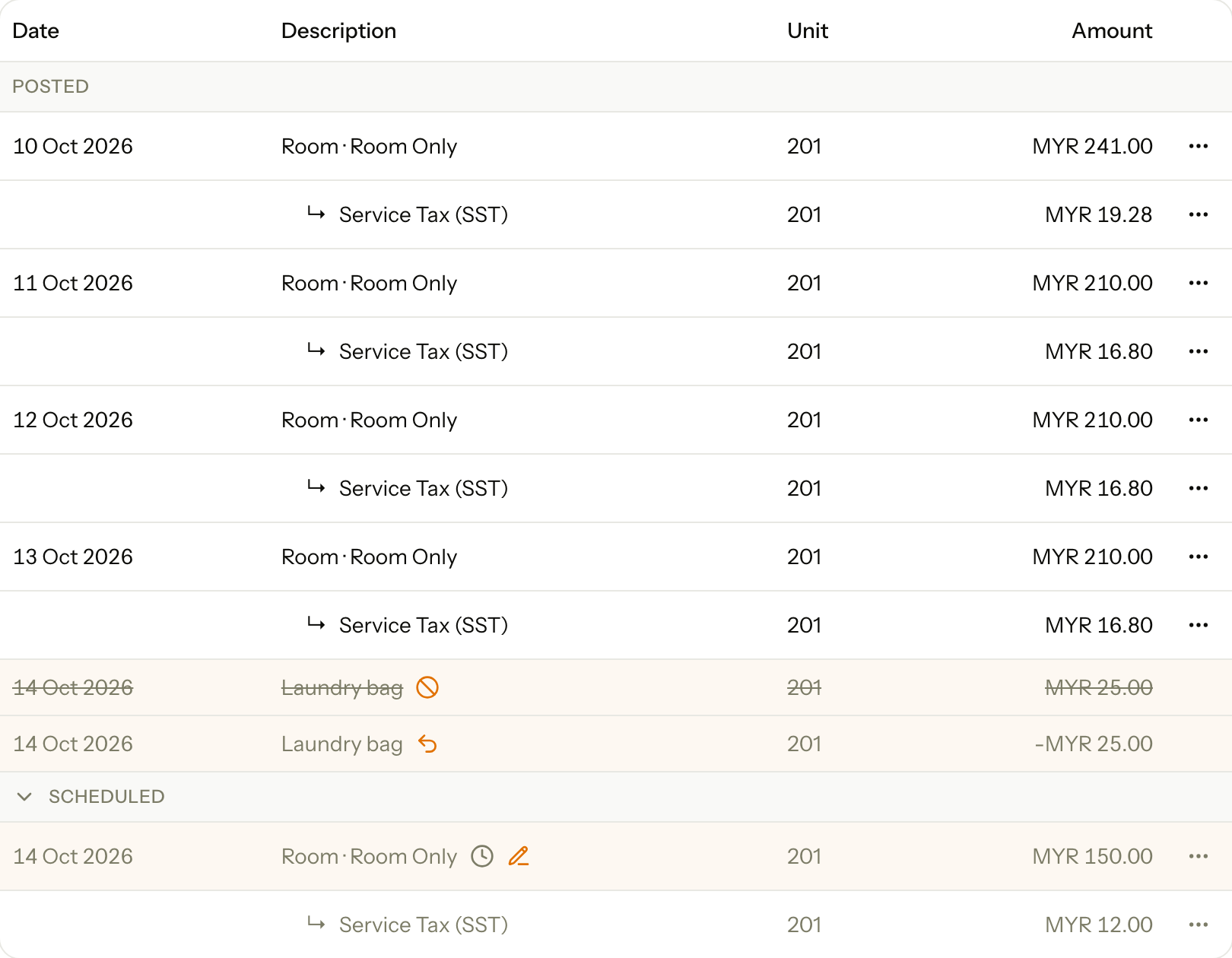
| Marker | Icon | On | What the row looks like |
|---|---|---|---|
| Scheduled, not posted yet | Clock | A scheduled row | Grey text |
| Price overridden | Pencil | A scheduled night with a changed price | Warm tint |
| Reversed | Circle with a line | A line that was cancelled, and its tax and discount lines | Warm tint, grey text, crossed out |
| Reversal of an earlier line | Curved arrow | The line that cancelled it | Warm tint, grey text |
| Refund | Turn-back arrow | A refund of a payment | Blue tint |
| Manual entry | Pencil | A line made in the Manual Folio Editor. Only people who may see manual entries see it. | None |
A row that has a tint keeps the icon too, so the meaning never depends on colour. The Manual entry marker opens to show who made the line, when, and why. See Manual Folio Editor.
A scheduled discount or tax shows no marker. Its indent and grey text already say it is scheduled.
The More actions menu
More actions groups the tasks that go beyond one line. A group you may not use is hidden. The menu is hidden when you may use none of them.
| Group | Item | What it does |
|---|---|---|
| Charges | Move charges | Moves charges to another open folio. See Move charges. |
| Routing | Routing rules | Sets which folio takes which charges. See Routing. |
| Routing | Third-party folio | Makes a bill for someone else to pay. See Routing. |
| Manual | Manual Folio Editor… | Adds or corrects lines by hand. See Manual Folio Editor. |
| Manual | Copy old folio | Copies a folio from the old system. See Migrated and old stays. |
The buttons next to it
| Button | Shows on | What it does |
|---|---|---|
| Apply discount | An open folio with a charge that can take a discount | Folio discounts |
| Record payment | An open folio | Record a payment |
| Refund credit | An open folio that holds a credit its payments can give back | Refund or void |
| Settle to City ledger | An open folio that a company pays, with a balance above 0 | See AR invoices and payments |
| Post charge | An open folio with a room that can take a charge | Post charges |
| Close folio | An open folio | Close and reopen |
A closed folio
A closed folio is read only. It shows its invoice number next to the folio number, and a notice above the rows.
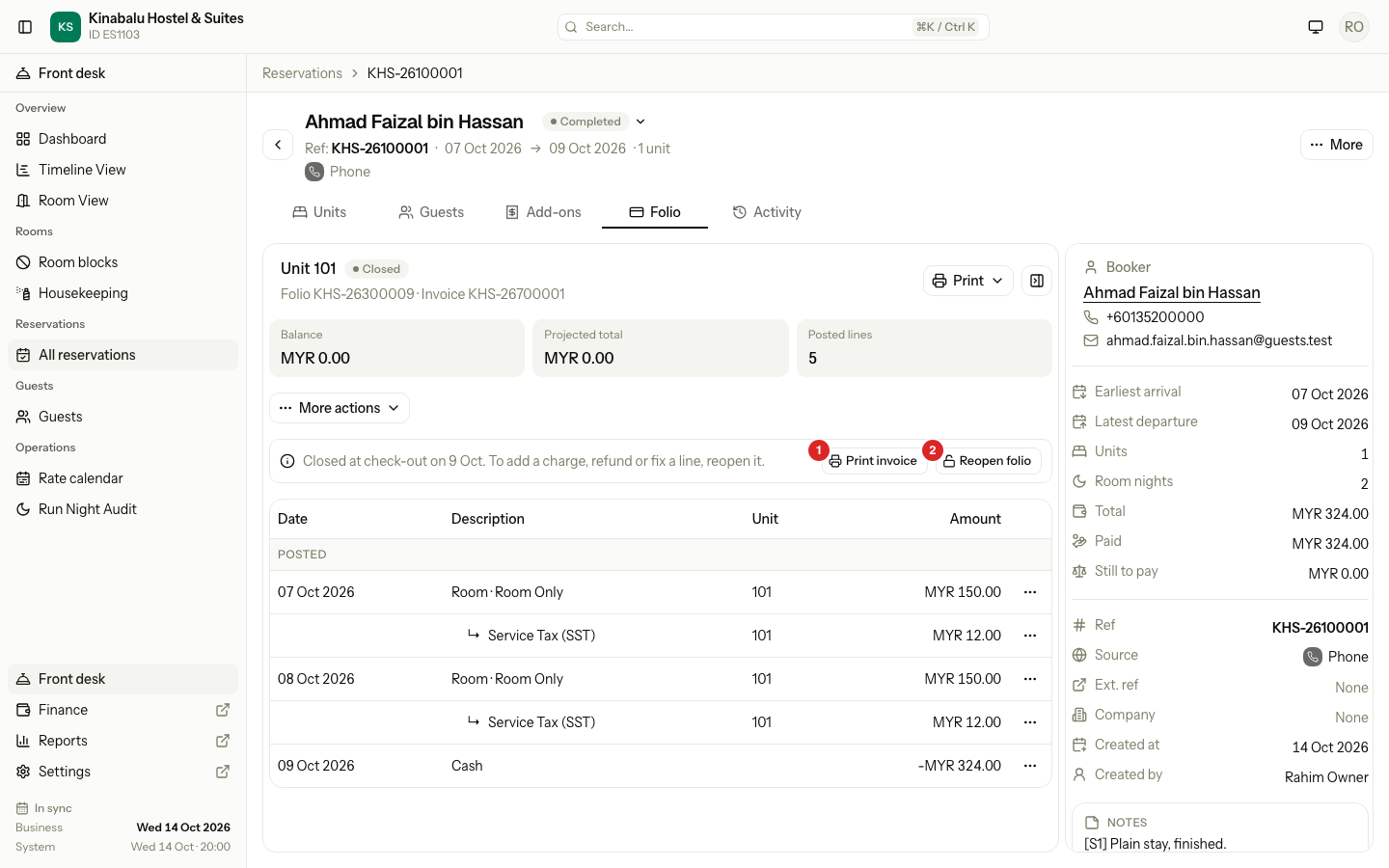
The notice says when the folio closed and what to do. Print invoice and Reopen folio sit on the right of it. Posting, discounts, moving and reversing are all hidden until the folio opens again. See Close and reopen.
Who can do what
| Task | Permission | Owner | Manager | Front desk | Finance |
|---|---|---|---|---|---|
| Read the tab | View reservations | Yes | Yes | Yes | Yes |
| Post a charge | Post charges to folios | Yes | Yes | Yes | Yes |
| Reverse a line | Reverse folio lines | Yes | Yes | No | Yes |
| Apply or remove a discount | Apply and remove folio discounts | Yes | Yes | Yes | Yes |
| Print a voucher or an invoice | Print folio vouchers and invoices | Yes | Yes | Yes | Yes |
| Move charges, routing, third-party folios | Transfer folio lines and manage routing | Yes | Yes | No | Yes |
| Record a payment | Record payments and download receipts | Yes | Yes | Yes | Yes |
| Manual Folio Editor | Use the Manual Folio Editor | Yes | Yes | No | No |
| See the Manual entry marker | See which folio lines were entered manually | Yes | Yes | No | Yes |
A button you may not use is not shown. Ask an owner to change a role under Settings → Team. See Roles and permissions.
Special cases
| Situation | What happens | What to do |
|---|---|---|
| The reservation has no folio yet | The tab says No folio yet and Charges appear here once a unit has nights or an add-on. Only More actions shows. | Make a third-party folio from More actions if you need one. Otherwise wait for the first charge or payment. |
| A folio has no rows | The table says Nothing on this folio. | Post a charge or record a payment. |
| A night is in Scheduled but you expect it in Posted | The night audit posts it on its night. | Run the night audit. See Run the night audit. |
| A folio is Closed | You cannot post, discount, move or reverse. | Select Reopen folio in the notice, if you may. |
| A line has two markers | The row takes the tint of its first marker that has a colour. | Hover over each icon to read it. |
| You hid the summary and cannot find it | The summary hides on the Folio and Guests tabs only. | Select Show summary, or open another tab. |