
Manual Folio Editor
Add missed charges and payments with the day they really happened, and fix lines, with a reason for every change.
The Manual Folio Editor lets a manager settle a folio by hand. Use it when a stay ran on paper, when a charge or payment was missed, or when a line needs fixing. Every change comes with a reason, and estatell shows it on the line.
Estatell never writes into a business date that is already closed. Each line keeps two dates instead. See Two dates on a line.
Before you start
- Permission: Use the Manual Folio Editor. Owners and managers have it by default. Front desk and finance staff do not.
- To see the Manual marker on lines, you need to see which folio lines were entered manually. Owners, managers and finance staff have it by default.
- The folio must be Open. If it is closed, reopen it first. See Close and reopen.
- To enter a payment, the editor follows the same rules as Record a payment.
Steps
-
Open the reservation and select the Folio tab.
-
Choose the folio in the rail.
-
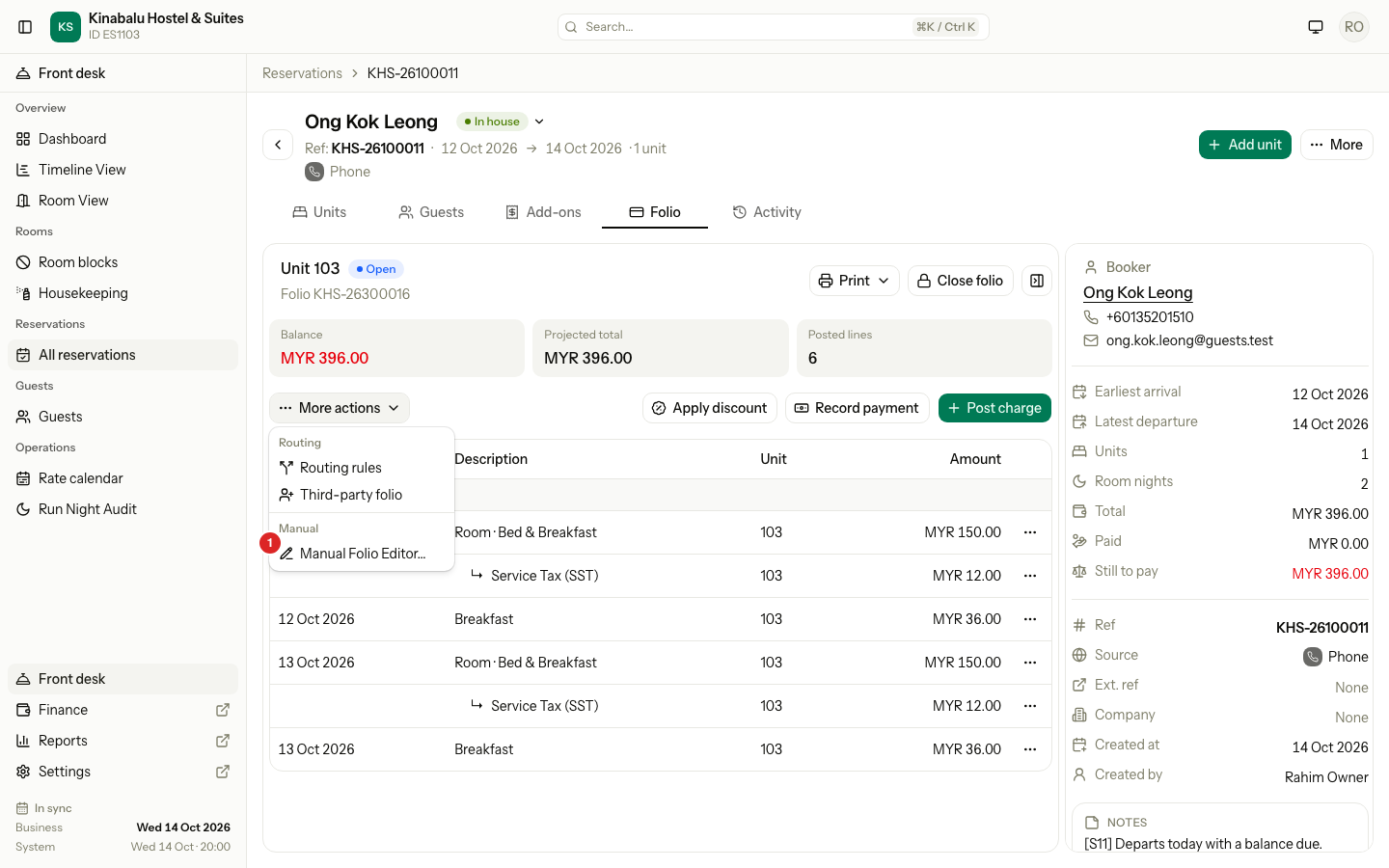
Select More actions, then Manual Folio Editor….
-
Choose a Reason, then select Continue. See Reasons.
-
On the New lines tab, fill each row. Select Add line for more rows. See The lines you add.
-
Check the Summary. It shows the charges, payments and balance now and after.
-
If the folio will be at 0.00 and you want it closed, tick Close the folio after posting.
-
Select Post 1 line. The button counts your lines, for example Post 3 lines.
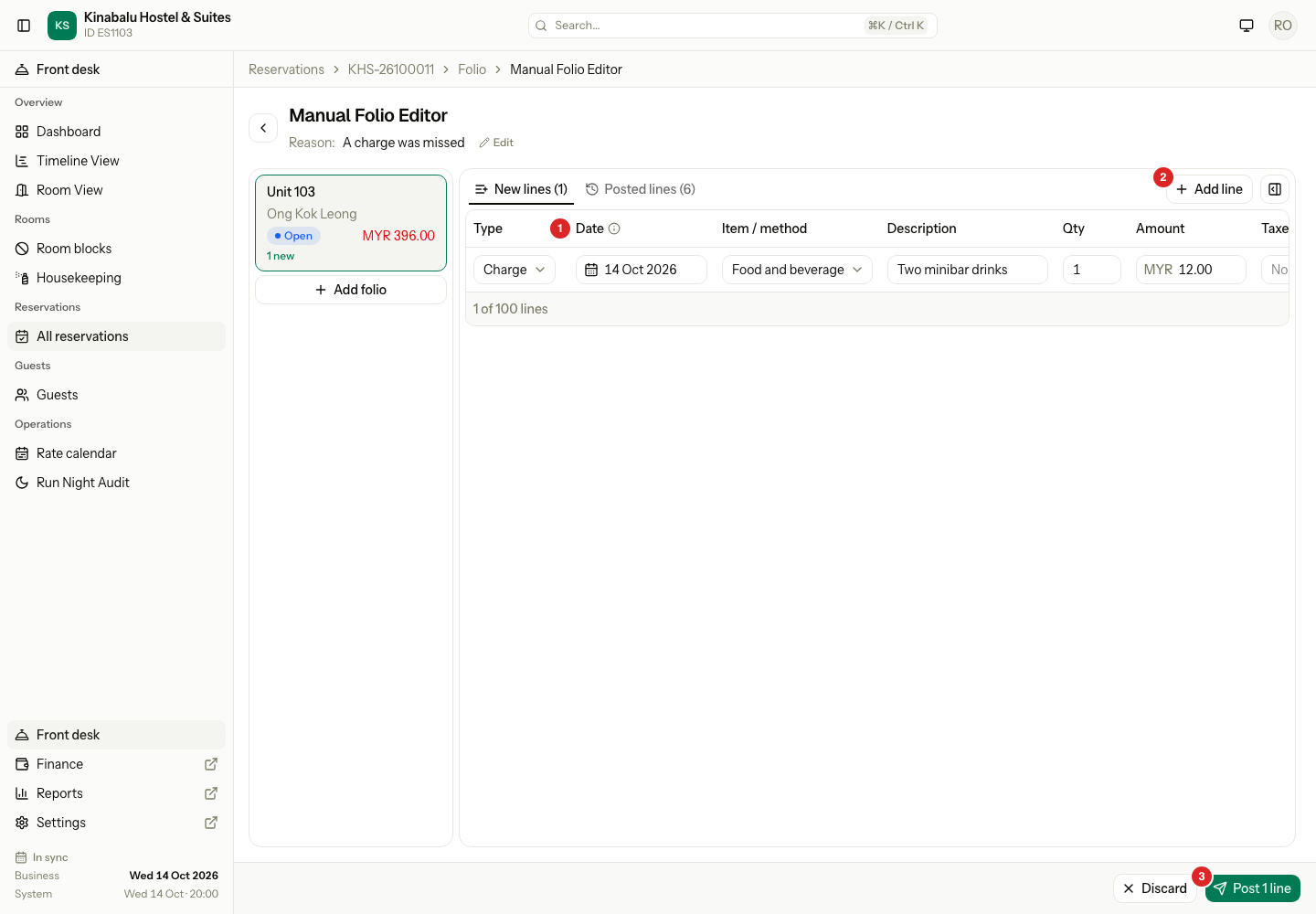
Nothing is saved until you select Post. Discard throws the new lines away. Estatell asks to confirm if there are new lines, and if you leave the page with new lines.
Reasons
The first dialog asks why you are editing by hand. Continue stays off until you choose a reason.
| Reason | Use it when |
|---|---|
| Entering charges from the paper folio | The stay was run on paper and you enter it now. |
| A charge was missed | A charge was never posted. |
| A payment was not recorded | The guest paid and nobody recorded it. |
| Moving from the old system | You copy lines from your old system. See Migrated and old stays. |
| Fixing a mistake | A line is wrong. |
| Other | None of the above. Enter Reason details, up to 500 characters, for example "Guest paid cash to the night staff". |
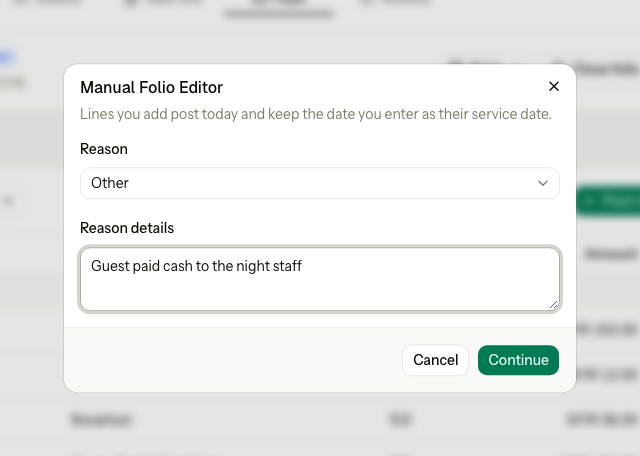
The reason shows under the page title. Select Edit next to it to change it. The reason stays with every line you post, and with the Manual marker.
The lines you add
The page has the folio rail on the left, your lines in the middle, and the summary on the right. Select the Hide summary button to give the lines more room.
| Column | What to enter |
|---|---|
| Type | Charge, Payment or Refund. |
| Date | The day it really happened. See Two dates on a line. |
| Item / method | For a charge, the charge item. For a payment, the payment method. For a refund, the payment to refund. |
| Description | For a charge, a note. For a payment, a reference. |
| Qty and Amount | For a charge. A charge item with a fixed price fills the amount for you. |
| Taxes / purpose | For a charge, the taxes. They start with the item's own taxes. For a payment, the Purpose. |
| Total | The amount with tax. Select the i next to it to see each tax. |
| Room | For a charge on a folio that has no room of its own, such as the Master folio. |
- A refund row cannot be more than what is left to refund on that payment.
- A charge needs a room that is checked in or checked out. Estatell refuses a charge for a room that has not arrived.
- A tax that is only for foreign guests shows Exempt and 0.00 for a local guest.
- You can add up to 100 lines in one go.
The folio rail
The rail lists every open folio, with its payer and balance. Choose another folio to add lines to it. Your lines stay when you switch. A folio with new lines shows "1 new".
Select Add folio under the rail to make a third-party folio for a guest or a company. The page stays as it is. See Routing.
The other tabs
| Tab | What it shows |
|---|---|
| New lines | The rows you are adding. |
| Posted lines | The charges and payments already on the folio. Each charge has a row menu. See Fix a posted line. Move charges… is here too, when the reservation has another open folio. |
| Scheduled | What the night audit will still post. You cannot change it here. To change a night's price, use Change a night's price. |
Two dates on a line
Each line keeps two dates.
| Date | What it means | Rule |
|---|---|---|
| The day it happened (Date) | The day the guest really had the service or paid. | From the day the booking was made up to today. Never after today. |
| The business date it counts in | The day estatell books the line for revenue, tax and cash-up. | Always the current business date. A closed date never changes. |
For example, a guest paid MYR 100.00 on 9 Oct to the night staff, and you enter it on 14 Oct. Set Date to 9 Oct. The folio shows 9 Oct, and a grey line under it says "posted 14 Oct 2026". The reports count it on 14 Oct, so the night audit totals of 9 Oct do not change.
- The folio tab, the voucher and the invoice show and sort lines by the day it happened.
- Reports count by the business date it posted.
- The Old system payment method may go back before the property started. See Migrated and old stays.
Fix a posted line
The ⋯ menu of a charge on Posted lines has these items. Each one opens its own dialog, asks for a Reason, and posts at once. It does not wait for Post.
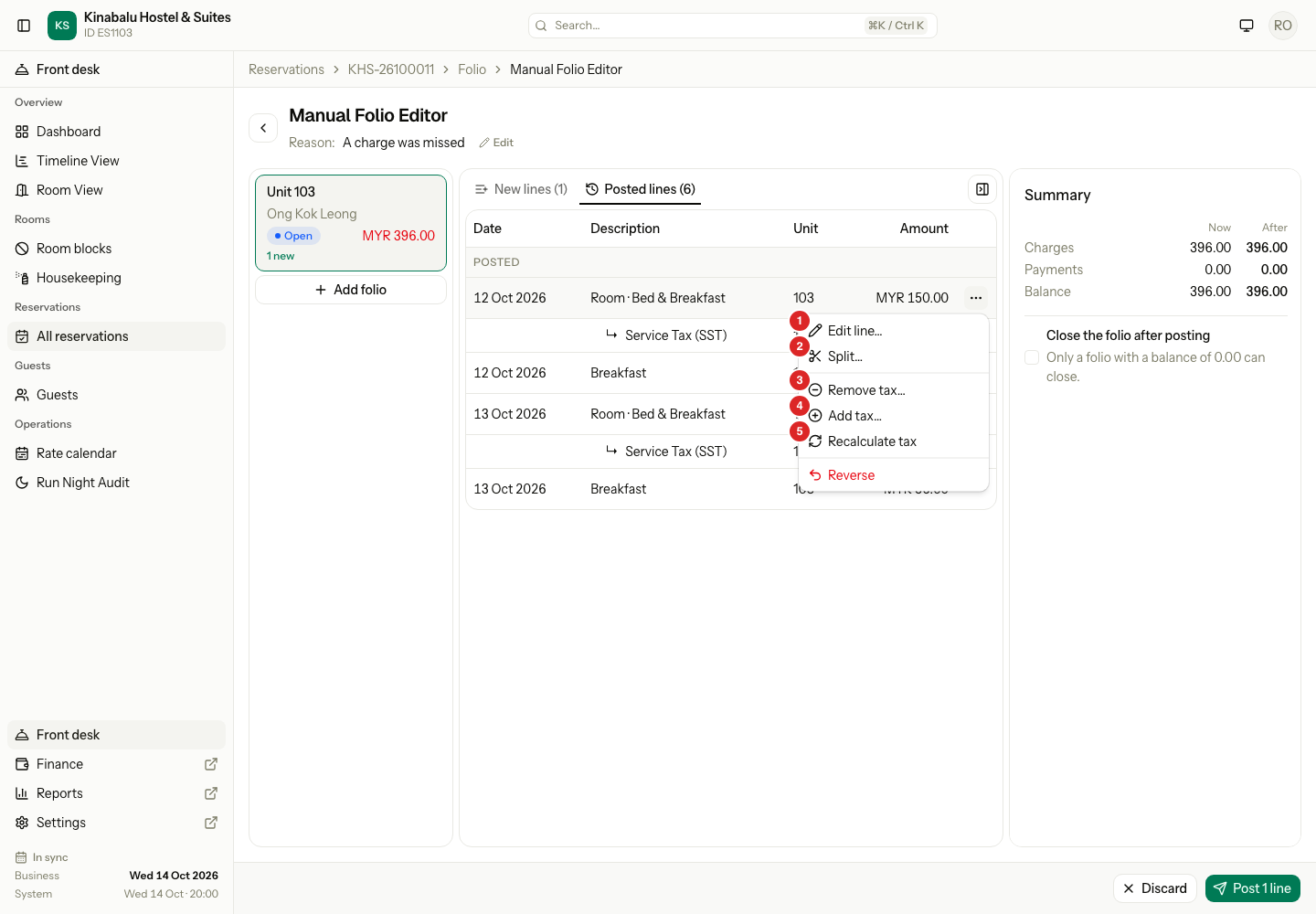
| # | Menu item | What it does | Refused when |
|---|---|---|---|
| 1 | Edit line… | Changes the Description, Rate, Qty or Taxes. The dialog shows Before and After. The old line is reversed and a new one posted. A room night changes only its Price per night. | Nothing changed, or the charge has a discount. |
| 2 | Split… | Splits the line into 2 to 20 parts, each with a folio and an amount. The amounts must add up to the line. Tax is worked out again on each part. | The parts do not add up, or the charge has a discount. |
| 3 | Remove tax… | Reverses the tax lines you choose. The charge stays. | The charge has a discount. |
| 4 | Add tax… | Adds a tax you choose under the charge. The charge does not change. | The tax is part of the price, or the charge has a discount. |
| 5 | Recalculate tax | Reverses the tax lines and posts new ones with the item's taxes and the guest's nationality today. | The tax is already correct, or the charge has a discount. |
- A charge with a discount offers Reverse only. Remove the discount first. See Folio discounts.
- A room night's tax fix applies to that night only. The night audit charges later nights with the normal taxes.
- To change a payment, use a refund. See Refund or void.
- The same items show in the row menu of the Folio tab, after Move….
The Manual marker
A line made in the editor, or fixed with a row menu item, shows a Manual marker with a pencil. Point at it to read who made the line, when, and why. For example "Manual entry by Rahim Owner, 14 Oct 2026 20:00. Reason: A charge was missed". People who may not see manual entries see a normal line. See The Folio tab.
The Activity tab of the reservation always records the change.
Special cases
| Situation | What happens | What to do |
|---|---|---|
| The folio is closed | Manual Folio Editor… is not in the menu. | Reopen the folio. See Close and reopen. |
| One row is refused | Nothing posts. The row shows the reason. | Fix that row, then select Post again. |
| You select Post twice | Estatell posts the lines once. | Nothing to do. |
| You leave the reason empty | Continue stays off. For Other, it stays off until you type the details. | Choose a reason. |
| The date is before the booking was made | "Pick a day from the booking date to today." | Pick a later day. |
| You choose a payment purpose that does not fit the folio | The purposes follow the folio: a room's own folio takes Settlement, Advance and Security deposit, a Master folio takes Settlement and Advance, and a third-party folio takes Settlement. | Choose a purpose the list offers. |
| You tick Close the folio after posting and it cannot close | The box stays off and says why. For example a room is still checked in. | See Close and reopen. |
| You leave the page with new lines | Estatell asks if you want to discard them. | Select Post, or discard. |
| The migration window is closed | "The migration window is closed, so entries from the old system cannot be added or changed. Correct a line with a reversal or a refund." | Use a reversal or a refund. |