
Move charges
Move charges that have posted from one folio to another, and choose where each room's later charges go.
Use Move charges when charges sit on the wrong bill. For example, a company agrees to pay every room of a group, or room charges go back to a room's own folio that holds an advance.
One page moves many charges from several folios into one folio. It can also change where a room's scheduled charges will post.
Before you start
- Permission: Transfer folio lines and manage routing. Owners, managers and finance staff have it by default.
- The reservation needs at least 2 open folios: the one you move from and the one you move to.
- A closed folio is not on the page. Reopen it first. See Close and reopen.
Steps
-
Open the reservation and select the Folio tab.
-
Select More actions, then Move charges.
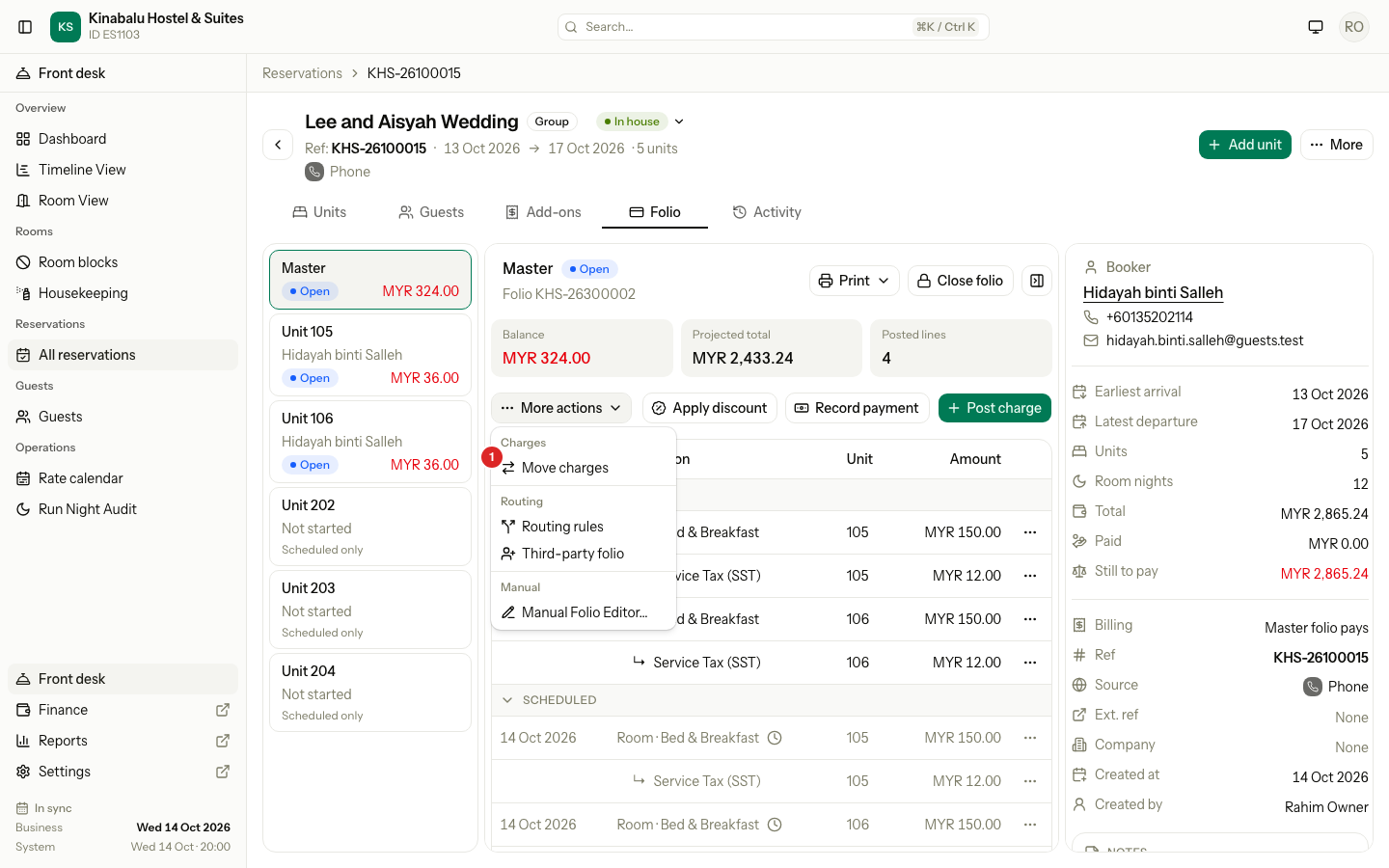
To move one charge, select the ⋯ menu on its row, then Move…. The page opens with that charge ticked.
-
Under To, choose the folio that takes the charges. It starts on the Master folio, or on the first other open folio.
-
Under From, tick the charges to move. Use Quick select to tick many at once.
-
If a room has scheduled charges, choose where they go. See Scheduled charges.
-
Check Incoming and the balances under To.
-
Select the green button. It names what will move, for example Move 2 charges and 1 schedule.
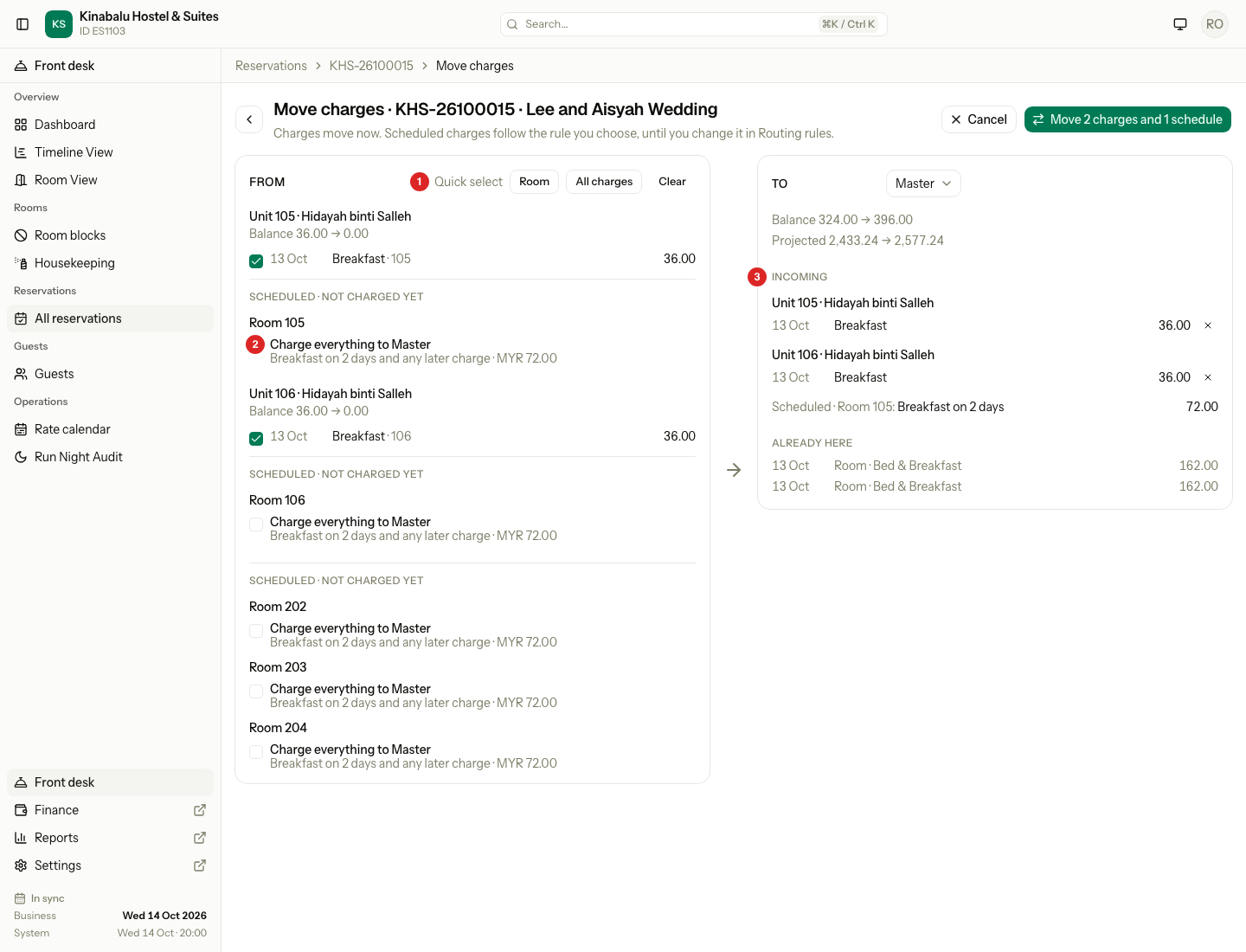
| # | What | What it shows |
|---|---|---|
| 1 | Quick select | Room ticks every room charge. All charges ticks every charge. Clear unticks all. |
| 2 | A scheduled choice | A room's charges that have not posted yet. See Scheduled charges. |
| 3 | Incoming | The charges that will land on the folio under To. Select × to untick one. |
The page checks the result as you tick. Under To, Balance and Projected show the figure now, an arrow, and the figure after the move. Already here lists the charges the folio holds now.
Estatell moves a charge with its tax and discount lines. They show under the charge and always move together with it.
If you leave the page with charges ticked, estatell asks if you want to discard them. Cancel goes back to the Folio tab.
What you can move
| Can move | Cannot move |
|---|---|
| A posted charge that is not reversed | A payment or a refund. Move the charges to the money instead. |
| A charge on any open folio of the reservation | A charge on a closed folio. Reopen the folio first. |
| A tax or discount line on its own. It moves with its charge. | |
| A charge on a folio settled to the City ledger. |
Scheduled charges
A scheduled charge has not posted yet. The night audit posts it later, to the folio that the routing rules choose. So moving a scheduled charge means adding a routing rule for that room.
Under From, each room with scheduled charges shows up to two choices. Both are off at first.
| Choice | What it adds | What goes to the folio under To |
|---|---|---|
| Charge room nights to the folio | A rule: this room, Room charges, to the folio | The room nights, with their inclusions and tax |
| Charge everything to the folio | Two rules: this room, Room charges, and this room, all charges | Room nights, scheduled add-ons, and any later charge of that room |
- Each choice shows its dates and amount, for example "Breakfast on 2 days and any later charge".
- If the room nights already go to that folio, only Charge everything shows.
- A room with no scheduled charges left shows no choice.
- If you move a room's posted room charges but leave its scheduled nights, estatell tells you: "2 scheduled nights of Room 101 will still be charged to Master." Tick a choice to move them too.
- If a more specific rule keeps a charge elsewhere, estatell says so: "Island trip stays on the travel agent's folio: a rule sends diving charges there."
- If the room already has a Manual rule with the same charges, the new choice replaces it. Billing mode rules stay. The new rule wins for that room.
You can change or remove the rules later in Routing rules. See Routing.
After the move
- The charges post again on the folio under To, on today's business date. The old lines are reversed on the folios they left. The ledger keeps both.
- A toast says what moved, for example "2 charges moved to Master."
- The reservation's Activity tab shows one entry for the whole move.
- If a room has checked out and its folio is now at 0, the folio closes by itself.
- The Move button is used once. A second click on charges that already moved is refused.
Special cases
| Situation | What happens | What to do |
|---|---|---|
| You tick more than 200 charges | "You can move up to 200 charges at once. Move them in two parts." The button stays off. | Move 200 charges, then move the rest. |
| You tick nothing | "Tick a charge or choose a scheduled option to move." | Tick a charge or a scheduled choice. |
| A charge was moved or reversed while the page was open | "A charge you ticked cannot be moved. It was already moved or reversed, or it belongs to another charge. Reload the page and try again." Nothing moves. | Reload the page and tick again. |
| One charge cannot move | The whole move is refused and nothing is saved. | Fix that charge, then try again. |
| A room has no scheduled nights left | "No scheduled nights are left to move for" the room. | Untick that choice. |
| The reservation has only one open folio | Move charges is not in the menu. | Make a third-party folio first. |
| A checked-out room's folio is closed | It is not listed under From. | Reopen it. See Close and reopen. |
| A front desk user | Move charges is not in the menu. | Ask a manager. |
| The guest cannot check out because a room still charges this folio | The check-out says "Room 107 still charges its scheduled nights to this folio. Send them to another folio first." | Choose a scheduled choice here for that room. |