
Activity log
Read the list of actions Estatell recorded for your property, newest first, and search it.
The Activity log is a list of actions that Estatell recorded for your property: a night audit that completed, a business date that closed, a bed that was assigned. Use it to find out what happened, who did it and when.
The log is read only. You cannot change it or export it.
Before you start
- Permission: View and export reports. Owners, managers and finance staff have it by default.
- The log shows only your property. Another property's actions never show here.
Read the log
Open Reports, then Audit, then Activity log. The newest action is first. The log shows 25 actions on each page. Use Next and Previous at the bottom to move between pages.
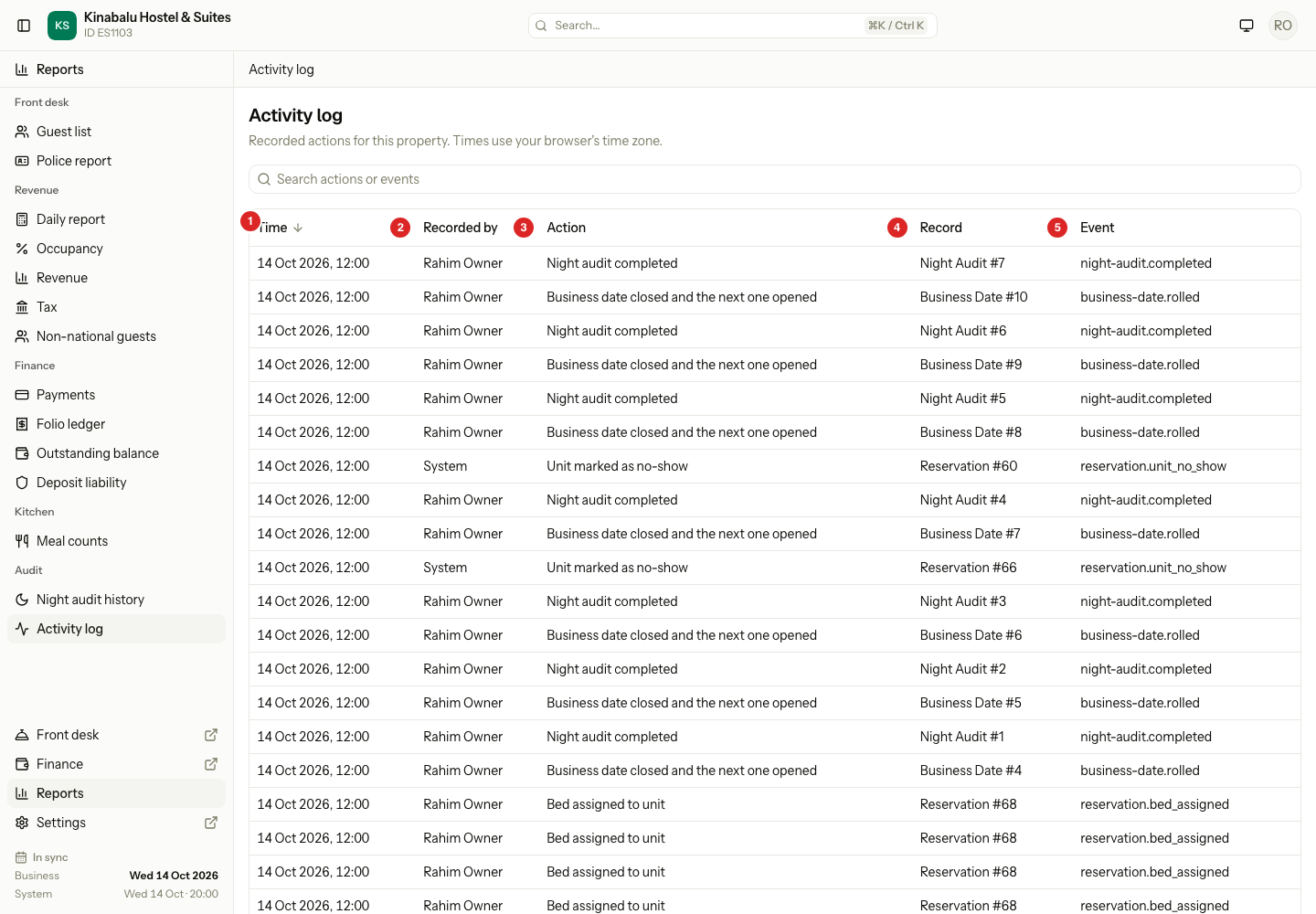
| Column | What it shows |
|---|---|
| Time | The date and time of the action. Select the header to show the oldest first. |
| Recorded by | The staff member who did it. See System and Unknown user. |
| Action | What happened, in words. For example "Night audit completed". |
| Record | The kind of record the action is about, with its internal number. For example "Reservation #68". |
| Event | A short code for the action. For example night-audit.completed. |
The number in Record is an internal number. It is not the reservation number that you see on a booking, such as KHS-26100011. You cannot use it to search a reservation. Use the Action and the Time to find the booking instead.
Times use the time zone of your browser, not the property's time zone. If your computer's clock is set to another country, the times differ from the times in other reports, such as Night audit history.
Search the log
- Select the search box, Search actions or events.
- Type a word from the action or the event. For example,
no-showornight audit.
The list shows only the actions that match. Clear the box to see them all.
The search looks in Action and Event only. It does not search a person's name or a record number.
The search and the sort stay in the page address, so you can bookmark them or send them to a colleague.
System and Unknown user
| Recorded by | Meaning |
|---|---|
| A staff name | That person did the action. |
| System | Estatell did it by itself, for example the scheduled night audit or an automatic no-show. |
| Unknown user | A person did it, but their account no longer exists. |
What the log does not hold
- It does not hold passwords, ID numbers or other private details of guests.
- It does not show if an email or a message reached the guest.
- It holds an entry when someone exports a report that holds full ID numbers, such as the Police report.
Special cases
| Situation | What happens | What to do |
|---|---|---|
| Many rows have the same time | The night audit does many actions together. Estatell keeps them in the order they happened. | Select Time to reverse the order. |
| Record shows a number you do not know | It is an internal number. | Search by Action and Time. Open the reservation from the board. |
| Record shows "—" | The action is not about one record. | Nothing. |
| A record was deleted later | Record keeps its type and number. | Nothing. |
| The search finds nothing | The page says "No activity matches your search". | Try another word from the action. |
| The log is empty | The page says "No activity recorded yet". | Nothing. Actions appear as staff work. |
| You need to know who ran a night audit | The log has a row for each completed audit, but the history report shows more. | See Night audit history. |