
Bulk update
Change prices and restrictions for many dates and plans at once, or extend a plan's prices for 12 months.
Use bulk update when one date at a time is too slow. For example, you can raise every weekend price for December, or close several room types for a week. You can also extend a plan's prices when they run out.
Before you start
- Permission: Edit rates and restrictions. Owners and managers have it by default.
- Set up first: a rate plan that sells your room types.
Change many dates
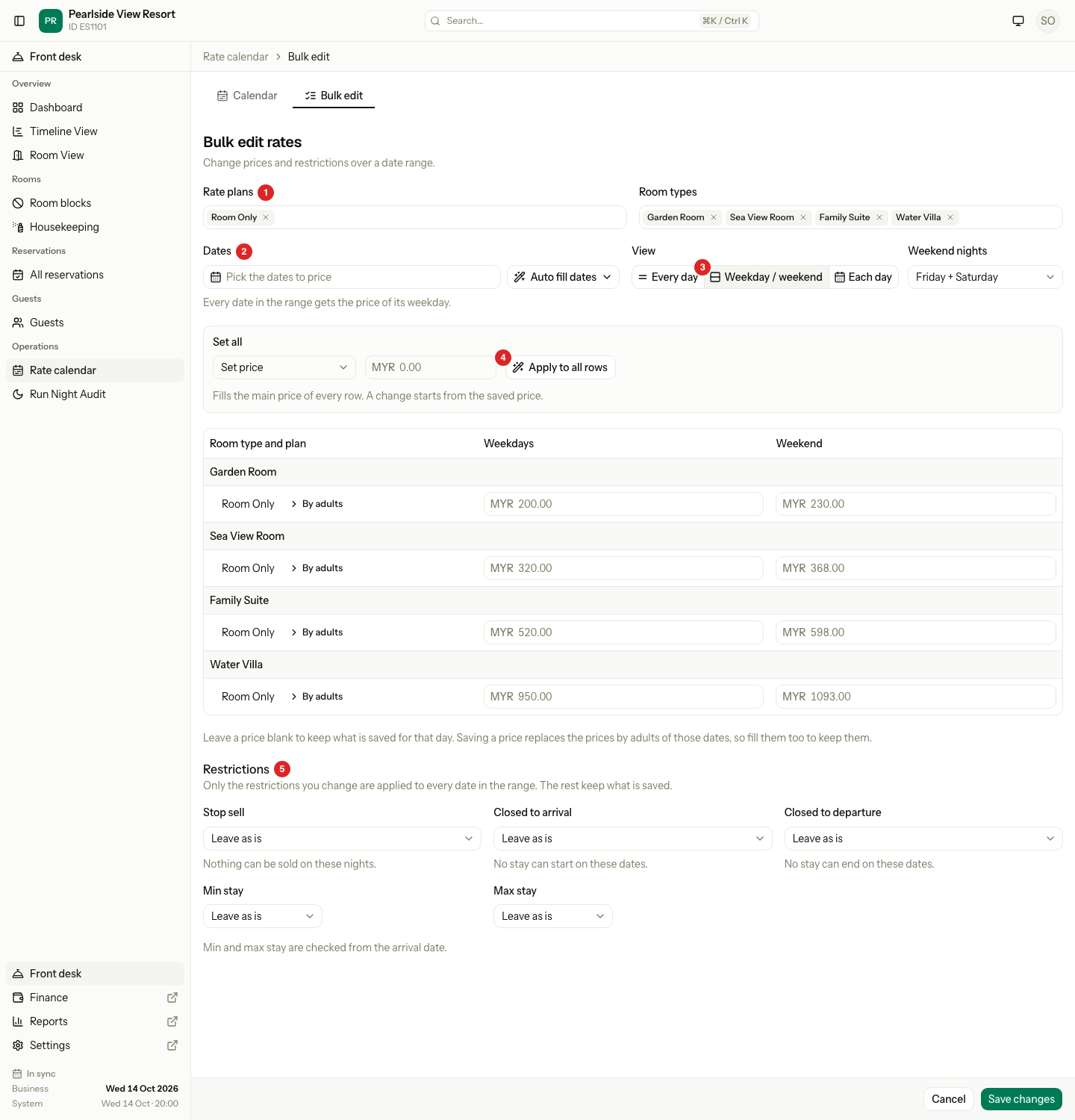
- Open Rate calendar, then the Bulk edit tab.
- In Rate plans, pick one or more plans.
- In Room types, pick the room types. Estatell starts with all of them.
- In Dates, pick the first and last date. Or select Auto fill dates and choose Next month, Next 3 months, Next 6 months or Next 12 months. The range can be up to 731 days.
- Under View, choose how to enter prices:
- Every day gives one price for every date.
- Weekday / weekend gives two prices. Check Weekend nights next to it.
- Each day gives a price for each day, Monday to Sunday.
- Type the new price in each row. A blank price keeps the saved price, which shows in grey.
- Change the restrictions, if you need to. See the table below.
- Select Save changes.
Estatell saves every plan together, or none. It then opens the calendar at the first date.
Weekend nights is for this change only. It does not change your property setting.
Change many prices at once
The Set all box fills the main price of every row. Choose how:
| Choice | What it does |
|---|---|
| Set price | Puts one price in every row. |
| Change by % | Moves each saved price by a percentage. |
| Change by amount | Moves each saved price by an amount. |
For a change, enter its size, then choose More or Less. Select Apply to all rows. It only fills the form. Check the rows, then select Save changes. A change by % or amount needs the Weekday / weekend or Each day view. A column with no saved price is left alone.
Prices by adults
A room type that sleeps more than one adult has By adults on each row. Open it to enter a price for each number of adults. When you save a price, Estatell replaces the prices by adults for those dates. Fill them too if you want to keep them.
Restrictions
Each restriction has three choices. Estatell changes only what you choose. The other restrictions keep their saved values on every date.
| Restriction | Choices |
|---|---|
| Stop sell | Leave as is, Turn on, Turn off |
| Closed to arrival | Leave as is, Turn on, Turn off |
| Closed to departure | Leave as is, Turn on, Turn off |
| Min stay | Leave as is, Set to a number of nights, No limit |
| Max stay | Leave as is, Set to a number of nights, No limit |
Restrictions apply to every row you picked, also rows with no price yet. See the restrictions table for what each one means.
Extend a plan's prices
Prices end one day. When a room type has no price in the next 60 days, the calendar shows Prices are running out.
- Open Rate calendar.
- In the warning, find the plan.
- Select Extend 12 months.
Estatell copies the last 7 priced days of each room type forward for 12 months. It starts the day after the last price, or today, whichever is later.
| Copied | Not copied |
|---|---|
| Price, prices by adults, Min stay, Max stay, hour prices | Stop sell, Closed to arrival, Closed to departure |
The restrictions that are not copied belong to one date, for example a stop sell for repairs. Dates that already have them keep them.
Derived plans never show the warning. They follow the parent plan.
Special cases
| Situation | What happens | What to do |
|---|---|---|
| You pick a Day use plan | It is edited alone, with its hour prices and Stop sell. Other plans drop off the list. | Do other plans in a separate change. |
| You pick a derived plan | The price is off. It says "Follows" the parent plan. Only restrictions can change. | Change the parent plan's price. |
| You pick a Package plan | The price is off. Only restrictions can change. | Set package prices in the plan's own settings. |
| The view has fewer columns than your prices need | Estatell refuses to switch and shows why. | Stay on a view with more columns, or clear the differences. |
| Max stay is below Min stay | Estatell shows "The max stay cannot be below the min stay." | Change one of them. |
| The range is longer than 62 days | The calendar shows the first 62 days after you save. | Move the calendar to see the rest. |
| Save changes is grey | There are no dates or nothing to change. | Pick dates, then enter a price or choose a restriction. |
| The plan does not sell a room type | The room type is not in the list. | Add it in the plan's Room types tab. |
| You want to remove a price | A blank price keeps the old one. | Turn on Stop sell for the dates. |
| Prices for a date are replaced | The old price and prices by adults are replaced for those dates. | Check the rows before you save. |