
Force close
Run the night audit even though a blocker is open, with a reason, and what happens to the issues that are left.
A normal run stops while the sheet shows Fix before running, or Not over yet. Force close runs the audit anyway. Use it only when a blocker cannot be fixed tonight, for example when no room is free for a guest who is already in the building.
Forcing is rare. Fix the row if you can. See Readiness checks.
Before you start
- Permission: Force close the night audit, as well as Run the night audit. Owners and managers have both by default.
- You must write a Reason. Estatell keeps it with the audit.
- Force close… shows only when something stops a normal run.
What force close skips
| Stop | A normal run | A forced run |
|---|---|---|
| Fix before running (a blocker, No room or bed tonight) | Refused. | Runs. |
| Not over yet (the business date has not ended) | Refused. | Runs. |
| Needs a look rows | Run. The audit deals with them by its rules. | The same. |
Forcing does not fix the blocker. It only lets the audit start. See Run the night audit for the steps.
Force close the audit
-
Open the Run Night Audit sheet. See Readiness checks.
-
Select Force close… under the rows.
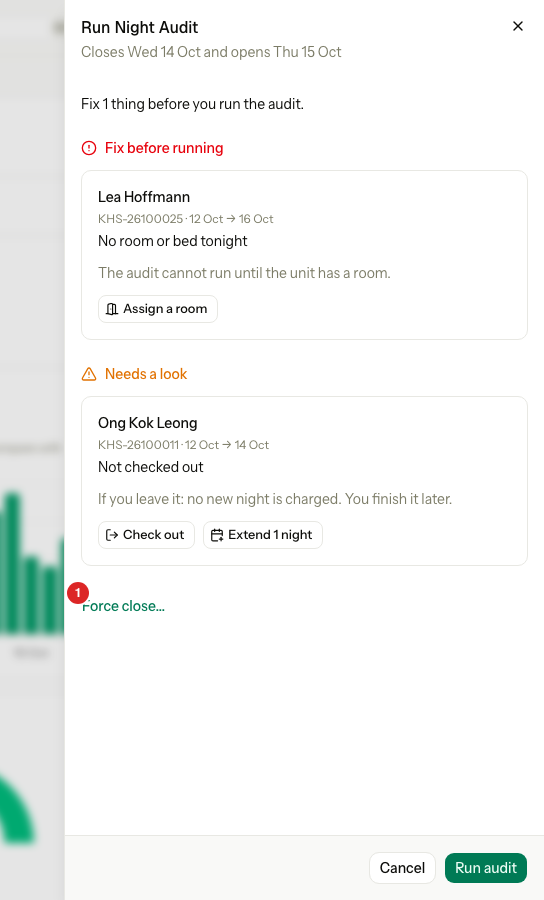
-
In Reason, write why the audit runs before it is ready.
-
Select Force close at the bottom of the sheet.
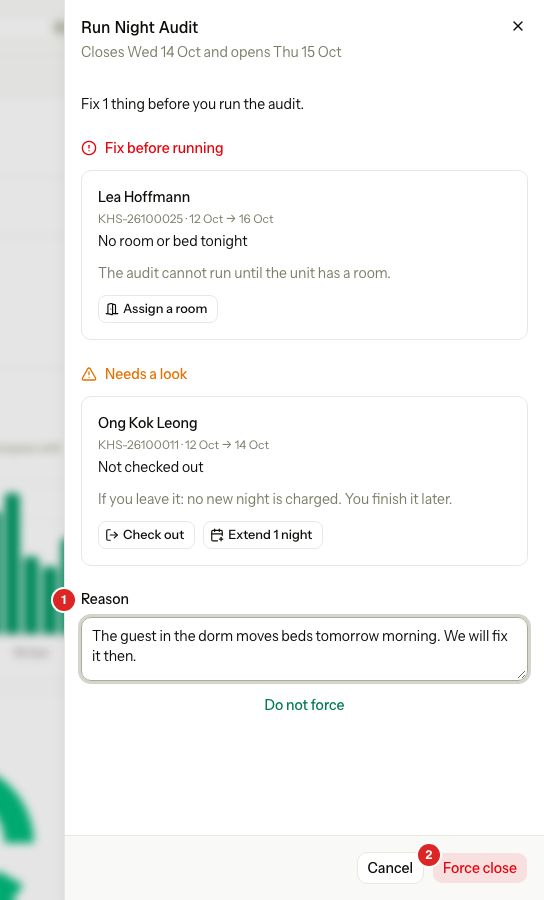
The button stays off until you write a reason. To go back, select Do not force, under the Reason box. The sheet then shows Run audit again.
The sheet follows the audit as it runs, like any other run.
What happens to the issues
The audit does not wait for the blocker. It runs every step and closes the day.
- A row the audit cannot finish becomes an issue. It carries to the next day's sheet as Left from an earlier audit. See Earlier audit issues.
- When the audit ends, the sheet says how many items need a look.
- The Night audit history report marks the audit as forced and shows your reason. See Night audit history.
A closed business date never changes. Fix the guest's room on the new date.
Special cases
| Situation | What happens | What to do |
|---|---|---|
| You have no Force close… link | You do not have Force close the night audit. | Ask an owner or manager. |
| Force close is off | The Reason box is empty. | Write a reason. |
| You select Do not force | The sheet goes back to Run audit. Nothing runs. | Fix the blocker, or force again. |
| The business date has not ended | Not over yet shows. A force closes the day early, and the business date moves ahead of the calendar. | Wait, unless you are sure. |
| A scheduled run meets a blocker | It stops and tries again later. It never forces. See Scheduled audit. | Fix the blocker, or force close by hand. |
| An audit failed half way | A forced run is not needed. | Select Resume audit. See Run the night audit. |
| You forced by mistake | The day is closed. There is no undo. | Fix the issues on the next day's sheet. |