
General
Choose who completes a registration card, whether check-in needs one, how long ID photos are kept and the security deposit.
The General tab of the registration card settings sets the rules for the whole property: who signs, when a card is needed, how long ID photos are kept, and the security deposit.
Before you start
- Permission: Manage property settings. Owners and managers have it by default.
- To let staff skip the card at check-in, they need Check in without a registration card. Owners and managers have it by default. Front desk staff do not.
Steps
- Open Settings, then Registration card. The General tab opens first.
- Under Who completes a card, choose Primary guest only or Every adult.
- Turn Require card before check-in on or off.
- Enter ID document retention (days), or leave it blank to keep ID photos.
- Under Security deposit, choose Do not collect or Collect a deposit. If you collect a deposit, enter the Deposit amount.
- Select Save changes.
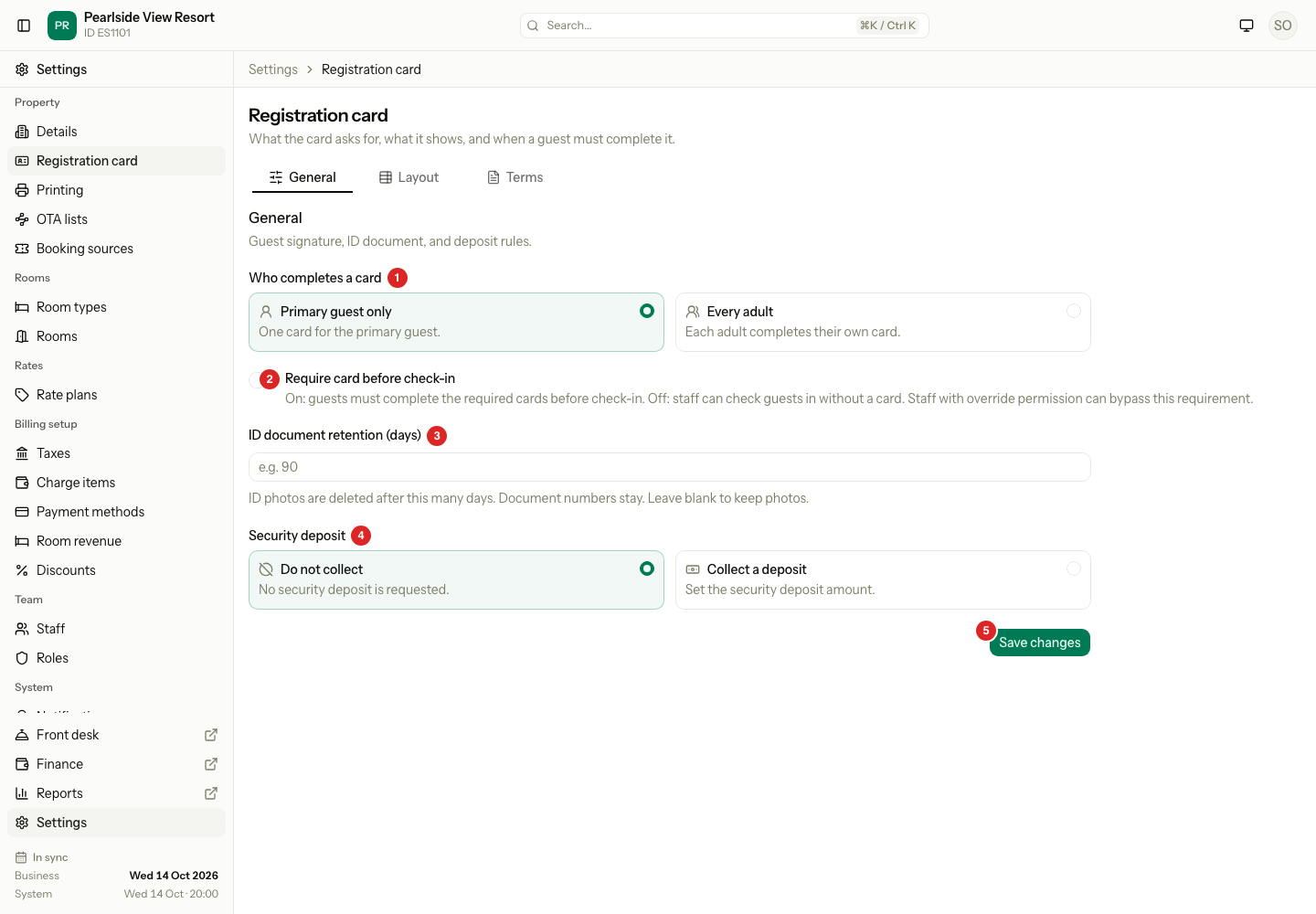
| # | Setting | What it does |
|---|---|---|
| 1 | Who completes a card | Primary guest only means one card for the primary guest. Every adult means each adult completes their own card. A guest known to be under 18 on arrival does not need one. |
| 2 | Require card before check-in | On: check-in is refused until the required cards are signed. Off: staff can check in with no card. A new property starts with it off. |
| 3 | ID document retention (days) | A number from 1 to 3650. ID photos are deleted this many days after they were uploaded. The document number stays. Blank keeps the photos. |
| 4 | Security deposit | The deposit shown at check-in. It is also the value of security_deposit in the terms. |
| 5 | Save changes | Saves all the settings on this tab. |
What happens
- A change applies to new check-ins at once. Cards already signed stay as they are.
- A staff member with Check in without a registration card can still check in a guest whose card is not signed. Estatell records who did it.
- The deposit amount you set is the amount the check-in screen offers. See Check in.
- Estatell checks once a day, at 03:30, and deletes the photos that are too old. Only the photo files go. The guest and the document number stay. See Identity documents and Privacy.
Special cases
| Situation | What happens | What to do |
|---|---|---|
| Require card before check-in is on and a guest has no signed card | Check-in is refused with "A registration card is not signed. Sign it, or tick Check in without a card." | Sign the card. Or, if you may, tick Check in without a card. |
| A front desk user cannot skip the card | The Check in without a card tick box is not shown. | Sign the card, or ask a manager. |
| Every adult is chosen and a guest has no date of birth | Estatell cannot tell the age, so the guest needs a card. | Add the date of birth on the guest's profile. |
| You choose Do not collect | Estatell saves a deposit of 0. | Choose Collect a deposit and enter an amount to ask for one. |
| You switch to Do not collect after you typed an amount | The amount stays in the field until you leave the page, but it is not saved as a deposit. | Choose Collect a deposit again to use it. |
| The retention field is blank | Estatell keeps every ID photo. | Enter a number of days to delete old photos. |
| You enter a retention of 0 or more than 3650 | Estatell refuses the save. | Enter a number from 1 to 3650. |