
Overview
When to cancel, when to mark a no-show, how the fee is worked out and how to bring a unit back.
Use Cancel when a guest tells you they will not come. Use Mark no-show when a guest does not arrive and does not tell you. Both release the room so you can sell it again. Both can charge a fee, from the policies your owner set. Reinstate brings the unit back.
| Action | Use it when | Allowed when | Fee |
|---|---|---|---|
| Cancel | The guest tells you they will not come. | The unit is Confirmed. | The cancellation policy. Free inside the free cancellation window. |
| Mark no-show | The guest did not arrive and did not tell you. | The unit is Confirmed and the arrival date is today or earlier. | The no-show policy. |
| Reinstate | A cancelled or no-show guest comes back. | Before the departure date, with a free room of that type. | None. A fee already posted stays. |
Before you start
- Permission: Manage reservations. Owners, managers and front desk staff have it by default.
- To skip the fee you also need Do not charge cancellation and no-show fees.
- Set up first: your cancellation and no-show policies, in Settings › Billing setup › Room revenue. See Set the policies.
How a unit moves
Only a Confirmed unit can be cancelled or marked no-show. A unit that is already checked in is checked out instead. See Check-out.
How the fee is worked out
The fee comes from the policy on the day you cancel or mark the no-show. A booking does not keep a copy of the policy. The fee is charged to the unit's folio on the business date, with tax.
Set the policies
Owners and managers set the policies. They need Manage property settings.
- Open Settings › Billing setup › Room revenue.
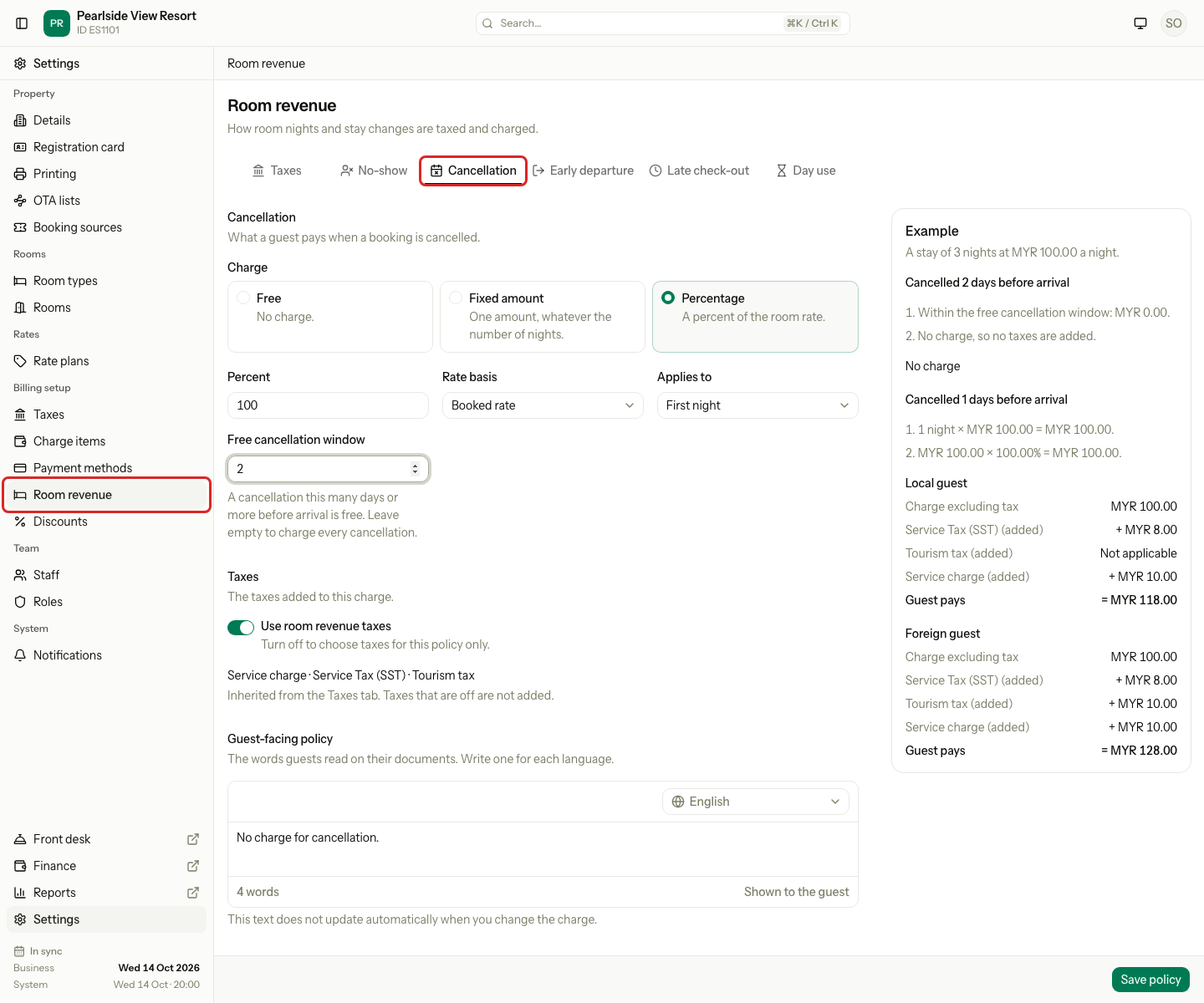
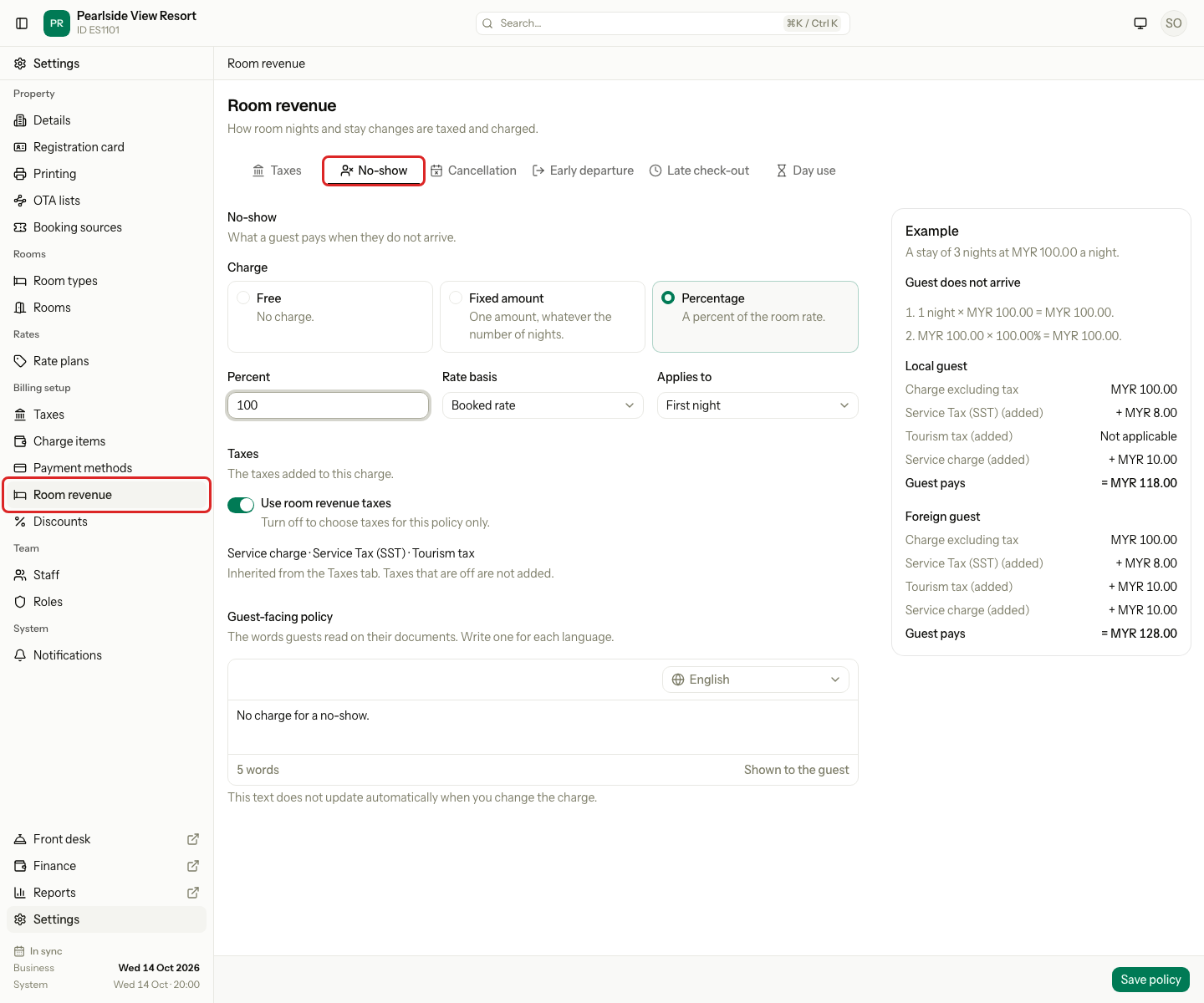
- Select the Cancellation tab or the No-show tab.
- Under Charge, choose Free, Fixed amount or Percentage.
- For a percentage, fill in Percent, Rate basis and Applies to. For cancellation, set the Free cancellation window too.
- Check the Example on the right. It shows what a guest pays on a sample stay.
- Select Save policy.
| Policy setting | Choices |
|---|---|
| Charge | Free, Fixed amount, or Percentage |
| Applies to | First night or Whole stay |
| Percentage of | Booked rate (the price booked) or Current rate (today's price for the same room and dates) |
| Free cancellation window | Cancelling this many days or more before arrival costs nothing. Cancellation only. |
Worked examples
A unit is booked for 3 nights at MYR 280.00 a night, so the stay is 3 × 280.00 = MYR 840.00. Tax is 8%.
| Policy | Fee before tax | Tax 8% | Fee charged |
|---|---|---|---|
| Fixed amount MYR 100.00 | 100.00 | 8.00 | MYR 108.00 |
| 100% of the first night | 280.00 | 22.40 | MYR 302.40 |
| 50% of the whole stay | 840.00 × 50% = 420.00 | 33.60 | MYR 453.60 |
| 100% of the whole stay | 840.00 | 67.20 | MYR 907.20 |
| Free | 0.00 | 0.00 | No charge |
With a free window of 2 days and a policy of 100% of the first night:
| You cancel | Days before arrival | Fee |
|---|---|---|
| 5 Oct, arrival 8 Oct | 3 days | No charge |
| 6 Oct, arrival 8 Oct | 2 days | No charge |
| 7 Oct, arrival 8 Oct | 1 day | 280.00 + 22.40 = MYR 302.40 |
A fee of 0 posts nothing. The 8% tax is an example. Your property's taxes apply.
What happens to the unit
- The night rows and their prices stay as history.
- The room or bed is released, so it can be sold again.
- The fee, if any, posts to the unit's folio.
- Add-ons that are not posted yet are removed if you ticked Also remove add-ons. Posted add-ons stay. If you did not tick it, they stay on the unit and come back if you reinstate.
- Payments are not refunded automatically. Refund them on the Folio tab. See Payments and refunds.
- The reservation is Cancelled only when every unit is cancelled. When every unit is a no-show, it is Completed.
- The activity log records it with the fee and the reason.
Special cases
| Situation | Example | What happens | What to do |
|---|---|---|---|
| Skip the fee | A guest has a medical emergency. | • Do not charge needs a reason. • "Enter a reason." if it is empty. • The choice is logged. | • Enter the reason. |
| You cannot see Do not charge | A front desk user without the permission. | • The tick box is not shown. • The fee is charged. | • Ask a manager to do it. |
| The fee changed | A colleague changed the policy while your dialog was open. | • "The fee changed while this form was open. Check the new amount and confirm again." | • Check the new fee and confirm again. |
| The policy is missing | A new property with no cancellation policy. | • "The policy for this fee is missing. Check Room revenue in settings." | • Ask an owner to set the policy. |
| The unit folio is closed | A fee cannot post to a closed folio. | • "The unit folio is closed, so it cannot change." | • Reopen the folio, then try again. |
| A guest already paid | The guest paid MYR 1,000.00 and the fee is MYR 302.40. | • The money stays on the folio. | • Refund MYR 697.60 on the Folio tab. |