
Overview
The Today tab shows what is left to do at the front desk, the day's numbers and tonight's occupancy.
The Dashboard is the first page staff see. Its Today tab is a place to act: start a booking in one click, see which guests still need checking in or out, and read four numbers. Everything uses the property's business date, not the calendar date.
Users with View and export reports also see a Performance tab. It opens first. Select Today to get to this page. See Performance.
Before you start
- Permission: every part of the page follows its own permission, and a part you may not use is left out. The permissions are named in the tables below.
The Today tab
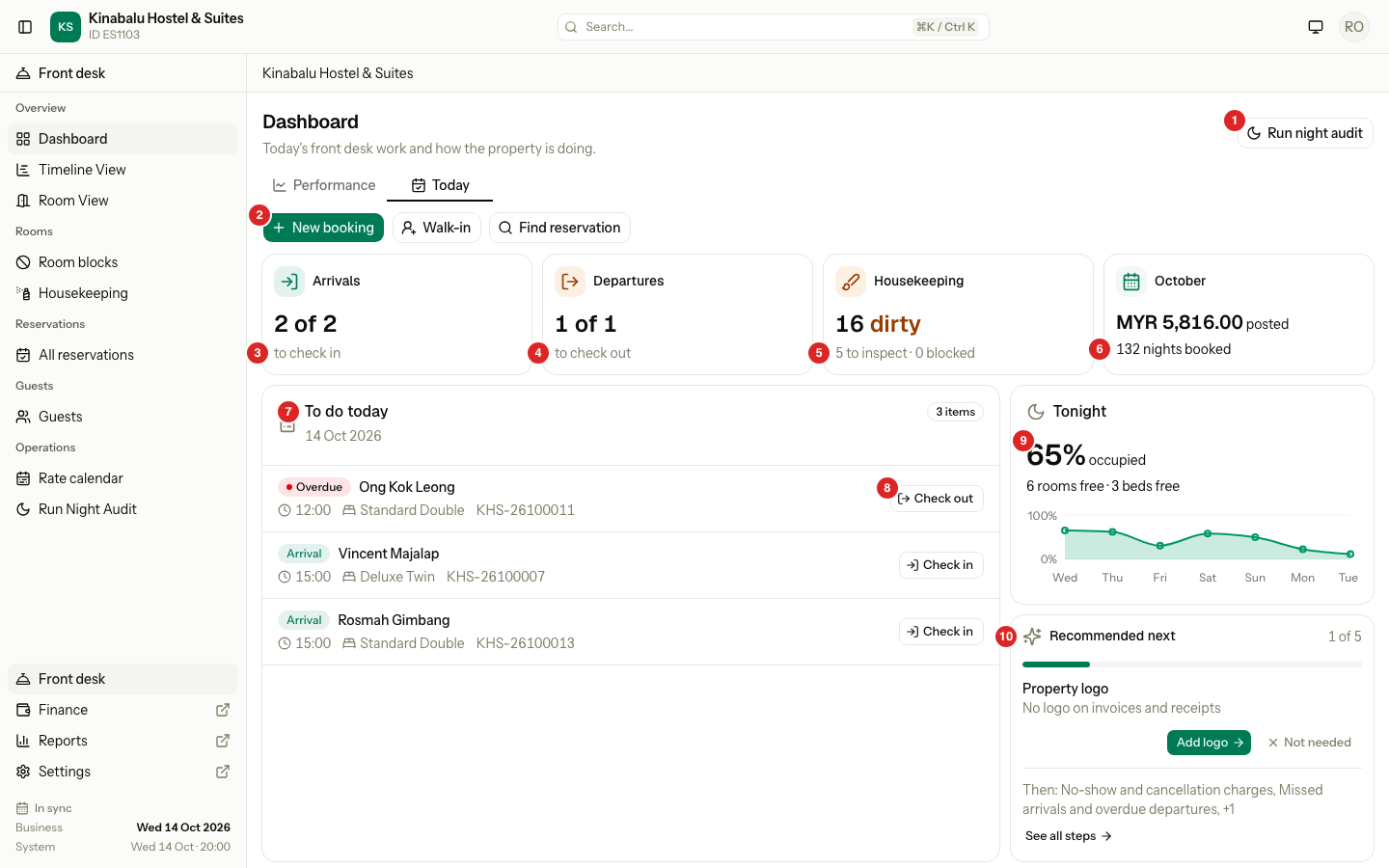
| # | What | What it does |
|---|---|---|
| 1 | Run night audit | Opens the night audit. Needs Run the night audit. |
| 2 | Quick actions | New booking, Walk-in and Find reservation. |
| 3 | Arrivals | Units still to check in, out of all units arriving today. |
| 4 | Departures | Units still to check out, out of all units leaving today. |
| 5 | Housekeeping | Rooms that are dirty, to inspect or blocked. |
| 6 | The month tile | Revenue posted and room nights booked this month. |
| 7 | To do today | One list of what is left, with a button on each row. |
| 8 | A row button | Runs the task, for example Check out. |
| 9 | Tonight | Occupancy and free rooms tonight, and the next 7 nights. |
| 10 | Recommended next | The next setup step. See After go-live. |
Night audit alert
A red bar sits under the tabs when the night audit needs you. It has an Open audit button. It is not shown on a normal day.
| Situation | The bar says | What to do |
|---|---|---|
| The last audit failed | "Night audit for 11 Oct did not finish. The business date did not change." | Select Open audit and run it again. |
| The last run was refused because of problems | "Night audit for 11 Oct is waiting: 2 items need a fix before it can run." | Select Open audit, fix the items, then run it. |
| The business date is more than a day behind the calendar | "The business date is 10 Oct. Run the night audit to catch up." | Select Open audit and run it. |
The alert shows on the Performance tab too, because a stuck audit changes the figures there.
Quick actions
| Button | What it does | Permission |
|---|---|---|
| New booking | Opens the new booking form. Cancel brings you back here. | Manage reservations |
| Walk-in | Opens the walk-in form. Cancel brings you back here. | Manage reservations |
| Find reservation | Opens All reservations with the search box ready. | View reservations |
The four tiles
Each tile is a link to a report or board.
| Tile | Shows | Opens | Permission |
|---|---|---|---|
| Arrivals | "2 of 2 to check in": units arriving today, and how many are still Confirmed. | The arrivals report, for today | View reservations |
| Departures | "1 of 1 to check out": units leaving today, and how many are still Checked in. | The departures report, for today | View reservations |
| Housekeeping | The dirty count, then rooms to inspect and blocked. | The housekeeping board | View the housekeeping board |
| The month, for example October | Revenue posted, and room nights booked. | The revenue report, this month | View and export reports |
The month tile counts two different things:
| Figure | What it counts |
|---|---|
| posted | Charges and discounts posted to folios from the 1st to the business date, by posting date. It leaves out tax and payments. It matches the revenue report for the same dates. |
| nights booked | Room nights in the month by stay date, for units that are Confirmed, Checked in or Checked out. It counts past and future nights. Hover for their room total. |
To do today
One list, in this order. A badge at the top right counts all rows. The list shows the first 10, and scrolls on a big screen.
| Row | It appears when | Button |
|---|---|---|
| Overdue | A guest is Checked in and the departure date has passed, or it is today and the departure time has passed. | Check out |
| Arrival | A unit is Confirmed and arrives today or earlier. Sorted by arrival time. | Check in |
| No boat | Your property uses boats, and a Confirmed unit arrives today or tomorrow with no boat booked. | Set boats |
| Departure | A guest is Checked in and leaves today, and is not due yet. Sorted by departure time. | Check out |
| Folio | The night audit found a folio to look at: a master folio not billed, a folio still open after check-out, or money held on a closed booking. | Review folio |
Each row shows the guest, then the time, the room type or room, and the booking reference. Select anywhere on the row to run its button.
- Check in and Check out open the same dialogs as on the reservation page. When you close one, the list, tiles and alert refresh.
- A Folio or No boat button opens the reservation instead of a dialog.
- A day use shows its hours, for example "Day use 10:00–14:00".
- With no rows, the card says "Nothing left for today".
The rows use the same rules as the night audit, so the dashboard and the audit never disagree.
Tonight
Tonight shows the occupancy for the night as a percentage, and how many rooms are free. A property with dorms shows free beds too. The chart below covers the next 7 nights. Hover or tap it to see sold, total and left by room type. Select the tile to open the rate calendar.
Recommended next
The card shows the next open step of the setup checklist. See After go-live for the steps. It goes away when every step is done or dismissed.
Special cases
| Situation | What happens | What to do |
|---|---|---|
| A booking has several units in the same state | One row, for example "4 rooms". | For arrivals, Check in opens Check in all. See Group check-in. For departures, Check out opens the group page. See Group check-out. |
| You may not check in or check out | The button reads View booking. | Open the booking, or ask someone who can. |
| You may not see a tile | The tile is left out, and the rest move up. | Nothing. Ask an owner to change your role. |
| A guest is past their departure time | The row is Overdue, not Departure. | See Overdue stays. |
| More than 10 rows | Only the first 10 show. The badge shows the full count. | Work the list from the top. The next rows appear. |
| The business date is behind the calendar | The alert bar tells you. | Select Open audit. |
| The list is empty | "Nothing left for today." | Nothing. |