
Past stay
Enter a stay that began before today and was entered late, with every night charged.
Use Past stay when a guest already arrived, but nobody entered the booking. For example, a walk-in typed in the next morning, or a paper booking. Estatell charges every night, each with its real date.
A normal booking refuses an arrival before today. Past stay is the way around it.
Before you start
- Permission: Manage reservations and Manual folio. Owners and managers have both by default.
- The stay began on or after your go-live date. For an earlier stay from your old system, use a migrated or old stay.
Open the form
Open Reservations › All reservations, select New, then Past stay. If you do not see it, you do not have the Manual folio permission.
Fill in the stay
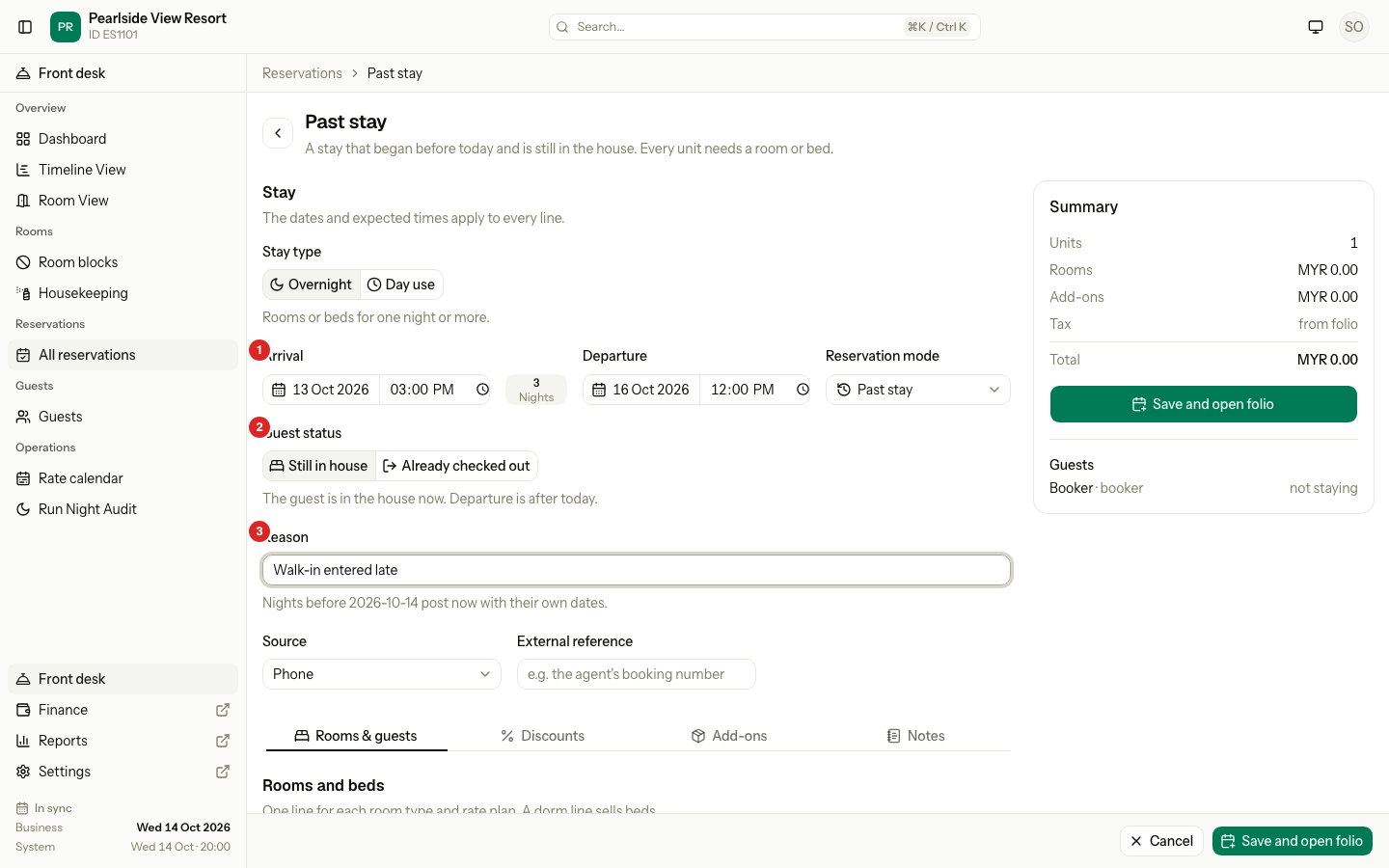
| # | Part | What it shows or does |
|---|---|---|
| 1 | Arrival | The real arrival date and time. It starts at yesterday. |
| 2 | Guest status | Still in house or Already checked out. It sets which departure dates you can pick. |
| 3 | Reason | Why the stay is entered late. Required and logged. |
- Pick the Guest status.
- Still in house: the departure is after today.
- Already checked out: the departure is today or earlier.
- Enter Arrival: the real arrival date and time. It must be before today.
- Enter Departure with a date and time.
- Enter the Reason, for example "Walk-in entered late". It is required, and it is logged.
- Add the rooms and the guests as on a new booking. Every line needs a room or bed for the whole stay. The source starts as Walk-in, and you can change it.
- Select Save and open folio.
The prices come from your rates, as on a normal booking. Use ✎ to set a different total. Rate restrictions, such as a minimum stay, are not checked for nights that have passed. Room availability is.
What happens when you save
| Guest status | Result |
|---|---|
| Still in house | The guest is checked in with the date you entered. Every night before today posts to the folio now, each with its own date. The folio tab opens. |
| Already checked out | The guest is checked in and then out with the dates you entered. The folio stays open with its balance, and the room is not marked dirty. |
For Already checked out, a dialog asks "Settle the folio now?". Settle now opens the Manual Folio Editor, where you enter the payments and close the folio. Later leaves the folio open with its balance. The dialog shows once.
No fee is charged for cancellation, no-show, early departure or late check-out.
Day use on a past date
A guest stayed a few hours on an earlier day, and nobody entered it. For example, a 14:00 to 17:30 stay yesterday, entered this morning. For a day use today, use Walk-in.
- Switch Stay type to Day use.
- Pick the date and the Start time. The date is before today and on or after your go-live date.
- Guest status is Already checked out. A past day use has ended.
- Set End to when the guest left. The hours are rounded up: 14:00 to 17:30 is charged as 4 hours.
- Enter the Reason.
- Pick the Room type, the Rate plan, the Room, and the price if you enter one. See Day use.
- Add the guests, then select Save and open Manual Folio Editor.
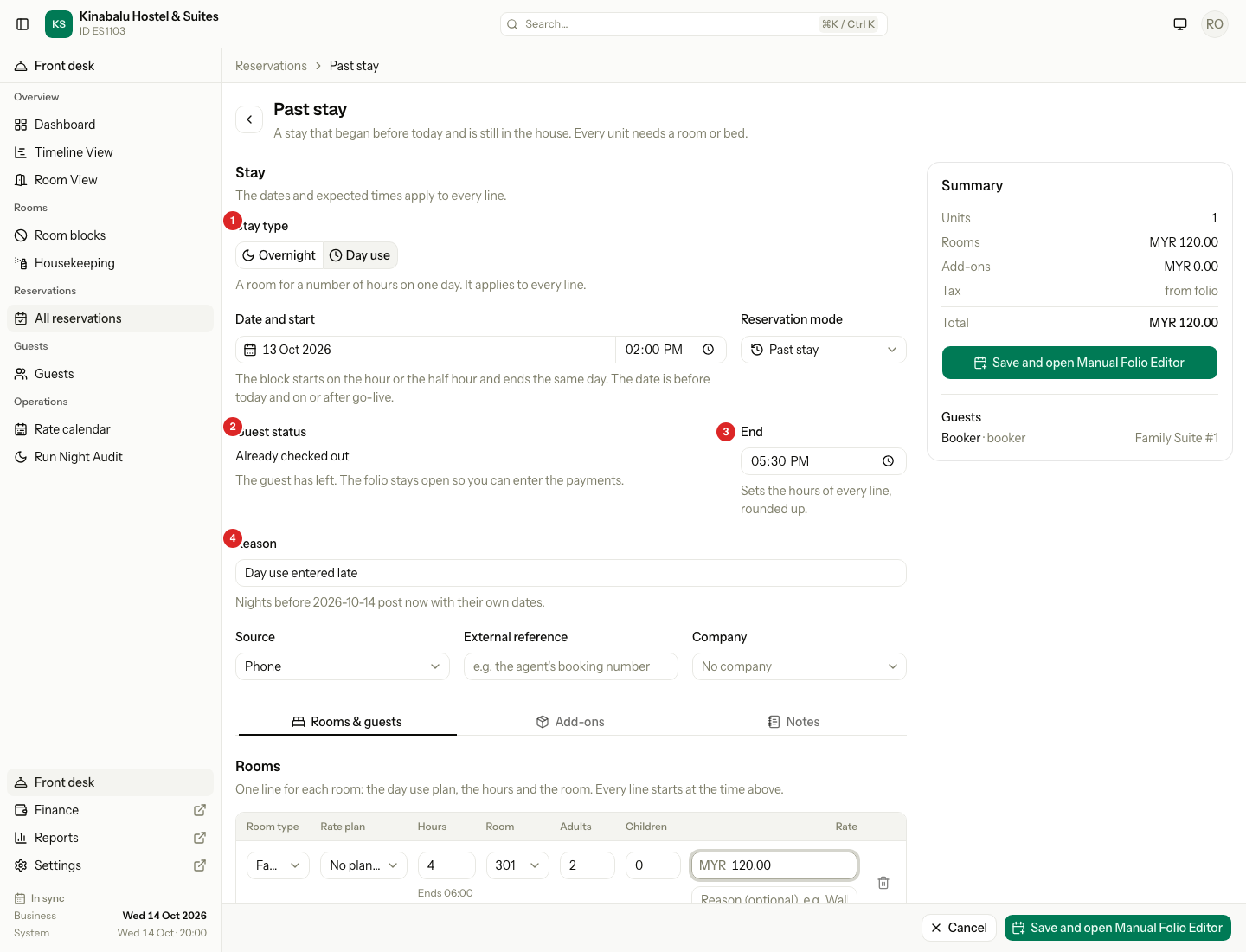
| # | Part | What it shows or does |
|---|---|---|
| 1 | Stay type | Day use. |
| 2 | Guest status | Already checked out, fixed. |
| 3 | End | When the guest left. It sets the hours of every line. |
| 4 | Reason | Why the stay is entered late. Required and logged. |
The plan's Sold between hours and its smallest and largest number of hours are not checked. If the plan has no price for the hours, the line moves to No plan · enter price.
When you save, the guest is checked in at the start and out at the end, on that date. The price posts today, with the day use date as its service date. The room is not marked dirty. The Settle the folio now? dialog opens, as for any stay that has checked out.
That day's Day use sold count in the reports is already closed, so it does not include this stay. The revenue counts on the day you enter it.
Special cases
| Situation | What happens | What to do |
|---|---|---|
| Arrival is today | A walk-in is the right mode. | Use Walk-in. |
| Arrival is before go-live | "This stay began before go-live. Use Migrated stay." | Use Migrated stay. |
| Already checked out, with a departure after today | "The guest has left, so departure cannot be after today. Choose Still in house." | Change the departure, or the guest status. |
| A room is taken on one of the nights | The line shows an error, and nothing is saved. | Pick a room that is free for the whole stay. |
| The reason is empty | "Enter a reason." | Enter why the stay is entered late. |
| The guest has no nationality | "Pick the nationality." | Pick it, as on a new booking. |
| A night is wrong | The nights are already posted. | Reverse the line on the folio, or fix it in the Manual Folio Editor. |
| A day use without End | The save is refused. | Enter when the guest left. |
| A day use that ends before it starts | The save is refused. | Check the start and the end. |
| A day use before go-live | Migrated and old stays take nights only. The Stay type switch does not show there. | A day use before go-live cannot be entered. |