
Change a night's price
Change the price of one or more booked nights, before or after they are charged.
Use Change price when the rate of a booked night is wrong or has changed. Examples are a corporate rate agreed late, a wrong rate the night audit already charged, or a free night for a guest.
You do not need to know if a night is already charged. Pick the nights, enter the new price and a reason. Estatell does the rest.
Before you start
- Permission: Change the price of booked nights. Owners, managers and finance staff have it by default. Front desk staff do not, because changing a charged night reverses folio lines. An owner can give it to front desk in Settings › Roles.
- The unit must be Confirmed, in house or checked out.
- You set a price when you book with the ✎ on the booking form. That needs no permission. Changing a price later does, because it changes revenue.
Change the price
- Open the reservation. On the Units tab, pick the unit.
- Tick the nights in the night table, then select Change price. Tick the box in the header to pick every night.
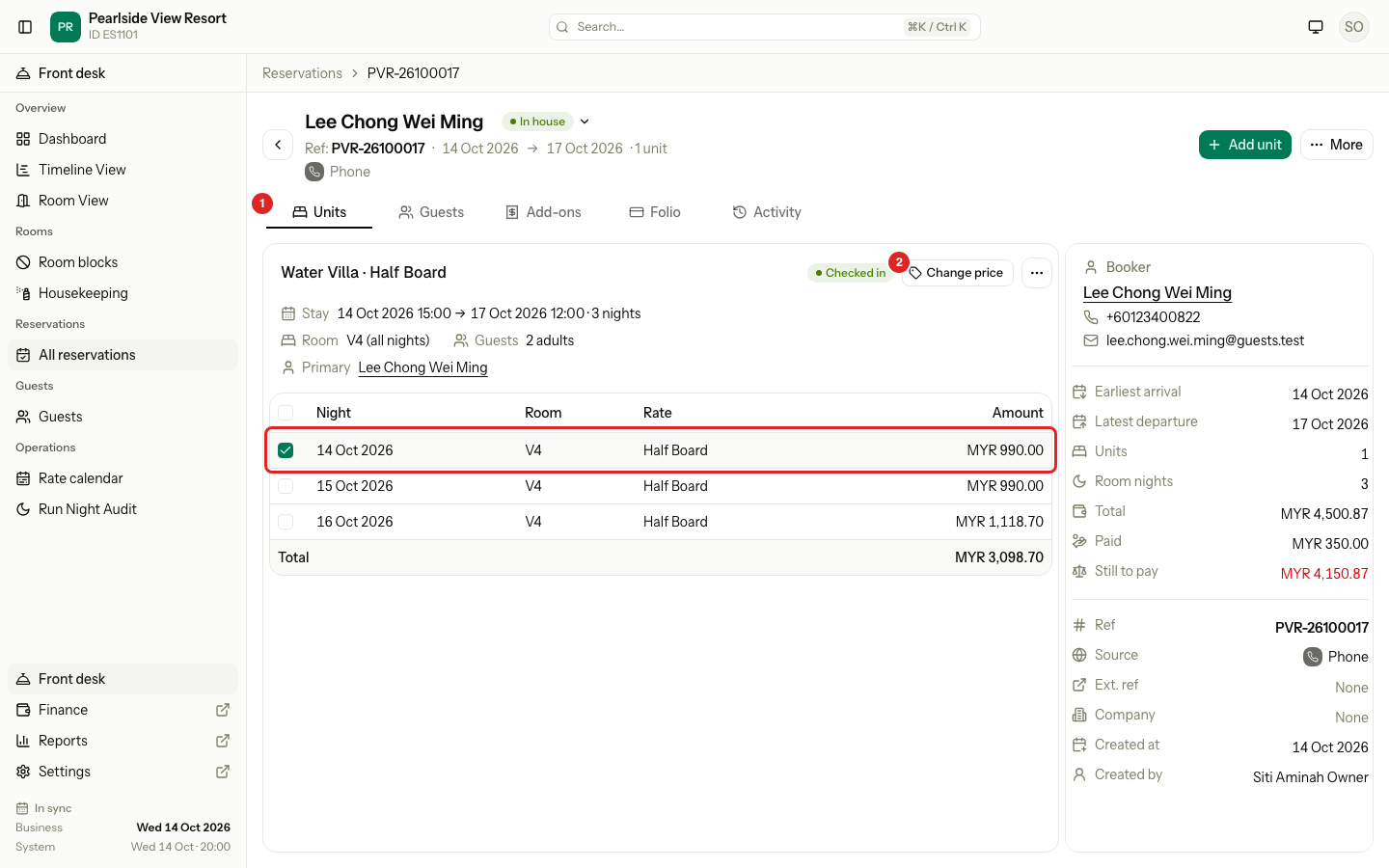
| # | Part | What it shows or does |
|---|---|---|
| 1 | Units | The tab with each unit and its night table. |
| 2 | Change price | Opens the dialog for the ticked nights of this unit. It shows only if you have the permission. |
- In the dialog, check the Nights. Tick or untick more if you need to.
- Enter the New price per night. The same price is used for every ticked night. The text under it shows the old price.
- Enter the Reason. It is required, up to 500 characters.
- Check the Difference, then select Change.
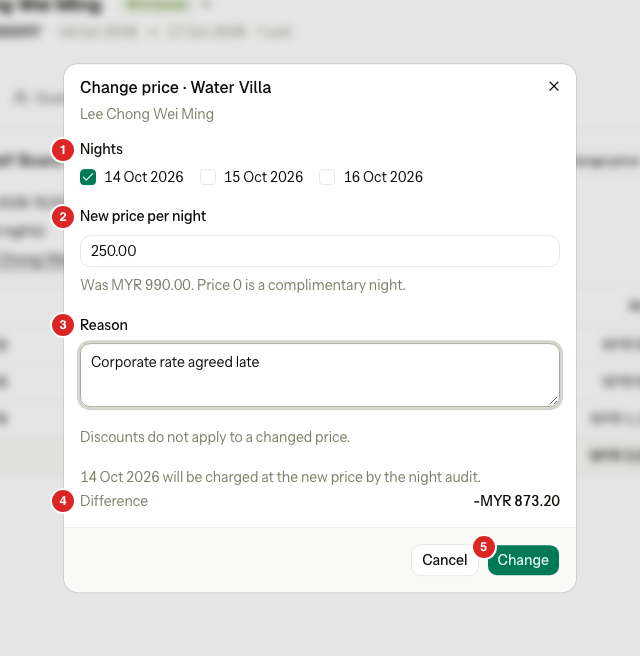
| # | Part | What it shows or does |
|---|---|---|
| 1 | Nights | The nights of the unit. The ones you ticked on the Units tab are ticked. |
| 2 | New price per night | The price for each ticked night, before tax. "Was MYR 990.00" shows the price now. |
| 3 | Reason | Why the price changes. It shows in the night table and on the Activity tab. |
| 4 | Difference | How much the guest pays more or less, with tax. A minus sign means less. |
| 5 | Change | Saves the new price. It stays off until the nights, price and reason are valid. |
You can also start from the Folio tab. Open the ⋯ menu of a posted room line and select Correct price…. The dialog opens with that night ticked.
| What you see | Meaning |
|---|---|
| Nights, with "(charged)" | The nights you can change. "(charged)" means the night audit already charged it. |
| "Was MYR 990.00" | The price now. When the nights differ, it shows the lowest and the highest. |
| "Price 0 is a complimentary night." | Enter 0 for a free night. No tax is charged on 0. |
| "Discounts do not apply to a changed price." | A discount on this night is dropped. The new price replaces the whole sum. |
| Difference | How much the guest pays more or less, with tax. A minus sign means less. |
The price is for one night. You cannot enter a total for the stay, because spreading a total over nights makes odd cents.
What happens to each night
| Night | What Estatell does |
|---|---|
| Not charged yet | It saves the new price. Nothing posts now. The Folio tab shows the new scheduled rows at once, and the night audit charges the new price. |
| Already charged | It reverses every line of the night, then charges the night again at the new price. Inclusions and taxes are done again too. |
For a charged night, the old lines stay as they are, and two new groups of lines post on today's business date. The room line then reads "· night of 13 Oct, corrected". Closed dates stay closed. Today's revenue shows the reversal and the new charge, and together they equal the difference.
Worked example
A night was charged at MYR 250.00 with 8% tax. You change it to MYR 220.00.
| Line | Room | Tax 8% | Total |
|---|---|---|---|
| Original charge | 250.00 | 20.00 | 270.00 |
| Reversal of the original | −250.00 | −20.00 | −270.00 |
| New charge | 220.00 | 17.60 | 237.60 |
| Net change | 237.60 − 270.00 = −32.40 |
The guest now owes MYR 32.40 less. The night audit does not charge the night twice.
You can correct the same night again. Each correction reverses the one before.
Complimentary night
Enter 0.00 as the price. The night is charged at 0.00, with no tax. A night that was charged at MYR 250.00 and 8% tax is reversed, and the guest owes 270.00 less.
Where you see the change
- The night table shows the new amount and your reason, as it does for a price set at booking.
- The stay total, the money on the summary card and the booking summary all use the new price.
- The Activity tab records it: the unit, the nights, the old and new price, which nights were charged, and the reason.
Change price or discount
| Change price | Apply discount | |
|---|---|---|
| Use it for | Correcting the rate | Goodwill, or a reduction for a reason |
| Charged night | Reversed and charged again | A discount line is added |
| Needs | Change the price of booked nights | The folio discount permission |
| Example | The agreed rate was MYR 220.00, not 250.00. | A guest had a noisy night. Give 10% off. |
Special cases
| Situation | Example | What happens | What to do |
|---|---|---|---|
| No nights ticked | You untick every night in the dialog. | • "Tick at least one night of this unit." | • Tick at least one night. |
| No reason | You leave Reason empty. | • "Enter a reason." | • Enter why the price changes. |
| The price is not valid | You type "two hundred". | • "Enter a price of 0 or more, with up to two decimals." | • Enter a number such as 220.00. |
| The price is below the package | A Dive Package night costs MYR 346.67 and includes meals and a dive trip. You enter MYR 300.00. | • "The price is less than the inclusions of the night." | • Enter a higher price. • Or change to a plan without those inclusions. |
| The night had a discount | A night at MYR 250.00 had 10% off. | • The discount is dropped. • "Discounts do not apply to a changed price." | • Enter the price you want the guest to pay. |
| The folio is closed | The guest checked out and the folio is closed. | • "The unit folio is closed, so it cannot change." | • Ask a user who can reopen the folio to do it first, then change the price. |
| The folio is settled to the city ledger | A night is on a company invoice. | • "A folio of these nights is settled to the city ledger, so it cannot change. Issue a credit note on its AR invoice instead." | • Issue a credit note on the invoice. See AR invoices and payments. |
| The unit is cancelled or no-show | A cancelled unit. | • "This unit cannot do that in its current status." | • Reinstate the unit first. |
| The property has no business date | A new property before go-live. | • "This property has no open business date yet." | • Finish the go-live steps. |
| The rules changed since the first charge | A routing rule now sends room charges to the Master folio. | • The new lines follow today's rules and may land on another folio. • The old lines stay where they are. | • Move the old lines by hand if needed. |
| The same price | The night is already MYR 220.00 and you enter 220.00. | • The night is skipped. | • Nothing. |
| Change price is missing | A front desk user opens the Units tab. | • The checkboxes and the button are hidden. | • Ask an owner, manager or finance user. |
| A group with different prices | Four rooms at different rates. | • The dialog is for one unit. | • Change each unit on its own. |