
Performance
See occupancy, ADR, RevPAR, channel mix and lead time over a period, and compare it with the one before.
The Performance tab shows how the business is doing over a period. It is for owners and managers. It opens first when you open the dashboard. The front desk's daily work is on the Today tab.
Before you start
- Permission: View and export reports. Without it you see only the Today tab, with no tab bar.
- Occupancy, ADR and RevPAR come from the night audit. A day the audit has not closed has no bar, except today, which is worked out live.
Steps
- Open Dashboard. The Performance tab is open.
- Choose a period next to Period. See the presets below.
- Read the line under the presets. It states both ranges in words, for example "1 Oct – 14 Oct 2026 · compared with 1 Sept – 14 Sept 2026".
- Read the cards. Hover a bar to see its day, and the compared day.
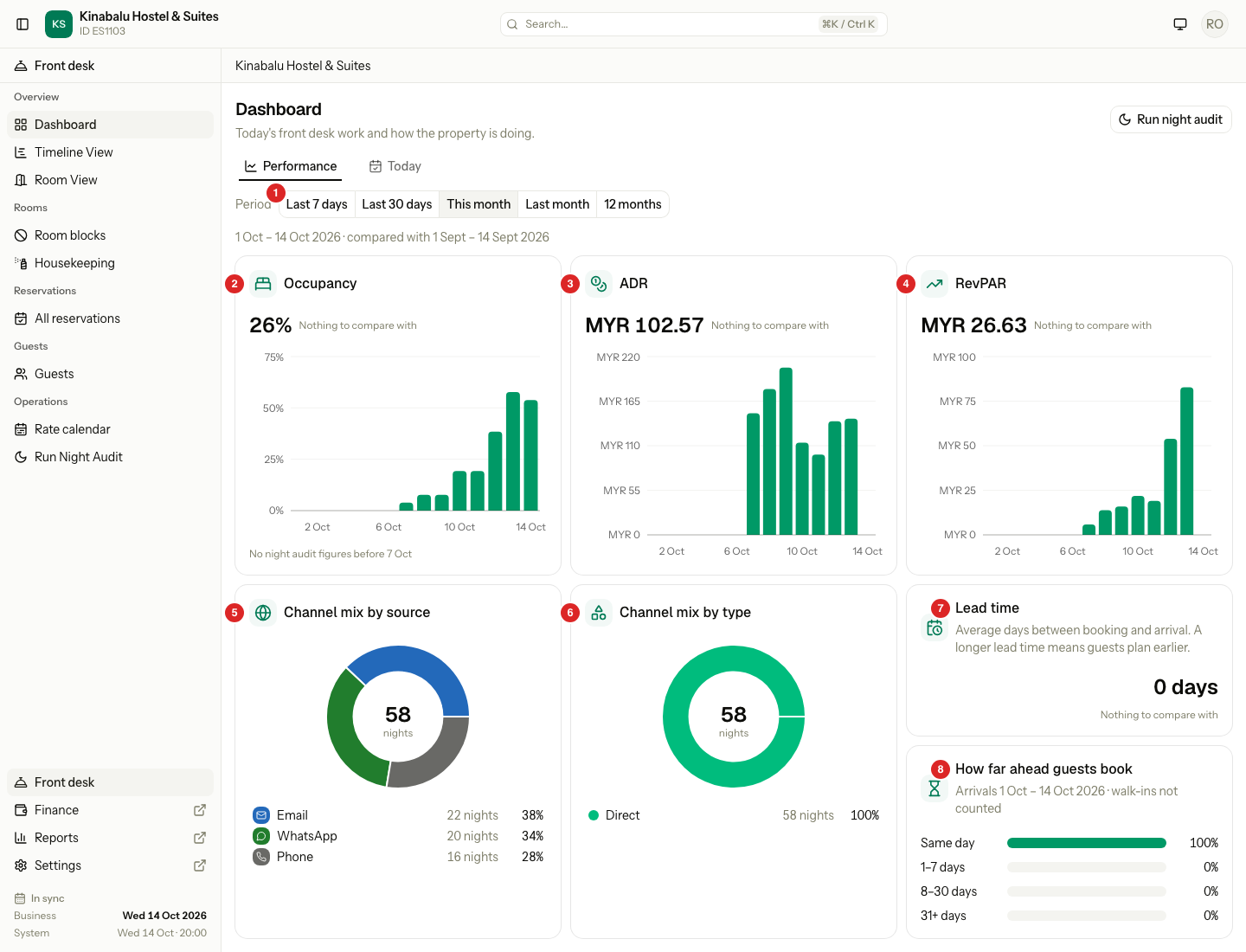
| # | Card | What it shows |
|---|---|---|
| 1 | Period | The period presets. |
| 2 | Occupancy | The share of rooms sold, with a bar for each day. |
| 3 | ADR | The average price of a sold room. |
| 4 | RevPAR | Room revenue for each room available. |
| 5 | Channel mix by source | Room nights by booking source. |
| 6 | Channel mix by type | Room nights by Direct, OTA, Company / Travel agent and Walk-in. |
| 7 | Lead time | How many days ahead guests book, on average. |
| 8 | How far ahead guests book | Arrivals in four groups of lead time. |
Period and comparison
Every period ends on or before the business date. The comparison is the period before it.
| Preset | Range | Compared with | Bars |
|---|---|---|---|
| Last 7 days | 7 days ending on the business date | The 7 days before | Day |
| Last 30 days | 30 days ending on the business date | The 30 days before | Day |
| This month | The 1st to the business date | The 1st to the same day of last month | Day |
| Last month | The whole last month | The month before it | Day |
| 12 months | The 11 whole months before, plus this month so far | The same range one year earlier | Month |
| Month picker | Any whole past month | The month before it | Day |
- This month is the default.
- The month picker shows from the first month with data to last month. It is hidden while there is no whole past month.
- If the day does not exist last month (31 Oct against September), the comparison ends on the last day of that month.
- Each card shows a change chip, for example "▲ 4 pt". Occupancy changes in points. ADR and RevPAR change in percent. Lead time changes in days. Up is green and down is amber. For lead time the chip is grey, because neither direction is good.
- With no figures in the compared range, the card says "Nothing to compare with".
What each figure counts
| Figure | How it is worked out | Includes | Leaves out |
|---|---|---|---|
| Occupancy | Rooms sold ÷ rooms available, over the period | Overnight stays | Day use |
| ADR | Room revenue ÷ rooms sold | Room revenue posted to the folio | Day use, tax |
| RevPAR | Room revenue ÷ rooms available | Room revenue posted to the folio | Day use, tax |
| Channel mix | Share of room nights by booking source, or by source type | Confirmed, Checked in and Checked out units, including walk-ins | Cancelled and no-show units |
| Lead time | Days from the booking date to the arrival date, as a whole-day average | Confirmed, Checked in and Checked out units arriving in the period, overnight and day use | Walk-ins |
These are the same totals as the Occupancy report, so the tab and the report agree for the same dates.
Occupancy, ADR and RevPAR
- Each card has the figure for the period, the change chip, and a bar for each day (each month, for 12 months). A dashed line shows the compared period.
- A day with no figure has no bar. The tooltip says why: "No night audit", or for ADR and RevPAR "No rooms sold".
- Revenue counts on the day it is posted. A correction can make a day's ADR or RevPAR negative. That bar hangs below the line in amber, and its tooltip says "Corrections reversed earlier nights".
Channel mix
- The two donuts show the total room nights in the middle, and a list below. Each row shows the nights and the share. Shares add up to 100%.
- Sources with no nights in the period are not listed.
- On the by type card, select › on Company / Travel agent to see the nights by company.
- A manual Booking.com booking and one from the channel manager are one row.
Lead time
- Same day is 0 days. The groups are Same day, 1–7 days, 8–30 days and 31+ days, as a share of the arrivals counted.
- Walk-ins are not counted, because they would always be 0.
Special cases
| Situation | What happens | What to do |
|---|---|---|
| No stays in the period | Each card says "No data" and "No stays in this period". | Choose another period. |
| Stays, but no night audit figures | Occupancy, ADR and RevPAR say "No data" and "No night audit figures for this period". Channel mix and lead time still show. | Nothing. Figures start the day the night audit first closes, so earlier days stay empty. |
| A new property | The comparison is hidden. | Wait until the period before has data. |
| The night audit is stuck | The alert bar shows above the cards, and the figures are late. | See Night audit alert. |
| You do not have the report permission | There is no tab bar. A link to this tab shows the Today tab. | Ask an owner. |