
Undo check-in
Put a unit checked in by mistake back to Confirmed, on the same day.
Use Undo check-in when you checked in the wrong unit, or checked in too early. The unit goes back to Confirmed and keeps its room. It works only on the same business date, before the night audit.
Before you start
- Permission: Undo a check-in made today. Owners and managers have it by default.
- The unit was checked in during today's business date.
- No night is posted for the unit yet. After the night audit, the check-in cannot be undone.
Steps
-
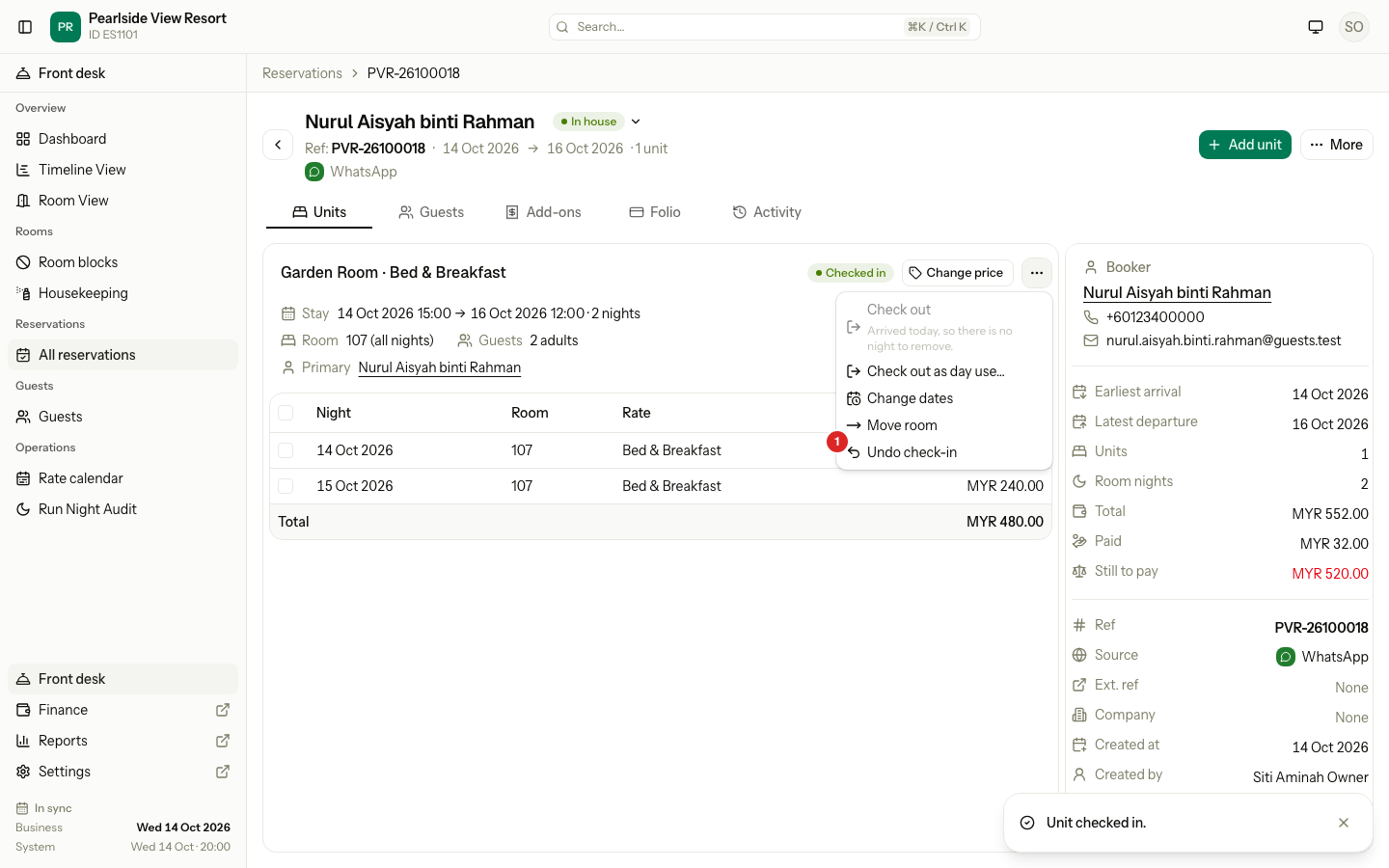
Open the reservation. On the Units tab, pick the unit.
-
Select the ⋯ menu on the unit, then Undo check-in.
-
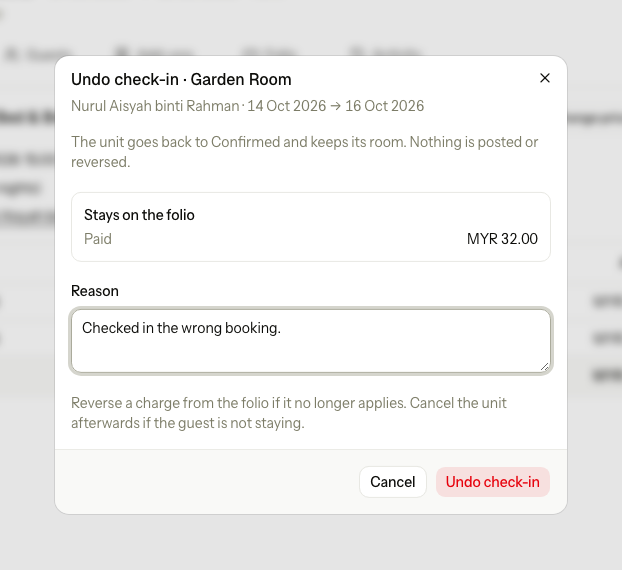
Read Stays on the folio. It lists what check-in recorded, such as payments.
-
Enter the Reason. It is required.
-
Select Undo check-in.
-
If the guest is not staying, cancel the unit. See Cancel.
What happens
- The unit goes back to Confirmed and keeps its room or bed.
- Nothing is posted or reversed. Payments, taxes, the deposit and add-ons posted at check-in stay on the folio.
- Signed registration cards stay.
- The activity log records it with the reason.
Special cases
| Situation | Example | What happens | What to do |
|---|---|---|---|
| After the night audit | The guest checked in yesterday. | • Undo check-in is not in the menu. • "The business date has changed since this was done, so it cannot be undone." | • Use check-out, or early check-out. See Check-out. |
| A night is already posted | A day use, whose price posts at check-in. | • "A night or day use block is already posted for this unit, so the check-in cannot be undone." | • Reverse the charge on the folio if it was wrong. |
| The guest paid at check-in | MYR 32.00 was collected. | • The payment stays on the folio. | • Refund it on the folio if the guest is not staying. |
| You checked in the wrong guest | Two guests with the same name arrive today. | • The wrong unit is Checked in. | • Undo it. Then check in the right unit. |
| The guest wants another room | The guest is unhappy with room 107. | • Undo is not needed. | • Move the guest to another room. See Change a stay. |
| You cannot see Undo check-in | A front desk user. | • The menu item is not shown. | • Ask a manager or owner. |
| No reason | You leave Reason empty. | • "Enter a reason." | • Enter why you undo the check-in. |