
Day use
Sell a room for a few hours on one day, and have it back for the overnight guest that evening.
Day use sells a room for a number of hours on one day, for example 10:00 to 14:00 for MYR 95.00. Transit hotels and resorts sell it to travellers between flights, or to a wedding party getting ready.
Day use is sold at the front desk only. It never shows on your public site, the company portal or a channel such as Booking.com.
Before you start
- Permission: Manage reservations. Owners, managers and front desk staff have it by default.
- Set up (optional): a rate plan with the pricing basis Day use gives you a price for each number of hours, the hours it sells and the hours of the day it is sold in (Sold between, for example 08:00 to 18:00). See Rate plans and Rate calendar.
- Without a Day use plan, you can still sell day use. Pick No plan · enter price and type the amount. See Sell without a Day use plan.
- The Stay type switch shows on the booking form when your property has a room type sold by the room.
- Day use works for rooms, not dorm beds.
Day use or overnight
| Overnight | Day use | |
|---|---|---|
| Dates | Arrival and departure | One date |
| Time | Check-in and check-out times | A start time and a number of hours |
| Price | Per night | From the Day use plan, for the number of hours. Or an amount you enter. |
| Adults | Can change the price | Do not change the price |
| Room | Can be chosen later | Chosen when you book |
| Charge posts | Each night, at the night audit | Once, at check-in |
| Shows as | "3 nights" | "Day use · 4h" |
| Counts in occupancy | Yes | No. It has its own Day use sold and Day use revenue columns. |
Book day use
- Open the booking form, or select Walk-in for a guest at the desk.
- Switch Stay type to Day use. The form changes to Date and start.
- Pick the date and the Start time. A booking starts at 10:00. A walk-in starts at the next half hour. Start on the hour or the half hour.
- Pick the Room type.
- Pick the Rate plan. Your Day use plan is listed first. No plan · enter price is last.
- Pick Hours. Each choice shows the price, for example "4 hours · MYR 95.00". The end time shows below, for example "Ends 14:00".
- Pick the Room. Only rooms that are free for those hours are listed.
- Set Adults and Children.
- To book more rooms, select Add line. Every line starts at the same time.
- Add the guests, then select Create booking.
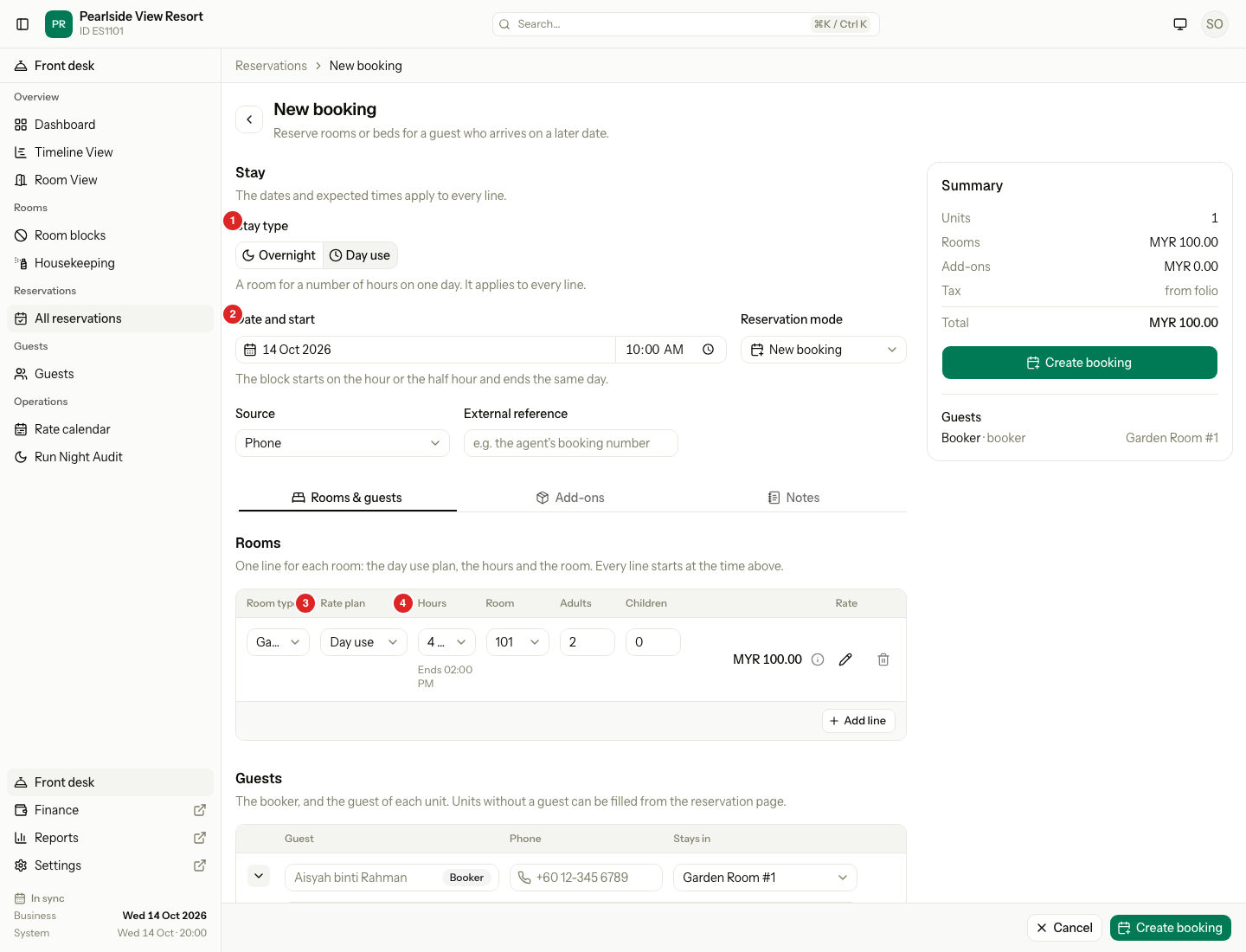
| # | Part | What it shows or does |
|---|---|---|
| 1 | Stay type | Day use. It applies to every line. |
| 2 | Date and start | The date and the start time of the block. |
| 3 | Rate plan | A Day use plan, or No plan · enter price. |
| 4 | Hours | The length of the block. The end time shows below it. |
| Example | Result |
|---|---|
| 12 Oct, start 10:00, Garden Room, Day use plan, 4 hours | The room is busy 10:00 to 14:00. The price is MYR 95.00. The reservation shows "Day use · 4h". |
A day use line has no beds and no Discounts tab. The Add-ons tab leaves out items that charge every night.
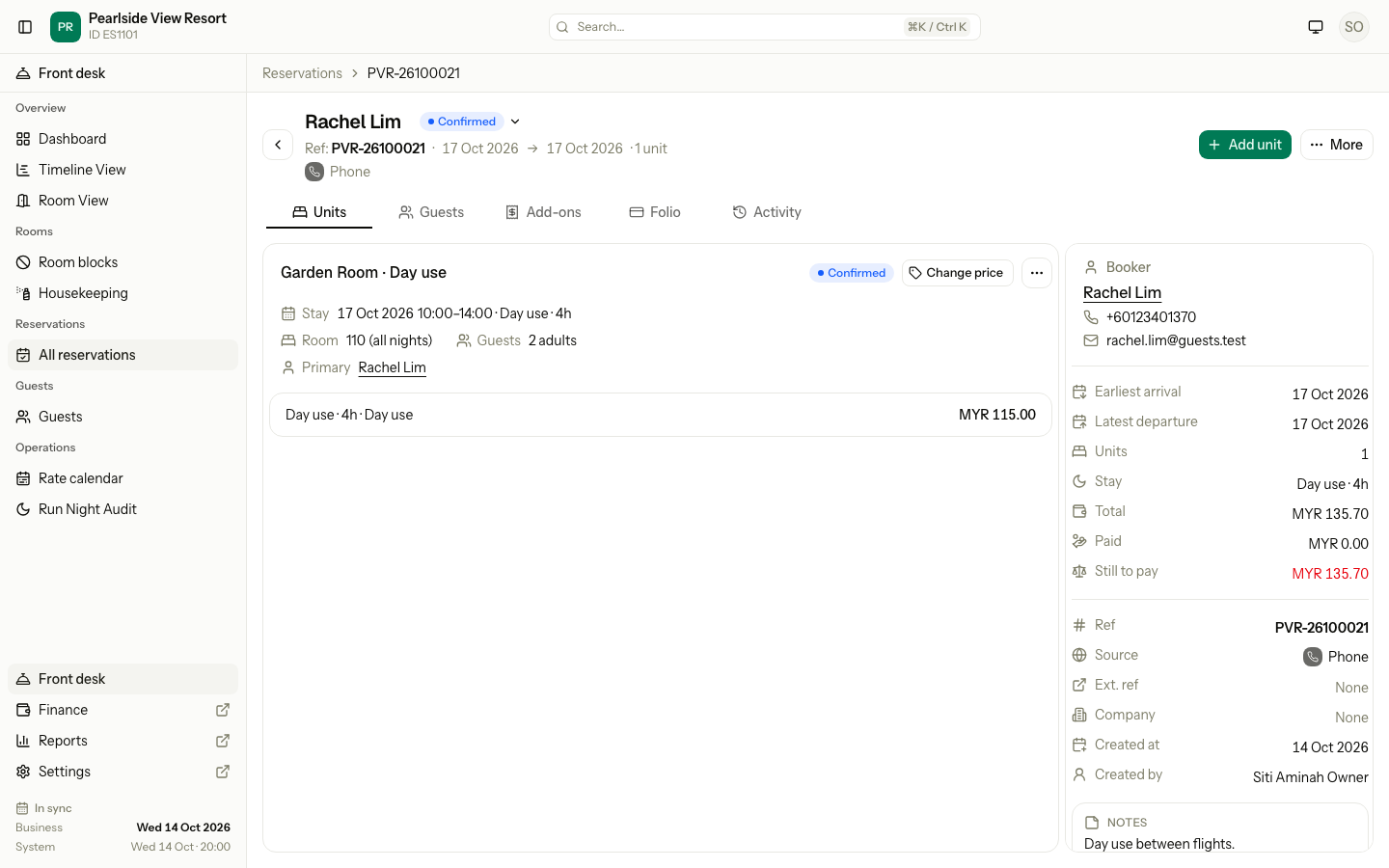
The reservation page shows the block as "Day use · 4h" on the unit, and in Stay in the summary.
Change the price
Select ✎ next to the price. Type the new amount, for example 80.00, and a reason if you want one, for example "Regular guest rate". The hours and the room stay the same. The same works in Add unit on the reservation page.
Sell without a Day use plan
Pick No plan · enter price in Rate plan when your property has no Day use plan, or when the guest wants hours the plan does not sell.
- Pick the Room type.
- In Rate plan, pick No plan · enter price.
- Type the Hours, for example 8.
- Pick the Room.
- Type the price, for example 150.00. Add a reason if you want one.
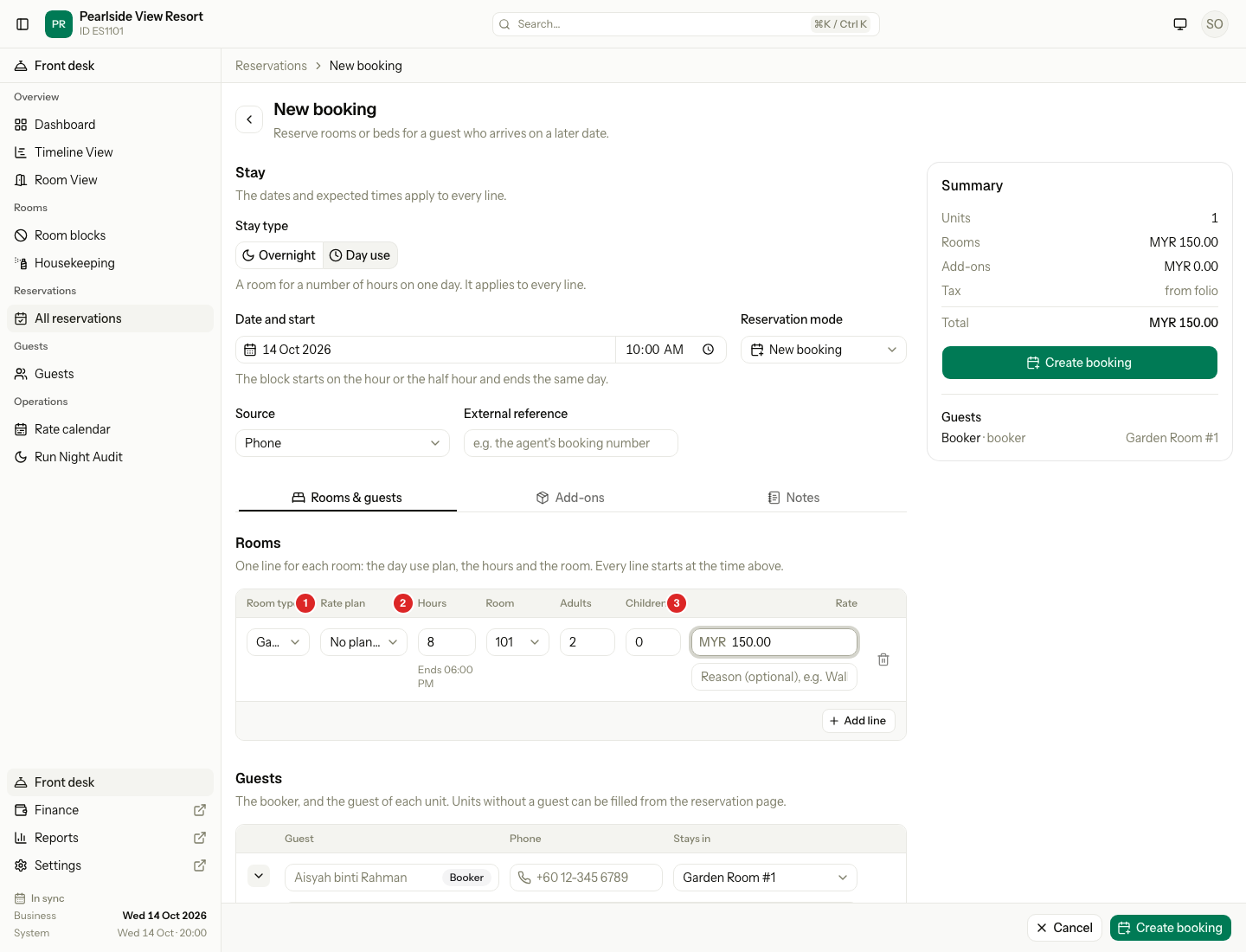
| # | Part | What it shows or does |
|---|---|---|
| 1 | Rate plan | No plan · enter price. |
| 2 | Hours | Any whole number of hours from 1. The block must end before midnight. |
| 3 | Rate | The price you type. Zero is allowed. |
| Day use plan | No plan · enter price | |
|---|---|---|
| Price | From the plan, for the hours | You type it |
| Hours | The hours the plan sells, for example 2 to 6 | Any whole hours that end before midnight |
| Start | Inside Sold between | Any time on the hour or the half hour |
| Meals and other inclusions | Included as the plan says | None |
| Stop sell | Stops the booking | Not checked |
On the reservation page, the folio and the reports, the plan of such a unit shows as Entered price.
If you pick a Day use plan and then a start or hours it does not sell, the line moves to No plan · enter price by itself. A note says why, for example "Outside what Day use sells. Enter the price."
Enter a day use after it started
Sometimes the guest is already in the room, or already gone, when you enter the booking. For example, a guest came at 02:00, left at 12:00, and you enter the stay at 15:00.
| The day use was on | Who can enter it | Where |
|---|---|---|
| Today | Front desk, owners and managers | Walk-in |
| An earlier day | Owners and managers | Past stay. See Past stay. |
Today, with Walk-in
- Open Walk-in and switch Stay type to Day use.
- Set the Start time to when the guest came, for example 10:00. A start earlier today checks the guest in at that time.
- Pick the Room type.
- Pick the Guest status:
- Still in house: the guest is in the room now. Check them out later as usual.
- Already checked out: the guest has left. Set End to when they left, for example 13:40.
- Pick the Room, add the guest and take the payment.
- Select Save and check out, or Check in for a guest still in house.
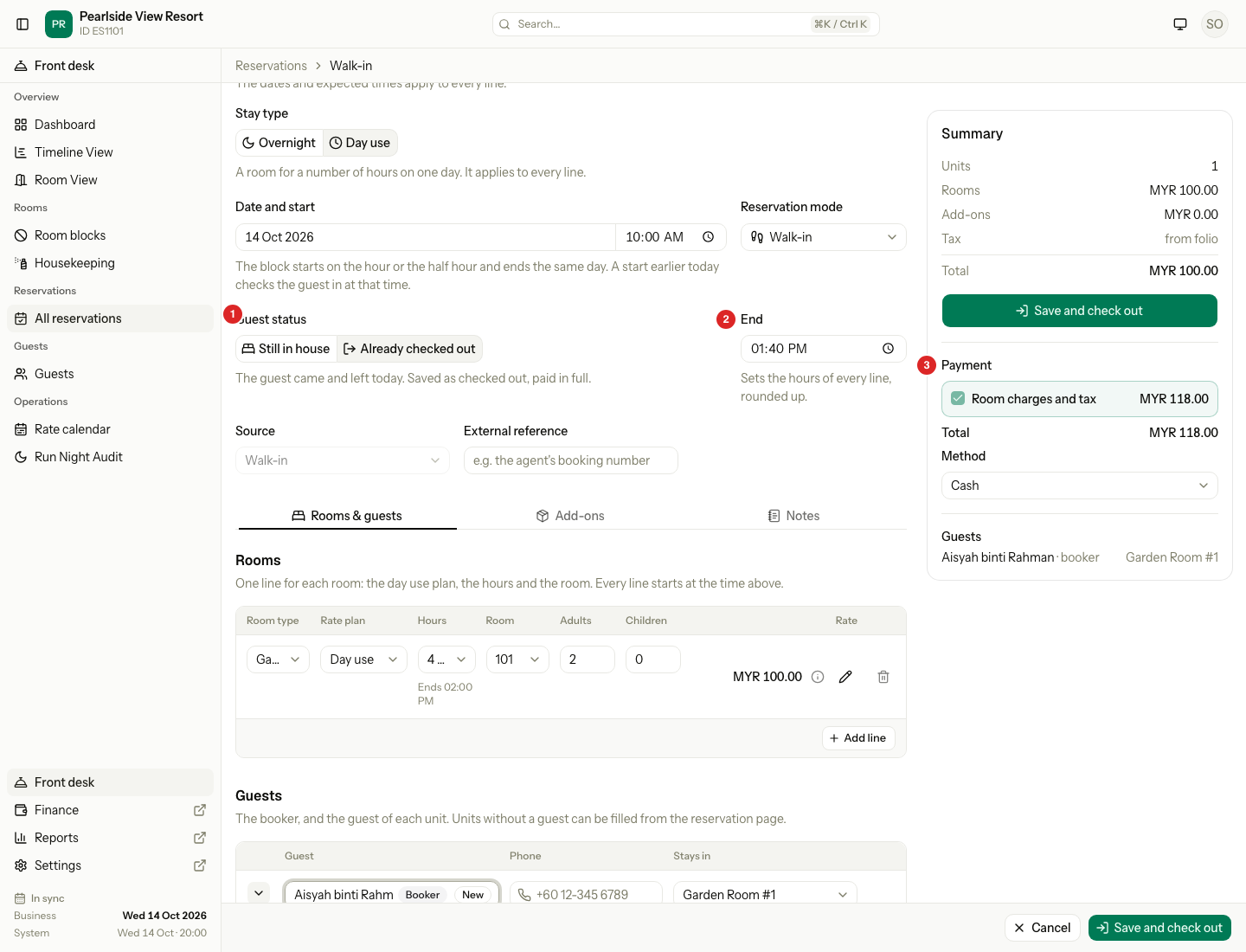
| # | Part | What it shows or does |
|---|---|---|
| 1 | Guest status | Still in house or Already checked out. |
| 2 | End | When the guest left. It sets the hours, rounded up to the next whole hour. |
| 3 | Payment | For a guest who has left, Room charges and tax is ticked and cannot be unticked. No security deposit is taken. |
| Example | Result |
|---|---|
| Start 10:00, End 13:40, Garden Room, Day use plan | 3 hours 40 minutes is charged as 4 hours, 10:00 to 14:00, MYR 100.00. One save books the room, checks the guest in at 10:00, posts the price, takes the payment and checks the guest out at 13:40. The room turns Dirty. |
For a day use that started earlier today, the plan's Sold between hours and its smallest and largest number of hours are not checked. The plan still needs a price for the hours. If it has none, the line moves to No plan · enter price.
A guest who leaves on the day they arrived
An overnight guest who checked in today and leaves before midnight can be checked out as a day use. Open the unit menu and select Check out as day use. Estatell charges the hours the guest stayed, from a Day use plan or an amount you enter, instead of the night. The room is free again for the nights the guest booked.
After midnight this is not offered, because the guest has stayed the night. Use the normal check-out.
What happens on the day
| Step | What Estatell does |
|---|---|
| Check in | Works on the date only. It posts the price of the block to the folio, and any add-ons not yet posted. The line reads "Day use · 10:00–14:00". |
| Check out | Works on or after the date. The room turns Dirty, so housekeeping can clean it for the next guest. |
| Cancel or no-show | The cancel or no-show fee counts the block as one night, priced at the block. The room is free again. |
Before check-in, a Confirmed day use shows as a scheduled row on the guest's folio.
Tax
The Tourism tax is not charged on day use. The day use charge has its own taxes. An owner sets them on the Day use tab of the Room revenue page. The tab is there even without a Day use plan. Malaysian customs guidance says day use has no tourism tax, unless the guest is charged the per-night room rate. For that case, add the tax on the Day use tab.
Change a day use
| Task | How |
|---|---|
| Move to another room | Open the unit menu and select Move room. Pick a free room of the same room type for the same hours. Enter a reason. You can move until the date. The price stays the same. |
| Change the hours or the date | Not offered. Cancel the booking and book again. |
| Reinstate a cancelled day use | Open the unit menu and select Reinstate. You can do it until the date. Estatell checks the room again. A changed or entered price is kept. Otherwise the plan price is checked again. |
| Late check-out | Not offered. |
Night audit and reports
- The night audit posts no room charge for day use, because it has no nights.
- A day use still Checked in at the audit shows in the Not checked out warning, with "Day use · ended 14:00". Check the guest out. The warning returns at every audit until you do.
- The audit never adds a night to a day use, whatever your overdue departure setting says.
- Occupancy, ADR and RevPAR count overnight stays only. Day use has its own columns in the Occupancy report.
- Meal counts leave day use out, even when the unit's plan includes breakfast.
- Arrivals, Departures and In-house show "Day use · 10:00–14:00" in place of the number of nights. In-house lists a day use on its date.
- The Timeline View draws a day use as a small clock mark in its date cell. The hours show when you hover.
Special cases
| Situation | Example | What happens | What to do |
|---|---|---|---|
| The plan does not sell the hours | A guest wants 8 hours, but your plan sells 2 to 6. | • The line moves to No plan · enter price. • "Outside what Day use sells. Enter the price." | • Type the price. • Or pick fewer hours on the plan. |
| No price for the hours on that date | Your plan has no 4-hour price on 12 Oct. | • 4 hours is not in the Hours list. • With no price at all for that date, the line moves to No plan · enter price. | • Pick No plan · enter price and type the price. • Or set the price in the Rate calendar. |
| The room type has no per-night plan | A room type has only a Day use plan and a package. | • No plan · enter price cannot be picked. • "Add a per-night plan for this room type to enter a price." | • Add a Per room or Per guest plan for the room type. See Rate plans. |
| No price typed | You pick No plan · enter price and leave the price empty. | • "Enter an amount of 0 or more for this day use." | • Type the price. Type 0 for a free stay. |
| The block runs past the sold-between hours | The plan is sold 08:00 to 18:00. A guest starts at 16:00 for 4 hours. | • The line moves to No plan · enter price. | • Type the price. • Or start earlier, or pick fewer hours. |
| The start is not on the hour or half hour | You type 10:15. | • "Start on the hour or the half hour, and end on the same day." | • Use 10:00 or 10:30. |
| No room is free for the hours | Room 101 has an overnight guest who checks out at 12:00. You book it from 10:00. | • Room 101 is not in the list. • "Choose a room. Day use is sold by room." if you pick none. | • Pick another room. • Or start after 12:00. |
| An overnight guest arrives that evening | A day use ends at 14:00. A guest arrives for the same room at 15:00. | • The room is free for them. • Check-out marks it Dirty. | • Check the day use guest out on time. • Housekeeping cleans the room before 15:00. |
| Overnight and day use in one booking | A guest wants one room for the night and one for the afternoon. | • "A booking is all overnight or all day use. Book the other kind separately." | • Make two bookings. |
| A nightly add-on | You add breakfast, charged every night, to a day use. | • "A nightly item cannot be added to a day use unit." | • Add a one-off item instead, such as a towel. It uses the day as its service date. |
| Check in on the wrong day | A guest booked for 12 Oct arrives on 13 Oct. | • Check-in is refused. | • Cancel the booking and book again for 13 Oct. |
| The guest stays longer than booked | A 10:00 to 14:00 guest is still in the room at 16:00. | • Late check-out and extend are not offered. • The night audit shows Not checked out and never adds a night. | • Check the guest out. • Post an extra charge on the folio, or make a new day use. |
| The guest wants a lower price | A regular guest pays MYR 80.00 instead of MYR 95.00. | • You can change the price. | • Select ✎ next to the price and type 80.00. |
| A walk-in left, but the night audit has not run | It is 01:00 on 13 Oct. The business date is still 12 Oct. | • "Run the night audit first." | • Run the night audit, then enter the day use. |
| A guest who left has not paid in full | You pick Already checked out, but the payment does not cover the balance. | • "The unit folio is not settled. Collect the balance or refund the deposit first." | • Take the full payment. • Or pick Still in house, and check the guest out when they pay. |
| End is later than now | It is 13:00 and you set End to 14:00. | • "The end cannot be after now." | • Use Still in house, and check the guest out when they leave. |
| No signed registration card for a guest who left | Your property needs a signed card at check-in. | • "A registration card is not signed. …" | • Ask someone who may check in without a card to enter it. |
| A day use on an earlier day | The guest came yesterday. | • Walk-in only takes today. | • An owner or manager enters it as a Past stay. |
| The guest cancels or does not arrive | A 4-hour day use priced at MYR 95.00 is a no-show. | • The fee follows your cancellation policy, counted as one night priced at MYR 95.00. | • Check the fee on the folio. See Cancel and no-show. |
| A guest wants to book on a booking site | A guest asks for day use on Booking.com. | • Day use is never sent to a channel. • "Day use is sold at the front desk only." | • Book it at the desk. |
| You add a boat trip | A day use guest wants a boat trip. | • "Day use bookings have no boat trips." | • Add the trip to an overnight booking. |