
Blocked rooms
See which rooms are out of service on the Housekeeping board, how a bed block differs, and what the Needs maintenance flag does.
A room block takes a room out of sale. The Housekeeping board shows the blocks that cover today's business date, so housekeeping does not clean or assign a room nobody can use. A bed block in a dorm takes one bed out of sale and leaves the room in use.
The board only shows blocks. You make and end them on the Room blocks screen. See Room blocks.
Before you start
- Permission: View the housekeeping board, to see blocks.
- Block room… in the row menu needs Block rooms and beds. Owners, managers and front desk have it by default. Housekeeping staff do not.
- Read Room status board first, for the columns and the statuses.
A blocked room
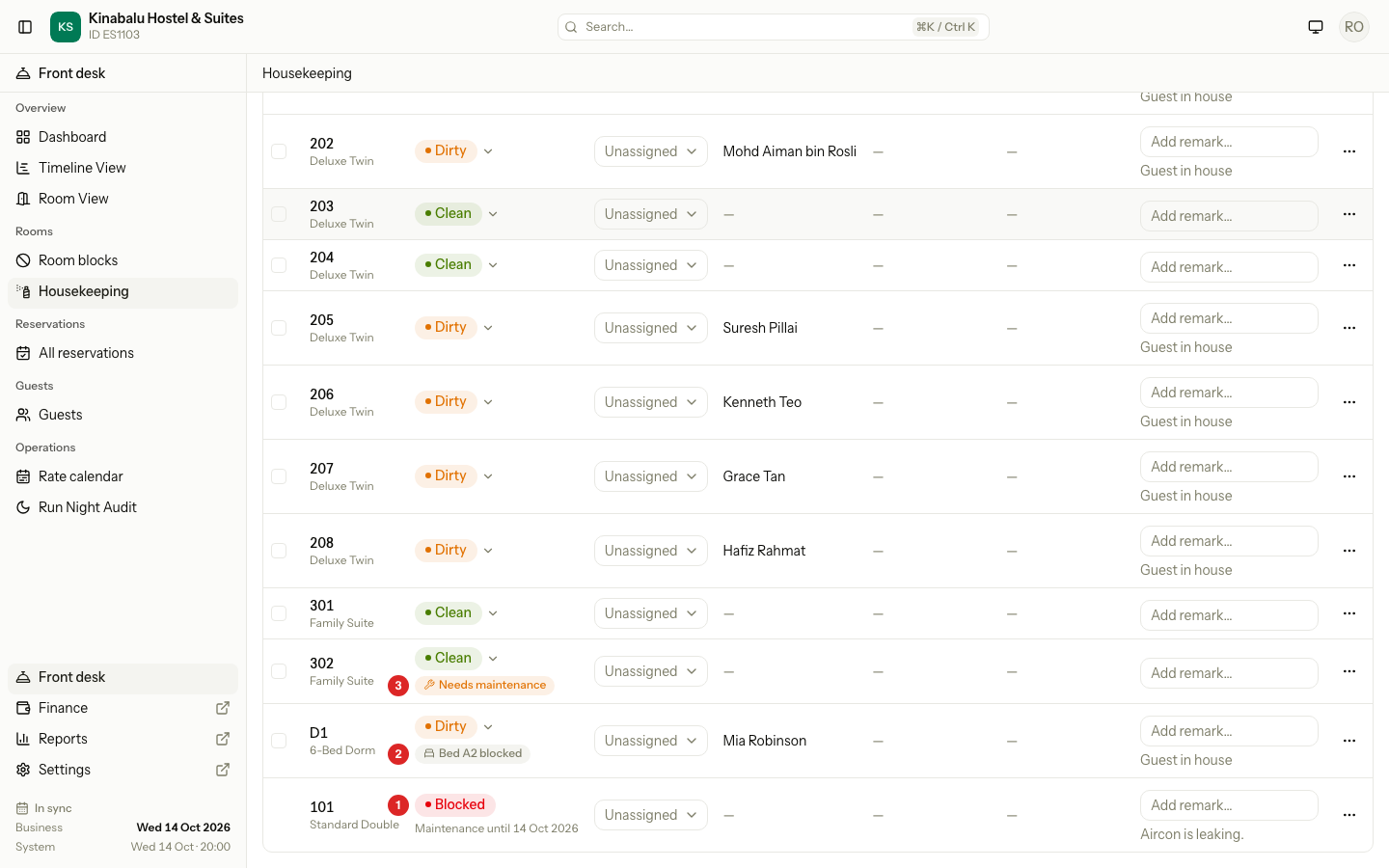
A room with a block on the whole room shows a red Blocked badge (1) in place of its status. The Status cell also tells you why and until when, for example "Maintenance until 18 Oct". Under Notes, the grey line shows the notes of the block, for example "Aircon is leaking."
A blocked room differs from other rows:
| Part | On a blocked room |
|---|---|
| Status | A plain Blocked badge. It is not a menu, so you cannot change it. |
| Tick box | None. The room cannot be ticked. |
| Bulk bar | Skips the room. It is not part of Select all, and a group tick leaves it out. |
| Position | Last in the default order. |
| Stored status | Kept under the block. When the block ends, the room shows its own status again, Dirty or Clean. |
The date after "until" is the last blocked night. A block that ends on 18 Oct shows "until 18 Oct" on 18 Oct. On 19 Oct the room shows its own status again.
To end a block early, use End now on the Room blocks screen. See Room blocks. The sheet asks whether the room is Dirty or Clean, and the board shows that status.
A bed block
In the screenshot above, dorm D1 has a block on one bed. A bed block does not take the room out of service. The room keeps its status menu, its tick box and its place in the order. A grey badge under the status names the bed, for example Bed A2 blocked (2). Point at the badge to see the reason and the last blocked night.
| Whole room block | Bed block | |
|---|---|---|
| Badge | Red Blocked, in place of the status | Grey Bed … blocked, under the status |
| Status menu | None | Works as usual |
| Tick box | None | Yes |
| Can be cleaned | No | Yes |
Housekeeping still cleans the room. Other beds in the dorm can still be sold.
Block a room from the board
-
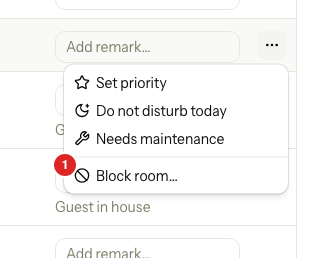
In the row of the room, select the ⋯ button.
-
Select Block room….
-
Estatell opens the Room blocks screen. Select Block room there and fill in the form. See Room blocks.
The menu opens the Room blocks screen only. It does not fill in the room for you.
Needs maintenance is not a block
Needs maintenance is a flag that says "something is broken here". Anyone who can update rooms raises it from the ⋯ menu. It shows as an amber Needs maintenance badge (3) under the status.
The flag changes nothing else. The room keeps its status, stays on sale and can still be booked. Use it when you want a manager to look at a fault. Use a block when the room cannot be used.
| Needs maintenance | Blocked | |
|---|---|---|
| What it means | A fault someone should look at. | The room is out of service. |
| Who sets it | Anyone with Update room status, assignments and flags. | Someone with Block rooms and beds, on the Room blocks screen. |
| Room can be booked | Yes | No, for the blocked nights. |
| Room status | Unchanged | Shows Blocked |
| How it ends | Maintenance fixed in the ⋯ menu, which needs Block rooms and beds. | The last night passes, or End now. |
When someone blocks the room, Estatell clears the flag. The block answers it.
Special cases
| Situation | What happens | What to do |
|---|---|---|
| You want to clean a blocked room | The status badge is plain, and the room has no tick box. | End the block first, or wait for its last night. |
| A block ends today or earlier | The room is back on the board with its stored status. | Check the status. Mark it Clean when it is done. |
| A bulk action includes a room that was blocked a moment ago | The bulk bar skips it and the toast says "Room 101 is out of service." | None. The other rooms are updated. |
| A guest is in a room that gets blocked | Estatell refuses the block while a stay holds those nights. | Move the stay first. See Room blocks. |
| Only one bed of a dorm is blocked | The room stays workable. A grey Bed … blocked badge shows. | Clean the room as usual. |
| You raise Needs maintenance on a room, then someone blocks it | The block clears the flag. | None. |
| You have no Block room… in the menu | You do not have Block rooms and beds. | Ask an owner, manager or front desk. |
| Housekeeping staff cannot dismiss Needs maintenance | Maintenance fixed needs Block rooms and beds. | Ask someone who has it. |