
MyKad reader
Fill guest details from the chip on a MyKad with a USB card reader, and install the small program that makes it work.
A MyKad has a chip that holds the holder's name, IC number, date of birth, gender, address and portrait. With a USB card reader on the front-desk computer, Estatell can read the chip and fill the form for you. You check what it filled, then save.
A web page cannot talk to a USB reader by itself. A small program, the bridge, runs on the front-desk computer. It reads the card and passes the result to Estatell. The bridge only answers Estatell. Other computers on the hotel network cannot reach it, and other websites are refused.
Before you start
- Reader: an ACS ACR39U or another USB contact card reader.
- Computer: Windows 10 or later, or macOS 11 or later. On any other system, use the manual file (see Install the bridge).
- Permission: none for the reader itself. Saving the result needs the permission of the screen you are on. For example, adding a document needs View and manage guest ID documents and Add and edit guests.
- Install the bridge once on each front-desk computer that has a reader.
Read a card
- Open a screen that has the MyKad box. See Where it works.
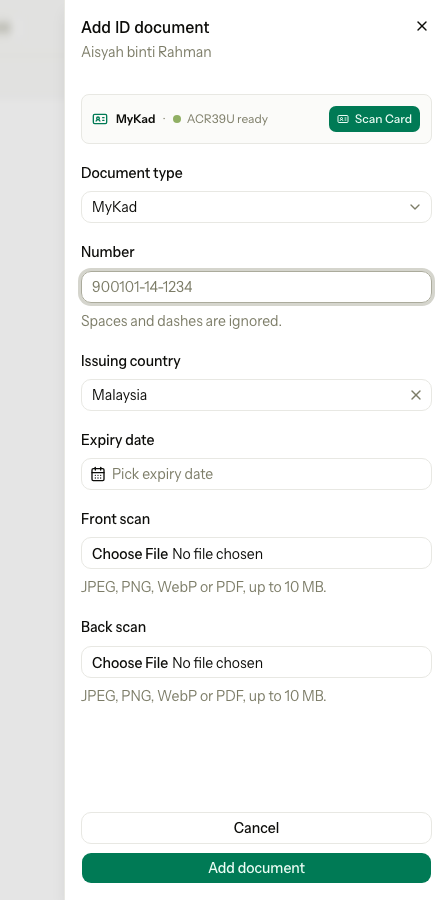
- Check that the box says the reader is ready.
- Put the MyKad in the reader.
- Wait a moment. Estatell reads the card by itself and fills the form.
- Check the details, then save as you normally do.
After a read, the box shows the portrait, the name, the IC number, the date of birth and part of the address, with a Scanned badge.
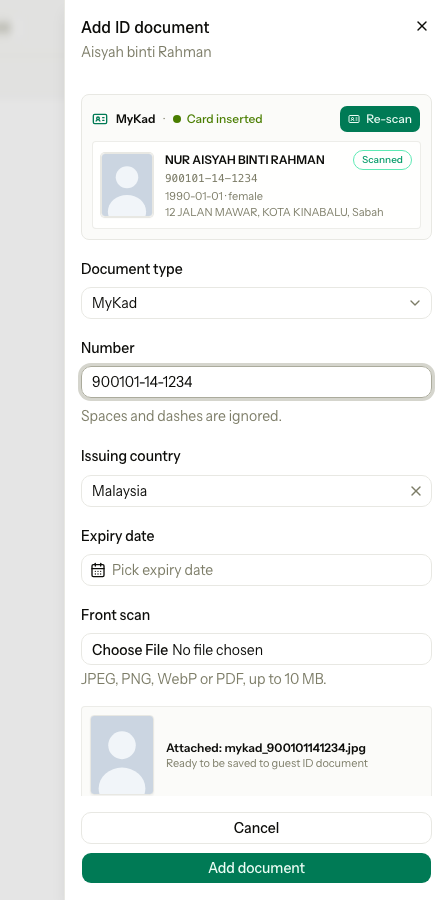
To read the card again, select Re-scan. A card that is already in the reader when you open the screen is read at once. If it is not, select Scan Card.
Reading a card changes nothing until you save. Estatell checks and stores everything again on the server.
What the box says
| What you see | What it means | What to do |
|---|---|---|
| Bridge offline | The bridge is not running on this computer. Estatell cannot reach it. | Select Install Bridge if it was never installed. If it is installed, restart the computer. On the guest page, select the Retry reader connection icon. |
| ACR39U ready (or the name of your reader) | The bridge works and a reader is plugged in. | Put the card in the reader. |
| ACR39U ready, with a red message such as "No smart card reader found. Connect ACR39U via USB." | The bridge works, but it cannot see a reader. | Plug the reader in. Try another USB port. |
| Card inserted | A card is in the reader. | Wait for the read, or select Re-scan. |
| Card detected · Auto-reading... or Reading... | Estatell is reading the chip. | Wait. It takes a few seconds. |
| A red message under the box, for example "Card read timed out. Please reconnect card." | The read failed. | Take the card out, put it in again, then select Re-scan. |
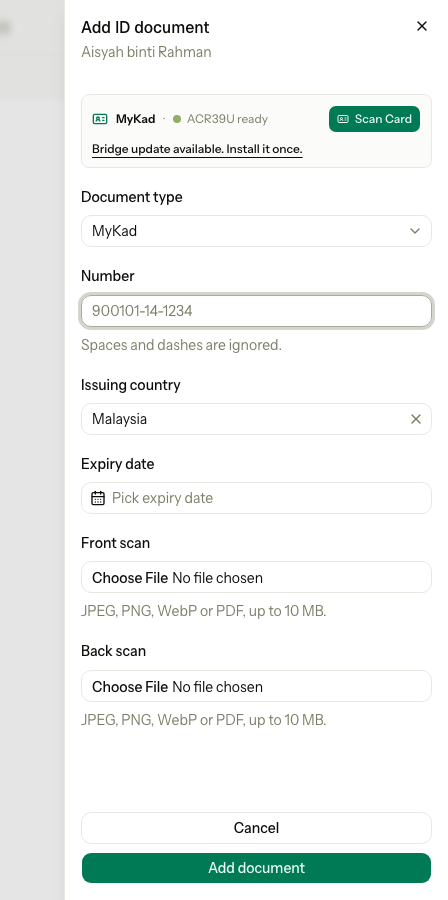
| Bridge update available. Install it once. or A newer card reader bridge is available. with Install update | The bridge is older than the one Estatell needs. Scanning still works. | Select Install update and open the file once. |
The box checks the bridge every few seconds, so the status changes by itself when you plug in the reader or insert a card.
Where it works
| Screen | What the card fills |
|---|---|
| Check-in dialog, see Check in | The nationality, when check-in asks for it. |
| New reservation and Walk-in, in the guests section, see Create a booking | The name, nationality (Malaysia), date of birth, gender and address of the guest. |
| The Guests tab of a reservation, when you open a guest's details, see Reservation page | The same fields as above. |
| The registration card, see Registration cards | The ID type (MyKad), the number and the country (Malaysia). The expiry date stays empty. |
| The sheet to add or edit an ID document, see Identity documents | The type, the number and the country. The portrait becomes the Front scan. |
| The Details tab of a guest | The name, nationality, date of birth, gender, address, ID number and the portrait. Estatell saves them when you select Save changes. |
| Add guest on the guest list | The name and nationality. |
The check-in dialog, the registration card and the other screens use a smaller box. The Details tab of a guest has a bigger box with the portrait and the card details.
Install the bridge
When the box says Bridge offline, select Install Bridge. Estatell downloads the right file for your computer.
| Computer | File | What to do |
|---|---|---|
| Windows | estatell-mykad-setup.exe | Open the file once. Accept the one administrator prompt. |
| macOS | estatell-mykad.pkg | Open the file once. Type the administrator password when asked. |
| Other | mykad-bridge.zip | Unzip it and run run_bridge.sh. It needs Python 3.8 or later, and it stops when you close its window. Use it on Linux or to find a problem. |
You do not need to install Python or open a terminal on Windows or macOS. The bridge then starts by itself every time the computer starts, for every user of the computer, and it is hidden.
The installers are not signed, so you see a warning the first time:
| Computer | Warning | What to do |
|---|---|---|
| Windows | "Windows protected your PC" | Select More info, then Run anyway. Some antivirus programs also flag the file. Allow it. |
| macOS | "cannot be opened" | Open System Settings, then Privacy & Security. Select Open Anyway. Then open the file again. |
Update the bridge
When the box offers Install update, select it and open the new file. The new installer stops the old bridge, replaces it and starts the new one. You do not need to uninstall first.
Uninstall the bridge
- Windows: open Settings, then Apps, and remove Estatell MyKad Bridge.
- macOS: open Terminal and run the command below. It asks for the administrator password.
sudo "/Library/Application Support/Estatell/MyKadBridge/uninstall.sh"Special cases
| Situation | What happens | What to do |
|---|---|---|
| The bridge is installed but the box says Bridge offline | • Estatell cannot reach the bridge on this computer. | • Restart the computer. If it still says offline, install the bridge again. |
| You use Estatell on a computer with no reader | • The box says Bridge offline and Install Bridge. | • Ignore it and type the details. The box is never required. |
| The reader is plugged in but not found | • The box says ACR39U ready with a red message. | • Plug the reader in again, or use another USB port. |
| The card is in the reader before you open the screen | • Estatell reads it when the screen opens. | • Nothing. Select Re-scan to read it again. |
| The portrait is missing | • Estatell fills the other fields. Nothing is saved as a scan. | • Add a scan by hand. See Identity documents. |
| Another website tries to read the card | • The bridge refuses it. It answers only Estatell. | • Nothing. |
| The guest's card is a passport or a foreign ID | • The reader cannot read it. | • Type the details and add a scan. |