
Morning report
The message Estatell sends after each night audit, what it holds, who gets it and what to do with it.
After each night audit, Estatell sends a message with the night's figures. Managers and owners read it with their morning coffee. It also says if something needs a person.
The message goes out when the audit ends, whether staff or the schedule ran it. See Scheduled audit.
Before you start
- Permission: the message goes to staff who hold Receive the night audit report, or Run the night audit for the failed message. Owners and managers have both by default. See Roles and permissions.
- Only active staff get it. A deactivated user does not.
The three messages
Estatell sends one message for each end of an audit.
| Message | Subject | When | Who gets it |
|---|---|---|---|
| Completed | "Night audit completed for Oct 14, 2026" | The audit completed and nothing is left to review. | Staff with Receive the night audit report |
| Exceptions | "Night audit for Oct 14, 2026: 1 exception to review" | The audit completed and at least one issue is still open. | Staff with Receive the night audit report |
| Failed | "Night audit failed for Oct 14, 2026" | A step failed. The business date did not close. | Staff with Run the night audit |
An audit you resume sends one more message when it ends. For example, a Failed message when it fails, then a Completed or Exceptions message when you resume it and it completes.
The message is sent after the audit ends. If a message cannot be sent, the audit is not changed.
What the message holds
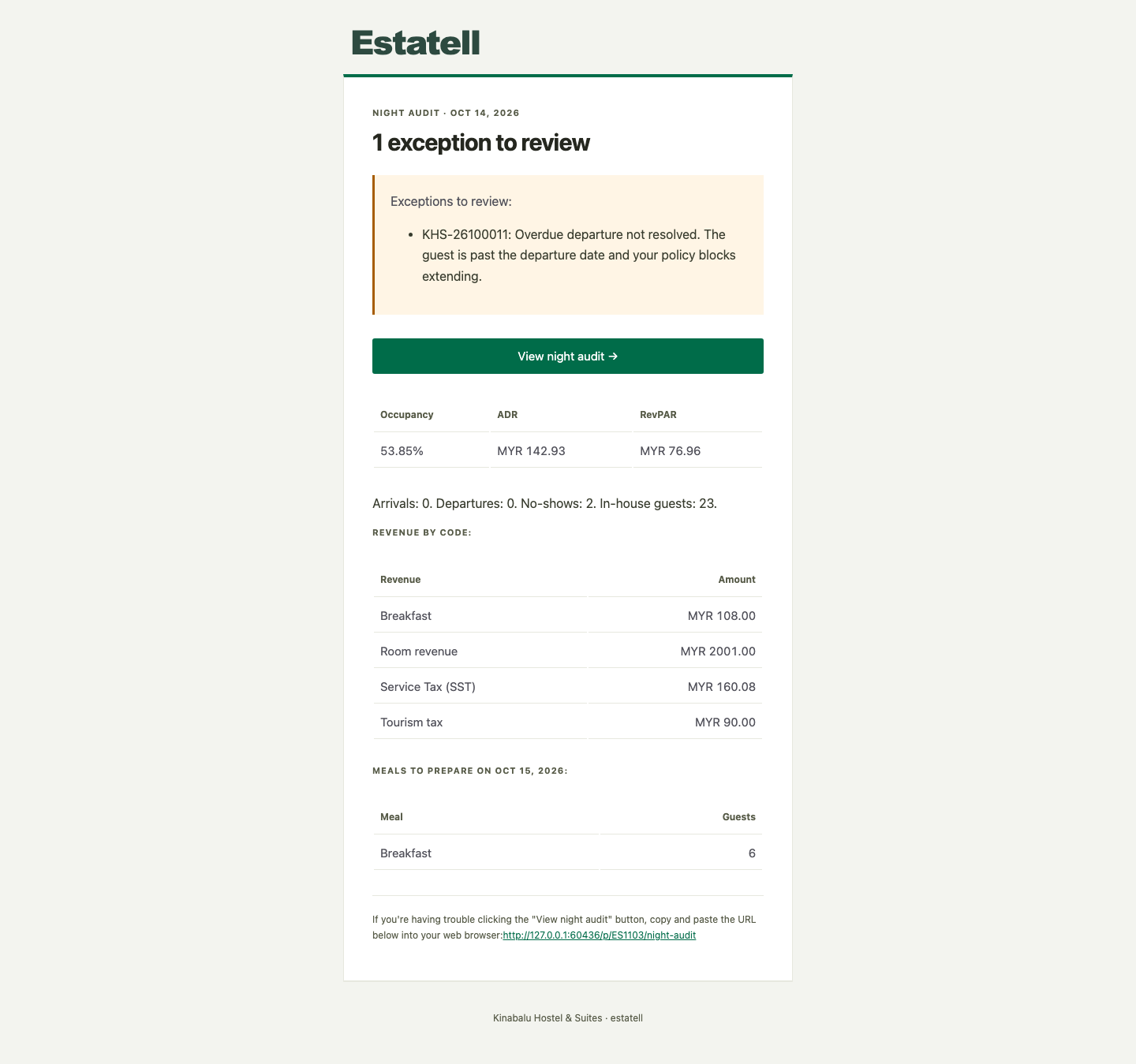
| Part | What it shows |
|---|---|
| Title | "Night audit completed", "N exceptions to review" or "Night audit failed", with the business date. |
| Exceptions | Each open issue, with the reservation and the reason in plain words. Only in an Exceptions message. |
| View night audit | A button that opens the night audit sheet. |
| Occupancy, ADR and RevPAR | The night's numbers. ADR is room revenue per room or bed sold. RevPAR is room revenue per room or bed available. |
| Front desk counts | Arrivals, departures, no-shows and in-house guests. |
| Revenue by code | One row for each revenue code that had lines on the business date, such as Room revenue or Breakfast. Taxes show as their own rows. Payments are not revenue. |
| Payments by method | The payments received on the business date, added up for each method. Refunds show as one more row. Left out when there were none. |
| Meals to prepare | The guests to feed on the date that opens after the audit, for each meal. Left out when no plan includes a meal. |
The figures come from the closed business date. They never change later.
An Exceptions message
An issue is open when the audit could not finish something for a guest. The message lists each one, for example:
KHS-26100011: Overdue departure not resolved. The guest is past the departure date and your policy blocks extending.
Select View night audit to open the sheet. The issues show there as Left from an earlier audit. See Earlier audit issues.
A Failed message
A Failed message is shorter. It has no figures, because the day is not closed. It says:
- the step where the audit stopped, for example "Post room charges",
- the error,
- that the business date is still open, and that running the audit again resumes at this step. Nothing is posted twice.
Open the sheet and select Resume audit. See Run the night audit.
How you receive it
| Message | By email | In Estatell | Can staff switch it off? |
|---|---|---|---|
| Completed | Yes | Yes | Yes, each channel |
| Exceptions | Yes | Yes | Yes, each channel |
| Failed | Yes | Yes, always | Email: yes. In Estatell: no, it is required. |
The in-app message carries the title, the business date, how many issues are open, and a link to the sheet.
Owners can switch a message off for the whole property under Settings, Notifications. Each person can opt out for themselves under Account, Notifications. A person cannot turn on a message the property has turned off.
The night audit packet
For a longer record of a closed night, open the Night audit history report and select Open packet. It is a PDF of the same figures, with every issue, open or resolved. See the Reports chapter, Night audit history.
Special cases
| Situation | What happens | What to do |
|---|---|---|
| Nobody gets the message | Only active staff with the permission get it, and only on the channels they have on. | Check the roles. See Roles and permissions. Then check the notification settings. |
| A manager opts out of Completed | They still get Failed in Estatell, because that message is required there. | Nothing. |
| The audit is Completed with issues left | You get Exceptions instead of Completed. | Open the sheet and deal with each item. |
| The audit fails twice in a row | You get a Failed message each time it fails. | Read the step and the error. If it keeps failing, ask for help. |
| You resume a failed audit and it completes | You get a Completed or Exceptions message for the same date. | Nothing. |
| The numbers look low | The figures are from the business date that closed, not the calendar date. | Check the date in the title. See Business date. |